
1. Isingeniso
Thank you for choosing the OUILA Rechargeable LED Cabinet Light. This product is designed to provide convenient and efficient lighting for various indoor spaces such as cabinets, closets, kitchens, and hallways. Featuring a motion sensor, dimmable brightness, and easy installation, it enhances visibility and comfort.
Please read this manual thoroughly before installation and operation to ensure proper use and to maintain the product's longevity.

Image 1.1: OUILA LED Cabinet Light providing illumination in a kitchen setting.
2. Umkhiqizo Uphelileview
Izici Eziyinhloko:
- Inzwa yokunyakaza: Automatically detects movement within 3 meters (10 feet) in dark conditions.
- 3 Izindlela Zokusebenza: Night Sensing Mode, Always ON Mode, Always OFF Mode.
- I-stepless Dimming: Adjustable brightness from 10% to 100%.
- Ibhethri Elishajwa kabusha: Built-in 2500 mAh lithium polymer battery with Type-C charging.
- Ukufaka Okulula: Integrated magnets for metal surfaces or included double-sided adhesive tape for other surfaces.
- Ukuvikelwa Kwamehlo: Provides stable, comfortable, and flicker-free illumination.
- Idizayini Eqinile: High-quality aluminum alloy construction, anti-corrosion and anti-rust.
Okuqukethwe Kwephakheji:
- OUILA LED Cabinet Light (Model GLS-C018)
- Ikhebula lokushaja le-USB Type-C
- Itheyiphu Yokunamathela Ezinhlangothini Ezimbili
- Metal Plates (for magnetic mounting on non-metallic surfaces)
- Imaniwali yosebenzisayo
3. Imininingwane
| Ipharamitha | Inani |
|---|---|
| Inombolo Yemodeli | I-GLS-C018 |
| Ubukhulu (L x W x H) | 41 x 4 x 0.9 cm (16.1 x 1.6 x 0.35 amayintshi) |
| Isisindo | 250 g (0.55 lbs) |
| Okubalulekile | I-Aluminium |
| Ukushisa Kombala | 6000K (Okumhlophe Okupholile) |
| I-Flux ekhanyayo | 300 Lumens |
| Amandla | 5 Watts |
| Amandla ebhethri | 2500 mAh Lithium Metal |
| Imbobo yokushaja | I-USB Type-C |
| Okokufaka kokushaja | I-DC 5V-1A |
| Isikhathi sokushaja | 3-4 amahora |
| Isikhathi Sokusetshenziswa (Inkokhelo Egcwele) | Amahora angu-4-80 (kuya ngemodi nokukhanya) |
| I-LED Lifespan | Kufika emahoreni angu-80,000 |
| Ibanga Lenzwa Yokunyakaza | Kufika kumamitha ayi-3 (10 amafidi) |
| I-engeli yenzwa yokunyakaza | 100 degrees |
4. Iziyalezo Zokuphepha
- Do not disassemble, repair, or modify the product. This may cause damage, electric shock, or fire.
- Keep the product away from water and high humidity environments to prevent damage to electronic components.
- Avoid exposing the product to direct sunlight or high temperatures for extended periods.
- Use only the provided USB Type-C cable and a compatible 5V-1A adapter for charging.
- Do not look directly into the LED light for prolonged periods, as it may cause eye strain.
- Gcina endaweni lapho izingane zingafinyeleleki khona.
5. Ukusetha nokufakwa
The OUILA LED Cabinet Light offers two primary installation methods:
Method 1: Magnetic Adsorption (for metallic surfaces)
- Ensure the metallic surface is clean and dry.
- Simply place the back of the LED light directly onto the metallic surface. The built-in magnets will securely hold it in place.
Method 2: Adhesive Tape (for non-metallic surfaces)
- Clean and dry the desired installation surface thoroughly.
- Peel off the protective film from one side of the provided double-sided adhesive tape.
- Attach the adhesive tape to the metal plates (if using on non-metallic surfaces) or directly to the back of the light if the surface is suitable.
- Peel off the protective film from the other side of the adhesive tape.
- Press the light firmly onto the desired surface for a few seconds to ensure a strong bond.
The light can be easily removed from its mounted position for charging or use as a portable light source.

Image 5.1: Illustration of the two installation methods: built-in magnet and double-sided tape.
6. Iziqondiso Zokusebenza
6.1 Charging the Light
Before first use, fully charge the light. Connect the provided USB Type-C cable to the charging port on the light and the other end to a 5V-1A USB power source (e.g., USB charger, power bank, computer USB port).
- Inkomba yokushaja: A red light indicates charging; a green light indicates a full charge.
- Isikhathi sokushaja: Cishe amahora angu-3-4 ukushaja okuphelele.
- Impilo Yebhethri: A full charge provides 4 to 80 hours of use, depending on the selected mode and brightness level.
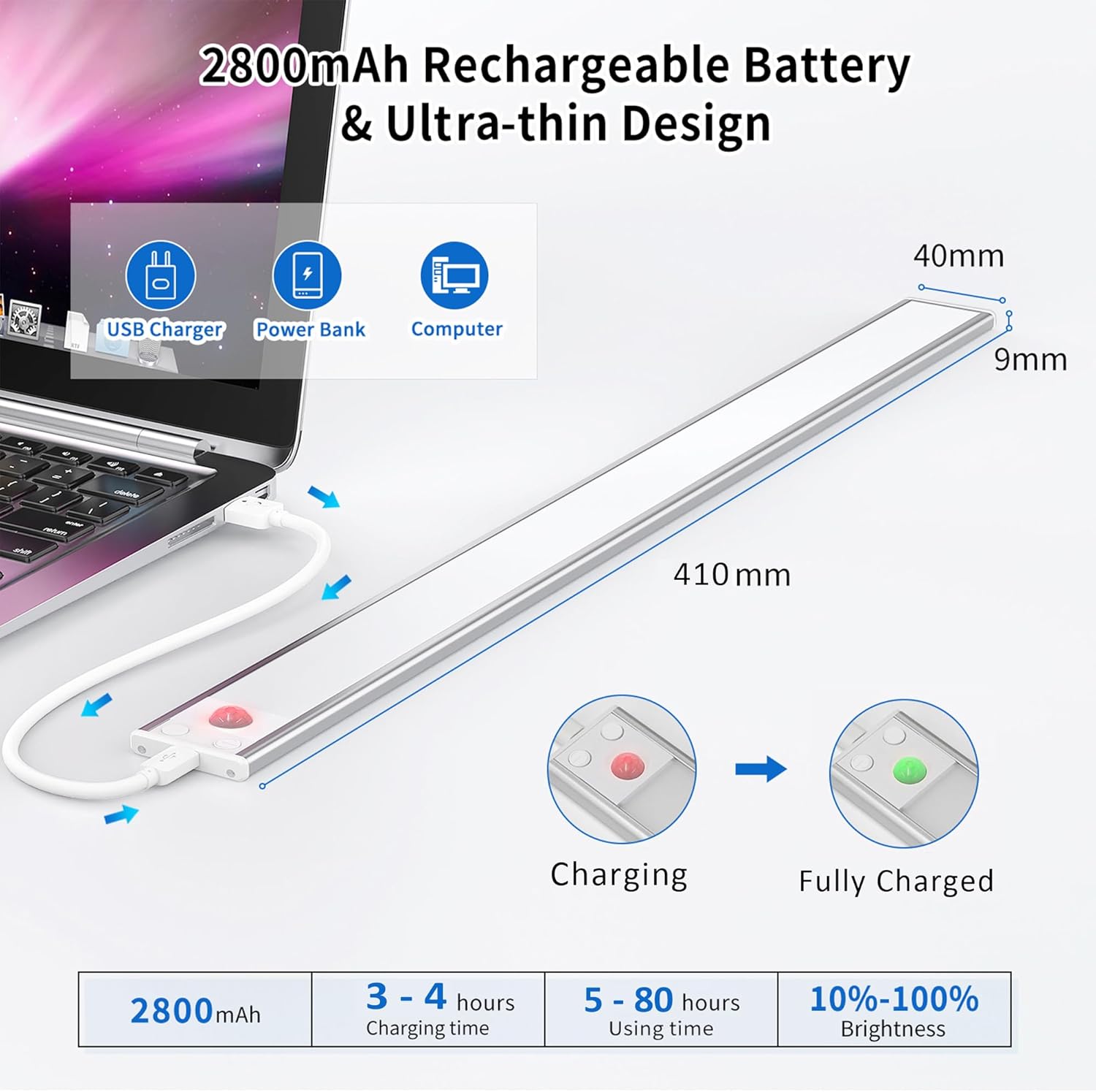
Image 6.1: Charging the OUILA LED Cabinet Light and battery indicators.
6.2 Izindlela Zokusebenza
The light features a control button to cycle through three modes:
- Always ON Mode: Press the button once. The light will remain continuously on, functioning as a standard light.
- Night Sensing Mode (Motion Sensor): Press the button a second time. The light will only activate when motion is detected in sufficiently dark conditions (ambient light below a certain threshold). It will turn off automatically after approximately 20 seconds if no further motion is detected, conserving energy.
- Always OFF Mode: Press the button a third time. The light will remain off.

Isithombe 6.2: Phezuview of the three operating modes.
6.3 Ukulungiswa Kokukhanya (Ukufiphala Okungasindi)
When the light is on (in either Always ON or Night Sensing Mode), press and hold the control button to adjust the brightness. The brightness will cycle smoothly between 10% and 100%. Release the button when the desired brightness level is reached.

Image 6.3: Mode selection and stepless brightness adjustment.
7. Isondlo
- Ukuhlanza: Wipe the light gently with a soft, dry cloth. Do not use abrasive cleaners or solvents.
- Ukunakekelwa kwebhethri: To prolong battery life, avoid completely draining the battery frequently. Recharge the light when the brightness noticeably diminishes. If storing for a long period, charge the battery to about 50% every 3-6 months.
- Isitoreji: Gcina ukukhanya endaweni epholile, neyomile kude nelanga eliqondile kanye namazinga okushisa aphezulu.
8. Ukuxazulula izinkinga
| Inkinga | Imbangela Engenzeka | Isixazululo |
|---|---|---|
| Ukukhanya akukhanyi. | Battery is depleted. Incorrect mode selected. | Charge the light. Cycle through modes to ensure it's not in 'Always OFF' mode. |
| Inzwa yokunyakaza ayisebenzi. | Not in Night Sensing Mode. Ambient light is too bright. Obstruction in sensor path. | Ensure the light is in Night Sensing Mode. Test in a darker environment. Clear any objects blocking the sensor. |
| Iyacwayiza noma ifiphele. | Ibhethri eliphansi. | Shaja kabusha isibani ngokugcwele. |
| Light falls off surface. | Improper installation. Surface not clean. | Re-install, ensuring surface is clean and dry. Apply firm pressure for adhesive tape. |
9. Iwaranti kanye Nokusekela
OUILA products are manufactured with high-quality standards. For warranty information or technical support, please refer to the contact details provided with your purchase or visit the official OUILA webindawo. Sicela ugcine ubufakazi bakho bokuthenga izimangalo zewaranti.
10. Ulwazi Olwengeziwe
Eye Protection Feature:
The OUILA LED Cabinet Light is designed to provide a soft, flicker-free light source, reducing eye strain compared to traditional cabinet lights. This ensures a more comfortable visual experience.

Image 10.1: Comparison highlighting the eye protection features of the OUILA light.
Izinhlelo Ezihlukahlukene:
This light is suitable for a wide range of indoor applications, including but not limited to:
- Kitchen cabinets and under-counter lighting
- Closets and wardrobes
- Stairwells and hallways
- Workshops and garages
- Bookcases and display shelves
- Bedside lighting

Isithombe 10.2: Eksamples of the OUILA LED light in various application scenarios.