
Isingeniso
Thank you for choosing the LAMA Kids Smartwatch. This manual provides essential information for the safe and efficient use of your device. Please read it carefully before use and retain it for future reference.
Setha
1. Ukushaja iwashi elihlakaniphile
Before first use, fully charge the smartwatch. Use the provided magnetic charging cable. Connect the magnetic end to the charging points on the back of the watch and the USB end to a standard USB power adapter (not included).
- Ukushaja okuphelele kuthatha cishe amahora angu-2.
- A fully charged watch provides 5-7 days of battery life, depending on usage.
- Avoid prolonged use or high brightness settings, as this may reduce battery life.
2. Ukufakwa kohlelo lokusebenza nokumatanisa
The LAMA Kids Smartwatch requires the I-FitCloudPro application for full functionality. The app is compatible with smartphones running Android 4.4 or higher, or iOS 8.0 or higher. It is not compatible with PCs, iPads, or other tablets.
- Landa ifayela le- I-FitCloudPro uhlelo lokusebenza olusuka esitolo sezinhlelo zokusebenza ze-smartphone yakho (i-Google Play Isitolo se-Android, i-Apple App Store ye-iOS).
- Qinisekisa ukuthi i-Bluetooth ivuliwe ku-smartphone yakho.
- Vula i- I-FitCloudPro uhlelo lokusebenza bese ulandela imiyalelo esesikrinini ukuze udale i-akhawunti noma ungene ngemvume.
- Within the app, navigate to the device pairing section and search for your LAMA Kids Smartwatch.
- Select your smartwatch from the list of available devices to complete the pairing process.
Imiyalelo yokusebenza
1. Ukuhamba Okuyisisekelo
The smartwatch features a 1.4-inch touchscreen display. Swipe left, right, up, or down to navigate through menus and functions. Tap to select an option.
2. Activity Tracking and Sport Modes
The watch tracks daily activity including steps, distance, and calories burned. It also offers 20 dedicated sport modes for more precise tracking.

Image: The LAMA Kids Smartwatch showing its activity tracking capabilities, including steps, time, and heart rate, designed to keep children motivated.
To access sport modes:
- Swipe on the watch face to find the "Sport Modes" icon.
- Thepha isithonjana ukuze view the list of 20 available activities (e.g., running, walking, cycling, swimming, yoga, basketball, volleyball, football, rowing).
- Select your desired sport mode to start tracking. The watch will display real-time data such as duration, heart rate, distance, calories, and steps.

Image: The smartwatch interface displaying various sport mode icons, illustrating its capability to track 20 different physical activities for children.
I-3. I-Heart Rate Monitoring
The smartwatch continuously monitors your child's heart rate throughout the day.
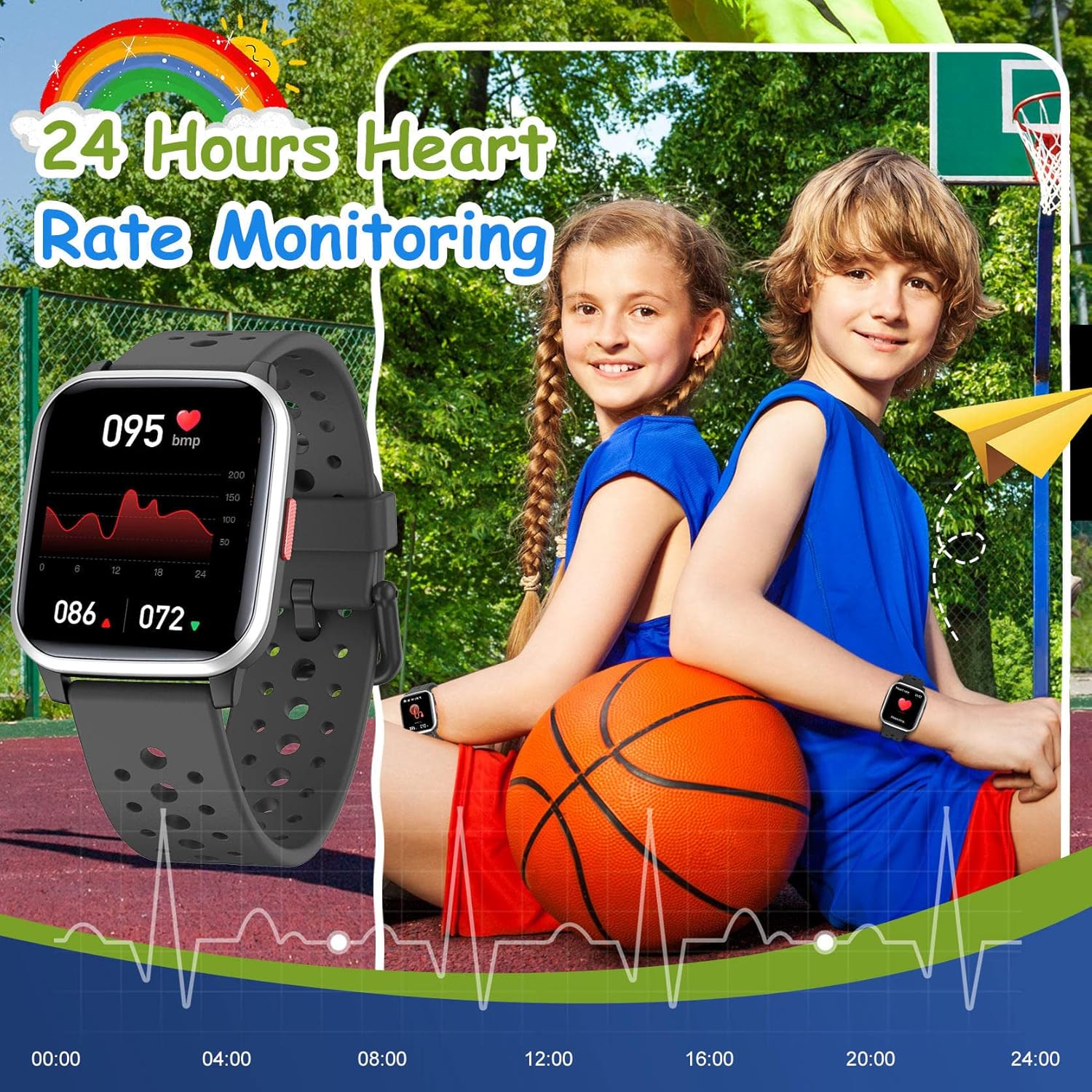
Image: The smartwatch screen showing a detailed 24-hour heart rate monitoring graph, indicating the device's health tracking feature.
Kuya view heart rate data:
- Swipe to the heart rate monitoring screen on the watch.
- For detailed historical data and trends, open the I-FitCloudPro uhlelo lokusebenza ku-smartphone yakho.
4. Sleep Tracking
The smartwatch automatically tracks your child's sleep quality at night. This includes sleep duration and patterns.
- Sleep data can be viewed in detail within the I-FitCloudPro uhlelo lokusebenza.
5. Izaziso Ezihlakaniphile
Receive notifications for SMS, calls, and messages from various applications directly on your smartwatch when paired with your smartphone.
- Supported apps include Facebook, Twitter, WhatsApp, Messenger, Instagram, Snapchat, Skype, and Gmail.
- The watch will vibrate to alert you to new messages or missed calls, even if your phone is on silent.
- Enable notification permissions for the I-FitCloudPro app on your smartphone to ensure proper functionality.
6. Iwashi le-alamu
Set vibrating alarms through the I-FitCloudPro uhlelo lokusebenza.
- In the app, navigate to the alarm settings, set the time, and select a reminder icon.
- The vibrating alarm can wake your child without disturbing others.
7. Imidlalo
The smartwatch includes 5 classic puzzle games designed to help develop logical thinking skills.

Image: The smartwatch showing one of its five classic puzzle games, designed to engage children and develop their logical thinking abilities.
To play games:
- Swipe on the watch face to find the "Games" icon.
- Tap to select and choose from the available puzzle games.
8. Ukwenza ngokwezifiso ubuso bewashi
Personalize the smartwatch with various dynamic watch faces.
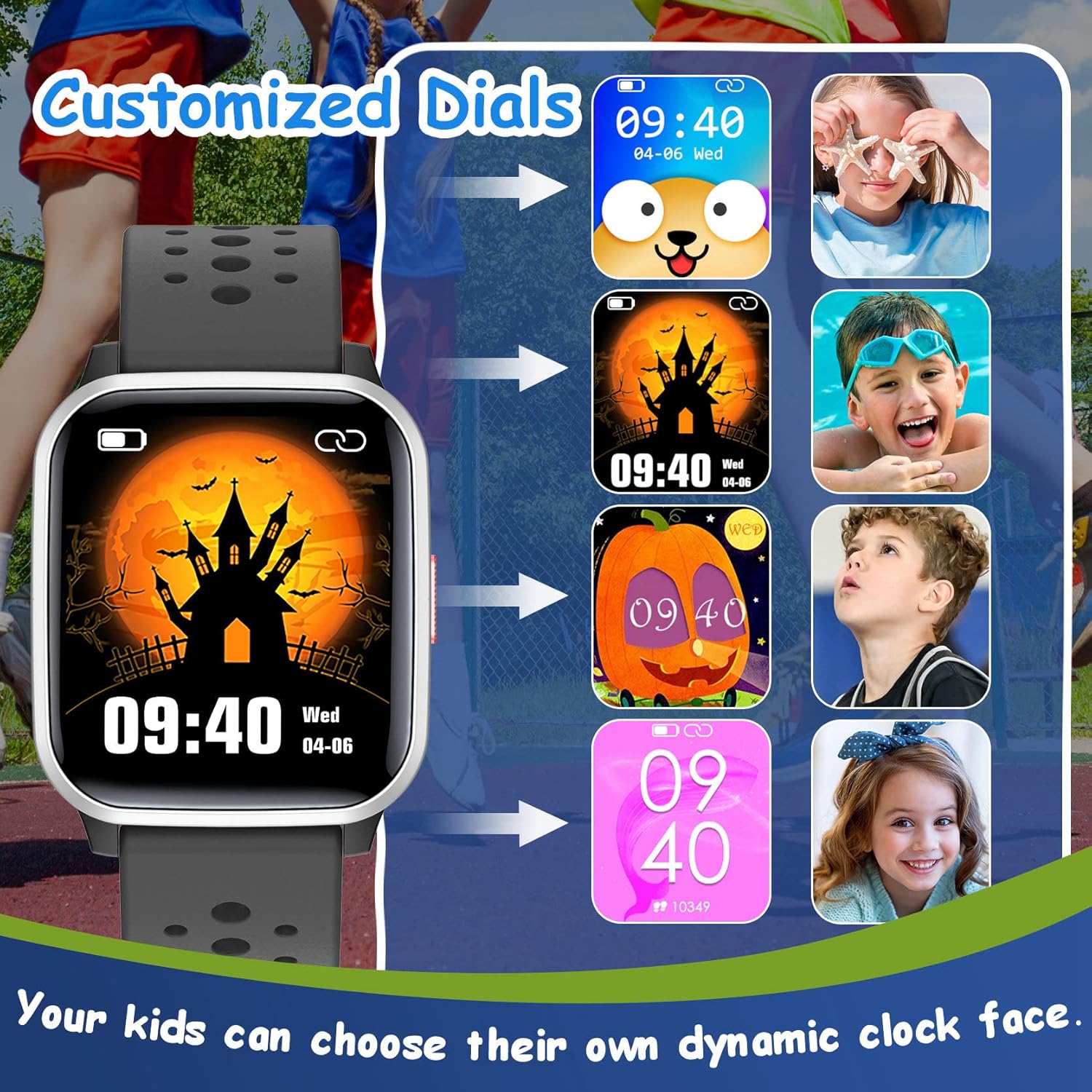
Image: A selection of customizable watch faces for the LAMA Kids Smartwatch, allowing children to choose their preferred display style.
Ukushintsha ubuso bewashi:
- Long-press on the current watch face on the smartwatch.
- Swipe left or right to browse through available watch faces and tap to select.
- More options may be available through the I-FitCloudPro uhlelo lokusebenza.
9. Eminye Imisebenzi
- Isikhumbuzi sokuhlala: Set reminders in the app to encourage movement after periods of inactivity.
- Ukulawula Ikhamera: Use the smartwatch as a remote shutter for your smartphone camera via the app.
- Isitophuwashi: Access the stopwatch function directly on the watch for timing activities.
- Female Function: The watch includes a feature to record menstruation cycles, accessible through the app.
Isondlo
1. Ukuhlanza
- Sula isikrini sewashi kanye nebhande njalo ngesithambile, damp indwangu.
- Gwema ukusebenzisa amakhemikhali anamandla noma izinto ezihudulayo, ngoba lokhu kungalimaza idivayisi.
- Qinisekisa ukuthi abathintwayo abashajayo bahlanzekile futhi bomile ngaphambi kokushaja.
2. Ukumelana Namanzi (IP68)
The LAMA Kids Smartwatch is IP68 waterproof, meaning it is resistant to dust and can withstand immersion in water up to 1.5 meters for up to 30 minutes. This makes it suitable for activities like swimming, hand washing, and use in rain.

Image: The smartwatch highlighting its IP68 waterproof rating, suitable for various water activities such as swimming and hand washing.
- Do not use the watch in hot water, saunas, or steam rooms, as high temperatures can compromise the seal.
- Gwema ukucindezela izinkinobho ngaphansi kwamanzi.
- Rinse the watch with fresh water after exposure to salt water or chlorinated water and dry thoroughly.
3. Ukunakekelwa Kwebhethri
- Ukwelula impilo yebhethri, gwema ukukhipha ibhethri ngokugcwele njalo.
- Gcina iwashi endaweni epholile, eyomile uma lingasetshenziswa isikhathi eside.
- Sebenzisa kuphela ikhebuli yokushaja enikeziwe.
Ukuxazulula inkinga
Iwashi elingavuliwe:
- Qinisekisa ukuthi iwashi lishajwe ngokugcwele. Yixhume kushaja okungenani imizuzu engama-30.
- Cindezela bese ubamba inkinobho yokuvula imizuzwana eyi-10-15 ukuze uzame ukuqala kabusha ngenkani.
Ayikwazi ukubhanqa ne-smartphone:
- Qiniseka ukuthi i-Bluetooth ivuliwe ku-smartphone yakho.
- Ensure the smartwatch is sufficiently charged.
- Confirm that you are using the correct app: I-FitCloudPro.
- Qala kabusha kokubili i-smartphone yakho ne-smartwatch.
- Try unpairing any previously connected devices from your phone's Bluetooth settings.
- Ensure your smartphone meets the minimum OS requirements (Android 4.4+ or iOS 8.0+).
Izaziso aziveli:
- Check that the watch is successfully paired with your smartphone.
- Verify that notification permissions are granted for the I-FitCloudPro app in your smartphone's settings.
- Ensure notifications are enabled for specific apps within the I-FitCloudPro izilungiselelo zohlelo lokusebenza.
- Confirm that your phone's "Do Not Disturb" mode is not active.
Idatha yomsebenzi engalungile:
- Ensure the watch is worn snugly on the wrist, not too loose or too tight.
- Calibrate the watch's step tracking if an option is available in the app.
- Movement patterns can sometimes affect accuracy; ensure natural arm swings for step counting.
Imininingwane
| Ibhrendi | LAMA |
| Imodeli | Izingane ze-Smartwatch |
| Umbala | Mnyama |
| Usayizi Wesikrini | 1.4 amayintshi |
| Isistimu esebenzayo | Android, iOS |
| Ukuxhumana | I-Bluetooth |
| Ukumelana Namanzi | IP68 |
| Uhlobo Lwebhethri | I-Lithium-polymer |
| Impilo Yebhethri | 5-7 days (typical usage) |
| Isikhathi sokushaja | Cishe. Amahora angu-2 |
| Uhlelo lokusebenza oluhambisanayo | I-FitCloudPro |
| Izici ezikhethekile | Heart rate monitor, activity tracking, 20 sport modes, sleep tracking, smart notifications, alarm clock, games, camera control, stopwatch, sedentary reminder, female function. |
Iwaranti kanye Nokusekela
For warranty information and customer support, please refer to the documentation included with your purchase or contact the retailer where the product was acquired. You may also visit the official LAMA website ukuze uthole olunye usizo.