
1. Isingeniso
Siyabonga ngokuthengaasing the DUAL DL-DAB3-001 DAB+/Bluetooth Alarm Clock Radio. This device combines a digital radio (DAB+ and FM), Bluetooth connectivity for audio streaming, a dual alarm clock, and convenient induction charging for compatible smartphones. This manual provides essential information for safe operation, setup, and maintenance of your device. Please read it thoroughly before use and retain it for future reference.
Umfanekiso 1.1: The DUAL DL-DAB3-001 alarm clock radio positioned on a bedside table, demonstrating its compact design and integration into a modern bedroom environment. A smartphone is shown on the induction charging pad, and the digital display shows the time and date.
2. Iziyalezo Zokuphepha
- Funda yonke imiyalelo ngaphambi kokusebenzisa idivayisi.
- Ungalibeki idivayisi emvuleni, emswakameni, noma emazingeni okushisa aphezulu.
- Qinisekisa ukungena komoya ngendlela efanele; ungavimbi noma yiziphi izimbobo zokungenisa umoya.
- Use only the provided AC adapter. Using unauthorized adapters may damage the device and void the warranty.
- Ungazami ukuqaqa noma ukuguqula idivayisi. Thumela zonke izinsiza kubasebenzi abaqeqeshiwe.
- Gcina idivayisi ikude nezinkundla zikazibuthe ezinamandla.
- Lahla amabhethri ngokuzibophezela ngokwemithetho yendawo.
3. Okuqukethwe Kwephakheji
Sicela uhlole ukuthi zonke izinto ezibalwe ngezansi zikhona yini kuphakheji yakho:
- DUAL DL-DAB3-001 Alarm Clock Radio
- AC Power Adapter (Input: AC 100-240V ~ 50/60 Hz 1A; Output: DC 9V 2.5A)
- Incwadi Yomsebenzisi (le dokhumenti)
Note: 2 x AAA R4 batteries for backup are not included and must be purchased separately.
4. Umkhiqizo Uphelileview
4.1 Ngaphambili Naphezulu View

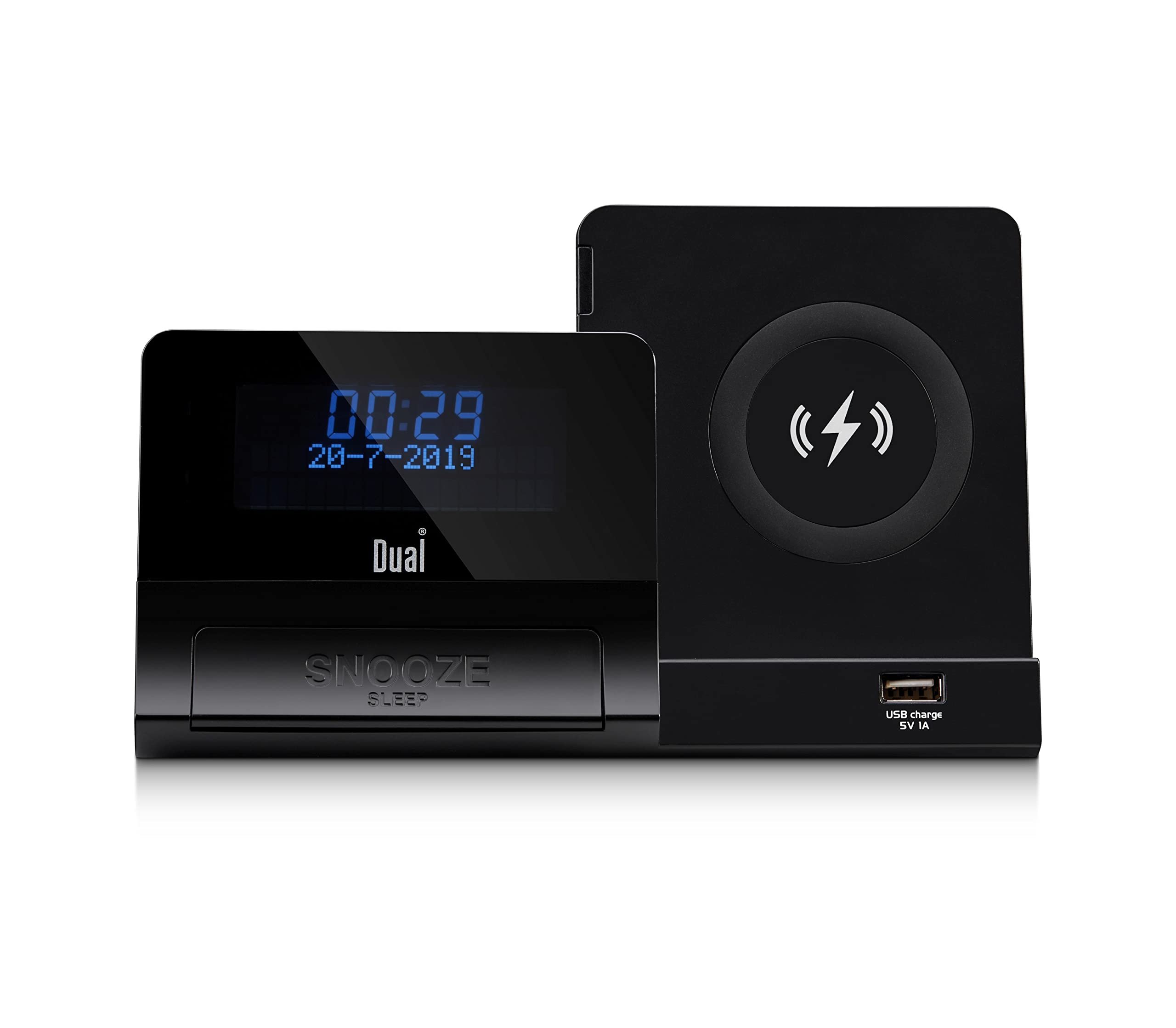
Umfanekiso 4.1: Okuningiliziwe view of the DUAL DL-DAB3-001, highlighting the 5-inch LCD display, the large 'SNOOZE' button, the circular wireless induction charging pad on the right, and the USB charging port (5V 1A) located below the charging pad.
- Isibonisi se-LCD: Shows time, date, radio information, and alarm status.
- SNOOZE/SLEEP Button: Activates snooze during an alarm or sleep timer during playback.
- Iphedi yokushaja engenantambo: For induction charging of compatible smartphones.
- USB Charging Port (5V 1A): For charging other USB-powered devices.
- Control Buttons (not visible in this view, typically on top/side): Power, Mode, Tune/Scan, Volume, Alarm Set, Presets.
4.2 Rear Panel (General Description)
The rear panel typically includes:
- U-DC IN Jack: Okokuxhuma i-adaptha yamandla e-AC.
- I-AUX IN Jack: Okokuxhuma amadivaysi omsindo angaphandle.
- I-Headphone Jack: Okokulalela kwangasese.
- Igumbi Lebhethri: For 2 x AAA R4 backup batteries.
5. Setha
5.1 Ukuxhuma Amandla
- Insert the DC plug of the supplied AC adapter into the DC IN jack on the rear of the unit.
- Plug the AC adapter into a standard wall outlet (AC 100-240V ~ 50/60 Hz).
- Iyunithi izovula noma ingene kwimodi yokulinda.
5.2 Battery Installation (Backup)
For time and alarm settings backup during power outages:
- Vula ikhava yengxenye yebhethri ngemuva kweyunithi.
- Insert 2 x AAA R4 batteries (not included), observing the correct polarity (+/-).
- Vala ikhava yengxenye yebhethri ngokuphephile.
5.3 Initial Power On and Time Synchronization
Upon first power-on, the unit will typically attempt to synchronize the time and date automatically via DAB+ signal. Ensure the antenna is extended for optimal reception.
6. Iziqondiso Zokusebenza
6.1 Ukusebenza Komsakazo (DAB+/FM)
- Vula: Cindezela inkinobho Amandla inkinobho ukuvula umsakazo.
- Khetha Imodi: Cindezela inkinobho Imodi button to switch between DAB+ and FM radio.
- Auto Scan (DAB+): In DAB+ mode, the radio will automatically scan for available stations upon first use. For a manual scan, refer to the specific button (e.g., Skena or Imenyu ongakhetha).
- Tuning (FM): Kumodi ye-FM, sebenzisa i Shuna +/- buttons to manually tune or press and hold for auto-scan to the next available station.
- Ilondoloza Okusethiwe: To save a station, tune to the desired station, press and hold the Setha kusengaphambili button, select a preset number using Shuna +/-, bese ucindezela Setha kusengaphambili futhi ukuze uqinisekise.
- Ukukhumbula ukusethwa kusengaphambili: Cindezela inkinobho Setha kusengaphambili button briefly, then use Shuna +/- to select the desired preset.
6.2 Ukusebenza kwe-Bluetooth
- Faka Imodi ye-Bluetooth: Cindezela inkinobho Imodi button until "Bluetooth" appears on the display. The unit will enter pairing mode, indicated by a flashing Bluetooth icon.
- Ukumatanisa: On your smartphone or other Bluetooth device, enable Bluetooth and search for available devices. Select "DL-DAB3-001" from the list.
- Uxhumano: Once paired, the Bluetooth icon on the radio's display will stop flashing and remain solid. You can now stream audio from your device to the radio.
- Ukulawula ukudlala: Use your connected device or the radio's controls (if available) to play, pause, skip tracks, and adjust volume.
6.3 Umsebenzi Wewashi Le-alamu
The DL-DAB3-001 features a dual alarm system.
- Ukusetha ama-alamu: Cindezela bese ubamba i I-alamu Setha button (or similar, refer to specific button labels). Use Shuna +/- to set the alarm time, then press I-alamu Setha to confirm. Repeat for the second alarm.
- Umthombo we-alamu: Select your preferred alarm source (DAB+ radio, FM radio, or buzzer) using the Imodi or I-alamu Setha button during the alarm setup process.
- Ivula/Yenza Angasebenzi Ama-alamu: Cindezela kafushane inkinobho I-alamu Setha button to toggle alarms on/off. An alarm icon will appear on the display when active.
- Snuza: Uma i-alamu ikhala, cindezela inkinobho SNOZA button to temporarily silence it for a set period (e.g., 9 minutes).
- I-alamu yokumisa: Cindezela inkinobho Amandla button to turn off the alarm completely until the next set time.
- Isikhathi sokulala: While playing audio, press the SHONUZA/LALA button repeatedly to cycle through sleep timer options (e.g., 15, 30, 60, 90 minutes) before the unit automatically turns off.
6.4 Induction Charging
The unit features a wireless induction charging pad for Qi-compatible smartphones.
- Ensure the radio is powered on and connected to the AC adapter.
- Beka i-smartphone yakho ehambisana ne-Qi ngqo kuphedi yokushaja engenantambo.
- The charging indicator on your phone should activate, confirming that charging has begun.
- If charging does not start, adjust the position of your phone on the pad. Remove any thick cases that may interfere with charging.
6.5 Ukushaja i-USB
The USB port on the front of the unit provides 5V 1A power output for charging other devices.
- Connect your device's USB charging cable to the USB charging port on the radio.
- Ensure the radio is powered on and connected to the AC adapter.
- Ukushaja kuzoqala ngokuzenzakalelayo.
6.6 Okokufaka Okwelekelelayo
Connect external audio sources (e.g., MP3 player) via the AUX IN jack.
- Connect a 3.5mm audio cable (not included) from your external device's headphone jack to the AUX IN jack on the radio.
- Cindezela inkinobho Imodi inkinobho yokukhetha imodi ye-AUX.
- Lawula ukudlala kanye nevolumu kusuka kudivayisi yakho yangaphandle.
7. Isondlo
- Ukuhlanza: Disconnect the power before cleaning. Use a soft, dry cloth to wipe the unit. Do not use abrasive cleaners or solvents.
- Isitoreji: If storing the unit for an extended period, disconnect it from power and remove the backup batteries. Store in a cool, dry place.
- I-Antenna: Handle the telescopic antenna carefully to avoid damage.
8. Ukuxazulula izinkinga
| Inkinga | Imbangela Engenzeka | Isixazululo |
|---|---|---|
| Awekho amandla | AC adapter not connected or faulty; Power outlet not working. | Check AC adapter connection. Try a different power outlet. |
| Umsakazo awusamukeli kahle (DAB+/FM) | I-Antenna ayinwetshiwe; Isignali ebuthakathaka; Ukuphazamiseka. | Fully extend the telescopic antenna. Reposition the unit. Perform a new auto-scan for DAB+ stations. |
| Ukumataniswa kwe-Bluetooth kwehlulekile | Device not in pairing mode; Bluetooth disabled on smartphone; Already connected to another device. | Ensure the radio is in Bluetooth pairing mode. Enable Bluetooth on your smartphone. Disconnect from other Bluetooth devices. |
| Induction charging not working | Phone not Qi-compatible; Phone not positioned correctly; Thick phone case. | Verify phone compatibility. Adjust phone position on the pad. Remove phone case. |
| I-alamu ayizwakali | I-alamu ayisebenzi; Ivolumu iphansi kakhulu. | Ensure alarm is set and activated (check display icon). Increase volume. |
9. Imininingwane
- Imodeli: DL-DAB3-001
- Ukunikezwa kwamandla kagesi: DC 9V 2.5A (via AC adapter)
- Amabhethri ekhophi yasenqolobaneni: 2 x AAA R4 (not included)
- I-Radio Tuner: I-DAB+, FM
- Inguqulo ye-Bluetooth: 5.0
- Amandla Okukhiphayo: 2 x 3 Watts
- Bonisa: 5-inch LCD (adjustable brightness)
- Induction Charging: I-Qi iyahambisana
- Okukhipha i-USB: 5V 1A
- Ukuxhumana: Auxiliary Input, Headphone Jack
- Ubukhulu (L x W x H): 18 x 10.8 x 9.8 cm
- Isisindo: awu 800g
10. Iwaranti kanye Nokusekela
This DUAL product is covered by a manufacturer's warranty. Please refer to the warranty card included in your package or contact your retailer for specific warranty terms and conditions. For technical support or service inquiries, please contact the customer service department of your place of purchase or visit the official Dual website ukuze uthole olunye usizo.