
I-TecTake 404378-3
TecTake Metal Office Cabinet - User Manual
Model: 404378-3 | Brand: TecTake
1. Isingeniso
This user manual provides essential information for the safe and efficient use of your TecTake Metal Office Cabinet, Model 404378-3. Please read this manual thoroughly before assembly and operation to ensure proper handling and to maximize the lifespan of your product.

Figure 1.1: The TecTake Metal Office Cabinet, open to display its spacious interior with organized files and storage boxes.
2. Ulwazi Lokuphepha
Ngaso sonke isikhathi qaphela lezi zinyathelo zokuphepha ezilandelayo ukuze uvimbele ukulimala nokulimala komkhiqizo:
- Take precautions during handling and assembly of the steel cabinet to avoid injuries.
- Consult the manufacturer's instructions for proper assembly and use.
- Qinisekisa ukuthi ikhabhinethi ibekwe endaweni eqinile, eqondile ukuze igweme ukugoba.
- Do not overload shelves beyond the specified weight capacity.
- Gcina izingane nezilwane ezifuywayo kude ngesikhathi somhlangano.
- Use appropriate tools for assembly as instructed.

Figure 2.1: The TecTake Metal Office Cabinet in a typical office environment, demonstrating its compact and secure design when closed.
3. Umkhiqizo Uphelileview kanye Izici
The TecTake Metal Office Cabinet is a robust and versatile storage solution designed for various environments, including offices, workshops, and homes. It offers secure and organized storage for documents, files, and other valuable items.
Izici Eziyinhloko:
- Isistimu yokukhiya evikelekile: Equipped with a cylinder lock and two keys for maximum security of your contents.
- Amashalofu Alungisekayo: Four individually height-adjustable shelves to accommodate various item sizes and storage needs.
- Ikhono Lomthwalo Ophakeme: Each shelf can support up to 40 kg, ensuring robust storage.
- Ukwakhiwa Okuqinile: Made from high-quality powder-coated steel for long-lasting durability and an industrial aesthetic.
- Ukusebenza okuthulile: Reinforced swing doors with noise-dampening rubber buffers for silent closing.
- Kulula Ukuhlanza: Smooth, rimless shelves simplify interior cleaning.
- Ukusetshenziswa Okuhlukahlukene: Ideal for office, garage, cellar, or other storage areas.
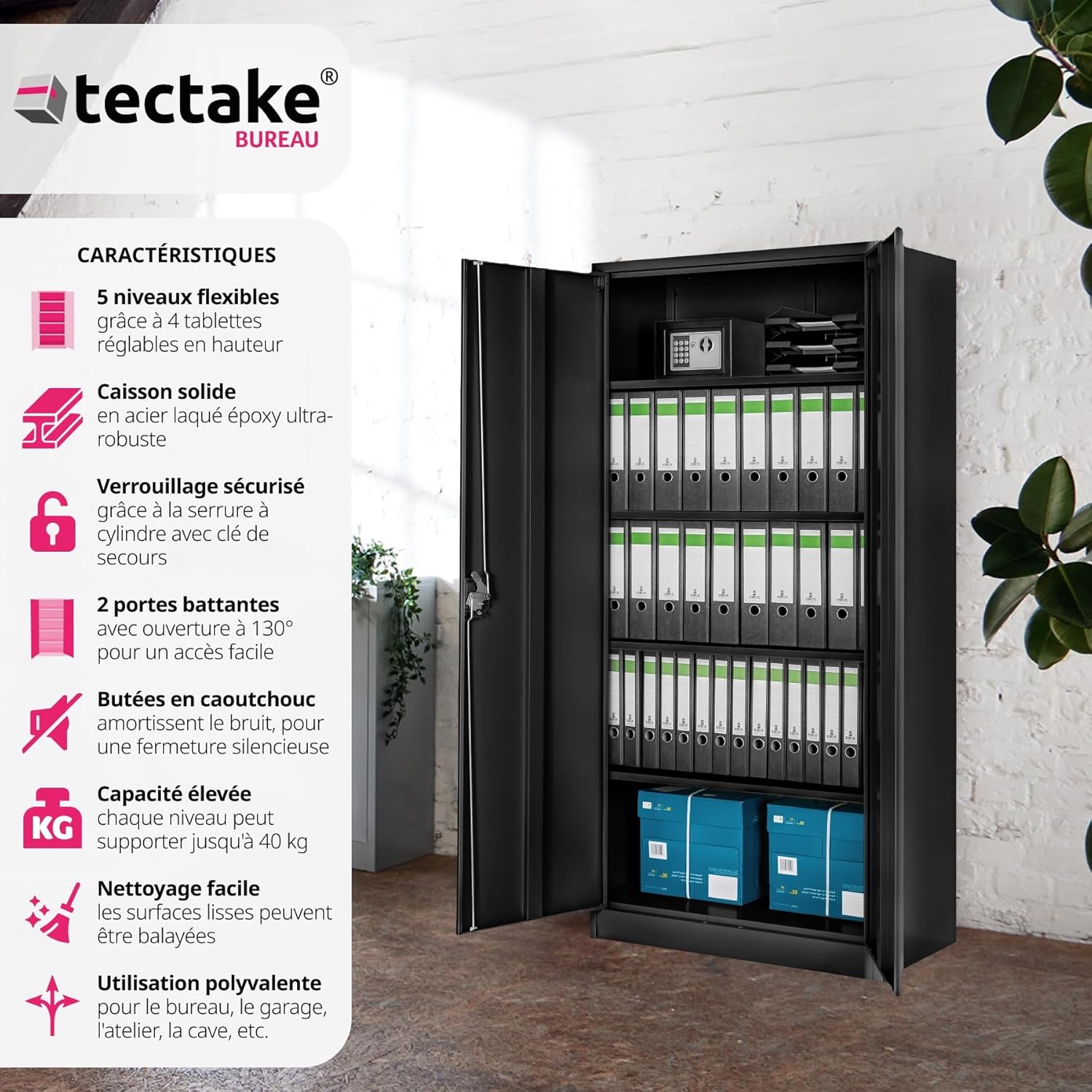
Figure 3.1: Visual representation of the cabinet's key features, such as adjustable shelves and robust construction.

Figure 3.2: The cabinet's versatility is demonstrated across different environments, from a home office to a warehouse.
4. Uhlu Lwezingxenye
Before starting assembly, ensure all components are present and undamaged. If any parts are missing or damaged, please contact customer support.
| Isakhi | Ubuningi | Incazelo |
|---|---|---|
| Cabinet Body Panels | Okuhlukahlukene | Side panels, back panel, top, and bottom panels. |
| Amashalofu | 4 | Adjustable shelves for interior organization. |
| Iminyango | 2 | Reinforced swing doors. |
| Khiya Indlela | 1 isethi | Cylinder lock with turning handle. |
| Okhiye | 2 | For the cylinder lock. |
| Rubber Buffers | Setha | For noise dampening on doors. |
| I-Hardware Yomhlangano | Setha | Screws, bolts, nuts, and other fasteners. |
5. Ukusetha nokuhlanganisa
Assembly of the TecTake Metal Office Cabinet is designed to be straightforward. Follow these steps carefully:
- Khipha Izingxenye: Carefully remove all parts from the packaging and lay them out on a clean, soft surface to prevent scratches. Verify all components are present using the list above.
- Hlanganisa Uhlaka Lwekhabhinethi: Xhuma amaphaneli aseceleni kumaphaneli aphezulu naphansi usebenzisa ihadiwe enikeziwe. Qinisekisa ukuthi konke ukuxhumana kuvikelekile.
- Namathisela Iphaneli Yasemuva: Vikela iphaneli yangemuva kuhlaka oluhlanganisiwe.
- Faka Izisekelo Zeshelufu: Insert the shelf supports into the desired height slots on the interior side panels. The shelves are individually adjustable.
- Faka Amashalofu: Place the four shelves onto the installed supports. Ensure they are level and stable.
- Iminyango Yokufaka: Attach the two swing doors to the cabinet frame using the hinges. Ensure they open and close smoothly.
- Faka i-Lock Mechanism: Secure the cylinder lock and turning handle to one of the doors as per the specific instructions provided with the lock.
- Apply Rubber Buffers: Attach the noise-dampening rubber buffers to the inside edges of the doors or cabinet frame where the doors make contact, to ensure quiet closing.
- Ukubekwa Kokugcina: Move the assembled cabinet to its final desired location. Ensure it is on a stable and level surface.
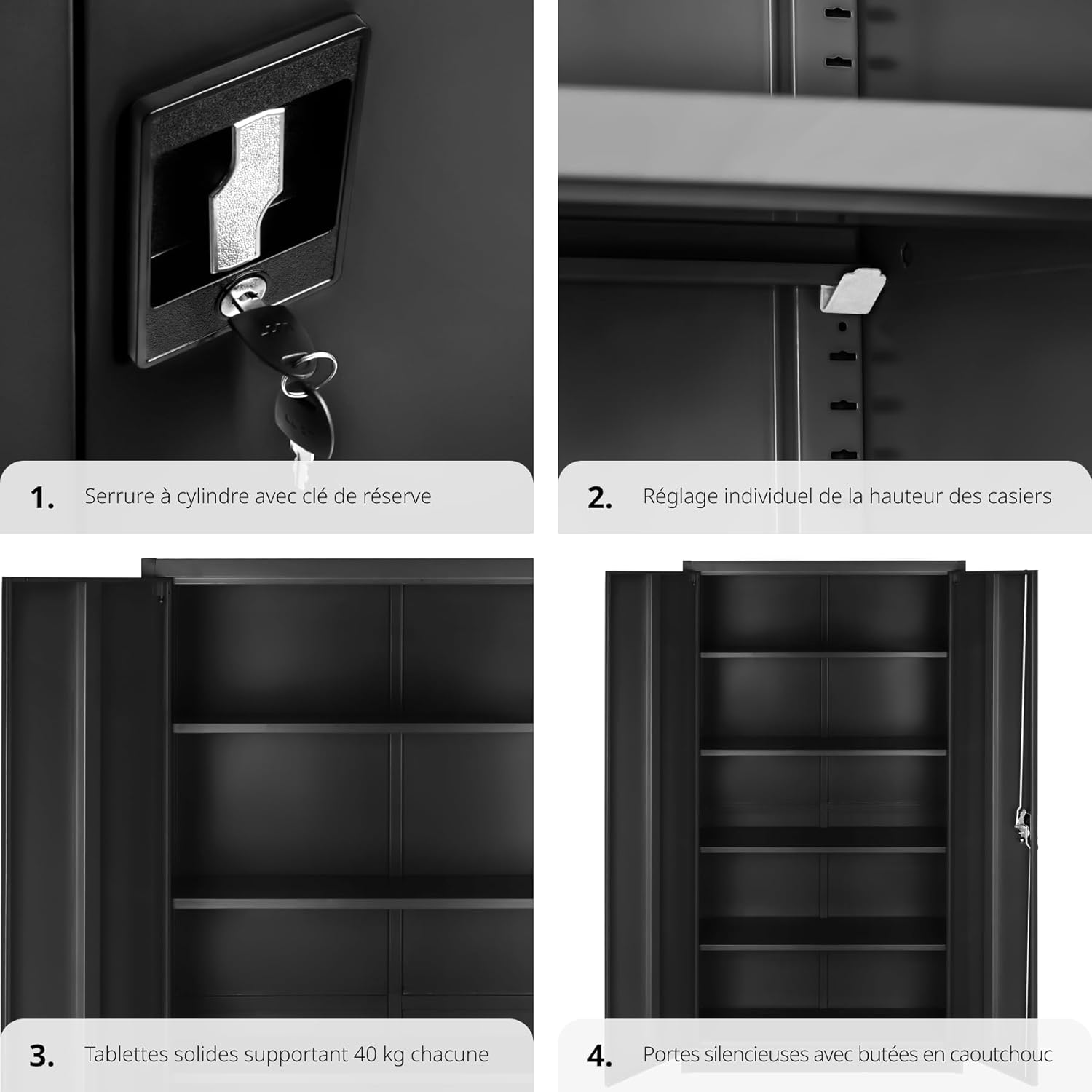
Umfanekiso 5.1: Okuningiliziwe views of the lock mechanism, shelf adjustment, shelf capacity, and door buffers, illustrating key assembly and operational features.
6. Iziqondiso Zokusebenza
6.1. Ukukhiya nokuvula
To secure your documents and items, use the integrated cylinder lock:
- Ukukhiya: Close both doors firmly. Insert one of the provided keys into the lock and turn it clockwise until the mechanism engages. Remove the key.
- Ukuvula: Insert the key into the lock and turn it counter-clockwise until the mechanism disengages. The doors can now be opened.
Always keep the spare key in a safe and accessible location.
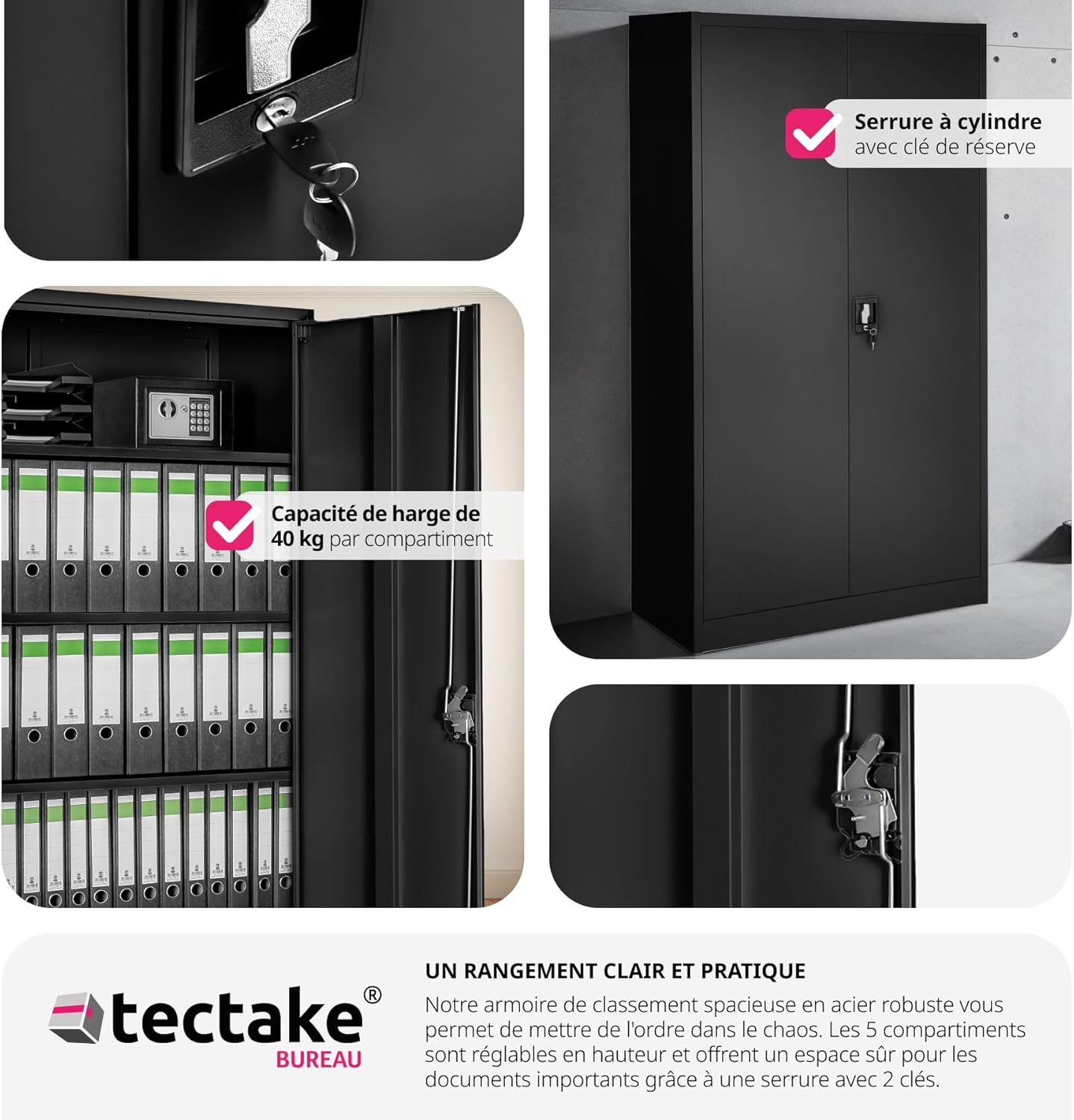
Figure 6.1: The cabinet's secure locking mechanism, ensuring the safety of your stored items.
6.2. Ukulungisa Amashalofu
The shelves can be adjusted to different heights to suit your storage needs:
- Thulula ishelufu ofisa ukulilungisa.
- Phakamisa ishelufu ngokucophelela bese ulisusa ezisekelweni zalo.
- Relocate the shelf supports to the desired slots on the cabinet's interior side panels. Ensure the supports are at the same height on both sides.
- Place the shelf back onto the new supports, ensuring it is stable and level.

Figure 6.2: The cabinet's interior with adjustable shelves, demonstrating the ample storage capacity and wide door opening for easy access.
7. Isondlo
To keep your TecTake Metal Office Cabinet in optimal condition, follow these simple maintenance guidelines:
- Ukuhlanza: Sula izindawo nge- soft, damp cloth. For stubborn dirt, use a mild, non-abrasive cleaner. Avoid harsh chemicals or abrasive materials that could damage the powder-coated finish. The smooth, rimless shelves are designed for easy cleaning.
- Ukuhlola: Ngezikhathi ezithile hlola zonke izikulufu nezixhumi ukuze uqinisekise ukuthi zihlala ziqinile. Phinda uqinise uma kunesidingo.
- Ukuthambisa: If the lock mechanism or hinges become stiff, apply a small amount of silicone-based lubricant.
- Ukusabalalisa Isisindo: Distribute weight evenly across shelves to prevent warping or instability. Do not exceed the maximum weight capacity per shelf.
8. Ukuxazulula izinkinga
Lesi sigaba sikhuluma ngezinkinga ezivamile ongase ubhekane nazo ngekhabhinethi yakho.
| Inkinga | Imbangela Engenzeka | Isixazululo |
|---|---|---|
| Iminyango ayivaleki kahle noma ayiqondani kahle. | Uneven floor; loose hinges; cabinet not square. | Ensure cabinet is on a level surface. Check and tighten hinge screws. If cabinet is not square, slightly loosen assembly screws, adjust, and retighten. |
| Lock mechanism is stiff or difficult to turn. | Ukuntuleka kokuthambisa; imfucumfucu ivaliwe. | Apply a small amount of graphite powder or silicone spray lubricant into the keyhole. Avoid oil-based lubricants. |
| Shelves sag or wobble. | Overloaded shelf; incorrect installation of shelf supports. | Reduce weight on the shelf. Ensure shelf supports are fully inserted and correctly aligned in the slots. |
| Cabinet makes noise when opening/closing doors. | Missing or worn rubber buffers. | Check if rubber buffers are properly installed. Replace if worn. |
9. Imininingwane
Detailed technical specifications for the TecTake Metal Office Cabinet:
- Ibhrendi: I-TecTake
- Inombolo Yemodeli: 404378-3
- Umbala: Black (80 x 40 x 180 cm, Noir)
- Ubukhulu bomkhiqizo (L x W x H): 40 x 80 x 180 cm (cishe 15.7 x 31.5 x 70.9 amayintshi)
- Isisindo Sento: 35.3 Amakhilogremu (cishe 77.8 lbs)
- Isisindo Esiphezulu Umthamo Ngeshelufu: 40 Amakhilogremu (cishe 88.2 lbs)
- Inombolo Yamashalofu: 4 (okulungisekayo ngakunye)
- Isitayela Somnyango: Flat Panel Swing Doors
- Uhlobo lokukhiya: Cylinder Lock with 2 Keys
- Okubalulekile: Insimbi Egcotshwe Ngempushana
- Ukusetshenziswa Okunconyiwe: Ngasendlini
- Uhlobo lokukhweza: Phansi Intaba
- Isici esikhethekile: Adjustable shelves, Noise-dampening rubber buffers

Figure 9.1: Detailed dimensions and weight capacity of the cabinet.
10. Iwaranti kanye Nokusekela
For information regarding warranty coverage, spare parts availability, or technical support, please contact TecTake customer service or refer to the official TecTake webindawo. Gcina irisidi lakho lokuthenga njengobufakazi bokuthenga kwanoma yiziphi izimangalo zewaranti.
Ulwazi lokuxhumana: Please visit the official TecTake website or refer to your purchase documentation for the most up-to-date contact details.
Note: Spare parts availability information was not provided at the time of manual creation.
Ask a question about this manual
Ask about setup, troubleshooting, compatibility, parts, safety, or missing instructions. Manuals+ will review the question and use this page’s manual context to help answer it.