
Candy FIDC X625 L
Candy Idea FIDC X625 L Multifunction Oven User Manual
Model: FIDC X625 L
Igama Brand: Candy
Isingeniso
The Candy Idea FIDC X625 L is a versatile 70-liter electric multifunction oven designed to integrate seamlessly into any kitchen. It features a double glass door for safety, a telescopic guide for ease of use, and a durable stainless steel handle. This manual provides essential information for the safe and efficient operation, installation, and maintenance of your new oven.

Umfanekiso 1: Ngaphambili view of the Candy Idea FIDC X625 L Multifunction Oven.
Yini EseBhokisini
Please check the contents of the packaging carefully. If any items are missing or damaged, contact your retailer immediately.
- Candy Idea FIDC X625 L Oven Unit
- 1 x Ithreyi yokubhaka
- 2 x Wire Racks
- Ikhebula Lamandla
- Incwadi Yokufundisa (le dokhumenti)
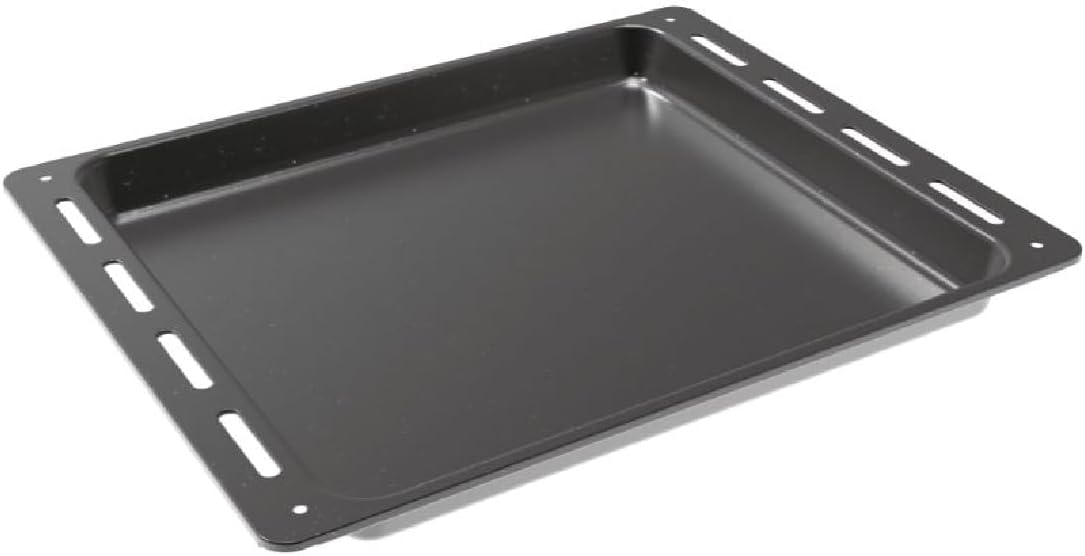
Figure 2: Included baking tray.
Ukusetha nokufaka
Ukufakwa ngendlela efanele kubalulekile ekusebenzeni okuphephile nangempumelelo kwehhavini lakho. Kunconywa ukuthi ukufakwa kwenziwe uchwepheshe oqeqeshiwe.
Ukuqaqa
Remove all packaging materials from the oven and its accessories. Inspect the oven for any signs of damage during transit.
Ukubekwa Nokususwa
The oven is designed for built-in installation. Ensure the cabinet opening dimensions match the oven's requirements. The integration niche size should be approximately 59 cm (Height) x 56 cm (Width) x 56 cm (Depth).

Figure 3: Installation dimensions and clearances. Consult the cooktop manufacturer's guide for adequate clearances if installing below a hob.
Ukuxhumana Ngogesi
Connect the oven to a suitable electrical supply according to local regulations. The oven operates at 2400 watts. Do not use extension cords or adapters. Ensure the power cable is not trapped or damaged during installation.
Imiyalelo yokusebenza
Iphaneli yokulawula ngaphezuluview
The oven features a user-friendly control panel with Push&Pull knobs and a Touch Timer Display for precise control over cooking functions and time.

Figure 4: Detail of the oven's control panel with Push&Pull knobs and digital display.
Basic Operation (Temperature and Functions)
Ukuze usebenzise i-oven:
- Khetha Umsebenzi: Use the left Push&Pull knob to choose one of the 8 available cooking functions (e.g., convection, grill, defrost).
- Setha izinga lokushisa: Use the right Push&Pull knob to set the desired cooking temperature.
- Ukushisa ngaphambili: Allow the oven to preheat to the set temperature before placing food inside for optimal results.
Ukusebenzisa Isibali sikhathi
The Touch Timer Display allows you to set cooking durations or program delayed starts. Refer to the detailed instructions in the full manual for specific timer functions.
I-Telescopic Guides
The oven is equipped with telescopic guides for easy and safe insertion and removal of trays and racks. These guides allow you to pull out the tray or rack fully without it tipping.

Figure 5: Oven interior showing the telescopic guides and wire racks.
Ukuhlanza Nokunakekela
Aquactiva Cleaning System
The Aquactiva steam cleaning system simplifies daily maintenance:
- Pour 300 ml of distilled water into the bottom of the oven cavity.
- Heat the oven at 90°C for 30 minutes.
- Once the oven has cooled down, wipe away any remaining grease or residue with a damp indwangu.
Ukuhlanza Okujwayelekile
- Always ensure the oven is cool before cleaning.
- Hlanza ingaphandle ngethafa elithambile, damp indwangu kanye ne-detergent ethambile. Gwema izinto zokuhlanza abrasive.
- The double glass door can be cleaned with a glass cleaner.
Ukuxazulula inkinga
If you encounter any issues with your oven, please refer to the following common solutions before contacting customer service.
| Inkinga | Imbangela Engenzeka | Isixazululo |
|---|---|---|
| Ihhavini ayivuli. | Akukho ukunikezwa kwamandla; i-circuit breaker ikhubekile. | Check power connection and circuit breaker. Ensure oven is properly plugged in. |
| Ihhavini alifudumali kahle. | Incorrect temperature setting; door not closed properly. | Verify temperature setting. Ensure oven door is fully closed. |
| Isibonisi asisebenzi. | Power interruption; control panel issue. | Reset power to the oven. If issue persists, contact service. |
For issues not listed here, or if solutions do not resolve the problem, please contact Candy customer support.
Imininingwane
| Isici | Imininingwane |
|---|---|
| Ibhrendi | Uswidi |
| Inombolo Yemodeli | FIDC X625 L |
| Ubukhulu bomkhiqizo (D x W x H) | 56.8 x 59.5 x 59.5 cm |
| Isisindo Somkhiqizo | 22.3 kg |
| Amandla | 70 amalitha |
| Umbala | Insimbi Engagqwali Nomnyama |
| Indlela Yokushisisa | Ingqungquthela |
| Uhlobo Lwamafutha | Ugesi |
| Uhlobo Lokufaka | Kwakhelwe ngaphakathi |
| Wattage | 2400 watts |
| Sula uhlelo | Ukuzikhipha kabusha |
| Izwe azalelwe kulo | igalikuni |
Iwaranti kanye Nokusekela
Your Candy Idea FIDC X625 L oven comes with a manufacturer's warranty. Please refer to the warranty card included with your purchase for specific terms and conditions. For technical assistance, spare parts, or service requests, please contact Candy customer support through their official webisayithi noma imininingwane yokuxhumana enikezwe kumadokhumenti akho ewaranti.
Always use genuine Candy spare parts for repairs to ensure safety and maintain product performance.
Ask a question about this manual
Ask about setup, troubleshooting, compatibility, parts, safety, or missing instructions. Manuals+ will review the question and use this page’s manual context to help answer it.