
1. Introduction to the ESP32-WROVER-IE Module
The EBYTE ESP32-WROVER-IE is a versatile Wi-Fi module designed for a wide range of applications, including low-power sensor networks, wearable electronic devices, and demanding tasks such as speech encoding, audio streaming, and MP3 decoding. It integrates the powerful ESP32-D0WD-V3 chip, featuring an Xtensa dual-core 32-bit LX6 microprocessor.
This module offers robust connectivity with IEEE802.11b/g/n protocol support, operating in the 2.4~2.5GHz frequency band. It boasts a transmission distance of up to 400 meters and an antenna output power of 20dBm, ensuring broad wireless communication range. Its low sleep current, less than 5 µA, makes it highly suitable for battery-powered applications.

Figure 1: Physical dimensions of the ESP32-WROVER-IE module, showing its compact size of approximately 31.4mm by 18mm.
Izici Eziyinhloko:
- Isixazululo se-Chip: ESP32-D0WD-V3 with Xtensa dual-core 32-bit LX6 microprocessor.
- Inkumbulo: 448 KB ROM, 520 KB SRAM, 16 KB RTC SRAM.
- Imvamisa yewashi: Supports up to 240 MHz.
- Izinga elingenantambo: IEEE802.11b/g/n (2.4~2.5GHz).
- Isixhumi esibonakalayo sokuxhumana: UART I/O.
- I-Antenna: Ipex antenna for flexible integration.
- Ukusetshenziswa kwamandla okuphansi: Sleep current less than 5 µA, ideal for battery-powered devices.
- Ukuhlanganiswa Okuphezulu: Excellent performance in wireless transmission distance and network connectivity.

Figure 2: Illustration highlighting the ultra-low power consumption capabilities of the ESP32 module, featuring an ultra-low power RF architecture and power-saving patents for extended battery life.
2. Imininingwane Yezobuchwepheshe
The following table provides detailed technical specifications for the ESP32-WROVER-IE module.
| Ukucaciswa | Inani |
|---|---|
| Ibhrendi | I-EBYTE |
| Inombolo Yemodeli | ESP32-WROVER-IE |
| Ubuchwepheshe bokuxhumana | I-Wi-Fi |
| Izinga Lokuxhumana Okungenantambo | 802.11b/g/n |
| Isibalo Sophrosesa | 2 (Dual-core LX6) |
| Imvamisa | 2.4~2.5GHz |
| Ibanga lokudlulisela | Kufika ku-400m |
| Uhlobo lwe-Antenna | Ipex |
| Isixhumi esibonakalayo | UART I/O |
| I-ROM | 448 KB |
| I-SRAM | 520 KB |
| RTC SRAM | 16 KB |
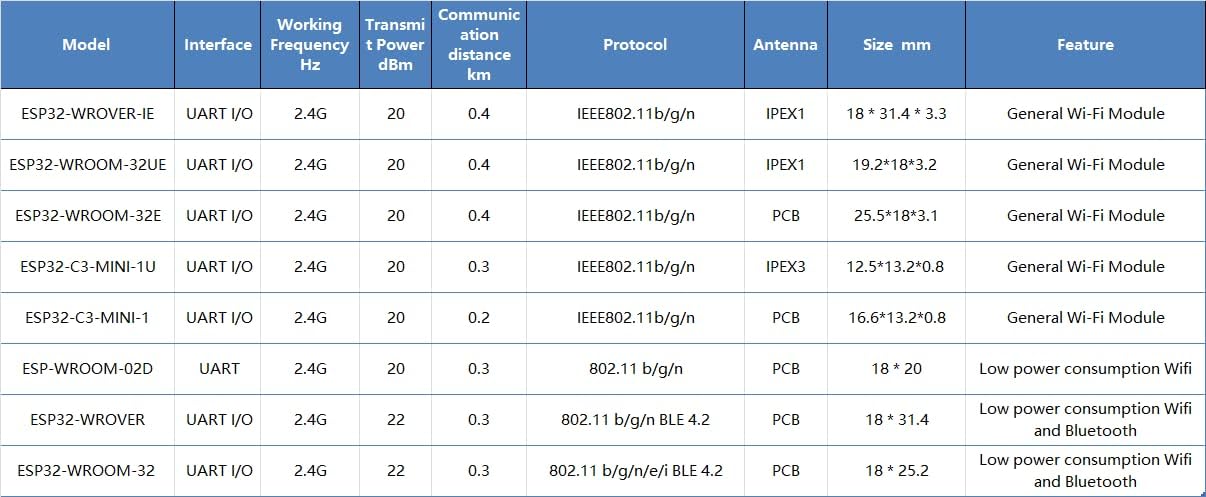
Figure 3: Detailed comparison table showing various EBYTE ESP32 modules, including their interfaces, frequencies, transmit power, communication distances, protocols, antenna types, sizes, and features.
3. Ukusetha Nokuhlanganisa
The ESP32-WROVER-IE module is designed for integration into custom hardware or development boards. Proper setup is crucial for optimal performance.
3.1 Ukuxhumana kwe-Hardware
- Ukunikezwa kwamandla kagesi: Connect the module to a stable power supply within its specified voltage range. Refer to the datasheet for exact voltage izidingo.
- UART Interface: Connect the module's UART (Universal Asynchronous Receiver/Transmitter) pins (TX, RX, GND) to your host microcontroller or development board. Ensure correct voltage levels (e.g., 3.3V).
- Ukuxhumana kwe-Antenna: Attach a compatible Ipex antenna to the module's Ipex connector. Ensure the connection is secure to achieve the specified communication range.
- Izikhonkwane ze-GPIO: Utilize the available General Purpose Input/Output (GPIO) pins for connecting sensors, actuators, or other peripherals as required by your application.
3.2 Ukucushwa Kwesoftware
- Indawo Yokuthuthukisa: Install the ESP-IDF (Espressif IoT Development Framework) or a compatible Arduino IDE environment with ESP32 board support.
- Firmware Upload: Use the chosen development environment to compile and upload your application firmware to the ESP32-WROVER-IE module via the UART interface.
- Ukuhlola Kwasekuqaleni: After uploading, perform basic tests to verify Wi-Fi connectivity and communication with your host system.
4. Operating the Module
Once the ESP32-WROVER-IE module is integrated and programmed, its operation depends on the specific application firmware.
4.1 Ukuxhumana kwe-Wi-Fi
- Imodi yesiteshi: The module can connect to an existing Wi-Fi network (router) to access the internet or communicate with other devices on the local network.
- Imodi Yephoyinti Lokufinyelela (AP): The module can create its own Wi-Fi network, allowing other devices to connect directly to it.
- Imodi Ehlanganisiwe: The module can operate as both a station and an access point simultaneously.
4.2 Ukuxhumana Ngedatha
The module supports various communication protocols over Wi-Fi, including TCP/IP, UDP, HTTP, MQTT, and more, enabling data exchange with cloud services, local servers, or other IoT devices.

Umfanekiso 4: Eksample of the ESP32 module's application in smart home environments, enabling wireless connectivity for various devices and systems.

Umfanekiso 5: Eksample of the ESP32 module's application in industrial automation, contributing to reliable and efficient control systems.
5. Maintenance and Handling
To ensure the longevity and reliable operation of your ESP32-WROVER-IE module, follow these guidelines:
- I-Static Electricity: Handle the module with care, preferably in an ESD-safe environment, to prevent damage from static discharge.
- Izimo Zemvelo: Operate and store the module within its specified temperature and humidity ranges. Avoid extreme conditions.
- Ukuvikelwa Komzimba: Protect the module from physical impact, excessive bending, or pressure, especially on the antenna connector and pins.
- Ukuhlanza: If necessary, clean the module gently with a dry, soft brush or compressed air. Avoid liquids or harsh chemicals.
- Ukuvuselelwa kwe-Firmware: Regularly check for and apply firmware updates from Espressif or EBYTE to benefit from performance improvements, bug fixes, and security enhancements.
6. Ukuxazulula izinkinga
If you encounter issues with your ESP32-WROVER-IE module, consider the following troubleshooting steps:
- Awekho Amandla:
- Qinisekisa umthamo wamandla kagesitage kanye nomthamo wamanje.
- Check all power connections for proper contact.
- Izinkinga zokuxhumana nge-Wi-Fi:
- Ensure the antenna is securely connected.
- Check Wi-Fi credentials (SSID, password) in your firmware.
- Verify that the Wi-Fi network is within range and operating on the 2.4GHz band.
- Confirm that the module's firmware includes Wi-Fi functionality and is correctly initialized.
- UART Communication Problems:
- Check TX/RX connections (ensure TX of one device connects to RX of the other).
- Verify baud rate settings match between the module and the host.
- Qinisekisa ivoltage levels are compatible (e.g., 3.3V).
- Imojula Ayiphenduli:
- Try a hard reset by cycling the power.
- Re-upload the firmware to ensure it's not corrupted.
- Check for any short circuits or incorrect wiring on your PCB.
7. Iwaranti kanye Nokusekela
For specific warranty information and technical support, please refer to the official EBYTE webisayithi noma uxhumane nesevisi yabo yamakhasimende ngokuqondile. Gcina irisidi yakho yokuthenga ukuze uthole izimangalo zewaranti.
Umkhiqizi: I-EBYTE
Imodeli: ESP32-WROVER-IE