
1. Isingeniso
This manual provides essential information for the safe and efficient operation of your Dual DL-32HD-008 LED TV. Please read these instructions carefully before using the television and retain them for future reference. This 32-inch (81 cm) HD LED TV features a 1366 x 768 resolution, multiple connectivity options including HDMI and USB, and an integrated DVB-T/C/S2 tuner.

Image 1.1: The Dual DL-32HD-008 LED TV.
2. Ulwazi Lokuphepha
Landela njalo izinyathelo zokuphepha eziyisisekelo uma usebenzisa le thelevishini ukuze unciphise ingozi yomlilo, ukushaqeka kukagesi, kanye nokulimala.
- Ungayibeki i-TV emvuleni noma emswakama.
- Ungayivuli i-TV casing; dlulisela zonke izinsiza kubasebenzi abaqeqeshiwe.
- Qinisekisa ukuthi kungena umoya ofanele eduze kwe-TV.
- Gcina i-TV kude nokukhanya kwelanga okuqondile, imithombo yokushisa, kanye namasimu anamandla kazibuthe.
- Khipha i-TV ngesikhathi seziphepho zombani noma uma ingasetshenziswa isikhathi eside.
3. Okuqukethwe Kwephakheji
Qinisekisa ukuthi zonke izinto zikhona ebhokisini:
- Dual DL-32HD-008 LED TV
- Stand Feet (2 pieces)
- Isilawuli kude
- Incwadi Yomsebenzisi (le dokhumenti)
4. Setha
4.1. Ukufakwa kwesitendi
To install the stand feet:
- Beka ubuso be-TV phansi ngokucophelela endaweni ethambile, eyisicaba ukuze uvimbele umonakalo esikrinini.
- Align each stand foot with the corresponding slots on the bottom of the TV.
- Vikela izinyawo usebenzisa izikulufo ezinikeziwe.

Image 4.1: TV with stand feet installed.
4.2. Ukukhweza Udonga
The TV supports VESA 100 x 100 mm wall mounts. A wall mount kit is not supplied. Please consult a professional for wall mounting to ensure safety and proper installation.
4.3. Ukuxhuma Amadivayisi Angaphandle
I-TV inikeza amachweba ahlukahlukene okuxhuma amadivayisi angaphandle:
- Izimbobo ze-HDMI: Connect Blu-ray players, game consoles, or set-top boxes. This model includes 1 HDMI 1.4 port and 1 HDMI ARC port.
- Imbobo ye-USB 2.0: For media playback or PVR (Personal Video Recorder) functionality.
- Okokufaka kwe-Antenna: Connect your terrestrial, cable, or satellite antenna for DVB-T/C/S2 reception.
- I-CI+ Slot: Ukuze kube namaModule Okufinyelela Okunemibandela (i-CAM) ukuze kukhishwe ukubethela iziteshi ezibethelwe.

Image 4.2: Rear panel with connectivity ports.
4.4. Power Connection and First-Time Setup
- Xhuma intambo kagesi ku-TV bese uyixhumanisa ne-othomathikhi yodonga.
- Cindezela inkinobho ethi "Power" kusilawuli kude noma ku-TV.
- Follow the on-screen instructions for the initial setup, including language selection, channel scanning, and network configuration (if applicable).
5. Ukusebenza
5.1. Ukulawula Okukudeview
Familiarize yourself with the remote control buttons for optimal TV operation.

Image 5.1: Remote Control.
5.2. Imisebenzi Eyisisekelo Ye-TV
- Amandla: Cindezela inkinobho AMANDLA inkinobho yokuvula noma ukuvala i-TV.
- Ivolumu: Sebenzisa i- I-VOL +/- izinkinobho zokulungisa ivolumu.
- Isiteshi: Sebenzisa i- CH +/- izinkinobho zokushintsha iziteshi.
- Okokufaka: Cindezela inkinobho INPUT button to select different input sources (HDMI, USB, TV).
- Imenyu: Cindezela inkinobho IMENU button to access the main menu for settings adjustments.
5.3. Tuner Operation
Your TV supports DVB-T (terrestrial), DVB-C (cable), and DVB-S2 (satellite) signal formats. After initial setup, channels will be scanned and stored. Use the EPG inkinobho ukuze view the Electronic Program Guide.
5.4. USB PVR Function
Connect a USB storage device to the USB 2.0 port to record TV programs. Refer to the on-screen menu for PVR setup and operation instructions.
6. Isondlo
6.1. Ukuhlanza Isikrini
Sula kahle isikrini ngendwangu ethambile, engenantambo. Ukuze uthole amamaki anenkani, kancane dampzu indwangu enamanzi noma isicoci sesikrini esikhethekile. Ungalokothi ufafaze uketshezi ngqo esikrinini.
6.2. Ukuhlanza i-Casing
Sebenzisa indwangu ethambile, eyomile ukuhlanza i-TV casing. Gwema ukusebenzisa izinto zokuhlanza abrasive noma izincibilikisi.
7. Ukuxazulula izinkinga
Uma uhlangabezana nezinkinga, bheka izinkinga ezilandelayo nezisombululo:
| Inkinga | Imbangela Engenzeka | Isixazululo |
|---|---|---|
| Awekho amandla | Intambo yamandla inqanyuliwe; awekho amandla aphuma ku-outlet. | Hlola uxhumano lwentambo yamandla; indawo yokuhlola ngenye idivayisi. |
| Asikho isithombe, kodwa umsindo ukhona | Umthombo wokufaka ongalungile ukhethiwe; ikhebula elingalungile. | Cindezela INPUT to select correct source; check HDMI/AV cable connections. |
| Awukho umsindo, kodwa isithombe sikhona | Ivolumu ithulisiwe noma iphansi kakhulu; udaba lwesistimu yomsindo yangaphandle. | Susa ukuthula noma wandise ivolumu; hlola uxhumano lomsindo lwangaphandle. |
| Isilawuli kude asisebenzi | Amabhethri aphelelwe amandla noma afakwe ngendlela engafanele; ukuvinjelwa. | Replace batteries (CR2032 type); ensure clear path to TV's IR sensor. |
| Ikhwalithi yesithombe esibi | Isignali ebuthakathaka; izilungiselelo zesithombe ezingalungile. | Check antenna connection; adjust picture settings in the menu. |
8. Imininingwane
Detailed technical specifications for the Dual DL-32HD-008 LED TV:
| Isici | Ukucaciswa |
|---|---|
| Igama Lemodeli | DL-32HD |
| Usayizi Wesikrini | Amasentimitha amane (32 cm) |
| Bonisa Ubuchwepheshe | I-LED |
| Isixazululo | I-720p (1366 x 768) |
| Isilinganiso Sokuvuselela | 60 Hz |
| I-Aspect ratio | 16:9 |
| Isilinganiso Sokuqhathanisa | 1200:1 |
| Ukukhanya Okuphezulu | 180 Candelas per square meter |
| Isikhathi sokuphendula | 8 millisecond |
| Viewing engela | 178 degrees |
| Imodi Yokukhipha Umsindo | Zungeza |
| Incazelo yesipika | 2 x 8 Watts Speakers |
| Isamba samachweba we-HDMI | 2 (1x HDMI 1.4, 1x HDMI ARC) |
| Isamba samachweba we-USB | 2 (USB 2.0) |
| Uhlobo Lweshuna | DVB-T, DVB-C, DVB-S2 |
| I-VESA Mount Standard | 100 x 100 mm |
| Ukusetshenziswa kwamandla | 65 Watts (On), 0.5 Watts (Standby) |
| Umugqa Voltage | 100-240 V AC 50-60 Hz |
| Ubukhulu bento (D x W x H) | 19P x 73.2W x 47.8H cm |
| Item Weight (without stand) | 3.5 kg |
| Isisindo Sento (ngesitendi) | 4.5 kg |
| Uhlobo Lwebhethri Lokulawula Isilawuli kude | CR2032 |
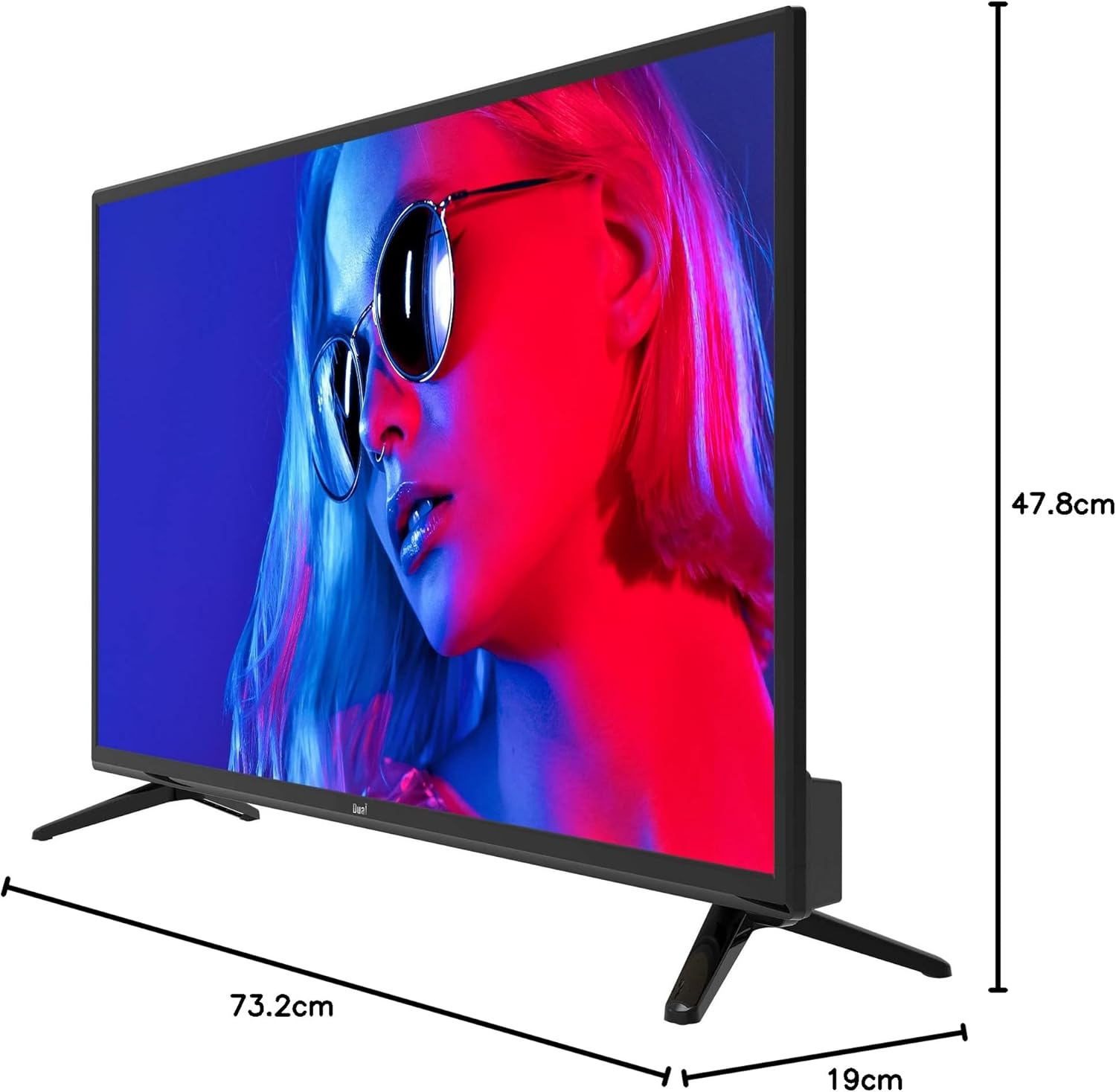
Isithombe 8.1: Ubukhulu be-TV.
8.1. Ilebula Lamandla

Image 8.2: EU Energy Label. For more details, visit the official EPREL database: Ikhasi Lomkhiqizo le-EPREL
9. Iwaranti kanye Nokusekela
9.1. Ulwazi Lwewaranti
This product comes with a Limited Warranty. Please refer to the warranty card included in your package for specific terms and conditions.
9.2. Spare Parts and Software Updates
Information regarding the availability of spare parts and guaranteed software updates for this model is currently not available. Please contact your retailer or the manufacturer for further inquiries.
9.3. Ukwesekwa Kwamakhasimende
For technical assistance or customer service, please contact your point of purchase or visit the official Dual webindawo yezinsiza zokusekela.