
1. Isingeniso
Thank you for choosing the Awei TC-7 Wired Earphones. These in-ear earphones are designed for clear audio and convenient communication, featuring a Type-C connector for modern devices and an inline microphone with control buttons. Please read this manual carefully to ensure proper use and maintenance of your earphones.
2. Okuqukethwe Kwephakheji
- Awei TC-7 Wired Earphones
- Multiple sizes of Ear Cushions (Small, Medium, Large)

Umfanekiso 2.1: The Awei TC-7 earphones include ear caps in various sizes to ensure a comfortable and secure fit for different users.
3. Umkhiqizo Uphelileview
The Awei TC-7 earphones feature a durable design with a Type-C plug for direct connection to compatible devices. The inline remote control allows for easy management of audio playback and calls.

Umfanekiso 3.1: A close view of the Awei TC-7 earphones, showcasing their in-ear design for optimal sound delivery.

Umfanekiso 3.2: The inline remote control features multi-function buttons for managing audio and calls.

Umfanekiso 3.3: The integrated HD microphone is designed to pick up clear audio, even in noisy environments.
4. Setha
- Khetha ama-Ear Cushions: Choose the ear cushion size (Small, Medium, or Large) that provides the most comfortable and secure fit for your ears. A proper fit enhances sound quality and noise isolation.
- Xhuma kudivayisi: Insert the USB-C plug of the earphones into the Type-C port of your smartphone, tablet, laptop, or other compatible device.
- Okukhipha Umsindo: Ensure your device's audio output is set to the connected earphones. This is usually automatic upon connection.
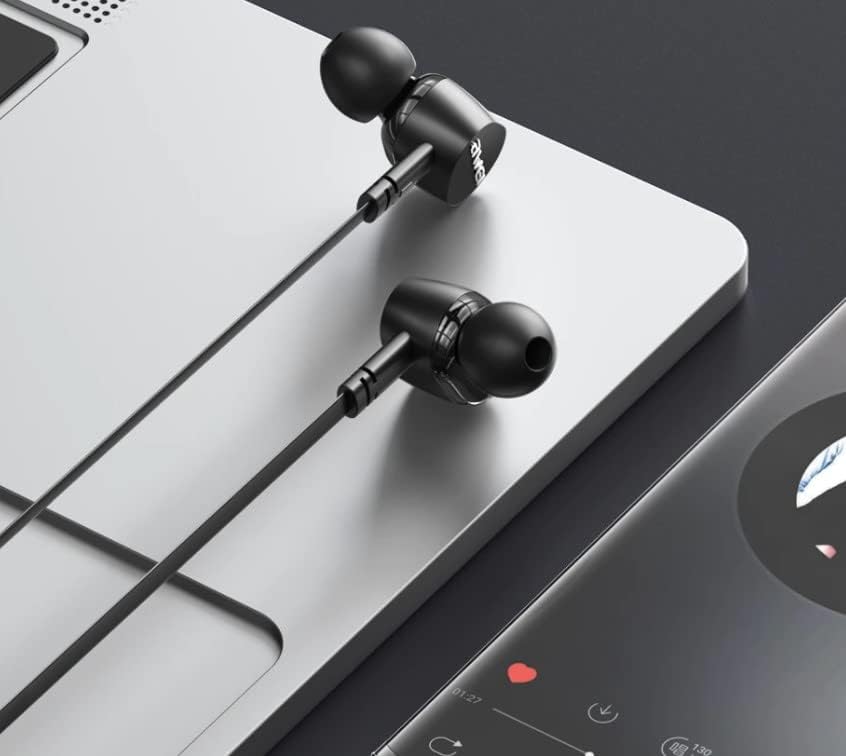
Umfanekiso 4.1: The earphones are compatible with various devices featuring a USB-C port, such as laptops and smartphones.
5. Iziqondiso Zokusebenza
The Awei TC-7 earphones feature an inline remote with buttons for convenient control of your audio and calls.
5.1. Ukulawula Ukudlala Umculo
- Dlala/Misa kancane: Cindezela inkinobho ephakathi kanye.
- Ithrekhi Elandelayo: Cindezela inkinobho yesikhungo kabili ngokushesha.
- Ithrekhi yangaphambilini: Cindezela inkinobho yesikhungo ngokushesha kathathu.
- Ivolumu ephezulu: Cindezela inkinobho ethi '+'.
- Ivolumu Phansi: Cindezela inkinobho ethi '-'.
5.2. Ukuphathwa Kwezingcingo
- Phendula/Phendula ikholi: Cindezela inkinobho ephakathi kanye ngesikhathi socingo olungenayo noma ucingo olusebenzayo.
- Yenqaba Ucingo: Cindezela bese ubamba inkinobho ephakathi cishe imizuzwana emibili ngesikhathi socingo olungenayo.
6. Isondlo
Proper care will extend the lifespan of your Awei TC-7 earphones.
- Ukuhlanza Izindlebe: Regularly remove the ear cushions and clean them with a soft, damp Indwangu. Qinisekisa ukuthi zomile ngokuphelele ngaphambi kokuzinamathisela kabusha.
- Ukunakekelwa Kwekhebula: The cable is designed to be tangle-free. Avoid excessive pulling or sharp bending to prevent internal damage.
- Isitoreji: When not in use, store the earphones in a clean, dry place, away from extreme temperatures.
- Ukumelana Namanzi: The earphones are rated as waterproof. However, avoid prolonged submersion and ensure the USB-C port is dry before connecting to a device after exposure to water.
7. Ukuxazulula izinkinga
If you encounter issues with your Awei TC-7 earphones, please refer to the following common solutions:
| Inkinga | Imbangela Engenzeka | Isixazululo |
|---|---|---|
| Awukho umsindo ophuma kuma-earphone | Earphones not properly connected; device volume too low; incorrect audio output setting on device. | Ensure the USB-C plug is fully inserted. Increase device volume. Check device audio settings to confirm output is set to earphones. |
| Imakrofoni ayisebenzi | Microphone port blocked; incorrect input setting on device; application permissions. | Ensure the microphone area is clear. Check device sound settings for microphone input. Verify application permissions for microphone access. |
| Izinkinobho aziphenduli | Loose connection; device incompatibility; software glitch. | Reconnect the earphones. Test with another compatible device if possible. Restart your device. |
8. Imininingwane
| Isici | Imininingwane |
|---|---|
| Igama Lemodeli | TC-7 |
| Ubuchwepheshe bokuxhumana | Inezintambo |
| I-headphone Jack | I-USB-C |
| Ukubekwa Kwendlebe | Endlebeni |
| I-Frequency Range | 20Hz - 20kHz |
| Izici Ezengeziwe | Microphone Included, Inline Control |
| Okubalulekile | Ipulasitiki |
| Izinga Lokumelana Namanzi | Ingangeni manzi |
| Izici zekhebula | I-Tangle Free |
| Amadivayisi Ahambisanayo | Smartphones, Laptops, Tablets, Desktops with USB-C |
9. Iwaranti kanye Nokusekela
For warranty information and customer support, please refer to the documentation provided at the point of purchase or contact your retailer. Keep your proof of purchase for any warranty claims.