
1. Isingeniso
This manual provides detailed instructions for the safe and efficient operation of your InFocus P120 INL412 Multimedia Projector (Model INL4128). Please read this manual thoroughly before using the projector and keep it for future reference. This projector is designed for high-quality image projection, suitable for various applications including presentations, home entertainment, and gaming.
2. Ulwazi Lokuphepha
Observe the following safety precautions to prevent damage to the projector and ensure user safety:
- Ukungenisa umoya: Ensure adequate ventilation around the projector. Do not block ventilation openings. Maintain a minimum distance of 30 cm (12 inches) from walls or other objects.
- Umthombo wamandla: Sebenzisa kuphela ugesi oshiwo kanye nevolumutage. Connect the power cord securely.
- Ukushisa: The projector generates heat during operation. Do not touch the projector's vents or exhaust areas directly after use.
- Okuphumayo Okukhanyayo: Ungabheki ngqo kulensi yeprojektha lapho i-lamp is on, as the intense light can cause eye damage.
- Ukubekwa: Place the projector on a stable, level surface. Avoid placing it in direct sunlight, near heat sources, or in areas with high humidity or dust.
- Ukuhlanza: Nqamula intambo yamandla ngaphambi kokuhlanza. Sebenzisa indwangu ethambile, eyomile. Ungasebenzisi izihlanzi eziwuketshezi noma ze-aerosol.
- Ukusevisa: Ungazami ukusevisa iprojektha ngokwakho. Thumela zonke izinsiza kubasebenzi benkonzo abaqeqeshiwe.
3. Umkhiqizo Uphelileview
3.1 Top Panel and Lens Area
The top panel features the control buttons for basic operation and the lens area with focus and zoom adjustments.

Umfanekiso 3.1: Phezulu view of the InFocus P120 INL412 projector, highlighting the control panel on the right and the lens adjustment area on the left. The InFocus logo is visible on the top surface.
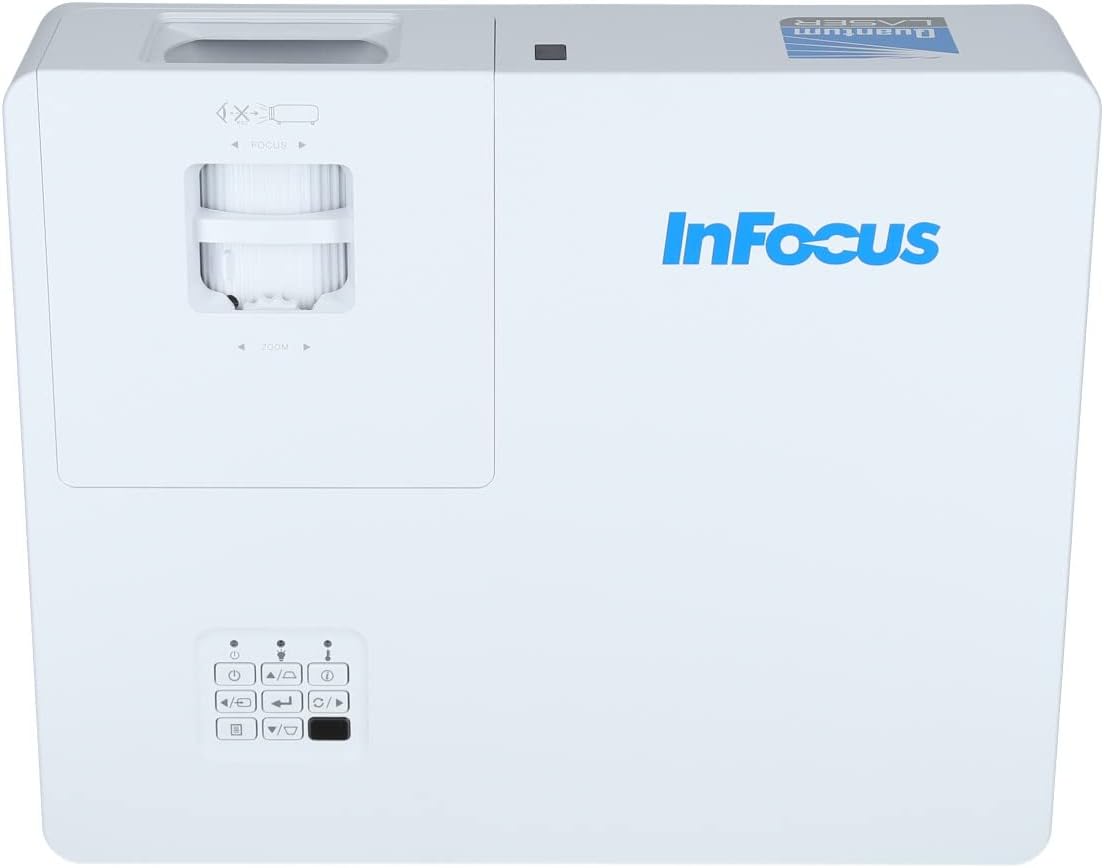
Umfanekiso 3.2: A closer view of the projector's top panel, showing the focus and zoom rings near the lens opening and the array of control buttons for power, menu, source selection, and navigation.
3.2 Izixhumi zephaneli yangemuva
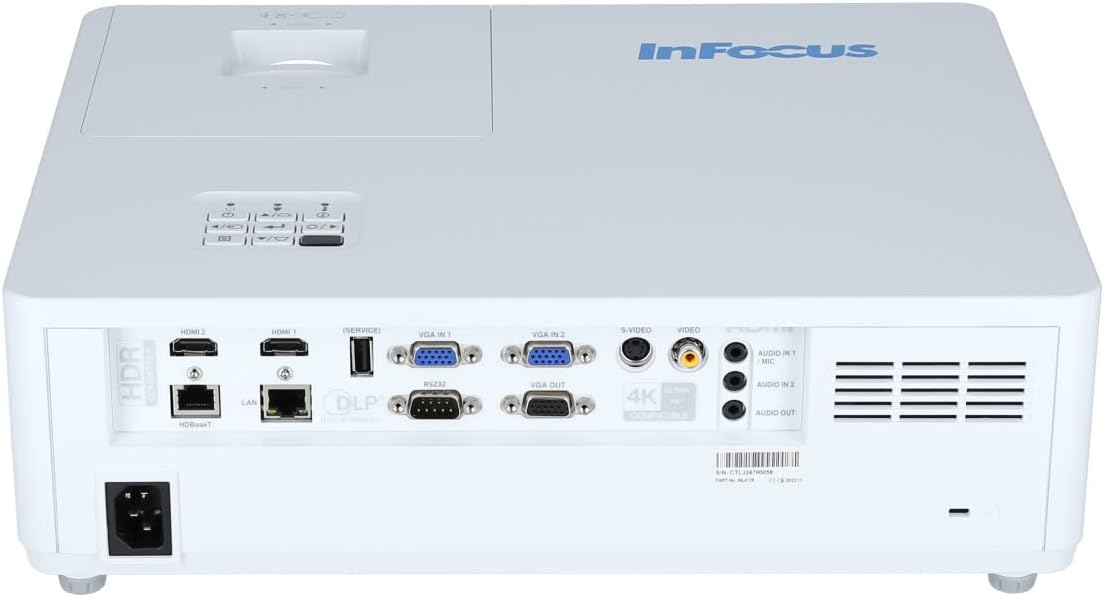
The rear panel provides various input and output ports for connecting external devices.

Figure 3.3: Rear panel of the InFocus P120 INL412 projector, displaying a comprehensive array of connectivity options including HDMI (x2), USB, S-Video, Ethernet (LAN), VGA In (x2), VGA Out, RS232, and Audio In/Out ports. The power input is located on the bottom left.
Key ports include:
- I-HDMI 1 & 2: For connecting high-definition digital video and audio sources.
- I-USB: For connecting USB devices, potentially for media playback or firmware updates.
- I-S-Video: For connecting older video sources.
- VGA IN 1 & 2: For connecting computers or other devices with VGA output.
- I-VGA OUT: Ukuxhuma kwimonitha yangaphandle.
- I-Ethernet (LAN): Okokuxhunywa kwenethiwekhi nokulawula.
- Audio IN 1 & 2 / Audio OUT: Ukuxhumeka komsindo we-analog.
- I-RS232: Ukulawula okulandelanayo.
- Okokufaka kwamandla: For connecting the AC power cord.
3.3 Front and Side Panels
The front panel houses the projection lens and front ventilation, while the side panels feature additional ventilation grilles.

Umfanekiso 3.4: Ngaphambili view of the InFocus P120 INL412 projector, displaying the main projection lens on the right and the extensive front ventilation grille on the left, crucial for heat dissipation.
Umfanekiso 3.5: Uhlangothi view of the InFocus P120 INL412 projector, illustrating the side ventilation grilles that contribute to maintaining optimal operating temperature.
4. Setha
4.1 Ukubekwa kweProjector
Position the projector on a stable, flat surface or mount it securely. Ensure the projector is within the optimal projection distance for your screen size. Maintain clear space around the projector for proper ventilation.
4.2 Ukuxhumanisa Amadivayisi
Before connecting any cables, ensure the projector and all source devices are powered off.
- Uxhumano lwe-HDMI: Connect an HDMI cable from your source device (e.g., laptop, Blu-ray player, gaming console) to either the HDMI 1 or HDMI 2 port on the projector.
- Uxhumano lwe-VGA: Connect a VGA cable from your computer to either VGA IN 1 or VGA IN 2. For audio, connect a separate audio cable from your computer's audio output to the corresponding Audio IN port on the projector.
- Uxhumano lwe-USB: Insert a USB drive into the USB port for media playback (if supported by firmware) or service functions.
- Ethernet (LAN) Connection: Connect an Ethernet cable to the LAN port for network control or updates.
- Okukhipha Umsindo: If using external speakers, connect an audio cable from the Audio OUT port on the projector to your audio system.
4.3 Ukuxhuma Amandla
Connect the power cord to the projector's power input and then plug the other end into a grounded electrical outlet.
5. Iziqondiso Zokusebenza
5.1 Ukuvula / Ukuvula
- Vula: Cindezela inkinobho Amandla button on the projector's control panel or the remote control. The power indicator light will change.
- Cisha ugesi: Cindezela inkinobho Amandla button again. A confirmation message may appear. Press the button a second time to confirm shutdown. Allow the projector to cool down before unplugging it.
5.2 Adjusting Focus and Zoom
Rotate the focus ring around the lens until the image appears sharp and clear. Use the zoom ring to adjust the image size to fit your screen.
5.3 Ukukhetha Umthombo Wokufaka
Cindezela inkinobho Umthombo button on the control panel or remote control to cycle through available input sources (HDMI 1, HDMI 2, VGA 1, VGA 2, S-Video, USB). Select the input corresponding to your connected device.
5.4 Ukuzulazula kwemenyu
Sebenzisa i- Imenyu button to access the on-screen display (OSD) menu. Use the arrow buttons to navigate through menu options and the Ngena inkinobho yokukhetha. Cindezela Imenyu futhi ukuphuma.
6. Isondlo
6.1 Ukuhlanza Ilensi
Gently wipe the lens with a soft, lint-free cloth specifically designed for optical surfaces. Do not use abrasive cleaners or excessive force, as this can scratch the lens.
6.2 Cleaning the Projector Exterior
Sebenzisa indwangu ethambile neyomile ukuhlanza i-projectorasing. For stubborn dirt, dampen the cloth slightly with water, then wipe dry immediately. Avoid getting liquids into the projector's openings.
6.3 Ventilation Care
Regularly check the projector's ventilation grilles for dust accumulation. Use a soft brush or a vacuum cleaner with a brush attachment to gently remove dust from the vents to ensure proper airflow and prevent overheating.
7. Ukuxazulula izinkinga
7.1 Akukho sithombe esibonisiwe
- Qinisekisa ukuthi iphrojektha ivuliwe futhi isibani sesikhombisi samandla siqinile.
- Verify that the video cable (HDMI, VGA, etc.) is securely connected to both the projector and the source device.
- Check that the correct input source is selected on the projector.
- Confirm that the source device (laptop, player) is powered on and outputting a signal.
7.2 Image is Blurry or Out of Focus
- Lungisa indandatho yokugxila kulensi yephrojektha kuze kube yilapho isithombe sibukhali.
- Ensure the projector is at the correct distance from the screen.
- Clean the projector lens if it appears dirty.
7.3 Awukho umsindo
- If using HDMI, ensure the source device's audio output is set to HDMI.
- If using VGA, ensure a separate audio cable is connected from the source to the projector's Audio IN port.
- Check the volume settings on both the projector and the source device.
- If using external speakers, ensure they are properly connected to the Audio OUT port and powered on.
8. Imininingwane
| Isici | Imininingwane |
|---|---|
| Ibhrendi | I-InFocus |
| Umkhiqizi | Ku-Focus |
| Igama Lemodeli | P120 INL412 |
| Inombolo Yemodeli | INL4128 |
| Unyaka | 2023 |
| Isikhombimsebenzisi se-Hardware | Ethernet, HDMI, S-Video, USB |
| Inombolo Yezinto | 1 |
| I-Aspect ratio | 16:9 |
| Wattage | 341 watts |
| Amabhethri afakiwe | Cha |
| Kudingeka Amabhethri | Cha |
| I-Form Factor | Ideskithophu |
| Uhlobo Lokukhweza | Ukukhweza itafula |
| Isilawuli kude sifakiwe | Yebo |
| Ubukhulu bomkhiqizo | 56.13 x 46.48 x 25.15 cm |
| Isisindo sento | 5.5 kg |
| Ubukhulu Bosayizi Wesithombe | 308.28 amayintshi |
| Ubuncane Besithombe | 910.63 amamilimitha |
| Idethi Yokuqala Etholakalayo | Januwari 5, 2022 |
9. Iwaranti kanye Nokusekela
For warranty information and technical support, please refer to the documentation included with your purchase or visit the official InFocus webindawo. Gcina ubufakazi bakho bokuthenga ngezimangalo zewaranti.