
Isingeniso
This manual provides comprehensive instructions for the use and care of your new Remote brand compatible remote control. This remote is specifically designed to function seamlessly with Nordmende ND40S3000J SMART televisions, offering full functionality without the need for complex programming.
Please read this manual carefully to ensure proper setup and operation of your remote control.
Setha
1. Ukufakwa kwebhethri
The remote control requires alkaline batteries (not included). Follow these steps to install them:
- Thola ikhava yengxenye yebhethri ngemuva kwesilawuli kude.
- Shelelisela ikhava phansi noma cindezela i-latch ukuyivula.
- Insert two new alkaline batteries, ensuring the positive (+) and negative (-) terminals match the diagrams inside the compartment.
- Shintsha isembozo segumbi lebhethri, usibuyisele endaweni yaso kuze kube yilapho sichofoza ngokuphephile.
Okubalulekile: Always use new alkaline batteries for optimal performance. Do not mix old and new batteries, or different types of batteries.
2. Ukusetshenziswa Kokuqala (Akukho Ukuhlela Okudingekayo)
This compatible remote control is pre-programmed for the Nordmende ND40S3000J SMART TV model. No additional programming or setup steps are required. Once batteries are installed, the remote is ready for immediate use with your television.
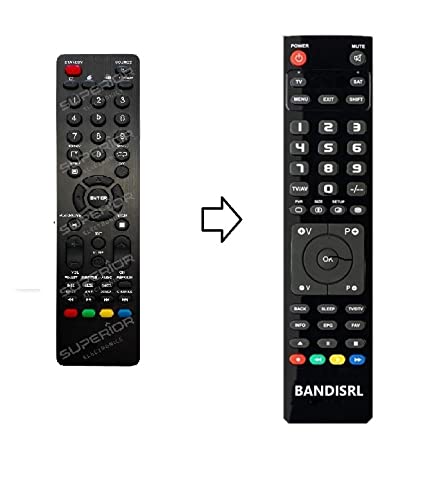
Umfanekiso 1: The Remote compatible remote control. This image displays the layout of the buttons and the overall design of the remote, ready for use with your Nordmende TV.
Imiyalelo yokusebenza
To operate your Nordmende ND40S3000J SMART TV with this remote control, point the remote directly at the television's infrared receiver. Ensure there are no obstructions between the remote and the TV.
- Inkinobho yamandla: Cindezela ukuvula noma ukuvala i-TV.
- Ivolumu phezulu/Phansi: Ilungisa ivolumu yomsindo.
- Isiteshi Phezulu/Phansi: Ishintsha iziteshi ze-TV ngokulandelana.
- Izinkinobho Zezinombolo (0-9): Khetha iziteshi ze-TV ngokuqondile.
- Izinkinobho Zokuzulazula (Okhiye Bemicibisholo, KULUNGILE): Zulazula kumamenyu bese ukhetha izinketho.
- Smart TV Buttons: Access specific Smart TV functions or applications (e.g., Home, Apps, Netflix, YouTube, etc., depending on the remote's layout and TV's features).
- Inkinobho yokuthulisa: Ithulisa umsindo we-TV.
- Inkinobho Yomthombo/Yokokufaka: Ijikeleza ngemithombo yokufaka etholakalayo (i-HDMI, i-AV, njll.).
Refer to your Nordmende TV's original user manual for specific details on its menu structure and Smart TV functionalities.
Isondlo
Ukuhlanza Isilawuli kude
Ukuze uhlanze isilawuli sakho esikude, sebenzisa indwangu ethambile neyomile. Uma ungcolile, susa ukungcola okuncaneampen the cloth with water. Do not use abrasive cleaners, alcohol, or solvents, as these can damage the remote's surface and internal components.
Ukushintshwa Kwebhethri
Replace batteries when the remote control's response becomes sluggish or stops working. Always replace both batteries simultaneously with new alkaline batteries. Dispose of used batteries according to local regulations.
Isitoreji
Gcina isilawuli kude endaweni epholile, eyomile kude nokukhanya kwelanga okuqondile kanye namazinga okushisa aphezulu. Uma isilawuli kude singasetshenziswa isikhathi eside, kungcono ukususa amabhethri ukuze uvimbele ukuvuza.
Ukuxazulula inkinga
- Isilawuli kude asisebenzi:
- Hlola ukuthi amabhethri afakwe kahle yini nge-polarity efanele (+/-).
- Replace the batteries with new alkaline batteries.
- Qinisekisa ukuthi azikho izithiyo phakathi kwesilawuli kude kanye nesamukeli se-infrared se-TV.
- Make sure you are pointing the remote directly at the TV.
- Qinisekisa ukuthi i-TV ivuliwe.
- Some buttons are not responding:
- This remote is designed for the Nordmende ND40S3000J SMART TV. If you are using it with a different model, some advanced functions may not be compatible.
- Ensure the buttons are clean and free from debris.
- TV responds intermittently:
- Amabhethri angase abe phansi; esikhundleni sazo.
- Ensure a clear line of sight to the TV's infrared sensor.
- Avoid strong light sources (like direct sunlight) that might interfere with the infrared signal.
If troubleshooting steps do not resolve the issue, please refer to the Support section.
Imininingwane
| Ibhrendi: | Remote (Manufacturer: Bandisrl) |
| Amadivayisi Ahambisanayo: | Nordmende ND40S3000J SMART Television |
| Ubuchwepheshe bokuxhuma: | I-infrared (IR) |
| Isici esikhethekile: | Alukho uhlelo oludingekayo |
| Uhlobo Lwebhethri: | I-alkaline |
| Amabhethri afakiwe: | Cha |
| Umbala: | Mnyama |
| Inombolo yezinkinobho: | 25 |
| Uhlobo Olawulayo: | Inkinobho Yokulawula |
Iwaranti kanye Nokusekela
Ulwazi Lwewaranti
Specific warranty details for this compatible remote control are not provided in this manual. Please refer to the purchase documentation or contact the seller/manufacturer (Bandisrl) for information regarding warranty coverage and terms.
Ukwesekwa Kwamakhasimende
For further assistance, technical support, or inquiries regarding compatibility with other TV models, please contact the manufacturer, Bandisrl. Contact information can typically be found on the product packaging or the seller's webindawo.
If you own a different TV model than the Nordmende ND40S3000J SMART, it is recommended to contact Bandisrl to confirm compatibility before purchase or use.