1. Isingeniso
This manual provides comprehensive instructions for the setup, operation, and maintenance of your BESIA Bluetooth Remote Control, model RC802V FNR1. This remote is designed for seamless compatibility with various TCL Smart TV models, offering both infrared (IR) and Bluetooth connectivity for enhanced functionality, including voice control.

Figure 1: BESIA Bluetooth Remote Control RC802V FNR1
2. Setha
2.1 Ukufakwa kwebhethri
The remote control requires two (2) AAA batteries for operation.
- Thola ikhava yengxenye yebhethri ngemuva kwesilawuli kude.
- Slayida isembozo phansi ukuze uvule igumbi.
- Insert two new AAA batteries, ensuring correct polarity (+ and -) as indicated inside the compartment.
- Shelelisela ikhava uyibuyisele endaweni ize ichofoze ngokuphephile.
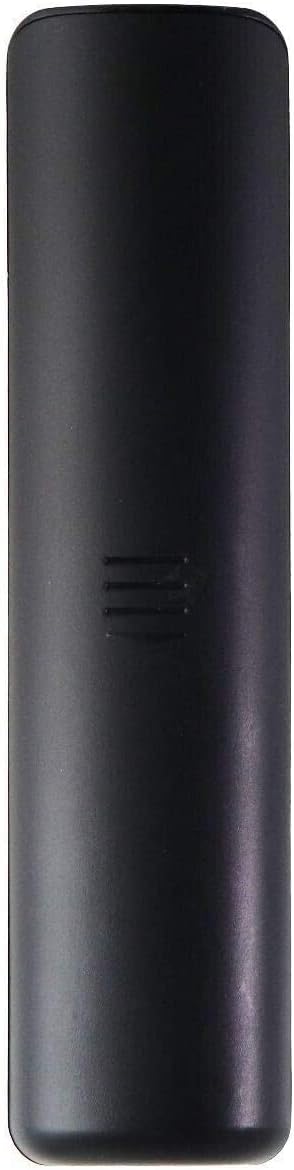
Figure 2: Back of the remote control
2.2 Ukumatanisa kwe-Bluetooth
For full functionality, including voice control, the remote must be paired with your TCL Smart TV via Bluetooth.
- Ensure your TCL Smart TV is powered on.
- Khomba isilawuli kude ku-TV.
- Cindezela kanyekanye bese ubamba i OK inkinobho kanye ne Ikhaya button (the button with a house icon) for 3 to 10 seconds.
- A pairing confirmation message should appear on your TV screen. Follow any on-screen prompts to complete the pairing process.

Figure 3: Pairing instructions for the remote control
3. Ukusebenzisa isilawuli kude
3.1 Imisebenzi Yenkinobho Iphelileview
The remote control features a standard layout for easy navigation and control of your TCL Smart TV. Refer to the diagram below for a detailed overview of each button's function.

Figure 4: Remote Control Button Functions
- Power Button (Red): TV on/off.
- Settings Button (Gear Icon): Accesses the settings menu.
- Home Button (House Icon): Returns to the Android TV home page.
- Option Menu Button (Three Lines): Displays the option menu.
- Navigation Direction Buttons (Up, Down, Left, Right): Navigates through menus and selections.
- Inkinobho ye-OK: Confirms an entry or selection; displays channel in TV mode.
- Inkinobho Yasemuva (Umcibisholo Wesokunxele): Returns to the previous menu or quits an application.
- Source List Button (Rectangle with Arrow): Accesses the input source list.
- Google Assistant Button (Colored Dots): Activates Google Assistant for voice commands (requires network connection).
- Ivolumu Phezulu/Phansi (+/-): Adjusts sound volume.
- Mute Button (Speaker with X): Mutes or unmutes audio.
- Virtual Keyboard Button (Keyboard Icon): Turns on the virtual keyboard when available.
- Channel Up/Down (CH+/-): Ishintsha iziteshi.
- Inkinobho ye-Netflix: Direct access to the Netflix application (when available).
- Inkinobho ye-YouTube: Direct access to the YouTube application (when available).
3.2 Using Voice Control (Google Assistant)
After successful Bluetooth pairing, you can utilize the integrated Google Assistant for voice commands.
- Cindezela inkinobho Inkinobho Yomsizi we-Google (colored dots) on the remote.
- Speak clearly into the remote control's microphone when prompted.
- Ensure your TV has an active internet connection for Google Assistant functionality.

Figure 5: Google Assistant Voice Control
3.3 Compatible TCL Smart TV Models
This remote control is compatible with a wide range of TCL Smart TV models, including but not limited to:
- 43S6500FS, 43S6800FS, 49S6500, 49S6500FS, 49S6800FS, 49S6800
- 32S6500S, 40S6800FS, 40S6800, 43S6500, 43S6800FS
- 40S330, 32S330, 43S434, 50S434, 55S434, 65S434, 75S434
- 43P30FS, 32P30S, 49P30FS, 32S6500A, 65P8S, 65P8, 55P8S, 55P8, 55EP680, 50P8S, 50P8
- 49S6510FS, 32S6500, 32S6800S, 32S6510S, 32A325, 32A323, 32S6800
- 40S6500, 40S6500FS, 40S6800FS, 40S6510FS, 40S6800
- 40A325, 40A323, 43S6510FS
4. Isondlo
4.1 Ukushintshwa Kwebhethri
When the remote control's performance degrades or it becomes unresponsive, it is likely due to low battery power. Replace both AAA batteries with new ones following the instructions in Section 2.1.
4.2 Ukuhlanza
To clean the remote control, use a soft, dry cloth. Do not use liquid cleaners or abrasive materials, as these may damage the remote's surface or internal components.
5. Ukuxazulula izinkinga
- Remote is unresponsive:
- Hlola ukuthi amabhethri afakwe kahle yini nokuthi ashaje ngokwanele. Washintshe uma kudingeka.
- Ensure there are no obstructions between the remote and the TV's IR receiver (for basic IR functions).
- Re-pair the remote control via Bluetooth (refer to Section 2.2).
- Voice control is not working:
- Confirm that the remote is successfully paired with the TV via Bluetooth (refer to Section 2.2).
- Ensure your TCL Smart TV has an active and stable internet connection.
- Verify that Google Assistant is enabled in your TV's settings.
- Buttons are not functioning correctly:
- Clean the remote control to remove any dirt or debris that might be obstructing button presses.
- If specific buttons remain unresponsive after cleaning and battery replacement, the remote may require replacement.
6. Imininingwane
| Isici | Imininingwane |
|---|---|
| Imodeli | RC802V FNR1 |
| Ibhrendi | Besia |
| Ukuxhumana | Bluetooth, Infrared (IR) |
| Amadivayisi Ahambisanayo | TCL Smart Televisions |
| Umthombo wamandla | 2 x AAA Amabhethri (angafakiwe) |
| Ubukhulu bomkhiqizo | 5 x 2 x 0.5 amayintshi |
| Isisindo sento | 1.44 amakhilogremu |
| Umbala | Mnyama |
| Isici Esikhethekile | Umklamo we-Ergonomic, Ukulawula Izwi |
7. Ukusekela
If you encounter any issues not covered in this manual or require further assistance, please contact Besia customer support.
For the latest support information and contact details, please visit the official Besia webvakashela iwebhusayithi noma ubheke ukupakishwa komkhiqizo wakho.