
ELEFOCUS RC-815S, TX-8030, RC-816S, RC-903S, RC-904S, TX-8160, TX-8050, TX-8140
ELEFOCUS Replacement Remote Control User Manual
For Onkyo RC-815S, TX-8030, RC-816S, RC-903S, RC-904S, TX-8160, TX-8050, TX-8140 Network Audio/Video AV Stereo Receivers
Isingeniso
This manual provides essential information for the proper use and maintenance of your ELEFOCUS replacement remote control. This remote is designed as a direct replacement for various Onkyo Network Audio/Video AV Stereo Receivers, including models RC-815S, TX-8030, RC-816S, RC-903S, RC-904S, TX-8160, TX-8050, and TX-8140.
Please note that this is a replacement item and while it functions out of the box with compatible models, some advanced or specific functions of your original remote may not be fully supported. No complex programming is required; simply insert batteries to begin use.
Setha
1. Ukufakwa kwebhethri
Isilawuli kude sidinga amabhethri amabili (2) e-AAA (awafakiwe). Landela lezi zinyathelo ukuze uwafake:
- Thola indawo yebhethri ngemuva kwesilawuli kude.
- Cindezela phansi kuthebhu bese uslayida isembozo sebhethri phansi ukuze usivule.
- Faka amabhethri amabili e-AAA, uqinisekise ukuthi amatheminali amahle (+) nangalungile (-) ahambisana kahle nezimpawu ezingaphakathi kwegumbi.
- Shelelisela ikhava yebhethri emuva endaweni ize ichofoze ngokuvikelekile.
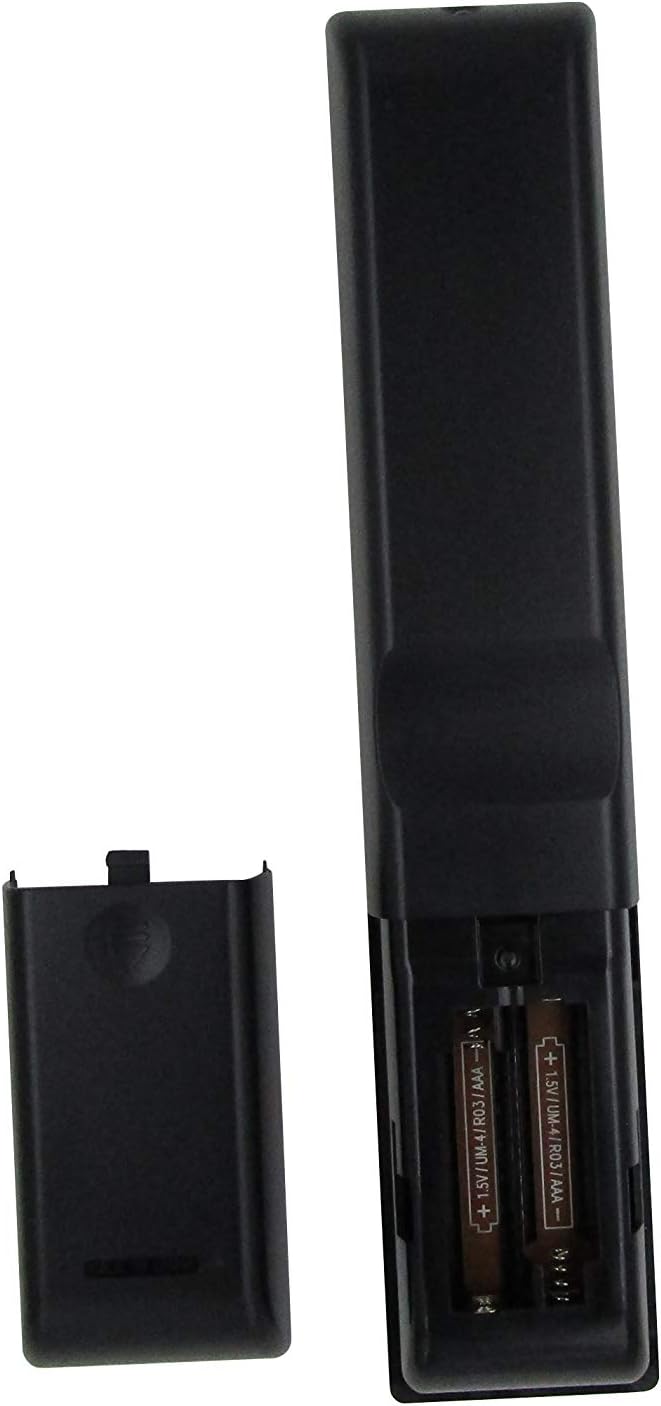
Umfanekiso 1: Battery compartment with AAA batteries. Ensure correct polarity when inserting batteries.
Once batteries are installed, the remote is ready for use. No additional programming or setup is typically required for compatible Onkyo receiver models.
Imiyalelo yokusebenza
This replacement remote control provides essential functions for your Onkyo receiver. Point the remote directly at the receiver's infrared (IR) sensor for optimal performance.

Umfanekiso 2: Kuphelileview yesakhiwo sesilawuli kude.
Imisebenzi Esemqoka:
- Inkinobho yamandla (⏻): Ivula noma ivale umamukeli.
- Input Selector Buttons (BD/DVD, CBL/SAT, PC, Game, TV/Tape, CD, Phono, Tuner, NET, Bluetooth): Selects the desired audio/video input source.
- Ivolumu phezulu/phansi (▲ / ▼): Ilungisa ileveli yevolumu eyinhloko.
- Iyathulisa: Ithulisa noma isuse ukuthula okukhiphayo komsindo.
- Navigation Pad (Up, Down, Left, Right, Enter): Used to navigate menus and confirm selections on your receiver's display.
- Imenyu: Accesses the receiver's main menu.
- Setha: Enters the setup menu for configuration.
- Buyela: Ibuyela emuva kumenyu yangaphambilini noma isikrini.
- Umsindo: Cycles through audio modes or settings.
- Playback Controls (Rewind, Play/Pause, Fast Forward, Stop, Previous Track, Play, Next Track): Controls media playback for connected devices.
- Phinda: Toggles repeat playback mode.
- Okungahleliwe: Toggles random/shuffle playback mode.
- Isipikha A/B: Selects speaker output groups.
- Ikhiphedi Yezinombolo (0-9): For direct input of numbers, such as radio frequencies or track numbers.
- Ofeleba: Functionality may vary by receiver model.
- > 10: For entering numbers greater than 9 on some systems.
- D.TUN: Direct tuning for radio.
- Bonisa: Changes display information on the receiver.
- Isikhuni: Ilungisa ukukhanya kwesibonisi somamukeli.
- Lala: Isetha isibali sikhathi sokulala se-receiver.
- I-CLR: Clears current input or selection.
Inothi elibalulekile:
As a replacement remote, some advanced or specific functions present on your original Onkyo remote may not be replicated or fully functional. This remote is designed to cover the primary and most commonly used features.
Isondlo
1. Ukushintshwa Kwebhethri
Replace batteries when the remote's response becomes sluggish or stops working. Always replace both batteries at the same time with new AAA batteries. Do not mix old and new batteries, or different types of batteries.
2. Ukuhlanza
Ukuze uhlanze isilawuli kude, sebenzisa indwangu ethambile neyomile. Uma ungcolile, susa ukungcola okuncaneampen the cloth with water or a mild, non-abrasive cleaner. Do not use harsh chemicals, solvents, or abrasive cleaning pads, as these can damage the remote's surface or internal components.
3. Isitoreji
When not in use for extended periods, it is recommended to remove the batteries to prevent leakage, which can damage the remote. Store the remote in a cool, dry place away from direct sunlight and extreme temperatures.
Ukuxazulula inkinga
| Inkinga | Imbangela Engenzeka | Isixazululo |
|---|---|---|
| Remote is not working at all. |
|
|
| Eminye imisebenzi ayisebenzi. |
|
|
| Isilawuli kude sisebenza ngezikhathi ezithile. |
|
|
If your specific Onkyo receiver model is not listed in the product title (RC-815S, TX-8030, RC-816S, RC-903S, RC-904S, TX-8160, TX-8050, TX-8140), this remote may not be compatible. Please verify compatibility before purchase.
Imininingwane
- Ibhrendi: ELEFOCUS
- Amadivayisi Ahambisanayo: Onkyo Network Audio/Video AV Stereo Receivers (Models: RC-815S, TX-8030, RC-816S, RC-903S, RC-904S, TX-8160, TX-8050, TX-8140)
- Ubuchwepheshe bokuxhuma: I-infrared (IR)
- Umthombo wamandla: 2 x AAA Amabhethri (angafakiwe)
- Isici esikhethekile: Umklamo we-ergonomic
- Inombolo Ephezulu Yamadivayisi Asekelwe: 1 (specific Onkyo receiver)
Ulwazi Lwewaranti
Specific warranty details for this ELEFOCUS replacement remote control are not provided in the product information. Please refer to the seller's return policy or contact the seller directly for information regarding warranty coverage and terms.
Ukwesekwa Kwamakhasimende
For further assistance or inquiries regarding your ELEFOCUS replacement remote control, please contact the seller directly through the platform where the purchase was made. As this is a third-party replacement product, direct manufacturer support may not be available.
For general information about your Onkyo receiver, please refer to the original user manual provided with your receiver or visit the official Onkyo support webindawo.
Umkhiqizo Owengeziwe Views

Umfanekiso 3: I-engeli view yesilawuli kude.

Umfanekiso 4: Close-up of the upper section of the remote, showing input and media controls.
Amavidiyo Omkhiqizo Osemthethweni
No official product videos from the seller were provided for this item.
Ask a question about this manual
Ask about setup, troubleshooting, compatibility, parts, safety, or missing instructions. Manuals+ will review the question and use this page’s manual context to help answer it.