
1. Isingeniso
This manual provides essential information for the safe and effective use of your Canon PowerShot G1 X Mark III Digital Camera. Please read this manual thoroughly before using the camera and retain it for future reference.

Umfanekiso 1.1: Ngaphambili view of the Canon PowerShot G1 X Mark III Digital Camera with the lens extended. This image displays the camera's compact body, the integrated zoom lens, and the Canon branding.
The PowerShot G1 X Mark III is an advanced compact camera featuring a 24.2MP APS-C CMOS sensor and a DIGIC 7 image processor. It is designed for high-quality still photography and Full HD video recording, offering a versatile 3x optical zoom lens and Dual Pixel CMOS AF for precise focusing.
2. Yini EseBhokisini
Qinisekisa ukuthi zonke izinto ezilandelayo zifakiwe kuphakheji yakho:
- Canon PowerShot G1 X Mark III Digital Camera
- Canon NB-13L Lithium-Ion Battery Pack (3.6V, 1250mAh)
- Canon CB-2LH Battery Charger for NB-13L Li-Ion Batteries
- I-Lens Cap
- I-Lens Cap String
- NS-DC12 Neck Strap
- Strap Adapter for NS-DC12
- Ikhebula le-Micro HDMI
3. Setha
3.1. Ukushaja Nokufaka Ibhethri
- Insert the NB-13L battery into the CB-2LH charger.
- Plug the charger into a power outlet. The charging indicator will illuminate.
- Once charging is complete, the indicator will change or turn off. Remove the battery.
- Vula ikhava yegumbi lebhethri ekhamera.
- Insert the charged battery into the camera, ensuring correct orientation. Close the cover securely.
3.2. Ukufaka Imemori khadi
The camera supports SD, SDHC, and SDXC memory cards. For optimal performance, especially with video recording and continuous shooting, use a UHS Speed Class 3 (U3) card.
- Vula ikhava yesikhala sememori khadi.
- Faka imemori khadi ilebula libheke ngaphambili kwekhamera kuze kube yilapho lichofoza endaweni yalo.
- Vala isembozo sesikhala sememori khadi ngokuphephile.
3.3. Ukubopha Ibhande Lentamo
Thread the NS-DC12 neck strap through the strap adapters and then through the camera's strap mounts. Ensure both ends are securely fastened to prevent accidental drops.
3.4. Ukuvula kokuqala kanye nezilungiselelo eziyisisekelo
Cindezela inkinobho KHANYISA CISHA button to power on the camera. Follow the on-screen prompts to set the date, time, and language. These settings are crucial for proper image file abaphathi.
4. Ukusebenzisa Ikhamera
4.1. Ukulawula Ikhameraview

Umfanekiso 4.1: Phezulu view of the camera, illustrating the mode dial, hot shoe, and various control dials for quick adjustments.

Umfanekiso 4.2: Ngemuva view of the camera, highlighting the LCD screen, electronic viewfinder, and the arrangement of control buttons for menu navigation and settings.
Familiarize yourself with the camera's buttons and dials. The mode dial on the top allows selection of various shooting modes, including Program AE, Shutter-priority AE, Aperture-priority AE, Manual, and Automatic modes. Dedicated dials provide direct adjustment of exposure compensation and other settings.
4.2. Izithombe Eziyisisekelo
Ukuthatha isithombe:
- Turn the mode dial to your desired shooting mode (e.g., NGOKUZENZAKALELAYO for automatic settings).
- Frame your subject using the electronic viewisitholi noma isikrini se-LCD.
- Press the shutter button halfway down to focus. The camera uses Dual Pixel CMOS AF for fast and accurate phase-detection autofocus.
- Press the shutter button fully to capture the image.
4.3. Ukuqoshwa Kwevidiyo
The camera supports Full HD 1080p video recording at up to 60 frames per second in MP4 format.
- Set the camera to video recording mode (if applicable, or press the dedicated video record button).
- Cindezela inkinobho yokurekhoda ividiyo ukuze uqale ukurekhoda.
- Cindezela inkinobho futhi ukuze uyeke ukurekhoda.
4.4. Using the LCD Monitor and Electronic Viewumtholi

Umfanekiso 4.3: Uhlangothi view of the camera with the vari-angle touchscreen LCD extended, demonstrating its flexibility for various shooting angles.
The camera features a 3.0-inch vari-angle touchscreen LCD, allowing for flexible shooting angles and intuitive control. You can also use the built-in 2.36m-dot OLED electronic viewfinder for a clear view, especially in bright conditions.
4.5. I-Flash eyakhelwe ngaphakathi
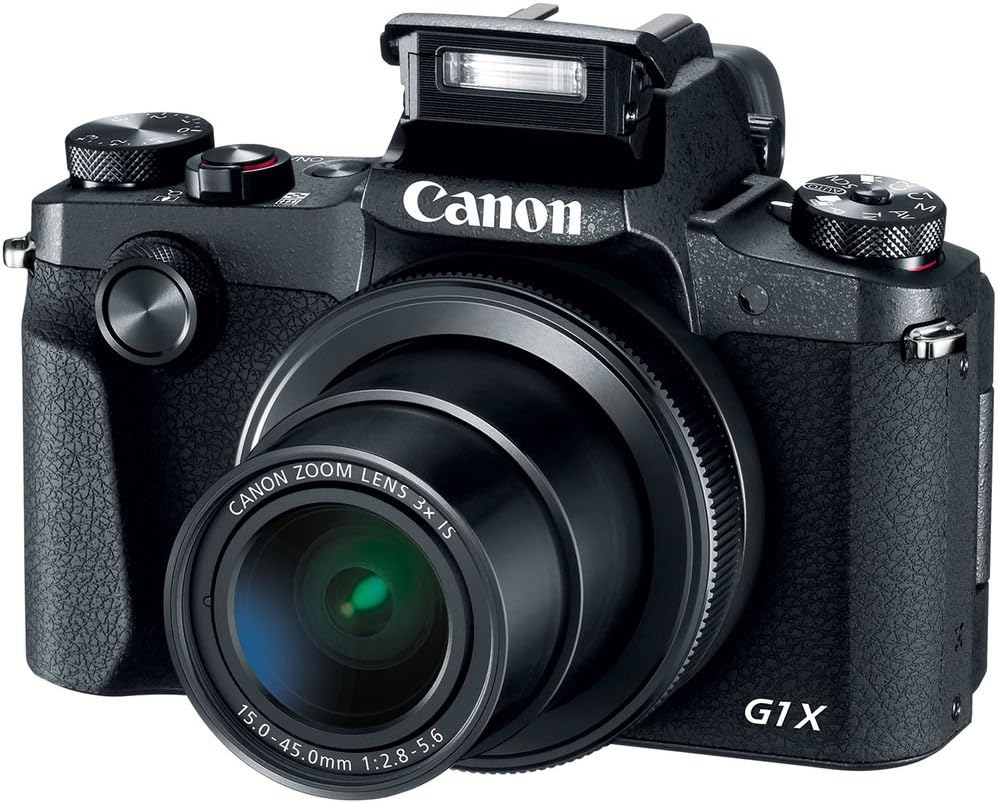
Umfanekiso 4.4: Ngaphambili view of the camera with the pop-up flash in the raised position, ready for use in low-light conditions.
The camera includes a built-in pop-up flash. To activate it, press the flash release button. Flash modes include Auto, On, Slow Synch, and Off. The hot shoe allows for external flash units.
4.6. Ukuxhumana
The PowerShot G1 X Mark III offers Wi-Fi, NFC, and Bluetooth connectivity for transferring images to smart devices and remote control. Refer to the camera's menu for pairing instructions.
5. Isondlo
5.1. Ukuhlanza Ikhamera
- Sebenzisa indwangu ethambile, engenazinti ukuhlanza umzimba wekhamera.
- For the lens and LCD screen, use a specialized lens cleaning cloth and solution. Avoid harsh chemicals.
- Use a blower brush to remove dust from the lens and sensor area (when exposed).
5.2. Ukunakekelwa Kwebhethri
- Shaja ibhethri ngokugcwele ngaphambi kokusebenzisa ngakunye.
- Gcina amabhethri endaweni epholile, neyomile uma engasetshenziswa.
- Gwema ukubeka amabhethri endaweni eshisa kakhulu.
5.3. Isitoreji
When storing the camera for extended periods, remove the battery and memory card. Store the camera in a dry, dust-free environment, preferably in a camera bag.
6. Ukuxazulula izinkinga
| Inkinga | Imbangela Engenzeka / Isixazululo |
|---|---|
| Ikhamera ayivuli amandla. | Battery may be depleted or incorrectly inserted. Ensure battery is charged and properly seated. |
| Awukwazi ukuthatha izithombe. | Memory card may be full, locked, or not inserted. Check card status and free space. |
| Izithombe zifiphele. | Check focus settings. Ensure sufficient light. Use image stabilization or a tripod if necessary. |
| I-Flash ayidubuli. | Flash may be set to 'Off' or in a mode where it does not fire automatically. Check flash settings. |
7. Imininingwane
- Inzwa: 24.2 MP APS-C CMOS Sensor
- Iphrosesa yesithombe: I-DIGIC 7
- Ilensi: 24-72mm (35mm Equivalent) 3x Optical Zoom, f/2.8-5.6
- Ukuzinzisa Isithombe: I-Optical
- Ukugxila ngokuzenzakalela: Dual Pixel CMOS AF (Phase Detection)
- Ibanga le-ISO: 100-25600 (Okunwetshiwe)
- Ukudubula Okuqhubekayo: Kufika ku-9 fps
- Ukuqoshwa kwevidiyo: Full HD 1080p at 60 fps (MP4)
- Viewisitholi: 2.36m-dot OLED Electronic Viewumtholi
- I-LCD: 3.0" Vari-Angle Touchscreen LCD (1280 x 720 resolution)
- Ukuxhumana: Built-In Wi-Fi, NFC, Bluetooth, Micro HDMI
- Imidiya Yesitoreji: SD, SDHC, SDXC (UHS-I compatible)
- Ibhethri: NB-13L Lithium-Ion
- Ubukhulu (Cishe): 4.53 x 3.00 x 2.36 amayintshi (115 x 76 x 60 mm)
- Isisindo (Cishe): 14.0 oz (399 g) with battery and memory card
- Ukwakha: Dust- and Water-Resistant
8. Iwaranti kanye Nokusekela
This product is covered by a 90-day limited warranty. For warranty claims or technical support, please refer to the official Canon support channels or contact your retailer.