
1. Iziyalezo Zokuphepha
Please read these safety instructions carefully before using the product. Keep this manual for future reference.
- Lo mkhiqizo uklanyelwe ukusetshenziswa endlini kuphela. Ungavezi umswakama noma amazinga okushisa aphezulu.
- Do not attempt to open or modify the device. This may void the warranty and pose a safety risk.
- Gcina idivayisi ikude nezingane.
- Use only the provided micro-USB cable for charging.
- Ungabheki ngqo emthonjeni wokukhanya we-LED.
2. Okuqukethwe Kwephakheji
Qinisekisa ukuthi zonke izinto zikhona kuphakheji:
- ANSMANN Under-Cabinet Light M
- Ikhebula lokushaja le-Micro-USB
- Incwadi Yeziqondiso
3. Umkhiqizo Uphelileview
The ANSMANN Under-Cabinet Light M is a versatile, rechargeable LED lamp designed for various indoor applications. It features a motion sensor, adjustable color temperatures, and a slim design for discreet placement.

Image 1: The ANSMANN Under-Cabinet Light M, showcasing its sleek, white design and integrated motion sensor.
Izici Eziyinhloko:
- Inzwa yokunyakaza ye-PIR: Automatically activates the light when motion is detected in low-light conditions.
- Twilight Sensor: Ensures the light only activates in dark environments, conserving battery life.
- Izinga lokushisa Lombala Elilungisekayo: Choose between 3 color temperatures (cool white, neutral white, warm white) or activate all LEDs for maximum brightness.
- I-stepless Dimming: Adjust brightness by holding down the control button.
- Ibhethri Elishajwa kabusha: Integrated battery for cordless operation, charged via micro-USB.
- Ukukhweza kazibuthe: Easy installation and removal with a magnetic strip.

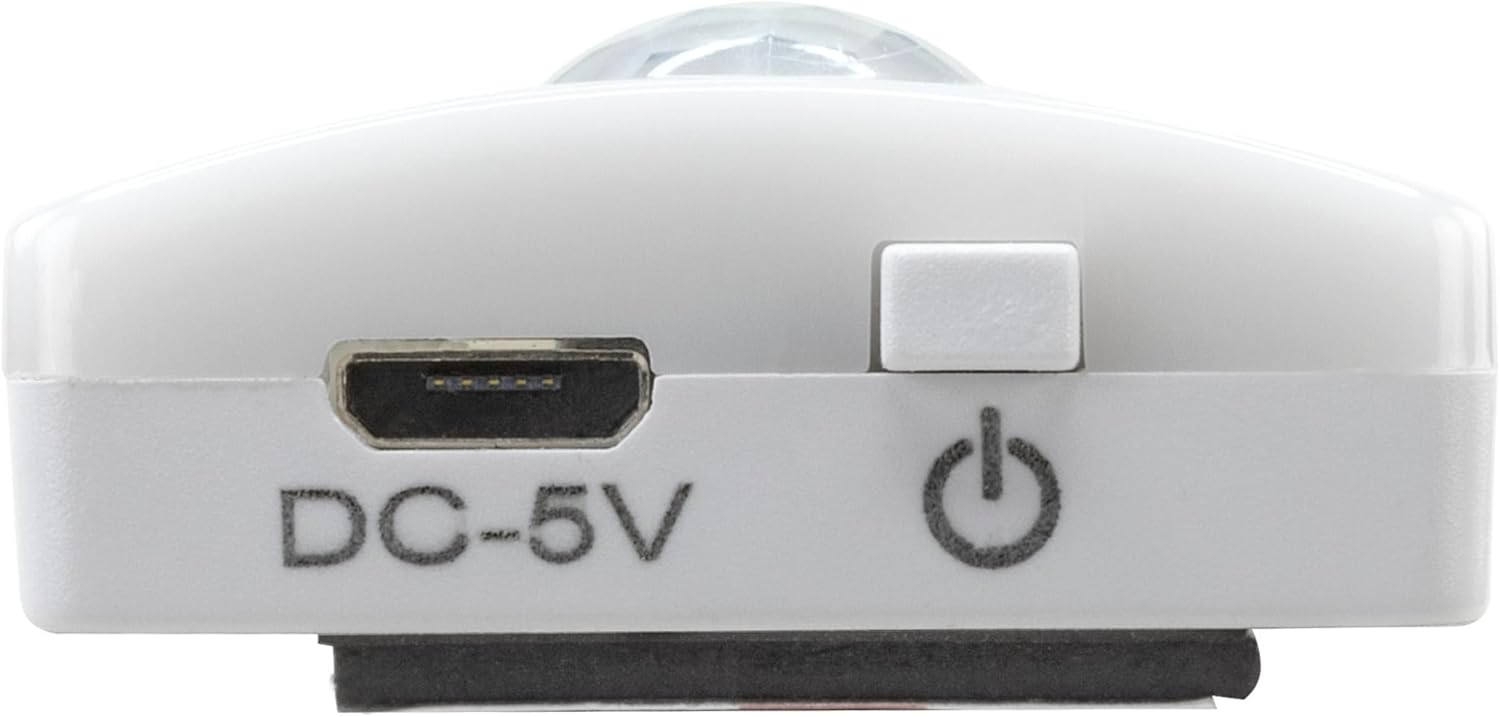
Image 2: Diagram illustrating the Micro-USB Port, On/Off button, and PIR motion sensor on the device.
4. Ukusetha nokufakwa
The Under-Cabinet Light M offers flexible installation options using its integrated magnetic strip.
Ukukhweza kazibuthe:
- Identify a suitable, clean, and dry surface for installation (e.g., inside a cabinet, under a shelf).
- The light comes with a fixed magnetic strip on its back. For non-metallic surfaces, use the included adhesive strip.
- Peel off the protective film from the adhesive strip and firmly press it onto the desired surface.
- Attach the Under-Cabinet Light M to the adhesive strip. The magnetic connection will hold it in place.
Isithombe 3: Ukuvala view of the magnetic strip and the removable adhesive strip, demonstrating the mounting mechanism.

Isithombe 4: Eksample of the under-cabinet light installed in a modern kitchen setting, providing illumination over a countertop.
5. Ukusebenza
The Under-Cabinet Light M offers intuitive control for its lighting functions.
Vula/Vala:
- Locate the On/Off button (refer to Image 2).
- Press the button once to turn the light on or off.
Ukulungisa Ukushisa Kombala:
- With the light on, short press the control button repeatedly to cycle through the 3 available color temperatures: cool white, neutral white, and warm white.
- A fourth press will activate all LEDs for maximum brightness.
Umsebenzi wokufiphalisa:
- To adjust the brightness, press and hold the control button. The light will gradually dim or brighten. Release the button when the desired brightness level is reached.
Motion and Twilight Sensor:
- When the light is in motion sensor mode, it will automatically turn on when movement is detected within its range.
- The integrated twilight sensor ensures that the motion sensor only activates the light in dark environments, preventing unnecessary illumination during daylight hours.
6. Iyashaja
The Under-Cabinet Light M is equipped with a rechargeable battery for convenient cordless use.
- When the battery is low, the light output may decrease or the light may not turn on.
- Gently detach the light from its magnetic mounting surface.
- Connect the provided micro-USB cable to the micro-USB port on the light (refer to Image 2).
- Connect the other end of the micro-USB cable to a suitable USB power source (e.g., USB wall adapter, computer USB port).
- Isibani sesikhombisi sizobonisa isimo sokushaja (isb., obomvu wokushaja, oluhlaza okotshani wokushaja ngokugcwele).
- Once fully charged, disconnect the cable and reattach the light to its mounting surface.

Isithombe 5: Okuningiliziwe view of the Micro-USB charging port and the On/Off button, essential for charging and operation.
7. Isondlo
To ensure the longevity and optimal performance of your Under-Cabinet Light M, follow these simple maintenance guidelines:
- Clean the light regularly with a soft, dry cloth. Do not use abrasive cleaners or solvents.
- Ensure the motion sensor lens is kept clean and free from obstructions for proper function.
- Store the light in a cool, dry place if not in use for extended periods.
8. Ukuxazulula izinkinga
If you encounter issues with your Under-Cabinet Light M, refer to the following common problems and solutions:
| Inkinga | Imbangela Engenzeka | Isixazululo |
|---|---|---|
| Ukukhanya akukhanyi. | Ibhethri liphelile. | Charge the light using the micro-USB cable. |
| Motion sensor is not detecting movement. | Ensure the sensor is clean and unobstructed. Check if the environment is dark enough for the twilight sensor to activate. | |
| Ukukhanya akukhokhisi. | Ikhebuli engalungile noma umthombo wamandla. | Try a different micro-USB cable or USB power adapter. |
| Charging port is dirty. | Gently clean the micro-USB port with a dry, soft brush. | |
| Iyacwayiza noma ifiphele. | Ibhethri eliphansi. | Shaja kabusha idivayisi. |
Uma inkinga iqhubeka ngemva kokuzama lezi zixazululo, sicela uxhumane nokwesekwa kwamakhasimende.
9. Imininingwane
| Isici | Imininingwane |
|---|---|
| Inombolo Yemodeli | 1600-0438 |
| Ubukhulu bomkhiqizo | 25L x 3.5W x 1.3H cm (9.84L x 1.38W x 0.51H amayintshi) |
| Isisindo sento | Amagremu angu-112 (0.25 lbs) |
| Umthombo wamandla | Isebenza Ibhethri |
| Imbobo yokushaja | Micro-USB (DC-5V) |
| Okubalulekile | Ipulasitiki |
| Umbala | Emhlophe |
| Uhlobo Lokufaka | Wall Mount (Magnetic) |
| Uhlobo Lwegumbi | Dining Room, Kitchen, Wardrobe, Hallway, etc. |
10. Iwaranti kanye Nokusekela
ANSMANN products are manufactured with high-quality standards. For information regarding warranty terms and conditions, please refer to the documentation provided with your purchase or visit the official ANSMANN webindawo.
For technical support or inquiries, please contact ANSMANN customer service through their official channels.