
1. Isingeniso
The Beca BHT-8000GCLW is an advanced WiFi-enabled smart thermostat designed for controlling gas boiler heating systems. This thermostat allows you to manage your home's temperature efficiently through its intuitive 4.8-inch color LCD touchscreen, a dedicated mobile application, or voice commands via smart home assistants. Its sleek, modern design and slim profile integrate seamlessly into any living space.
Izici Eziyinhloko:
- Ukulawulwa kwe-WiFi: Remote management via the SmartLife app on Android and iOS devices.
- Ukuhleleka: Supports 5+2 period programming for optimized comfort and energy savings.
- Ukunemba Okuphezulu: Maintains temperature within ±0.5 °C or ±1 °F of the set point.
- Large Color LCD: Intuitive 4.8-inch display for clear information visibility.
- Ukuhlanganiswa Kwekhaya Elihlakaniphile: Certified for Amazon Alexa, Google Home, and IFTTT.
- Weather Synchronization: Supports local weather synchronization for enhanced control.

Image 1.1: Beca BHT-8000GCLW Thermostat and its mobile application interface.
2. Ulwazi Lokuphepha
Please read this manual carefully before installation and operation. Failure to follow instructions could result in product damage or hazardous conditions. All wiring must be performed by a qualified electrician and comply with local electrical codes.
- Always disconnect power at the circuit breaker before installing or servicing the thermostat.
- Do not install the thermostat in areas with excessive vibration, direct sunlight, or drafts.
- Qinisekisa ukuthi unikezwa amandla ngevolthitage matches the thermostat's requirements (95 ~ 240 V AC).
- This device is designed for gas boiler control systems. Do not use it for other applications unless specified.
3. Okuqukethwe Kwephakheji
Qinisekisa ukuthi zonke izinto zikhona kuphakheji:
- Beca BHT-8000GCLW Smart Thermostat
- Ihardware yokukhweza (izikulufu)
- Wiring (if included by manufacturer, otherwise user-supplied)
- Incwadi Yomsebenzisi (le dokhumenti)
4. Umkhiqizo Uphelileview
The BHT-8000GCLW features a large, clear display and intuitive touch controls for easy operation. Its design emphasizes both functionality and aesthetics.

Image 4.1: Display features of the Beca BHT-8000GCLW Thermostat.
4.1. Display Elements and Buttons
Familiarize yourself with the various indicators and capacitive touch buttons on the thermostat's screen:

Image 4.2: Labeled display elements of the Beca BHT-8000GCLW Thermostat.
- WiFi (AP mode): Access Point mode indicator for Wi-Fi setup.
- WiFi (EZ mode): Easy mode indicator for Wi-Fi setup.
- Ukushisa Kuvuliwe: Ibonisa ukuthi isistimu yokushisisa isebenza nini.
- Isivinini somoya: (May indicate fan speed or external weather data).
- Isimo sezulu: Current weather condition icon.
- Izinkathi: Indicates the current programming period.
- UMsombuluko kuya ngeSonto: Day of the week indicator.
- Inzwa yangaphandle: Indicates if an external temperature sensor is connected/active.
- Ultraviolet Intensity: Isibonisi senkomba ye-UV.
- The Humidity Outdoor: Outdoor humidity display.
- Inkinobho ephansi: Decreases temperature or navigates menu options.
- Inkinobho Ephezulu: Increases temperature or navigates menu options.
- Iwashi: Ibonisa isikhathi samanje.
- Izinketho Ezithuthukisiwe: Ifinyelela kumenyu yezilungiselelo ezithuthukisiwe.
- Imodi: Switches between manual, programmable, or auto modes.
- Amandla: Inkinobho yokuvula / ukuvala.
- Isikhathi: Isibonisi sesikhathi samanje.
- Setha Isikhathi: Desired temperature setting.
- Imenyu: Ifinyelela kumenyu enkulu.
- Izinga lokushisa legumbi: Izinga lokushisa lamanje legumbi.
- Khiya: Child lock or keypad lock indicator.
5. Ukufakwa
Professional installation is highly recommended to ensure correct wiring and safe operation.
5.1. Ukukhweza
The thermostat is designed for installation in standard electrical wall boxes. It is compatible with 86 x 86 mm square boxes or 60 mm European round boxes.
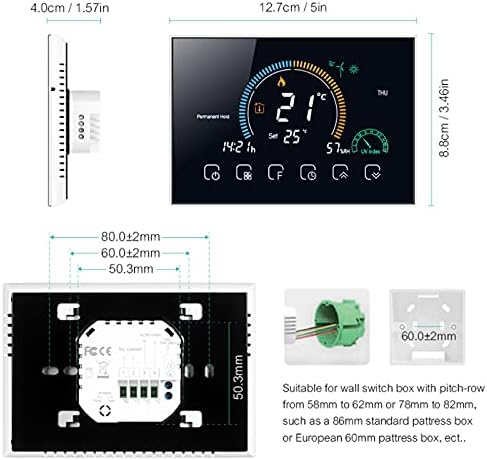
Image 5.1: Thermostat dimensions and compatible installation box types.
5.2. Ukuxhuma
WARNING: Disconnect power at the circuit breaker before wiring.
- Susa ngokucophelela iphaneli engaphambili ye-thermostat ukuze ufinyelele kuma-terminal ezintambo.
- Connect the power supply wires (Live and Neutral) to the designated terminals. The thermostat requires 95 ~ 240 V AC, 50 ~ 60 Hz.
- Connect the gas boiler control wires (dry contact) to the appropriate terminals. Refer to your boiler's manual for specific wiring requirements.
- Ensure all wire connections are secure. The terminals are suitable for 2 x 1.5 mm² wires or 1 x 2.5 mm² wire.
- Mount the thermostat backplate to the wall box using the provided screws.
- Reattach the front panel to the backplate.
6. Setha
6.1. Amandla Okuqala Avuliwe
After installation and wiring are complete, restore power at the circuit breaker. The thermostat display should light up, indicating it is powered on.
6.2. Wi-Fi Connection (SmartLife App)
To enable remote control and smart features, connect your thermostat to your home Wi-Fi network using the SmartLife app.
- Landa ifayela le- I-SmartLife uhlelo lokusebenza oluvela ku-App Store (iOS) noma ku-Google Play Store (Android).
- Register or log in to your SmartLife account.
- On the thermostat, press and hold the Wi-Fi button (refer to Image 4.2, item 1 or 2) until the Wi-Fi icon starts blinking rapidly (EZ mode) or slowly (AP mode).
- In the SmartLife app, tap '+' to add a device, then select 'Small Home Appliances' > 'Thermostat'.
- Follow the on-screen instructions in the app to connect the thermostat to your 2.4GHz Wi-Fi network.
- Once connected, the Wi-Fi icon on the thermostat will become solid.
6.3. Smart Home Integration (Alexa, Google Home)
After connecting to the SmartLife app, you can integrate your thermostat with Amazon Alexa or Google Home for voice control.
- Vula uhlelo lokusebenza lwe-Amazon Alexa noma uhlelo lokusebenza lwe-Google Home.
- Navigate to 'Skills & Games' (Alexa) or 'Works with Google' (Google Home).
- Cinga and enable the 'SmartLife' skill/service.
- Link your SmartLife account when prompted.
- Discover devices. Your Beca thermostat should now appear and be controllable via voice commands.
7. Iziqondiso Zokusebenza
The BHT-8000GCLW offers multiple ways to control your heating system.
7.1. Manual Temperature Control
In manual mode, you can set a desired temperature that the thermostat will maintain until changed.
- Press the 'Mode' button (Image 4.2, item 15) to switch to manual mode (usually indicated by a hand icon or 'M').
- Use the 'Up' (Image 4.2, item 12) and 'Down' (Image 4.2, item 11) buttons to adjust the target temperature.
- The thermostat will activate the boiler to reach and maintain this temperature.
7.2. Programmable Mode (5+2 Periods)
The 5+2 programmable mode allows you to set different temperature schedules for weekdays (5 days) and weekends (2 days), with multiple periods per day.
- Press the 'Mode' button to select programmable mode (often indicated by a clock or calendar icon).
- Access the programming menu (usually via the 'Menu' or 'Advanced Options' button).
- Set desired temperatures and times for each period (e.g., morning, day, evening, night) for weekdays and weekends.
- Save your settings. The thermostat will now automatically follow this schedule.
7.3. Ukulawulwa kohlelo lokusebenza
The SmartLife app provides comprehensive control over your thermostat from anywhere.
- Open the SmartLife app on your smartphone.
- Select your Beca thermostat from the device list.
- Ungakwazi view current temperature, adjust set points, change modes, modify schedules, and access advanced settings.
7.4. Ukulawula Izwi
Use voice commands with Amazon Alexa or Google Home for hands-free temperature adjustments.
- I-Alexa: "Alexa, set the thermostat to 22 degrees." or "Alexa, what is the temperature in the living room?"
- Umsizi we-Google: "Hey Google, turn up the heat." or "Hey Google, set the living room thermostat to 21 degrees."
7.5. Ingidi Yengane
To prevent unauthorized changes, activate the child lock feature. This is usually done by pressing and holding a specific button combination (refer to the thermostat's on-screen prompts or advanced settings menu). The lock icon (Image 4.2, item 21) will appear when active.
8. Isondlo
The Beca BHT-8000GCLW thermostat requires minimal maintenance.
- Ukuhlanza: Sula isikrini futhi casing with a soft, dry cloth. Do not use abrasive cleaners, solvents, or spray directly onto the thermostat.
- Gwema Izithiyo: Ensure no furniture or curtains block the thermostat, as this can affect temperature readings.
9. Ukuxazulula izinkinga
If you encounter issues with your thermostat, try the following steps:
- Asikho Amandla/Isikrini Esingenalutho: Check the circuit breaker. Ensure wiring connections are secure.
- Heating Not Responding: Verify the thermostat is in the correct mode (manual or programmable) and the set temperature is above the current room temperature. Check boiler operation.
- Wi-Fi Disconnected: Check your home Wi-Fi router. Restart the thermostat and attempt to reconnect via the SmartLife app. Ensure your Wi-Fi is 2.4GHz.
- Ukufundwa Kwezinga Lokushisa Okungalungile: Qinisekisa ukuthi i-thermostat ayivezwa elangeni eliqondile, okusalungiswa, noma imithombo yokushisa.
- Izinkinga Zokulawula Uhlelo Lokusebenza: Ensure your phone has an internet connection and the SmartLife app is up to date.
For persistent issues, contact Beca customer support or consult a qualified technician.
10. Imininingwane
| Isici | Ukucaciswa |
|---|---|
| Ukunikezwa kwamandla kagesi | 95 ~ 240 V AC, 50 ~ 60 Hz |
| Ukunemba | ±0.5 °C noma ±1 °F |
| Ibanga Lokusetha Izinga lokushisa | 5-35 °C |
| Khombisa Ibanga Lokushisa | 5 ~ 99 °C |
| Izinga Lokushisa Lesitoreji | -5 ~ 45 °C |
| Shell Material | I-PC + ABS (i-flame retardant) |
| Ibhokisi Lokufaka | 86 x 86 mm square box or 60 mm European round box |
| Amaphethelo weWire | 2 x 1.5 mm² wire or 1 x 2.5 mm² wire |
| Ikilasi Lokuvikela | IP20 |
| Izinkinobho | Izinkinobho zokuthinta ezinamandla |
| Ukuxhumana | I-Wi-Fi |
| Abasizi Abahlakaniphile Abahambisanayo | I-Amazon Alexa, Ikhaya le-Google, IFTTT |
| Umbala | Transparent (as per product details, though product image shows white frame) |
11. Iwaranti kanye Nokusekela
For warranty information and technical support, please refer to the documentation provided with your purchase or visit the official Beca webindawo. Gcina ubufakazi bakho bokuthenga ngezimangalo zewaranti.