1. Isingeniso
This manual provides detailed instructions for the safe and effective use of your ZOHAN EM042 AM/FM Radio Headphones and ZOHAN EM037 Bluetooth Hearing Protection Headphones. These devices are designed to offer hearing protection while providing audio entertainment in noisy environments.
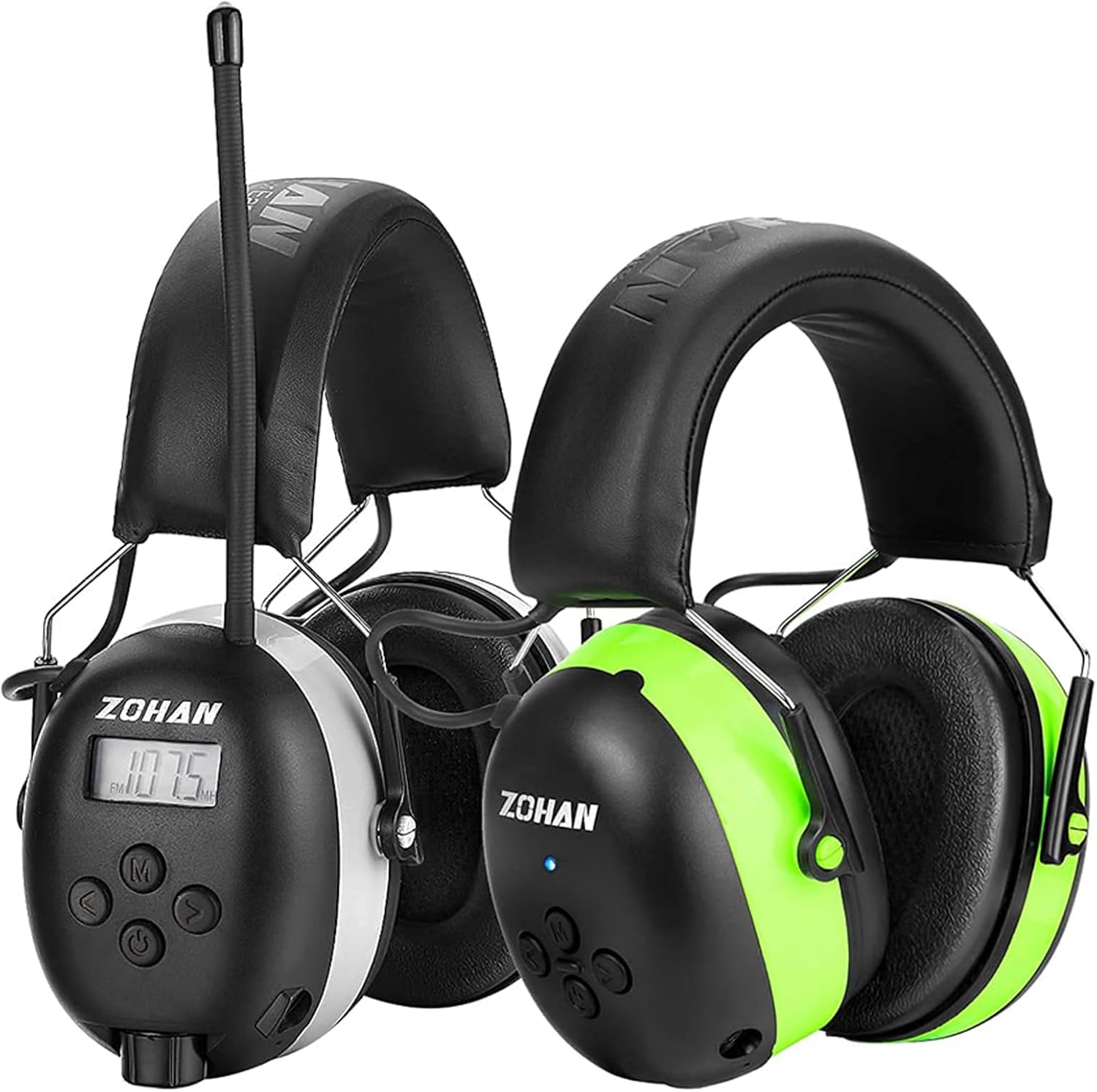
Image: The ZOHAN EM042 (left) with AM/FM radio and digital display, and the ZOHAN EM037 (right) with Bluetooth functionality, both designed for hearing protection.
2. Izici Eziyinhloko
ZOHAN EM042 AM/FM Radio Headphones:
- Noise Reduction Rating (NRR) of 24dB.
- Digital AM/FM radio tuning with LCD display.
- Store up to 10 AM and 10 FM stations in memory.
- Auto-scanning feature for quick station finding and saving.
- Idinga amabhethri angu-2 AA (awafakiwe).
- 3.5mm audio jack for external audio devices (cable included).
- Durable construction for everyday use.
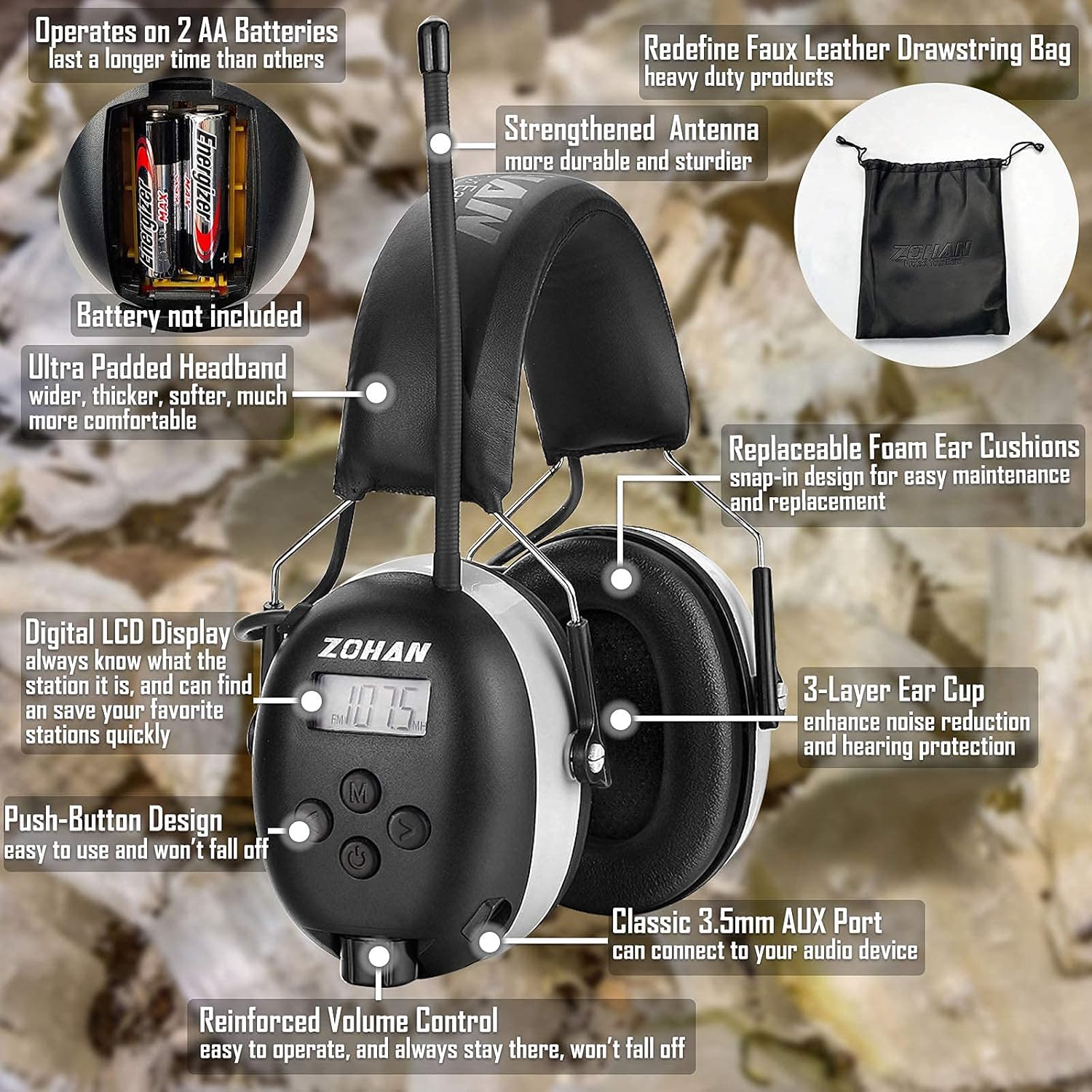
Image: Close-up of the ZOHAN EM042, showing its digital display, control buttons, battery compartment, and padded earcups.
ZOHAN EM037 Bluetooth Hearing Protection Headphones:
- Noise Reduction Rating (NRR) of 25dB, meeting European & American standards.
- Equipped with Bluetooth 5.0 technology for stable connection up to 80ft.
- HI-FI sound quality for an enhanced music experience.
- Ibhethri ye-lithium eyakhelwe ngaphakathi engu-1500mAh.
- Up to 40 hours of playtime in Bluetooth mode with a 4-hour charge time.
- Adjustable and extra-thick headband for comfort.
- Made of high-grade ABS plastic and PVC leather for durability.
- Imakrofoni eyakhelwe ngaphakathi yamakholi wefoni.
- 3.5mm audio input jack for wired mode (unlimited playtime).

Image: Infographic highlighting the ZOHAN EM037's Bluetooth 5.0, 25dB NRR, rechargeable battery, and comfort features.
3. Setha
3.1. ZOHAN EM042 Battery Installation
- Locate the battery compartment on one of the earcups.
- Vula ikhava yengxenye yebhethri.
- Faka amabhethri angu-2 AA, uqinisekise i-polarity elungile (+/-).
- Vala ikhava yengxenye yebhethri ngokuphephile.
3.2. ZOHAN EM037 Charging
- Connect the provided charging cable to the charging port on the earcup.
- Xhuma enye ingxenye yekhebula yokushaja emthonjeni wamandla we-USB.
- The LED indicator light will show charging status. A full charge takes approximately 4 hours.
- Nqamula ikhebula lokushaja uma selishajwe ngokugcwele.

Image: ZOHAN EM037 charging and playtime details.
3.3. ZOHAN EM037 Bluetooth Pairing
- Ensure the EM037 headphones are charged and powered on.
- Activate Bluetooth on your audio device (smartphone, tablet, etc.).
- Cinga amadivaysi e-Bluetooth atholakalayo.
- Select "ZOHAN EM037" from the list to pair.
- A confirmation tone or voice prompt will indicate successful pairing.
Video: A short demonstration of the ZOHAN EM037 Bluetooth Hearing Protector, showcasing ukwakheka nezici zayo.
4. Iziqondiso Zokusebenza
4.1. Vula/Vala
- Press and hold the power button (usually marked with a circle or power symbol) for a few seconds until the display lights up or a voice prompt is heard.
- To power off, press and hold the power button again until the display turns off or a voice prompt indicates shutdown.
4.2. ZOHAN EM042 AM/FM Radio Operation
- Khetha Imodi: Press the 'M' (Mode) button to switch to AM or FM radio mode. The digital display will show the current frequency.
- Iziteshi Zokushuna: Use the arrow buttons (up/down) to manually tune to desired frequencies.
- Skena ngokuzenzakalela: Press and hold the arrow buttons to initiate auto-scanning for available stations. The headphones will automatically find and save strong signals.
- Memory Stations: Press the 'M' button briefly to cycle through saved stations. To save a station, tune to the desired frequency, then press and hold the 'M' button until the display confirms saving.
- Ukulawula ivolumu: Use the dedicated volume knob or +/- buttons to adjust the listening volume.

Image: ZOHAN EM042 in an outdoor setting, demonstrating its use for hearing protection and entertainment.
4.3. ZOHAN EM037 Bluetooth Audio & Calls
- Dlala/Misa kancane: Press the multi-function button (often the power button or a dedicated play/pause button) once to play or pause audio.
- Yeqa Amathrekhi: Press and hold the '+' button to skip to the next track. Press and hold the '-' button to go to the previous track.
- Ukulawula ivolumu: Briefly press the '+' button to increase volume, and the '-' button to decrease volume.
- Phendula/Phendula ikholi: When a call comes in, press the multi-function button once to answer. Press it again to end the call.
- Yenqaba Ucingo: Cindezela bese ubamba inkinobho yemisebenzi eminingi ukuze wenqabe ucingo olungenayo.
- Umsizi Wezwi: Some models may support voice assistant activation by pressing and holding the multi-function button.

Image: ZOHAN EM037 Bluetooth 5.0 capabilities for hands-free calling and music.
4.4. Wired Audio Connection (Both Models)
- Connect one end of the provided 3.5mm audio cable to the auxiliary input jack on the earcup.
- Connect the other end to your external audio device.
- Audio will play through the headphones. Volume may be controlled by both the headphones and the connected device.
5. Isondlo
- Ukuhlanza: Sula ama-headphones ngento ethambile, damp indwangu. Ungasebenzisi izinto zokuhlanza ezidubekayo noma uzicwilise emanzini.
- Isitoreji: Store the headphones in a cool, dry place, away from direct sunlight and extreme temperatures. Use the provided carrying bag for protection.
- Ukumiselela Umgubho Wendlebe: The foam ear cushions are designed for snap-in replacement for easy maintenance. Refer to the product packaging or ZOHAN webindawo yokushintsha izingxenye.
- Battery Care (EM042): Remove AA batteries if the headphones will not be used for an extended period to prevent leakage.
- Battery Care (EM037): Charge the headphones regularly to maintain battery health, even if not in frequent use.

Image: Detailed breakdown of ZOHAN EM037 components and features.
6. Ukuxazulula izinkinga
- Awekho Amandla:
- EM042: Check if AA batteries are correctly inserted and not depleted. Replace if necessary.
- EM037: Ensure the device is charged. Connect to a power source and allow it to charge for at least 30 minutes.
- Akukho Umsindo/Ikhwalithi Yomsindo Embi:
- Check volume levels on both the headphones and the audio source.
- EM042 (Radio): Ensure the antenna is extended and you are in an area with good signal reception. Try auto-scanning again.
- EM037 (Bluetooth): Ensure the headphones are properly paired with your device and within the 80ft range. Disconnect and re-pair if necessary.
- Wired Connection: Ensure the 3.5mm audio cable is securely connected to both the headphones and the audio device. Try a different cable if available.
- Bluetooth Disconnection (EM037):
- Ensure your device is within the 80ft Bluetooth range.
- Hlola ukuphazamiseka kwamanye amadivaysi angenawaya.
- Turn off and on both the headphones and your Bluetooth device, then attempt to re-pair.
7. Imininingwane
| Isici | ZOHAN EM042 | ZOHAN EM037 |
|---|---|---|
| Isilinganiso Sokunciphisa Umsindo (NRR) | 24db | 25db |
| Ukuxhumana | AM/FM Radio, 3.5mm AUX | Bluetooth 5.0, 3.5mm AUX |
| Umthombo wamandla | Amabhethri angu-2 AA (awafakiwe) | 1500mAh Ibhethri Le-lithium Elishajwa kabusha |
| Charging Time (EM037) | N/A | Cishe. Amahora angu-4 |
| Playtime (EM037) | N/A | Kufika emahoreni angu-40 (imodi ye-Bluetooth) |
| Bluetooth Range (EM037) | N/A | Kufika ku-80ft |
| Izici Ezengeziwe | Digital LCD Display, 10 AM/10 FM Presets, Auto-Scan | Built-in Microphone, Adjustable Headband, Replaceable Ear Pads |
8. Iwaranti kanye Nokusekela
For warranty information, technical support, or to purchase replacement parts, please refer to the product packaging or visit the official ZOHAN webindawo. Gcina irisidi yakho yokuthenga ukuze uthole izimangalo zewaranti.
9. Izimo Zokusebenzisa
These ZOHAN hearing protection headphones are ideal for various activities where noise reduction and audio entertainment are desired:
- Lawn mowing and yard work
- Woodworking and construction sites
- Industrial environments
- Studying or reading in noisy areas
- Any activity requiring hearing protection with optional audio.

Image: ZOHAN EM037 headphones used for woodworking, studying, and tractor operation, emphasizing noise reduction.