1. Isingeniso
Siyabonga ngokuthengaasing the Nakamichi NM-Jukebox 40W Bluetooth Speaker. This manual provides essential information for setting up, operating, and maintaining your speaker. Please read it carefully to ensure optimal performance and longevity of your device.
2. Umkhiqizo Uphelileview
The Nakamichi NM-Jukebox is a 40W bookshelf-style Bluetooth speaker designed for music playback. It features a vintage aesthetic with modern audio technology, including touch controls and automatic equalization (auto EQ).
2.1 Izingxenye
- Nakamichi NM-Jukebox Speaker
- Power Adapter (ensure correct adapter for your region)
- Imaniwali yosebenzisayo
2.2 Speaker Features
- 40 Watts Maximum Output Power
- Bluetooth Wireless Communication Technology
- Stereo Audio Output Mode
- Indlela Yokulawula Ukuthinta
- Auto EQ Special Feature
- Bookshelf Speaker Type with Tabletop Mount

Umfanekiso 1: I-engeli yangaphambili view of the Nakamichi NM-Jukebox speaker, showcasing its brown wooden casing and gold-colored grille with the Nakamichi logo.

Umfanekiso 2: Ngaphambili ngqo view of the Nakamichi NM-Jukebox speaker, highlighting the detailed gold grille pattern and the Nakamichi branding.
3. Setha
3.1 Ukuqaqa
- Khipha ngokucophelela isipikha nazo zonke izesekeli ephaketheni.
- Gcina iphakheji ukuze ithuthwe noma igcinwe esikhathini esizayo.
3.2 Ukubekwa
Place the Nakamichi NM-Jukebox speaker on a stable, flat surface, such as a tabletop. Ensure there is adequate space around the speaker for optimal sound dispersion and ventilation.
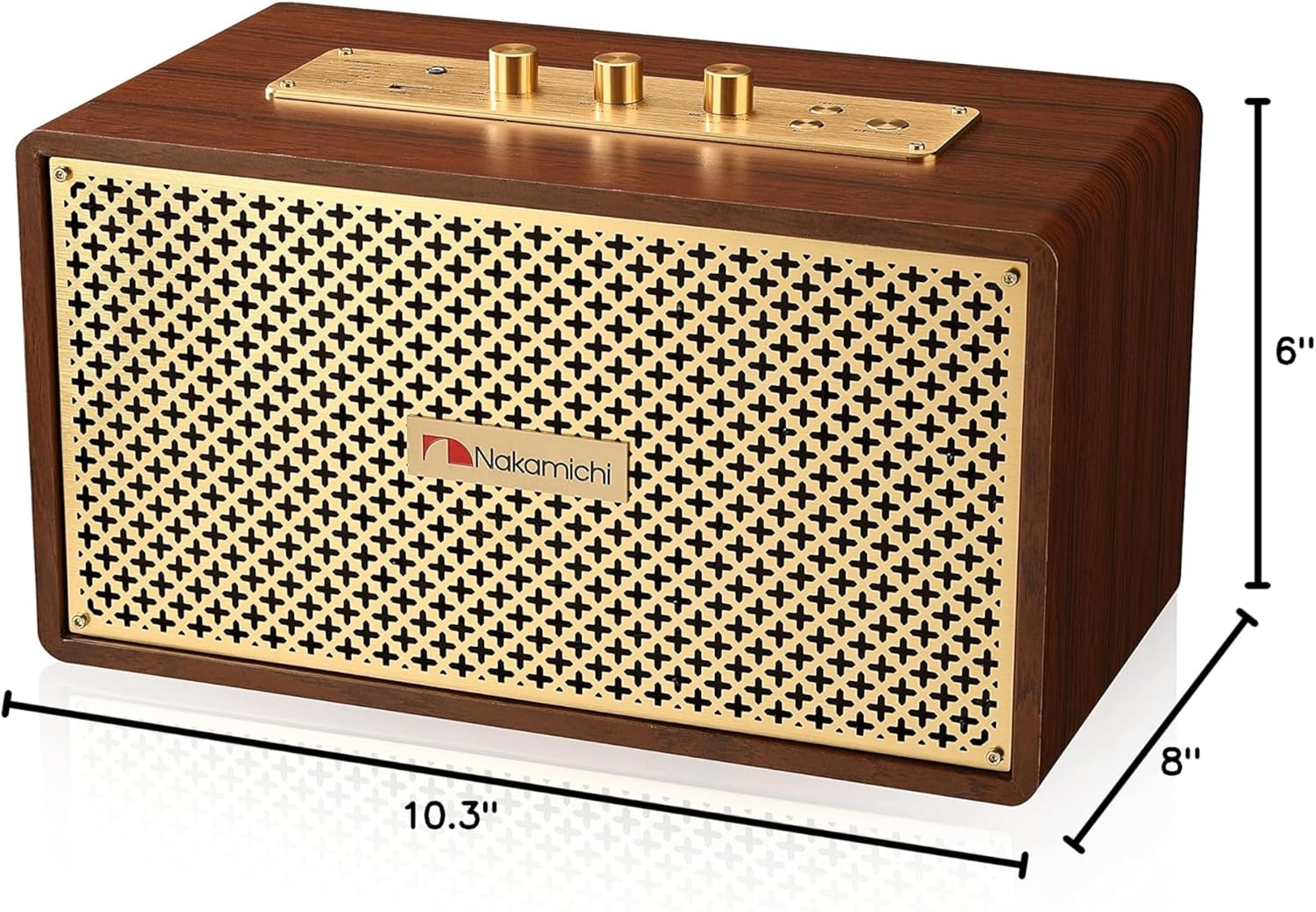
Figure 3: Dimensions of the Nakamichi NM-Jukebox speaker, measuring 8 inches deep, 10.3 inches wide, and 6 inches high.
3.3 Ukuxhuma Amandla
Connect the provided power adapter to the speaker's power input and then to a suitable wall outlet. Verify that the power adapter is compatible with your region's electrical standards.
4. Iziqondiso Zokusebenza
4.1 Ukuvula / Ukuvula
Locate the power button, typically on the control panel. Press and hold (or press, depending on design) to power the speaker on or off. An indicator light will usually confirm the power status.
4.2 Ukumatanisa kwe-Bluetooth
The Nakamichi NM-Jukebox uses Bluetooth for wireless audio streaming from compatible devices like smartphones and tablets.
- Qinisekisa ukuthi isipikha sivuliwe.
- Activate Bluetooth on your source device (e.g., smartphone).
- On the speaker, activate Bluetooth pairing mode. This may involve pressing a dedicated Bluetooth button or holding the power button until an indicator light flashes.
- On your source device, search for available Bluetooth devices. Select "NM-Jukebox" from the list.
- Once paired, the speaker will indicate a successful connection, and you can begin playing audio.
4.3 Audio Playback and Controls
After successful pairing, you can control audio playback from your connected device. The speaker also features touch controls for basic functions and sound adjustments.
- Ukulawula ivolumu: Adjust the master volume using the dedicated controls on the speaker or your paired device.
- Ukulungiswa kwe-Bass ne-Treble: The speaker may include physical or touch controls for adjusting bass and treble levels to customize your listening experience.
- Auto EQ: The integrated auto EQ feature automatically optimizes sound output for balanced audio performance.
5. Isondlo
5.1 Ukuhlanza
To clean the speaker, use a soft, dry cloth. Do not use liquid cleaners, aerosols, or solvents, as these may damage the finish or internal components. Ensure the speaker is powered off and unplugged before cleaning.
5.2 Isitoreji
When not in use for extended periods, store the speaker in a cool, dry place, away from direct sunlight and extreme temperatures. If possible, use the original packaging for protection.
6. Ukuxazulula izinkinga
If you encounter issues with your Nakamichi NM-Jukebox speaker, refer to the following common solutions:
- Awekho Amandla: Ensure the power adapter is securely connected to both the speaker and a working power outlet. Verify the outlet is active.
- Awukho Umsindo: Check the volume levels on both the speaker and your connected device. Ensure the speaker is correctly paired via Bluetooth. Try re-pairing the device.
- Izinkinga zokumatanisa kwe-Bluetooth: Make sure the speaker is in pairing mode. Disable and re-enable Bluetooth on your source device. Move your device closer to the speaker. Clear previous Bluetooth connections on your device if necessary.
- Umsindo Ohlanekezelwe: Reduce the volume on both the speaker and your source device. Ensure the audio source is of good quality.
Uma izinkinga ziqhubeka, xhumana nokwesekwa kwamakhasimende ukuze uthole usizo olwengeziwe.
7. Imininingwane
| Isici | Ukucaciswa |
|---|---|
| Igama Lemodeli | NM-JUKEBOX/BRW |
| Uhlobo lwesipika | Ishalofu lezincwadi |
| Isici Esikhethekile | I-Auto EQ |
| Ukusetshenziswa Okunconyiwe | For Music Players, Portable Use |
| Amadivayisi Ahambisanayo | I-Smartphone, Ithebhulethi |
| Ubukhulu bomkhiqizo (D x W x H) | 8" x 10.3" x 6" |
| Ingangeni manzi | Cha |
| Indlela Yokulawula | Thinta |
| I-Wireless Communication Technology | I-Bluetooth |
| Usayizi wesipika | 18.6 Amasentimitha |
| Umthombo wamandla | Isebenza Ibhethri |
| Uhlobo Lomshayeli Womsindo | I-Dynamic Driver |
| Amandla Okukhipha Isipikha aphezulu | 40 Watts |
| Imodi Yokukhipha Umsindo | Isitiriyo |
| Uhlobo Lokukhweza | I-Tabletop Mount |
| Isisindo sento | 11.81 amakhilogremu |
| I-UPC | 840735104563 |
8. Iwaranti kanye Nokusekela
8.1 Isiqinisekiso Esinomkhawulo
The Nakamichi NM-Jukebox speaker comes with a limited warranty. Please refer to the warranty card included with your product or visit the official Nakamichi webindawo ngemigomo nemibandela enemininingwane.
8.2 Ukwesekwa Kwamakhasimende
For technical assistance, troubleshooting, or warranty inquiries, please contact Nakamichi customer support. Contact information can typically be found on the official Nakamichi webindawo noma emaphaketheni omkhiqizo wakho.