
1. Isingeniso
The SMART SENSOR AR600E is a precision instrument designed for accurate measurement of overhead line heights, including power lines, communication cables, and tree heights. This device is suitable for various applications in construction sites, utility maintenance, and forestry. It features a digital display, selectable measurement units, and the ability to switch between BOT (Bottom) and TOP measurement modes. Additionally, it includes a temperature measurement function.
Please read this manual thoroughly before operating the device to ensure correct usage and to maximize its performance and lifespan.
2. Izici Eziyinhloko
- Digital Display for clear readings.
- Selectable Display Units.
- BOT/TOP Mode Switching for versatile measurement scenarios.
- Temperature Measurement Function.
- Measurement Range: 3-23 meters.
- Horizontal Measurement Range: 3-18 meters.
- Resolution: ±5mm (<10m) | ±10mm (>10m).
- Minimum Gap Wire: 150mm.
- Automatic Power Off feature to conserve battery.
- Backlight Display for low-light conditions.
- Inkomba Yezinga Lebhethri.
3. Setha
3.1 Ukuqaqa
Carefully remove the AR600E device from its packaging. Verify that all components are present and undamaged. The package should contain the AR600E unit and a 9V battery (if included).
3.2 Ukufakwa kwebhethri
- Thola ikhava yengxenye yebhethri ocingweni.
- Open the cover by sliding or unscrewing it.
- Insert a new 9V battery, ensuring correct polarity (+ and - terminals).
- Vala ikhava yengxenye yebhethri ngokuphephile.
Note: Always use a fresh 9V battery for optimal performance. Replace the battery when the low battery indicator appears on the display.
3.3 Amandla Okuqala Avuliwe
Press the power button to turn on the device. The digital display should illuminate, and the device will perform a self-test. If the display does not turn on, check the battery installation.
4. Iziqondiso Zokusebenza
4.1 Inqubo Yokulinganisa Ejwayelekile
- Vula idivayisi.
- Select the desired measurement unit (e.g., meters, feet) if applicable, using the unit selection button.
- Aim the device at the target object (e.g., overhead line, tree branch). Ensure a clear line of sight.
- Press the measurement button. The device will emit a signal and display the measured height on the digital screen.
- For accurate readings, hold the device steady during measurement.
4.2 BOT (Bottom) Mode
In BOT mode, the device measures the height of the lowest 6 cables. This mode is ideal for determining the clearance of the lowest conductors from the ground.
- To activate BOT mode, press the Mode button until "BOT" is indicated on the display.
- Aim the device at the lowest cable and take a measurement.
4.3 TOP (Top) Mode
In TOP mode, the device measures the height of the highest 6 cables. This mode is useful for assessing the overall height of a multi-conductor system or the highest point of a tree.
- To activate TOP mode, press the Mode button until "TOP" is indicated on the display.
- Aim the device at the highest cable or point and take a measurement.
4.4 Isilinganiso Sokushisa
The AR600E can also measure ambient temperature. This feature is automatically displayed or can be accessed via a dedicated button (refer to device specific button layout if available).
4.5 Ukucisha Ugesi Okuzenzakalelayo
To conserve battery life, the device will automatically power off after a period of inactivity. Press the power button to turn it back on.
4.6 Backlight Display
The backlight can be activated for improved visibility in low-light conditions. This is typically controlled by a dedicated button or automatically activated upon power on.
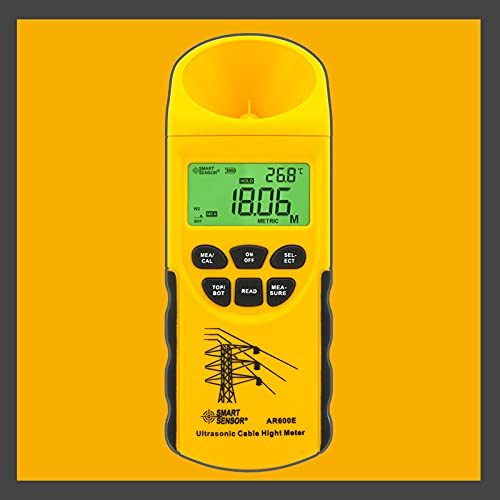
Figure 1: SMART SENSOR AR600E Overhead Line Height Meter. This image shows the device's main body, digital display, and the lens used for height measurement.
5. Isondlo
- Ukuhlanza: Wipe the device with a soft, dry cloth. Do not use abrasive cleaners or solvents. Ensure the lens is clean for accurate measurements.
- Isitoreji: Uma ingasetshenziswa isikhathi eside, susa ibhethri ukuze uvimbele ukuvuza. Gcina idivayisi endaweni epholile, eyomile, kude nokukhanya kwelanga okuqondile kanye namazinga okushisa aphezulu.
- Ukushintshwa Kwebhethri: Replace the 9V battery promptly when the low battery indicator appears to ensure consistent performance.
- Gwema Umthelela: Protect the device from drops and impacts, as this can damage internal components and affect accuracy.
6. Ukuxazulula izinkinga
| Inkinga | Imbangela Engenzeka | Isixazululo |
|---|---|---|
| Idivayisi ayivuli. | Ibhethri elifile noma elifakwe kabi. | Check battery polarity, replace with a new 9V battery. |
| Izilinganiso ezingalungile. | Dirty lens, unstable aiming, object out of range, environmental interference. | Clean the lens. Ensure stable aiming. Verify target is within 3-23m range. Avoid strong electromagnetic fields. |
| Isibonisi sifiphele noma siyacwayiza. | Ibhethri eliphansi. | Faka esikhundleni sebhethri le-9V. |
| Idivayisi ivala amandla ngokungalindelekile. | Automatic power-off activated, low battery. | This is a normal feature. If it happens too frequently, replace the battery. |
7. Imininingwane
- Ibhrendi: Inzwa SMART
- Imodeli: I-AR600E
- Ibanga Lokulinganisa: Amamitha angu-3 - 23
- Horizontal Measurement Range: Amamitha angu-3 - 18
- Isixazululo: ±5mm (<10m) | ±10mm (>10m)
- Minimum Gap Wire: 150 mm
- Izinga Lokushisa Lokusebenza: -10°C kuya ku-40°C (14°F kuya ku-104°F)
- Umthombo wamandla: 9V Ibhethri
- Ukucisha Amandla Okuzenzakalelayo: Yebo
- Isibonisi Sokukhanya Kwasemuva: Yebo
- Inkomba Yebhethri: Yebo
- Isisindo: 205g
- Ubukhulu: 75 x 72 x 200mm
8. Ulwazi Lwewaranti
Specific warranty details are not provided in the product information. Please refer to your purchase documentation or contact the retailer for warranty terms and conditions.
9. Ukusekela
For technical support, service, or further inquiries, please contact your local distributor or the point of purchase. Contact information for SMART SENSOR is not provided in this document.