
STECA 4250852802154
Steca Solarix PLI 2400-24V Hybrid Inverter with Charge Controller
Imodeli: 4250852802154
Isingeniso
The Steca Solarix PLI is a comprehensive hybrid inverter solution designed for photovoltaic island systems. It integrates an MPPT solar charge controller, a 230V pure sine wave inverter, and an integrated battery charger into a single unit. This device enables the creation of an independent 230V power grid using a solar generator and battery bank. It also supports recharging batteries via generator or grid connection.
The Solarix PLI functions as a grid-guided UPS hybrid inverter with zero export capability and blackout protection. In grid-connected operation, solar power helps reduce electricity costs. In the event of a power outage, the battery seamlessly takes over power supply within 10 milliseconds, ensuring continuous operation of essential loads.
Imiyalo yokuphepha
Sicela ufunde yonke imiyalelo yokuphepha ngokucophelela ngaphambi kokufaka nokusebenza. Ukwehluleka ukulandela le miyalo kungase kubangele ukushaqeka kukagesi, umlilo, noma ukulimala okubi kakhulu.
- Ukufakwa kufanele kwenziwe ngabasebenzi abaqeqeshiwe kuphela.
- Ensure all power sources are disconnected before performing any wiring or maintenance.
- Ungayibeki i-inverter emvuleni, eqhweni, esifuthweni, noma kunoma yiluphi uketshezi.
- Do not disassemble the unit. There are no user-serviceable parts inside. Refer all servicing to qualified service personnel.
- Qinisekisa ukungena komoya okufanele eduze kwe-inverter ukuvimbela ukushisa ngokweqile.
- Connect the inverter only to battery systems with the correct voltage (24V for this model).
- Always use appropriate overcurrent protection devices (fuses/breakers) for all circuits connected to the inverter.
- Gcina izingane zikude ne-inverter kanye nokuxhumana kwayo.
Umkhiqizo Uphelileview
The Steca Solarix PLI unit features a robust design with a clear display and intuitive controls for monitoring and configuration.
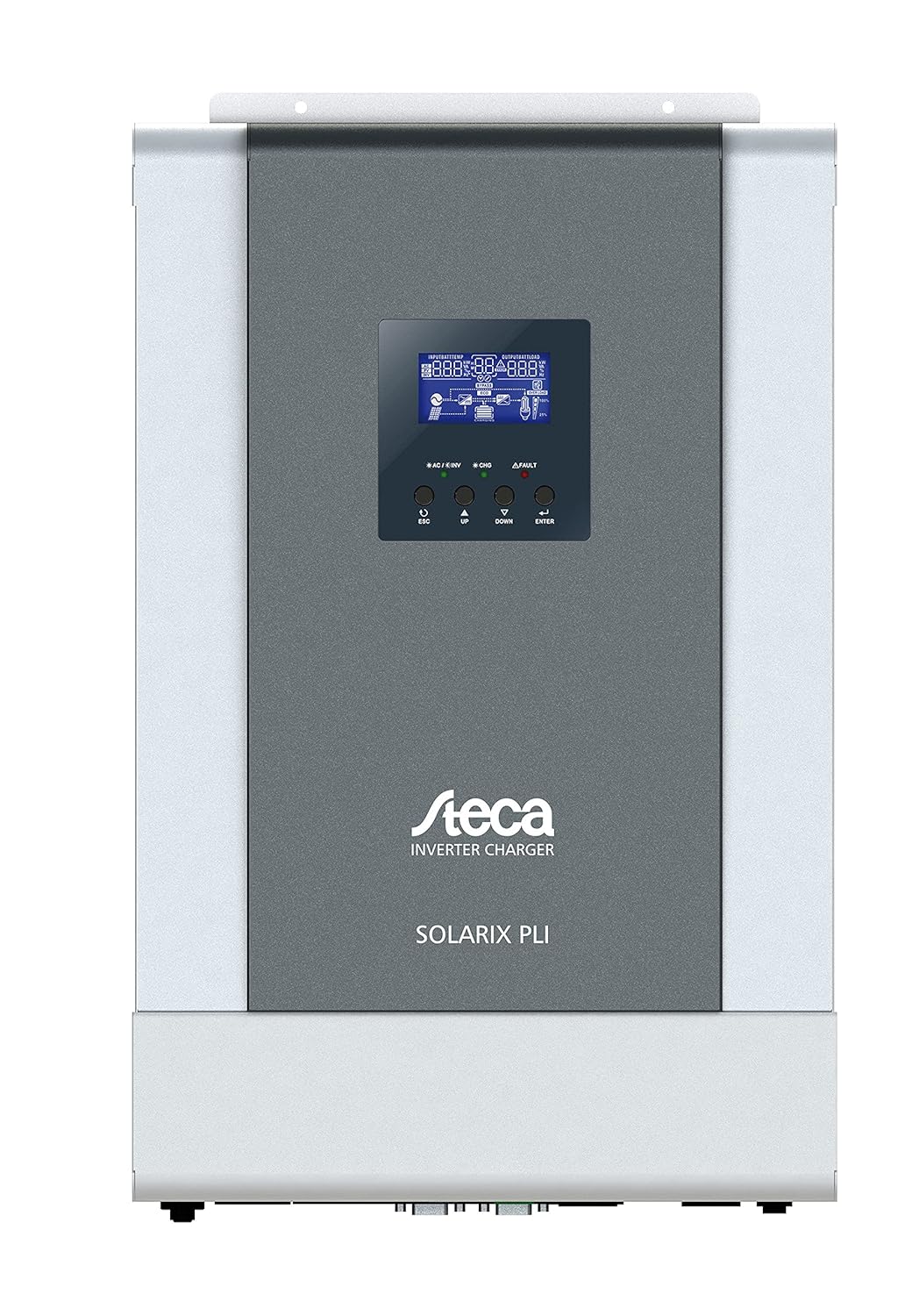
Umfanekiso 1: Ngaphambili view of the Steca Solarix PLI 2400-24V Hybrid Inverter. The central display shows operational status, while buttons below allow navigation and setting adjustments.
Izingxenye ezibalulekile zifaka:
- Isibonisi se-LCD: Shows real-time system data, operating status, and error codes.
- Izinkinobho Zokulawula: Used for navigating menus and adjusting settings (ESC, UP, DOWN, ENTER).
- AC Input/Output Terminals: For connecting to the grid and supplying AC loads.
- Amatheminali ebhethri: For connecting to the battery bank.
- Amatheminali Okufaka i-PV: For connecting to the solar panel array.
- Izimbobo Zokuxhumana: For external monitoring and control (e.g., USB, RS232).

Figure 2: Dimensional drawing of the Steca Solarix PLI, indicating its physical size and mounting points. Dimensions are provided in millimeters.
Setha
Proper installation is crucial for the safe and efficient operation of your Solarix PLI inverter. Follow these general steps:
- Ukukhweza: Select a suitable location for mounting the inverter. It should be indoors, dry, well-ventilated, and away from direct sunlight or heat sources. Ensure the mounting surface can support the inverter's weight (approx. 9.01 kg).
- Uxhumano Lwebhethri: Connect the battery bank to the inverter's battery terminals. Ensure correct polarity (+ to + and - to -). Use appropriately sized cables and fuses. This model is designed for 24V battery systems.
- Ukuxhumeka kwe-PV Array: Connect the solar panel array to the PV input terminals. Observe correct polarity and ensure the PV array voltage and current are within the inverter's specifications.
- AC Input Connection (Grid/Generator): If connecting to the utility grid or a generator, connect the AC input cable to the designated terminals. Ensure proper grounding.
- I-AC Output Connection (Imithwalo): Connect your AC loads (appliances, circuits) to the AC output terminals of the inverter.
- Amandla Aphezulu Okuqala: Once all connections are secure and verified, switch on the battery breaker, then the PV array breaker (if applicable), and finally the AC input breaker. The inverter display should power on.
- Ukucushwa: Use the control buttons and LCD display to configure operating parameters such as battery type, charging current, output voltage, and operating modes according to your system requirements.
Refer to the detailed wiring diagrams and specific instructions in the full user manual for precise connection procedures and safety precautions.
Isebenza
The Steca Solarix PLI offers various operating modes to optimize energy flow. The LCD display provides real-time information on input voltage, okukhiphayo voltage, battery status, charging current, and load power.
Isibonisi kanye Navigation
The LCD display shows various screens cycling through system parameters. Use the UP and DOWN buttons to manually cycle through screens or adjust values in settings. The ENTER button confirms selections, and ESC returns to the previous menu or screen.
Amamodi Okusebenza
- Utility Priority (UPS Mode): The inverter primarily uses grid power to supply loads and charge batteries. Solar power is used when available to supplement or reduce grid consumption. In case of grid failure, it switches to battery power.
- Okubaluleke Kakhulu Ngelanga: Solar power is prioritized for loads and battery charging. Grid power is only used when solar power is insufficient or batteries are low.
- Battery Priority: Loads are primarily supplied by battery power. Solar charges the battery. Grid power is used as a last resort when battery voltage drops below a set threshold.
Standby Functionality
The inverter features a standby mode to conserve energy. It typically enters standby when the load is below a certain threshold (e.g., <40W) and reactivates when the load increases (e.g., >100W). This threshold may be configurable in advanced settings.
Isondlo
Regular maintenance ensures the longevity and optimal performance of your Steca Solarix PLI inverter.
- Ukuhlanza: Periodically clean the exterior of the inverter with a dry, soft cloth. Do not use liquid cleaners or solvents. Ensure ventilation openings are free from dust and debris.
- Ukuhlolwa Kokuxhumana: Annually inspect all electrical connections (battery, PV, AC input/output) for tightness and signs of corrosion. Loose connections can cause overheating and damage.
- Ukungenisa umoya: Ensure the area around the inverter remains clear to allow for proper airflow and heat dissipation.
- Impilo Yebhethri: Monitor your battery bank's health according to the battery manufacturer's recommendations. Ensure proper charging and discharge cycles.
Always disconnect all power sources before performing any maintenance or inspection.
Ukuxazulula inkinga
This section addresses common issues you might encounter with your Steca Solarix PLI inverter.
| Inkinga | Imbangela Engenzeka | Isixazululo |
|---|---|---|
| No 230V output / Error Code 09 (Soft Start Failure) | Internal main board defect. | This often indicates a hardware failure that cannot be user-repaired. Contact Steca customer support or a qualified service technician. |
| Inverter does not activate from standby with low loads. | Load is below the inverter's standby activation threshold (e.g., <100W). | Increase the load connected to the inverter above the activation threshold. Check if the standby threshold is configurable in the settings. |
| Persistent warning tone. | Indicates a system warning (e.g., low battery, overload, high temperature). | Check the LCD display for specific error codes or warning messages. Address the underlying issue (e.g., reduce load, check ventilation, charge batteries). While the tone can be disabled, it's recommended to address the cause. |
| Display/Menu navigation buttons (UP/DOWN) seem reversed. | Minor firmware quirk or design choice. | Adapt to the button behavior. It does not affect functionality. |
| Inverter not charging batteries from PV. | Insufficient solar input, PV connection issue, or charge controller settings. | Check PV array connections and ensure sufficient sunlight. Verify PV input voltage on the display. Check charge controller settings (e.g., battery type, charging current). |
For issues not listed here or if solutions do not resolve the problem, please contact Steca customer support.
Imininingwane
| Isibaluli | Inani |
|---|---|
| Ibhrendi | STECA |
| Inombolo Yemodeli | 4250852802154 |
| Isisindo sento | 9.01 kg |
| Ubukhulu bomkhiqizo | 49.6 x 47.79 x 23 cm (Iphakheji) |
| Umbala | Mnyama |
| Ubukhulu bomkhiqizo | 130 amamilimitha |
| Uhlobo LweDrayivu | Battery, Solar |
| Voltage | 230 Volt |
| Wattage | 5700 Watt (Max. PV Generator) |
| Izingxenye Ezihlanganisiwe | I-Hybrid Inverter |
| Kudingeka Amabhethri | No (for inverter operation, but requires external battery bank for energy storage) |
| Idethi Yokuqala Etholakalayo | Juni 16, 2021 |
| I-Form Factor | I-Rack |
Iwaranti kanye Nokusekela
The Steca Solarix PLI typically comes with a manufacturer's warranty. Based on available information, the warranty period for this product is generally 2 iminyaka kusukela ngedethi yokuthenga. Sicela ugcine ubufakazi bakho bokuthenga ngezimangalo zewaranti.
For technical support, troubleshooting beyond this manual, or warranty service, please contact Steca customer service. You may need to provide your product model number (4250852802154) and serial number (if applicable).
Note: Warranty terms may vary by region and retailer. Always refer to the official warranty documentation provided with your product for precise details.
Ask a question about this manual
Ask about setup, troubleshooting, compatibility, parts, safety, or missing instructions. Manuals+ will review the question and use this page’s manual context to help answer it.