
ThruNite Catapult Mini Black CW
ThruNite Catapult Mini LED Flashlight Instruction Manual
Model: Catapult Mini Black CW
Umkhiqizo Uphelileview
The ThruNite Catapult Mini is a compact yet powerful LED flashlight designed for long-distance illumination. It features a rechargeable battery, multiple brightness levels, and a durable, waterproof aluminum alloy body, making it suitable for various outdoor and emergency applications.

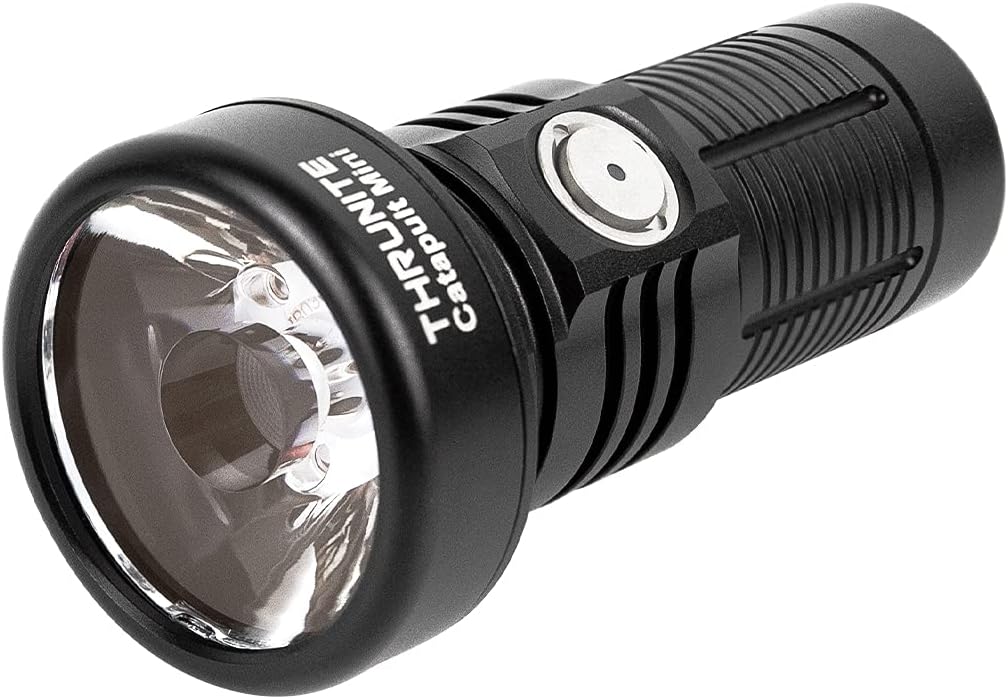
Image: The ThruNite Catapult Mini flashlight, showcasing its compact design and main body.
Yini EseBhokisini
- Catapult Mini flashlight *1
- Battery *1 (pre-installed)
- USB-C Charging Cord *1
- I-Lanyard *1
- Spare O-ring *1

Image: All components included in the ThruNite Catapult Mini package: flashlight, lanyard, USB-C charging cable, and spare O-rings.
Izingxenye Zomkhiqizo

Isithombe: Kuqhume view diagram of the flashlight, showing its internal components including the rechargeable battery, switch, aluminum alloy body, OSRAM LED, PMMA TIR lens, and waterproof O-ring.
- Ibhethri Elishajwa kabusha: Provides power for extended runtime.
- Shintsha: Multi-function side switch for operation and mode selection.
- Umzimba we-Aluminium Alloy: Durable and lightweight construction.
- OSRAM LED: High-performance light source.
- PMMA TIR Lens: Designed for optimal light throw and beam intensity.
- Waterproof O-ring: Ensures IPX8 water resistance.
- Imbobo yokushaja ye-USB-C: Integrated port for convenient recharging.
- Inkomba Yebhethri: Ibonisa ileveli yebhethri yamanje.
Setha
- Ukukhokhiswa kokuqala: Before first use, fully charge the flashlight. Ensure the light head and tail cap are screwed down tightly before charging.

Image: Diagram showing arrows indicating to screw down the light head and tail cap tightly for proper operation and charging.
- Iyashaja: Connect the included USB-C charging cord to the flashlight's USB-C port and a power source. The battery indicator will show charging status.
Isithombe: Eduze views of the USB-C charging port and the battery indicator light on the flashlight's side switch.
Imiyalelo yokusebenza
The ThruNite Catapult Mini features a single side switch for all operations.

Image: A hand holding the ThruNite Catapult Mini, demonstrating its ergonomic design and easy access to the side switch.
Ukusebenza Okuyisisekelo:
- VULA/VALA: Single click the side switch to turn the light ON/OFF.
- Shintsha Amamodi: When the light is ON, press and hold the side switch to cycle through Low, Medium, and High modes. Release the switch to select the desired mode.
- Firefly Mode: When the light is OFF, press and hold the side switch for 1 second to activate Firefly mode (0.5 lumens).
- Imodi ye-Turbo: Double click the side switch from any mode (except lock-out) to activate Turbo mode (680 lumens).
- Imodi ye-Strobe: Triple click the side switch from any mode to activate Strobe mode. Single click to return to the previous mode.
- Lock-out/Unlock: When the light is OFF, press and hold the side switch for 3 seconds to enter lock-out mode. The light will flash once to indicate lock-out. To unlock, press and hold the side switch for 3 seconds. The light will turn on in Firefly mode.
Inkomba Yebhethri:
The indicator light on the side switch provides real-time battery status:
- Okuluhlaza okwesibhakabhaka: Ileveli yebhethri > 21%
- Okunsomi: Ileveli yebhethri 11-20%
- Okubomvu: Ileveli yebhethri < 10%
Video: A night shot comparison demonstrating the long-throw capabilities of the ThruNite Catapult Mini flashlight against other models, highlighting its focused beam at a distance of 230 feet.
Isondlo
- Hlanza njalo imicu nama-O-ring ngendwangu ehlanzekile.
- Lubricate the O-rings periodically with silicone grease to maintain water resistance.
- If the flashlight is not used for an extended period, remove the battery to prevent leakage.
- Keep the lens clean to ensure optimal light output.

Image: The ThruNite Catapult Mini flashlight being exposed to water, illustrating its IPX8 waterproof rating.
Ukuxazulula inkinga
Izinkinga Ezivamile Nezixazululo:
- Ukukhanya akuvuli:
- Check if the battery is inserted correctly with the positive (+) end facing the head of the flashlight.
- Ensure the light head and tail cap are screwed on tightly.
- The flashlight might be in lock-out mode. Press and hold the side switch for 3 seconds to unlock.
- The battery might be depleted. Recharge the battery.
- Light flickers or modes change unexpectedly:
- Clean the contact points of the battery and the flashlight with an alcohol swab.
- Ensure the O-rings are properly lubricated and not damaged.
- Tighten the light head and tail cap.
- Inkinga yokushaja:
- Verify the USB-C cable is securely connected to both the flashlight and the power source.
- Zama ikhebuli ye-USB-C ehlukile noma i-adaptha yamandla.
- Ensure the light head and tail cap are screwed down tightly.
Imininingwane
| Isici | Imininingwane |
|---|---|
| Ibhrendi | I-ThruNite |
| Imodeli | Catapult Mini Black CW |
| Isici Esikhethekile | Iyaphatheka, Iyashajwa |
| Umthombo wamandla | Isebenza Ibhethri |
| Uhlobo Lomthombo Wokukhanya | I-LED |
| Okubalulekile | I-Aluminium |
| Ubukhulu bomkhiqizo | 3.18"D x 1.3"W x 1.3"H |
| Ibanga Lendlela Ekhanyayo | 598 Amamitha |
| Ukukhanya | 680 Lumens (Ubukhulu) |
| Uhlobo Lwebhethri | Ibhethri ye-Lithium Ion engu-1 (ifakiwe) |
| Isisindo sento | 3.09 amakhilogremu |
| Izinga Lokumelana Namanzi | Ingangeni manzi (IPX8) |
| Ukumelana Nomthelela | imitha eyi-1.5 |
Performance Table (General Mode):
| Imodi | Okukhiphayo | Isikhathi sokugijima | Ibanga | Ukuqina |
|---|---|---|---|---|
| I-Turbo | 680 lumens | 70 imiz | Amamitha ayi-598 (ubuningi.) | 89600 cd (ubukhulu.) |
| Phezulu | 235 lumens | 80 imiz | ||
| Maphakathi | 96 lumens | 4 amahora | ||
| Phansi | 21 lumens | 12 amahora | ||
| Ukhanyikhanyi | 0.5 lumens | 106 amahora | ||
| I-Strobe | 680 lumens | 30 imiz |
Iwaranti & Ukusekela
ThruNite products are designed for durability and performance. For warranty information, product support, or service inquiries, please visit the official ThruNite webisayithi noma uxhumane nesevisi yabo yamakhasimende ngokuqondile. Gcina irisidi lakho lokuthenga njengobufakazi bokuthenga.
Ukuze uthole olunye ulwazi, vakashela i- ThruNite Store on Amazon.
Ask a question about this manual
Ask about setup, troubleshooting, compatibility, parts, safety, or missing instructions. Manuals+ will review the question and use this page’s manual context to help answer it.