
Bytech BY-AU-BS-152-BK
Bytech True Wireless Bluetooth Boost Link True Speaker User Manual
Model: BY-AU-BS-152-BK
Isingeniso
Siyabonga ngokuthengaasing the Bytech True Wireless Bluetooth Boost Link True Speaker. This manual provides essential information for setting up, operating, and maintaining your new speakers. Please read this manual thoroughly before use to ensure proper operation and to maximize your listening experience. These speakers feature True Wireless Stereo (TWS) functionality, Bluetooth connectivity, FM Radio, and Bass Boost for rich audio.
Ulwazi Lokuphepha
- Do not expose the speakers to extreme temperatures, humidity, or direct sunlight.
- Gwema ukuwisa noma ukufaka izikhulumi emiphumeleni enamandla.
- Do not disassemble, repair, or modify the speakers yourself. Refer all servicing to qualified personnel.
- Keep the speakers away from water and other liquids.
- Sebenzisa kuphela ikhebula lokushaja elichaziwe kanye ne-adaptha yamandla.
- Hlanza izipikha ngendwangu ethambile neyomile. Ungasebenzisi izihlanzi ezikhuhlayo noma izinyibilikisi.
- Listen at moderate volume levels to avoid hearing damage.
Okuqukethwe Kwephakheji

Image: The Bytech Boost Link True Wireless Speakers shown in their retail packaging, highlighting the two speakers and the Bluetooth connectivity feature.
Sicela uhlole ukuthi zonke izinto zikhona futhi zisesimweni esihle:
- 2 x Bytech Boost Link True Wireless Speakers
- 1 x Ikhebula Lokushaja (i-USB)
- 1 x Incwadi Yomsebenzisi (le dokhumenti)
Umkhiqizo Uphelileview

Isithombe: Ingaphambili eliseduze view of the two Bytech Boost Link True Wireless Speakers, showing the speaker grilles and control buttons at the bottom.
Zijwayeze izingxenye nezilawuli zesipikha:
- Igrile yesipikha: Protects the speaker driver.
- Izinkinobho Zokulawula:
- Inkinobho yamandla: Power On/Off, Play/Pause.
- Inkinobho yemodi: Switch between Bluetooth, FM Radio, etc.
- Ithrekhi Yangaphambili/Inkinobho Yevolumu Ephansi: Cindezela kafushane ithrekhi yangaphambilini, cindezela isikhathi eside ukuze wehlise ivolumu.
- Inkinobho Yengoma Elandelayo/Yenyusa Ivolumu: Cindezela kafushane ukuze uthole ingoma elandelayo, cindezela isikhathi eside ukuze ivolumu ikhuphuke.
- Imbobo yokushaja: Ukuxhuma ikhebula lokushaja le-USB.
- Inkomba ye-LED: Shows power status, charging status, and pairing status.
Setha
Ekhokhisa oSomlomo
Before first use, fully charge both speakers. Connect the supplied USB charging cable to the charging port on each speaker and plug the other end into a USB power adapter (not included) or a computer's USB port. The LED indicator will show charging status and turn off or change color when fully charged.
Ivula/Vala amandla
- Ukuvula: Press and hold the Power button on each speaker until the LED indicator lights up and you hear a power-on prompt.
- Ukucisha: Press and hold the Power button on each speaker until the LED indicator turns off and you hear a power-off prompt.
Imiyalelo yokusebenza
Bluetooth Pairing (Single Speaker Mode)
- Ensure the speaker is powered on and in Bluetooth pairing mode (LED indicator will flash).
- Edivayisini yakho (i-smartphone, ithebhulethi, ikhompuyutha ephathekayo), vula i-Bluetooth bese usesha amadivaysi atholakalayo.
- Select "BYTECH BOOST LINK" (or similar name) from the list.
- Once paired, the LED indicator will stop flashing and remain solid, and you will hear a confirmation sound.
True Wireless Stereo (TWS) Pairing (Two Speakers)
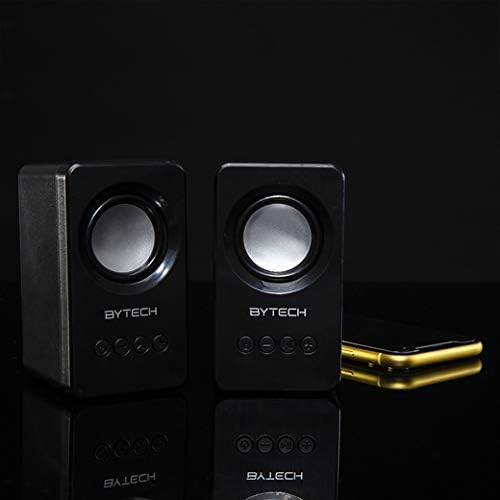
Image: The two Bytech Boost Link True Wireless Speakers positioned next to a smartphone, symbolizing their ability to connect wirelessly to each other and a device for stereo sound.
For a true stereo sound experience, you can pair both speakers together:
- Power on both Bytech Boost Link speakers. Do not connect them to your Bluetooth device yet.
- The speakers will automatically attempt to pair with each other. You will hear a confirmation sound when they are successfully linked for TWS. One speaker will become the master (left channel) and the other the slave (right channel).
- Once TWS paired, the master speaker will enter Bluetooth pairing mode (LED flashing).
- On your device, enable Bluetooth and search for "BYTECH BOOST LINK". Connect to this single entry.
- Both speakers will now play audio in stereo.
- Qaphela: If the speakers do not automatically pair, try double-pressing the Mode button on one of the speakers to initiate TWS pairing.
Ukusebenza komsakazo we-FM
- Power on the speaker(s).
- Cindezela inkinobho Imodi button repeatedly until you hear the FM radio prompt.
- Ukuze uskene ngokuzenzakalelayo futhi ulondoloze iziteshi, cindezela bese ubamba Dlala/Misa kancane button. The speaker will scan and store available FM stations.
- Sebenzisa i- Ithrekhi Edlule futhi Ithrekhi Elandelayo izinkinobho zokuhamba phakathi kweziteshi ezigciniwe.
Audio Playback and Volume Control
- Dlala/Misa kancane: Cindezela kafushane inkinobho yamandla.
- Ithrekhi Elandelayo: Short press the Next Track/Volume Up button.
- Ithrekhi yangaphambilini: Short press the Previous Track/Volume Down button.
- Ivolumu ephezulu: Long press the Next Track/Volume Up button.
- Ivolumu Phansi: Long press the Previous Track/Volume Down button.
Isondlo
- Ukuhlanza: Use a soft, dry, lint-free cloth to clean the surface of the speakers. Do not use liquid cleaners, aerosols, or solvents.
- Isitoreji: Uma ingasetshenziswa isikhathi eside, gcina izipikha endaweni epholile, neyomile ekude nelanga eliqondile namazinga okushisa aphakeme.
- Ukunakekelwa kwebhethri: To prolong battery life, avoid fully discharging the battery frequently. Charge the speakers regularly, even if not in use.
Ukuxazulula inkinga
| Inkinga | Imbangela Engenzeka | Isixazululo |
|---|---|---|
| Isipikha asikhanyisi. | Ibhethri eliphansi. | Shaja isipikha ngokugcwele. |
| Ayikwazi ukubhanqa nge-Bluetooth. | Speaker not in pairing mode; Device Bluetooth off; Too far from device. | Ensure speaker LED is flashing; Turn on Bluetooth on your device; Move speaker closer to device (within 10 meters). |
| Awukho umsindo. | Volume too low; Speaker not connected; Incorrect mode. | Increase volume on speaker and device; Re-pair Bluetooth; Ensure correct mode (Bluetooth/FM). |
| Ukumatanisa kwe-TWS kwehlulekile. | Izipikha sezivele zixhunywe kudivayisi; Izipikha ziqhelelene kakhulu. | Disconnect speakers from any device; Power off and on both speakers, then try TWS pairing again; Ensure speakers are close to each other. |
| Ukwemukelwa kahle komsakazo we-FM. | Isignali ebuthakathaka; Ukuphazamiseka. | Relocate the speaker to an area with better reception; Extend the charging cable (can act as an antenna). |
Imininingwane
- Imodeli: BY-AU-BS-152-BK
- Ibhrendi: I-Bytech
- Ubuchwepheshe bokuxhuma: Okungenantambo (Bluetooth)
- Imodi Yokukhipha Umsindo: Zungeza
- Uhlobo lwesipika: Umsindo Ozungezayo
- Izici ezikhethekile: Wireless Bluetooth, Bass Boost, FM Radio, True Wireless Stereo (TWS)
- Ukusetshenziswa Okunconyiwe: Okwezidlali Zomculo
- Amadivayisi Ahambisanayo: I-laptop, ithebhulethi, i-smartphone
- Uhlobo Olawulayo: On-device buttons
- Ubukhulu bephakheji: 20.7 x 16 x 9 cm
- Isisindo: 560 g
Iwaranti kanye Nokusekela
Bytech products are designed and manufactured to the highest quality standards. For information regarding warranty coverage, technical support, or service inquiries, please refer to the warranty card included with your purchase or visit the official Bytech webindawo. Sicela ugcine ubufakazi bakho bokuthenga izimangalo zewaranti.
For further assistance, please contact Bytech customer support.
Ask a question about this manual
Ask about setup, troubleshooting, compatibility, parts, safety, or missing instructions. Manuals+ will review the question and use this page’s manual context to help answer it.