
1. Isingeniso
Siyabonga ngokuthengaasing the QFX E-B3 Bluetooth Professional High-Power Speaker. This manual provides essential information for the safe and efficient operation of your speaker. Please read it thoroughly before use and retain it for future reference.
The QFX E-B3 is designed to deliver powerful audio with features including Bluetooth connectivity, FM radio, USB/SD card playback, LED party lights, and a 250W power amplifier. It also supports True Wireless System (TWS) for stereo pairing with another compatible speaker.
2. Ulwazi Lokuphepha
- Umthombo wamandla: Connect the speaker only to the specified power supply as indicated on the unit.
- Ukungenisa umoya: Ensure adequate ventilation around the speaker. Do not block any ventilation openings.
- Amanzi Nomswakama: This speaker is not waterproof. Do not expose it to rain, moisture, or any liquids to prevent electric shock or fire.
- Ukushisa: Keep the speaker away from heat sources such as radiators, heat registers, stoves, or other apparatus that produce heat.
- Ukuhlanza: Unplug the speaker from the power outlet before cleaning. Use a dry cloth for cleaning. Do not use liquid cleaners or aerosol cleaners.
- Ukusevisa: Ungazami ukuletha lo mkhiqizo ngokwakho. Dlulisela konke ukwesekwa kubasebenzi bensizakalo abafanelekayo.
- Ukubekwa: Beka isipikha endaweni eqinile, eyisicaba ukuze singawi.
3. Okuqukethwe Kwephakheji
Qinisekisa ukuthi zonke izinto zikhona kuphakheji:
- QFX E-B3 High-Power Speaker
- Imakrofoni
- Isilawuli kude
- Ikhebula le-AC Power
- Incwadi Yomsebenzisi (le dokhumenti)
4. Umkhiqizo Uphelileview
The QFX E-B3 speaker features dual 15-inch woofers and a 1-inch tweeter, protected by a metal grill. It includes integrated handles and wheels for portability.

Umfanekiso 4.1: Ngaphambili view of the QFX E-B3 Speaker.
Rear Panel Controls and Ports
The rear panel houses all input/output connections and control knobs.
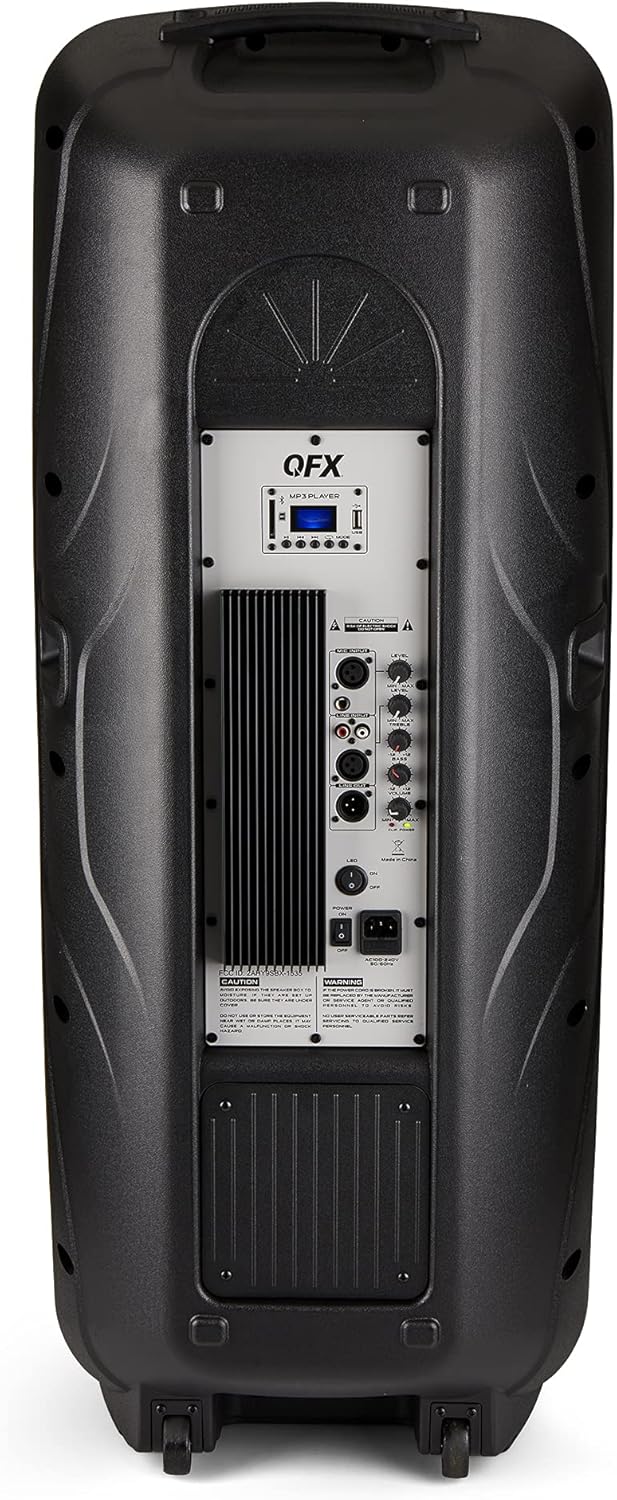
Figure 4.2: Rear panel with controls and ports.
- Ukushintshwa Kwamandla: Ivula/Cima isipikha.
- Okokufaka kwe-AC: Connects the AC power cable.
- USB/SD Card Ports: Okodlala umsindo files kusuka kumadrayivu e-USB noma amakhadi e-SD.
- Isikrini sokubonisa: Shows current mode and track information.
- Inkinobho yemodi: Switches between input modes (Bluetooth, FM, USB, SD, RCA).
- Inkinobho Dlala/Yemisa Isikhashana: Controls playback for USB/SD/Bluetooth.
- Izinkinobho Zengoma Yangaphambili/Elandelayo: Iqondisa amathrekhi noma iziteshi ze-FM.
- I-Master Volume Knob: Ilungisa ivolumu iyonke.
- Bass/Treble Control Knobs: Adjusts low and high frequencies.
- Okokufaka kwemakrofoni ye-XLR: Connects a wired microphone.
- Microphone Volume/Echo Knobs: Adjusts microphone volume and echo effect.
- RCA Input (L/R): Connects external audio devices via RCA cables.
- XLR Line Input/Output: For connecting to other audio equipment.
5. Setha
Ukubekwa Kwasekuqaleni
Place the speaker on a stable, flat surface. For optimal sound, position it in a central location within the listening area. The integrated wheels and handle allow for easy transport.

Figure 5.1: Speaker being moved with handle and wheels.
Ukuxhuma Amandla
- Qinisekisa ukuthi inkinobho yamandla yesipikha ikwisimo se-OFF.
- Connect the AC power cable to the AC input on the rear panel of the speaker.
- Plug the other end of the AC power cable into a standard wall outlet.
- Flip the power switch to the ON position. The display screen will illuminate.
6. Iziqondiso Zokusebenza
Ukubhanqa kwe-Bluetooth
- Turn on the QFX E-B3 speaker.
- Cindezela inkinobho IMODE button on the speaker or remote control until "BLUE" appears on the display screen, indicating Bluetooth mode.
- Nika amandla i-Bluetooth kudivayisi yakho yeselula (i-smartphone, ithebhulethi, njll.).
- Cinga available Bluetooth devices and select "QFX E-B3" from the list.
- Uma isibhangqiwe, isipikha sizokhipha umsindo wokuqinisekisa. Manje usungadlala umsindo kusuka kudivayisi yakho ngesipikha.
True Wireless System (TWS) Pairing
TWS allows two QFX E-B3 speakers to connect wirelessly for a stereo sound experience. This feature works only in Bluetooth mode.
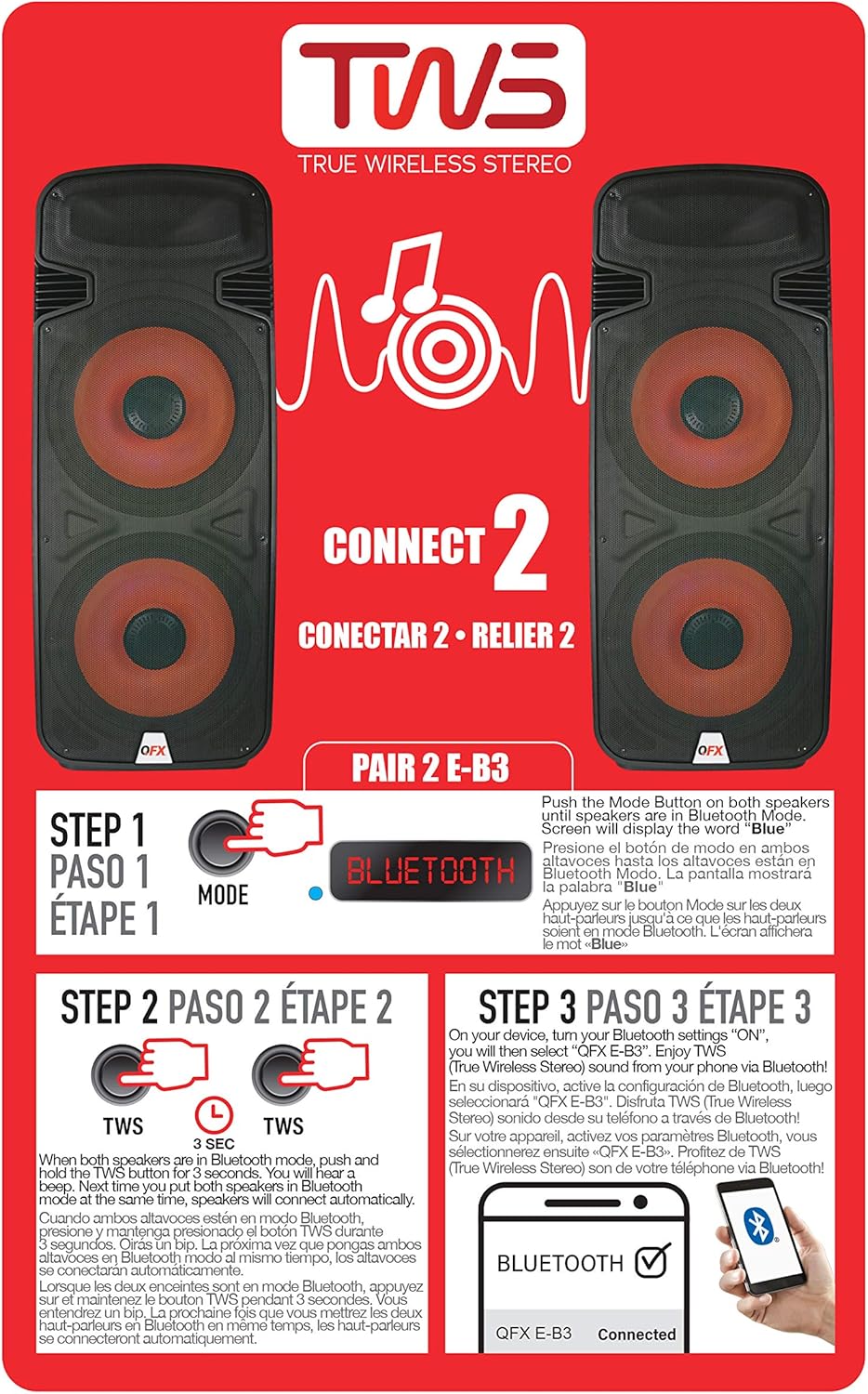
Figure 6.1: TWS Pairing Instructions.
- Ensure both QFX E-B3 speakers are powered on and in Bluetooth mode. The display on both speakers should show "BLUE".
- Kwesinye sezipikha (lesi kuzoba yisikhulumi sakho esiyinhloko), cindezela bese ubamba I-TWS button for approximately 3 seconds. The speakers will attempt to connect to each other.
- Once successfully paired, you will hear a confirmation sound, and the display on the primary speaker will show "BLUE" while the secondary speaker will show "BLUE" as well.
- On your Bluetooth-enabled device, search for and select "QFX E-B3". The two speakers will now play audio in stereo.
Ukusebenza komsakazo we-FM
- Cindezela inkinobho IMODE button to switch to FM radio mode. The display will show the FM frequency.
- Cindezela bese ubamba i Dlala/Misa kancane button to initiate an automatic scan for FM stations. The speaker will save all found stations.
- Sebenzisa i- Ithrekhi Eyangaphambili/Elandelayo izinkinobho zokuzulazula eziteshini ze-FM ezigciniwe.
Ukudlala Ikhadi le-USB/SD
- Faka idrayivu ye-USB flash noma ikhadi le-SD (elinomsindo ohambisanayo files) into the respective port on the rear panel.
- The speaker will automatically switch to USB/SD mode and begin playing the audio files. Uma kungenjalo, cindezela IMODE button to select USB or SD mode.
- Sebenzisa i- Dlala/Misa kancane futhi Ithrekhi Eyangaphambili/Elandelayo izinkinobho zokulawula ukudlala.
Okokufaka kwemakrofoni
- Connect a microphone to the XLR Microphone Input on the rear panel.
- Adjust the Microphone Volume and Echo knobs to achieve the desired sound.
Ukufakwa kwe-RCA
- Connect an external audio source (e.g., CD player, mixer) to the RCA Input (L/R) ports using appropriate RCA cables.
- Cindezela inkinobho IMODE button to select RCA input mode.
- Adjust the master volume on the speaker and the volume on your external audio source.
I-LED Party Lights
The speaker features integrated LED party lights that activate automatically when the speaker is powered on. There are no specific controls for the LED lights mentioned; they are designed to enhance the audio experience.
7. Isondlo
Ukuhlanza
- Always unplug the speaker before cleaning.
- Use a soft, dry cloth to wipe the exterior surfaces of the speaker.
- Ungasebenzisi izinto zokuhlanza abrasive, wax, noma izincibilikisi njengoba zingase zilimaze isiphetho.
- Gcina izimbobo zokungenisa umoya zingenaluthuli nemfucumfucu.
Isitoreji
When not in use for extended periods, store the speaker in a cool, dry place, away from direct sunlight and extreme temperatures. Cover the speaker to protect it from dust.
8. Ukuxazulula izinkinga
If you encounter issues with your QFX E-B3 speaker, refer to the following common problems and solutions:
| Inkinga | Imbangela Engenzeka | Isixazululo |
|---|---|---|
| Awekho amandla | Ikhebula likagesi alixhunyiwe; Indawo yokukhipha ugesi ayisebenzi; Iswishi sikagesi sesipikha sivaliwe. | Ensure AC cable is securely connected to speaker and outlet. Check if outlet is working. Turn speaker power switch ON. |
| Awukho umsindo | Volume too low; Incorrect input mode selected; Audio source not playing. | Increase master volume. Press MODE button to select correct input. Ensure audio source is playing and its volume is up. |
| I-Bluetooth ayixhumi | Speaker not in Bluetooth mode; Device Bluetooth off; Speaker already paired to another device; Device too far. | Ensure speaker is in Bluetooth mode ("BLUE" on display). Turn on device Bluetooth. Disconnect from other devices. Move device closer to speaker (within 30 feet). |
| Ukumatanisa kwe-TWS kuhlulekile | Izipikha azikho kwimodi ye-Bluetooth; inkinobho ye-TWS ayibanjwanga isikhathi eside ngokwanele. | Ensure both speakers are in Bluetooth mode. Press and hold the TWS button on one speaker for 3 seconds. |
| Ukudlala kwe-USB/SD akusebenzi | Incorrect mode; Incompatible file format; Corrupted USB/SD card. | Press MODE to select USB/SD. Ensure audio files are in a compatible format (e.g., MP3). Try a different USB/SD card. |
9. Imininingwane
| Isici | Ukucaciswa |
|---|---|
| Ibhrendi | I-QFX |
| Inombolo Yemodeli | E-B3 |
| Amandla Okukhipha Isipikha aphezulu | 250 Watts |
| Ubuchwepheshe bokuxhumana | I-USB, i-Bluetooth |
| Imodi Yokukhipha Umsindo | Isitiriyo |
| Uhlobo Lokukhweza | Plug Mount, Wheel Mount |
| Uhlobo lwesipika | Woofer (Dual 15 Inches) |
| Uhlobo lwesilawuli | Isilawuli kude |
| Umbala | Party LED |
| Ingangeni manzi | Amanga |
| Indlela Yokulawula | Isilawuli kude |
| I-Woofer Diameter | 15 amayintshi |
| Inombolo Yeziteshi Zomsindo | 2.0 |
| Ubuchwepheshe obungenantambo | I-Bluetooth |
| Iphrothokholi Yokuxhumana | I-Bluetooth |
| Umthombo wamandla | I-Corded Electric |
| Uhlobo Lomshayeli Womsindo | I-Dynamic Driver |
| Usayizi Womshayeli Womsindo | 15 amayintshi |
| Ubukhulu bento (D x W x H) | 16.77"D x 13.98"W x 23.74"H |
| Isisindo sento | 13.2 Amakhilogremu |
| Amadivayisi Ahambisanayo | Ikhompyutha Ephathwayo, Isidlali se-MP3, I-Smartphone, Ithebhulethi, Ithelevishini |
| I-UPC | 606540039618 |
10. Ulwazi Lwewaranti
This product is covered by a limited warranty. For specific details regarding warranty coverage and terms, please refer to the warranty information provided at the point of purchase or contact QFX customer support directly. The warranty is typically per contract with the retailer.
11. Ukusekela
For technical assistance, troubleshooting beyond this manual, or inquiries about your QFX E-B3 speaker, please contact QFX customer support or your retailer. Contact information can usually be found on the manufacturer's webisayithi noma irisidi lakho lokuthenga.