
Isingeniso
The Sharkoon Skiller SGK30 is a mechanical gaming keyboard designed for performance and durability. It features customizable RGB lighting, N-Key rollover, and a 1000Hz polling rate for responsive gameplay and typing. This manual provides essential information for setting up, operating, and maintaining your keyboard.

Image: Sharkoon Skiller SGK30 Mechanical Gaming Keyboard banner displaying the product name and type.
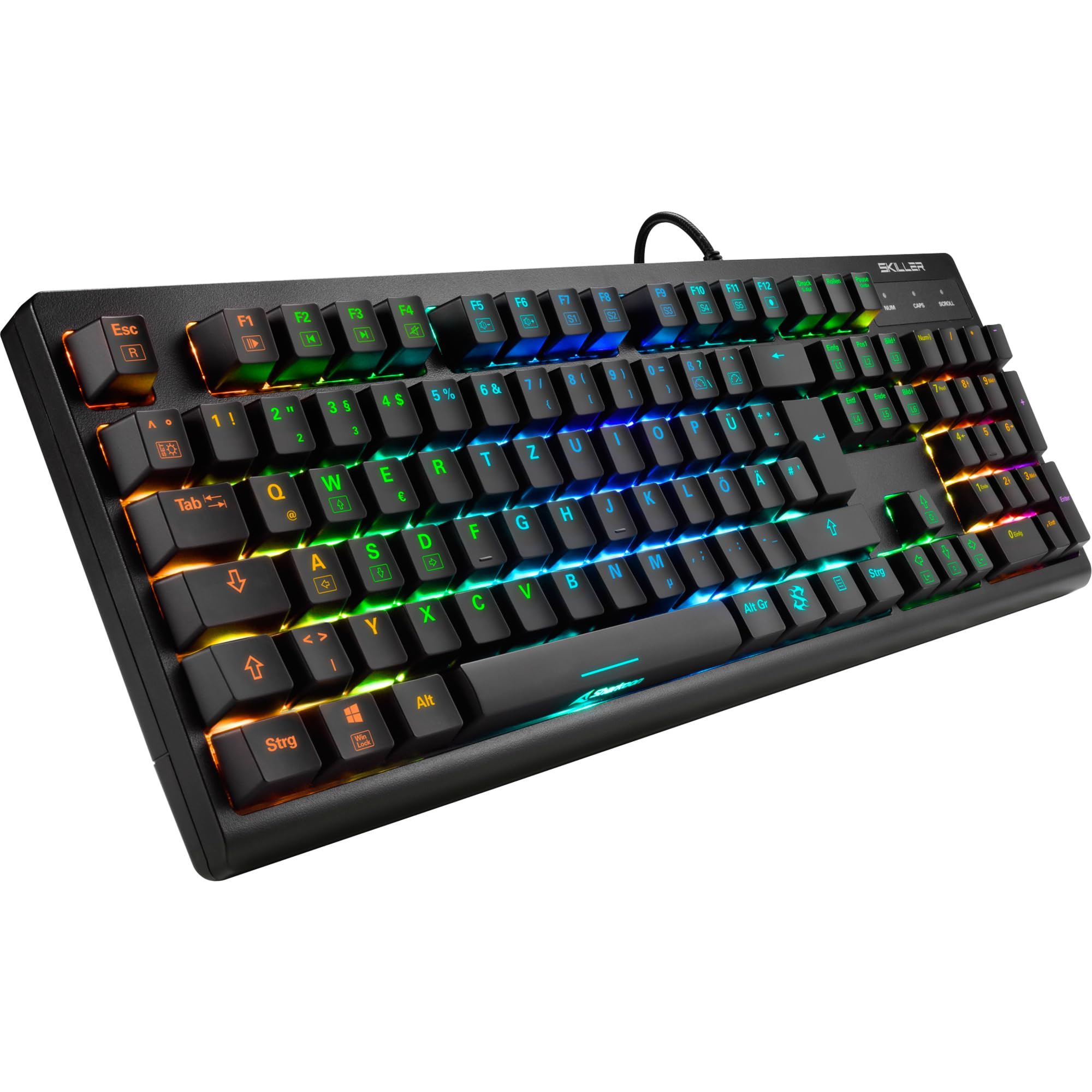
Isithombe: A phezulu phansi view of the Sharkoon Skiller SGK30 mechanical gaming keyboard, showcasing isakhiwo sayo esigcwele kanye nokukhanyisa kabusha kwe-RGB okunempilo.
Umkhiqizo Uphelileview Ividiyo
Ividiyo: Umkhiqizo osemthethweni uphelileview of the Sharkoon Skiller SGK30 Mechanical Gaming Keyboard, demonstrating its features, RGB lighting effects, and mechanical switches.
Setha
Follow these steps to set up your Sharkoon Skiller SGK30 keyboard:
- Khipha ikhibhodi: Carefully remove the keyboard and the included USB cable from its packaging.
- Xhuma Kukhompyutha: Plug the Micro USB end of the cable into the keyboard's port and the standard USB-A end into an available USB port on your computer.
- Ukufakwa komshayeli: The keyboard is plug-and-play. Your operating system (Windows 10 or later recommended) should automatically detect and install the necessary drivers.
- Ukufakwa Kwesofthiwe (Ngokuzithandela): For advanced customization of RGB lighting and key assignments, download the official Sharkoon software from the manufacturer's webindawo.

Image: The Sharkoon Skiller SGK30 keyboard positioned on a desk, ready for connection.
Imiyalelo yokusebenza
Imisebenzi Esemqoka Eyisisekelo
The Sharkoon Skiller SGK30 features a standard layout with additional function keys accessible via the FN ukhiye.
- I-FN + F1-F12: Access multimedia controls (e.g., play/pause, volume up/down, mute).
- FN + Windows Key: Lock/unlock the Windows key to prevent accidental presses during gaming.
- I-N-Key Rollover: All keys are registered simultaneously, ensuring every keystroke is detected, even during rapid input.
Ukulawulwa Kokukhanyisa kwe-RGB
The keyboard offers extensive RGB lighting customization. Use the following combinations to adjust lighting effects:
- FN + Insert/Home/Page Up/Delete/End/Page Down: Cycle through various pre-programmed lighting effects.
- FN + Arrow Keys (Up/Down): Adjust brightness levels of the lighting.
- FN + Arrow Keys (Left/Right): Adjust the speed of dynamic lighting effects.
- Custom Illumination: Use the dedicated software for advanced per-key lighting customization.

Isithombe: Ukuvala view of the keyboard keys highlighting the adjustable RGB illumination capabilities.
Ukwenza ngokwezifiso isoftware
For advanced settings, macro programming, and detailed RGB customization, download and install the Sharkoon Skiller SGK30 software from the official Sharkoon webindawo. Isoftware ikuvumela ukuthi:
- Dala futhi ulondoloze uchwepheshe wokukhanyisa ngokwezifisofiles.
- Program macros for specific keys.
- Remap imisebenzi ebalulekile.

Image: A screenshot showing the graphical user interface of the Sharkoon Skiller SGK30 customization software, illustrating various options for lighting and key remapping.
Isondlo
Ukugcinwa kahle kuqinisekisa isikhathi eside nokusebenza kahle kwekhibhodi yakho:
- Ukuhlanza: Use a soft, dry cloth to wipe the surface of the keyboard. For deeper cleaning, use compressed air to remove dust and debris from between the keycaps.
- Ukususwa kwekepisi elingukhiye: If necessary, keycaps can be carefully removed using a keycap puller (not included) for thorough cleaning of the switches. Reinstall keycaps by pressing them firmly onto the switch stems.
- Gwema Uketshezi: Ungabeki ikhibhodi oketshezini. Uma kwenzeka kuchitheka, nqamula ikhibhodi ngokushesha bese uyivumela yome ngokuphelele ngaphambi kokuxhuma kabusha.
- Isitoreji: Gcina ikhibhodi endaweni epholile, neyomile ekude nelanga eliqondile namazinga okushisa aphezulu.

Isithombe: Ukuvala view of the mechanical switches on the Sharkoon Skiller SGK30 keyboard, illustrating their design for durability and ease of maintenance. Note: This model is available with Red switches, while the image shows Blue switches.
Ukuxazulula inkinga
If you encounter issues with your Sharkoon Skiller SGK30 keyboard, refer to the following common solutions:
| Inkinga | Imbangela Engenzeka | Isixazululo |
|---|---|---|
| Ikhibhodi ayiphenduli | Ukuxhumeka kwe-USB okuxekethile, imbobo ye-USB enephutha, inkinga yomshayeli. |
|
| Ukukhanyisa kwe-RGB akusebenzi noma akulungile | Lighting settings incorrect, software conflict. |
|
| Okhiye ababhalisi | Uthuli/imfucumfucu ngaphansi kokhiye, inkinobho enephutha. |
|
Imininingwane
| Isici | Imininingwane |
|---|---|
| Ibhrendi | Sharkoon |
| Inombolo Yemodeli | 4044951030026 |
| Uhlobo Lwekhibhodi | Ikhibhodi Yokudlala Yemishini |
| Shintsha Uhlobo | Red Switch (Blue switches are also available for this model series) |
| Ukuxhumana | I-Micro USB |
| Izinga Lokuvota | 1000Hz |
| I-N-Key Rollover | Isekelwe |
| Ukukhanyisa kwe-RGB | Customizable RGB |
| Isistimu esebenzayo | Windows 10 (and compatible with other Windows versions) |
| Ubukhulu (LxWxH) | 44 x 14.4 x 3.5 cm |
| Isisindo | 867 g |
Yini EseBhokisini
The Sharkoon Skiller SGK30 package includes:
- Sharkoon Skiller SGK30 Mechanical Gaming Keyboard
- Ikhebula le-USB
Iwaranti kanye Nokusekela
For warranty information and technical support, please refer to the official Sharkoon webisayithi noma thintana nomthengisi wangakini. Gcina ubufakazi bakho bokuthenga ngezimangalo zewaranti.
Qaphela: Ukucaciswa komkhiqizo nezici zingashintsha ngaphandle kwesaziso sangaphambili.