
Umkhiqizo Uphelileview
The XIAOMI Redmi 9I is a feature-rich smartphone designed for everyday use. This manual provides essential information for setting up, operating, maintaining, and troubleshooting your device.
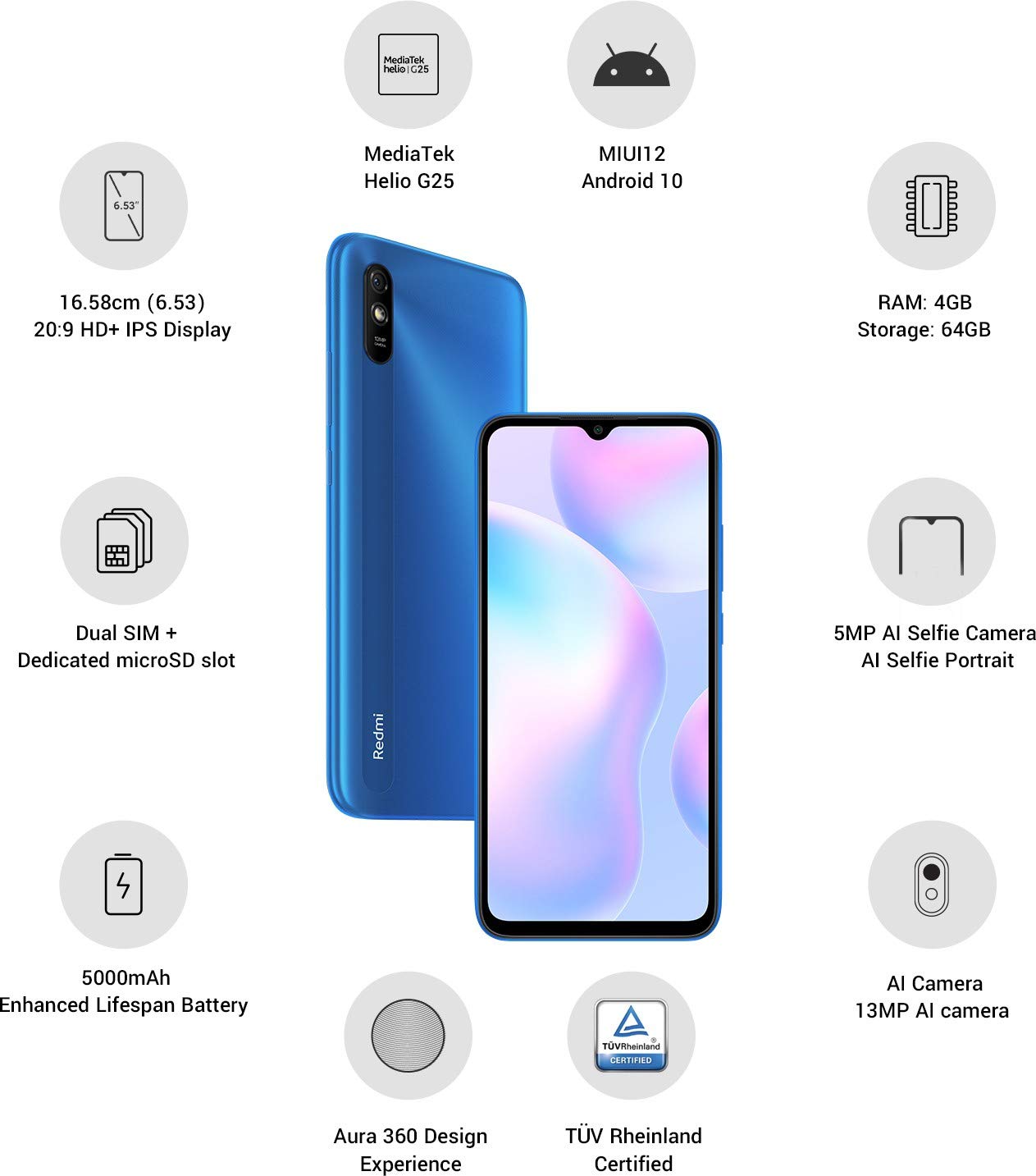
Isithombe: Kuphelileview of the Xiaomi Redmi 9I highlighting key features such as the 6.53-inch HD+ IPS Display, MediaTek Helio G25 processor, MIUI12 Android 10, 4GB RAM, 64GB Storage, Dual SIM + dedicated microSD slot, 5000mAh battery, 5MP AI Selfie Camera, 13MP AI Camera, Aura 360 Design Experience, and TÜV Rheinland Certification.
Umhlahlandlela Wokusetha
1. Unboxing kanye nokuhlolwa kokuqala
Susa zonke izinto ngokucophelela ephaketheni. Qinisekisa ukuthi kukhona izingxenye ezilandelayo:
- XIAOMI Redmi 9I Smartphone
- I-adaptha yamandla
- Cable Type-C Cable
- Ithuluzi le-SIM Ejector
- Umhlahlandlela Wokuqalisa Ngokushesha (uma ufakiwe)
2. Ukufaka i(ama)SIM khadi kanye neMicroSD Card
Locate the SIM card tray on the side of your device. Use the provided SIM ejector tool to open the tray. Insert your Nano SIM card(s) and/or a microSD card into the designated slots. Ensure the cards are correctly oriented as shown in the diagram below. Gently push the tray back into the phone until it clicks into place.

Isithombe: Side view of the Xiaomi Redmi 9I, illustrating the location of the SIM card tray. The tray is designed to hold dual Nano SIM cards and a dedicated microSD card.
3. Ukushaja Idivayisi
Before first use, fully charge your Redmi 9I. Connect the USB Type-C cable to the phone's charging port (located at the bottom) and the other end to the power adapter. Plug the adapter into a wall outlet. The charging indicator will appear on the screen.

Isithombe: Ngezansi view of the Xiaomi Redmi 9I, showing the USB Type-C charging port and speaker grille.
4. Ivula amandla kanye nokucushwa kokuqala
Press and hold the Power button (located on the right side of the device) until the XIAOMI logo appears. Follow the on-screen instructions to complete the initial setup, including language selection, Wi-Fi connection, Google account setup, and security settings.

Isithombe: Side view of the Xiaomi Redmi 9I, clearly showing the power button and volume rocker on the right edge of the device.
Imiyalelo yokusebenza
Ukuzulazula Okuyisisekelo
- Thinta: Thepha izithonjana ukuze uvule izinhlelo zokusebenza, ukhethe izinto, noma uqinisekise izenzo.
- Swayipha: Slide your finger across the screen to scroll, switch between home screens, or navigate within apps.
- Ncinza: Sebenzisa iminwe emibili ukusondeza noma ukusondeza izithombe kanye web amakhasi.
- Cindezela isikhathi eside: Cindezela bese ubamba into ukuze uthole izinketho ezengeziwe noma ukuhambisa izithonjana.
Ukushaya izingcingo nokuthumela imiyalezo
Tap the Phone icon to access the dialer. Enter a number or select a contact. Tap the Messages icon to compose and send text messages.
Ixhuma kumanethiwekhi
- I-Wi-Fi: Iya ku Izilungiselelo > Wi-Fi, turn Wi-Fi on, and select your desired network. Enter the password if prompted.
- I-Bluetooth: Iya ku Izilungiselelo > I-Bluetooth, turn Bluetooth on, and pair with compatible devices.
- Idatha Yeselula (4G): Qinisekisa ukuthi ikhadi lakho le-SIM liyasebenza futhi idatha yeselula ivuliwe Izilungiselelo > Amakhadi e-SIM namanethiwekhi eselula.
Ukusebenzisa Ikhamera
Tap the Camera icon to open the camera application. The Redmi 9I features a 13MP rear camera and a 5MP front camera. Switch between modes (Photo, Video, Portrait, etc.) by swiping across the screen. Tap the shutter button to capture photos or start/stop video recording.

Isithombe: Emuva view of the Xiaomi Redmi 9I, showcasing the 13MP AI camera module and the Redmi branding.
Isondlo
Ukuhlanza Idivayisi Yakho
Sebenzisa indwangu ethambile, engenabo uboya ukuze uhlanze isikrini nomzimba wefoni yakho. Gwema ukusebenzisa amakhemikhali anamandla noma izinto ezihudulayo, ezingalimaza isibonisi noma ukuqeda. Uma unamabala aqinile, gcoba kancaneampzu indwangu enamanzi noma isicoci sesikrini esiklanyelwe izinto zikagesi.
Izibuyekezo Zesofthiwe
Hlola njalo futhi ufake izibuyekezo zesofthiwe ukuqinisekisa ukusebenza okuhle kakhulu, ukuphepha, kanye nokufinyelela izici ezintsha. Iya ku- Izilungiselelo > Mayelana nefoni > Inguqulo ye-MIUI ukuhlola izibuyekezo.
Ukunakekela Ibhethri
The Redmi 9I is equipped with a 5000 mAh Lithium-Polymer battery. To prolong battery life:
- Gwema amazinga okushisa aphezulu.
- Ungalivumeli ibhethri liphele amandla ngaphambi kokuba lishajwe njalo.
- Sebenzisa ishaja nekhebula langempela.
- Optimize battery usage in Izilungiselelo > Ibhethri nokusebenza.
Ukuphathwa Kwesitoreji
Your device comes with 64GB of internal storage. To manage storage effectively:
- Susa njalo okungadingekile files, izithombe, namavidiyo.
- Khipha izinhlelo zokusebenza ezingasetshenziswanga.
- Utilize cloud storage services.
- Hambisa mkhulu files to an inserted microSD card.
Ukuxazulula inkinga
This section addresses common issues you might encounter with your Redmi 9I.
Idivayisi Ayivuliwe
- Ensure the battery is charged. Connect the phone to its charger for at least 30 minutes.
- Cindezela futhi ubambe inkinobho yamandla imizuzwana eyi-10-15 ukuze uphoqe ukuqala kabusha.
Ukuxhumana Okubi Kwenethiwekhi
- Hlola ukuthi i-SIM khadi yakho ifakwe kahle yini.
- Toggle Airplane Mode on and off (swipe down from the top for Quick Settings).
- Qala kabusha idivayisi yakho.
- Verify your mobile data plan is active and you are in an area with network coverage.
Applications Crashing or Freezing
- Vala futhi uvule uhlelo lokusebenza oluyinkinga.
- Sula inqolobane yohlelo lokusebenza kanye nedatha (Izilungiselelo > Izinhlelo zokusebenza > Phatha izinhlelo zokusebenza > [Igama Lohlelo Lokusebenza] > Sula idatha).
- Qinisekisa ukuthi uhlelo lokusebenza lubuyekezelwa enguqulweni yalo yakamuva.
- Qala kabusha ifoni yakho.
Isikrini asiphenduli
- Phoqelela ukuqala kabusha idivayisi ngokubamba inkinobho yamandla.
- If the issue persists, consider a factory reset (Warning: This will erase all data on your phone. Back up important data first. Iya ku Amasethingi > Mayelana nefoni > Setha kabusha njengasekuqaleni).
Imininingwane
| Isici | Imininingwane |
|---|---|
| Ibhrendi | XIAOMI |
| Imodeli | Redmi 9I |
| Isistimu esebenzayo | Android 9.0 (MIUI12) |
| RAM | 4 GB |
| Isitoreji Sangaphakathi | 64 GB |
| Iphrosesa | I-Snapdragon (2 GHz CPU Speed) |
| Uhlobo lokubonisa | I-LCD |
| Usayizi Wesikrini | 6.53 amayintshi |
| Ikhamera yangemuva | 13 MP |
| Ikhamera yangaphambili | 5 MP |
| Amandla ebhethri | 5000 millionamp Hours (Lithium-Polymer) |
| I-SIM Card Slot | I-Dual SIM (Nano) |
| Ukuxhumana | 4G, Wi-Fi, Bluetooth, USB Type C |
| I-GPS | I-GLONASS |
| Okubalulekile | Ipulasitiki |
| Izinga Lokumelana Namanzi | Ukumelana Namanzi |
Ulwazi Lwewaranti
The XIAOMI Redmi 9I comes with a Iwaranti yomkhiqizi yonyaka ongu-1 from the date of purchase. This warranty covers manufacturing defects under normal use. For detailed terms and conditions, please refer to the warranty card included in your product packaging or visit the official XIAOMI support webindawo.
Ukwesekwa Kwamakhasimende
If you encounter issues not covered in this manual or require further assistance, please contact XIAOMI customer support. You can typically find contact information (phone numbers, email, chat support) on the official XIAOMI webisayithi noma ngesigaba sokusekela ngaphakathi kwezilungiselelo zedivayisi yakho.
Before contacting support, please have your device's model number (Redmi 9I) and serial number ready. The serial number can usually be found in Amasethingi > Mayelana nefoni > Isimo.