
Isingeniso
Thank you for choosing the WEKOME D6 Desktop Mini Bluetooth Speaker. This compact and portable speaker delivers clear sound quality and offers versatile connectivity options. This manual provides detailed instructions on how to set up, operate, and maintain your speaker to ensure optimal performance.
Umkhiqizo Uphelileview

Umfanekiso 1: Ngaphambili view of the WEKOME D6 Mini Bluetooth Speaker, highlighting its compact cylindrical design and control panel.
The WEKOME D6 is a palm-sized desktop speaker designed for portability and ease of use. It features Bluetooth connectivity for wireless audio streaming and a TF card slot for direct music playback. Its robust design ensures clear audio output for various compatible devices.
Izici Eziyinhloko:
- Ukuxhumana kwe-Bluetooth: Seamless wireless pairing with smartphones, tablets, and laptops.
- Idizayini Ehlangene: Palm-sized for easy portability.
- Sula Ikhwalithi Yomsindo: Delivers crisp and clear audio.
- Impilo ende yebhethri: 500 mAh battery provides approximately 4-5 hours of playback.
- Ububanzi Obunwetshiwe: Bluetooth transmission distance of up to 10 meters (33 feet).
- TF Card Support: Maximum support for 32GB TF (MicroSD) cards for direct music playback.
- Amandla Okukhiphayo: Speaker maximum output power of 10 Watts.
Okuqukethwe Kwephakheji
Sicela uhlole iphakheji ngezinto ezilandelayo:
- WEKOME D6 Desktop Mini Bluetooth Speaker
- Ikhebula lokushaja le-USB
- Incwadi Yomsebenzisi (le dokhumenti)
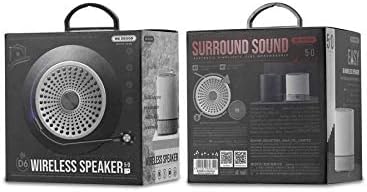
Umfanekiso 2: Retail packaging of the WEKOME D6 Mini Bluetooth Speaker, illustrating the product's branding and key information on the box.
Setha
1. Ukushaja uSomlomo:
- Xhuma ingxenye encane yekhebula lokushaja le-USB embobeni yokushaja esipikheni.
- Xhuma olunye uhlangothi lwekhebula le-USB ku-adaptha yamandla ye-USB (engafakiwe) noma imbobo ye-USB yekhompyutha.
- The charging indicator light will illuminate during charging and turn off once fully charged. A full charge typically takes 2-3 hours.
2. Ukuvula/Ukuvala:
- Ukuvula: Cindezela bese ubamba i Inkinobho yamandla for a few seconds until you hear an audible prompt or see an indicator light.
- Ukucisha: Cindezela bese ubamba i Inkinobho yamandla again for a few seconds.
3. Ukumatanisa kwe-Bluetooth:
- Ensure the speaker is powered on and in Bluetooth pairing mode (it will usually enter this mode automatically upon first power-on or if no device is connected). The indicator light will typically flash rapidly.
- Edivayisini yakho (i-smartphone, ithebhulethi, ikhompuyutha ephathekayo), vula i-Bluetooth bese usesha amadivaysi atholakalayo.
- Select "WEKOME D6" from the list of found devices.
- Once paired, the speaker will provide an audible confirmation, and the indicator light will stop flashing and remain solid.
- The speaker will automatically reconnect to the last paired device when powered on, if the device's Bluetooth is enabled and within range.
4. TF Card Insertion:
- Locate the TF card slot on the speaker.
- Gently insert a TF (MicroSD) card (up to 32GB) with pre-loaded music files into the slot until it clicks into place.
- The speaker will automatically switch to TF card playback mode if a card is detected.
Eqhuba uSomlomo
Izinkinobho Zokulawula:
Refer to Figure 1 for the location of the control buttons.
- Inkinobho yamandla: Cindezela bese ubamba ukuze uvule/uvale.
- Volume Up / Next Track Button (+):
- Ukucindezela okufushane: Khulisa ivolumu.
- Long press: Skip to the next track.
- Inkinobho Dlala/Misa Isikhashana (||): Cindezela isikhashana ukuze udlale noma umise umculo kancane.
- Volume Down / Previous Track Button (-):
- Ukucindezela okufushane: Nciphisa ivolumu.
- Long press: Go to the previous track.
- Mode Button (Dot between + and Play/Pause): Short press to switch between Bluetooth mode and TF card mode (if a TF card is inserted).
Isondlo
- Ukuhlanza: Use a soft, dry cloth to clean the speaker's surface. Do not use abrasive cleaners, alcohol, or other chemical solvents, as these may damage the finish.
- Isitoreji: Gcina isipikha endaweni epholile, neyomile kude nelanga eliqondile namazinga okushisa aphezulu.
- Ukunakekelwa kwebhethri: To prolong battery life, avoid fully discharging the speaker frequently. Charge the speaker regularly, even if not in use for extended periods.
- Ukumelana Namanzi: Lesi sipikha asimelani namanzi. Gwema ukuchayeka ezintweni eziwuketshezi.
Ukuxazulula inkinga
| Inkinga | Imbangela Engenzeka | Isixazululo |
|---|---|---|
| Isipikha asikhanyisi. | Ibhethri eliphansi. | Shaja isipikha ngokugcwele. |
| Awukho umsindo. | Volume too low; Speaker not paired; Incorrect mode. | Increase volume; Ensure speaker is paired; Switch to correct mode (Bluetooth/TF card). |
| Ayikwazi ukubhanqa nedivayisi ye-Bluetooth. | Isipikha asikho kwimodi yokubhangqa; I-Bluetooth yedivayisi ivaliwe; Kude kakhulu nesipikha. | Ensure speaker is in pairing mode; Turn on device Bluetooth; Move device closer to speaker (within 10M). |
| Music stops playing from TF card. | TF card not inserted correctly; Corrupted files; Unsupported format. | Reinsert TF card; Check TF card for errors; Ensure music fileAma-s akwifomethi esekelwayo (isb., i-MP3). |
Imininingwane
| Ibhrendi | WEKOME |
| Igama Lemodeli | D6 |
| Ubuchwepheshe bokuxhumana | I-Bluetooth |
| Uhlobo lwesipika | Desktop Mini Speaker |
| Amandla Okukhipha Isipikha aphezulu | 10 Watts |
| Amandla ebhethri | 500 mAh (approx. 4-5 hours playback) |
| Ibanga lokudlulisela | 10 amamitha (33 amafidi) |
| Ukusekelwa kwekhadi le-TF | Kufika ku-32GB |
| Amadivayisi Ahambisanayo | I-laptop, i-smartphone, ithebhulethi |
| Uhlobo Lokukhweza | Ithebulethi |
| Ubukhulu bephakheji | 12.4 x 11.4 x 7.6 cm |
| Isisindo | 210 g |
Iwaranti kanye Nokusekela
For warranty information and technical support, please refer to the warranty card included with your product or contact WEKOME customer service through their official website or authorized retailers. Keep your purchase receipt as proof of purchase for warranty claims.