
Isingeniso
This manual provides essential information for the safe and efficient operation of your QFX SBX-213 12-inch Portable Bluetooth Speaker. Please read it thoroughly before using the product and retain it for future reference.
Imiyalo yokuphepha
Ukuze uqinisekise ukusebenza okuphephile futhi uvimbele umonakalo, sicela uqaphele lezi zinyathelo zokuphepha ezilandelayo:
- Ungayibeki iyunithi emvuleni, emswakameni, noma emazingeni okushisa adlulele.
- Ungavuli isikhulumi casing. Thumela zonke izinsiza kubasebenzi abaqeqeshiwe.
- Keep the speaker away from heat sources, direct sunlight, and open flames.
- Use only the specified power adapter and charging cable provided with the unit.
- Ensure proper ventilation around the speaker to prevent overheating.
- Gwema ukubeka izinto ezisindayo esipikheni.
Okuqukethwe Kwephakheji
Uma usukhipha impahla, sicela uqinisekise ukuthi zonke izinto ezibalwe ngezansi zikhona futhi zisesimweni esihle:
- QFX SBX-213 Portable Bluetooth Speaker
- Ikhebula Lamandla
- Isilawuli kude
- Incwadi Yomsebenzisi (le dokhumenti)
Umkhiqizo Uphelileview
The QFX SBX-213 is a 12-inch portable speaker designed for versatile audio playback. It features Bluetooth connectivity for wireless streaming, an FM radio tuner, and a USB input for playing audio files kusuka ku-flash drive.
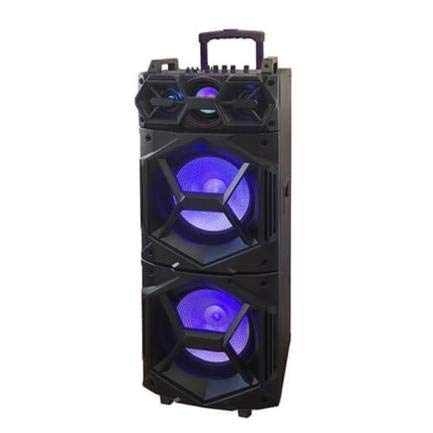
Isithombe: Ngaphambili view of the QFX SBX-213 Portable Bluetooth Speaker, showcasing its 12-inch driver and robust design. The speaker features a black finish and a protective grille over the main driver.
The speaker's control panel and ports typically include:
- Vula/Vala Iswishi
- Mode Button (to switch between Bluetooth, FM, USB inputs)
- Volume Control Knobs or Buttons
- Play/Pause, Previous/Next Track Buttons
- Imbobo ye-USB yokudlala imidiya
- Charging Port for power cable connection
- LED Indicator Lights for power, charging, and Bluetooth status
Setha
- Ukushaja Isipikha: Before first use, connect the provided power cable to the speaker's charging port and plug it into a standard electrical outlet. Allow the speaker to fully charge. The charging indicator light will typically change color or turn off when charging is complete.
- Ukubekwa: Place the speaker on a stable, flat surface. For optimal sound dispersion, avoid placing it in enclosed spaces or directly against walls.
Imiyalelo yokusebenza
1. Vula/Vala
To power on the speaker, locate the power switch, usually on the back or side panel, and slide it to the "ON" position. To power off, slide the switch to the "OFF" position.
2. Ukubhanqa kwe-Bluetooth
- Turn on the speaker. It will typically enter Bluetooth pairing mode automatically, indicated by a flashing LED light and an audible prompt.
- Nika amandla i-Bluetooth kudivayisi yakho yeselula (i-smartphone, ithebhulethi, njll.).
- Cinga available Bluetooth devices. You should see "QFX SBX-213" or a similar name in the list.
- Select the speaker to pair. Once connected, you will hear a confirmation sound, and the LED indicator will stop flashing.
- Manje usungakwazi ukudlala umsindo kusuka kudivayisi yakho usebenzisa isipikha.
3. Ukusebenza komsakazo we-FM
- Press the "MODE" button on the speaker or remote control until "FM" mode is selected.
- Press the "Play/Pause" button to initiate an automatic scan for FM stations. The speaker will save all found stations.
- Use the "Previous/Next Track" buttons to navigate between saved FM stations.
4. Ukudlala nge-USB
- Faka idrayivu ye-USB equkethe umsindo we-MP3 files echwebeni le-USB esipikheni.
- Press the "MODE" button until "USB" mode is selected. The speaker will automatically begin playing audio files kusuka kudrayivu ye-USB.
- Use the "Play/Pause" and "Previous/Next Track" buttons to control playback.
5. Ukulawulwa Kwevolumu
Adjust the master volume using the dedicated volume knob or buttons on the speaker. You can also control the volume from your connected Bluetooth device or the remote control.
Isondlo
- Ukuhlanza: Use a soft, dry cloth to clean the speaker's exterior. Do not use abrasive cleaners, waxes, or solvents, as these may damage the finish.
- Isitoreji: Uma ingasetshenziswa isikhathi eside, gcina isipikha endaweni epholile, eyomile, kude nokukhanya kwelanga okuqondile kanye namazinga okushisa aphezulu.
- Ukunakekelwa kwebhethri: To prolong battery life, avoid fully discharging the battery frequently. Charge the speaker regularly, even if not in use for long periods, to maintain battery health.
Ukuxazulula inkinga
If you encounter any issues with your QFX SBX-213 speaker, please refer to the following table for common problems and solutions:
| Inkinga | Imbangela Engenzeka | Isixazululo |
|---|---|---|
| Awekho amandla | Battery discharged; Power cable not connected securely | Charge the speaker fully; Ensure power cable is securely connected to both the speaker and the power outlet. |
| Alukho uxhumano lwe-Bluetooth | Bluetooth not enabled on device; Speaker not in pairing mode; Device too far from speaker | Enable Bluetooth on your device; Put the speaker into Bluetooth pairing mode; Move your device closer to the speaker (within 10 meters). |
| Akukho okukhipha umsindo | Volume too low; Incorrect mode selected; Device or speaker is muted | Increase the volume on both the speaker and your connected device; Press the MODE button to select the correct input (Bluetooth, USB, FM); Check if the speaker or device is muted. |
| FM radio static or poor reception | Isignali ebuthakathaka; Ukuphazamiseka | Relocate the speaker to an area with better reception; Perform an auto-scan for stations again; Avoid placing near other electronic devices that may cause interference. |
Imininingwane
- Ibhrendi: I-QFX
- Imodeli: I-SBX-213
- Usayizi wesipikha: 12 amayintshi
- Ubuchwepheshe bokuxhuma: I-USB, i-Bluetooth
- Izici ezikhethekile: Lightweight, Portable, FM Radio
- Uhlobo lokukhweza: Floor, Table Mount
- Uhlobo Olawulayo: Isilawuli kude
- Umthombo wamandla: Ikhebula likagesi
- Ubukhulu (H x W x D): Cishe 113 x 42 x 42 cm
- Isisindo: Cishe 4 kg
- I-UPC: 606540036341
- ASIN: B08GL3SHQP
Iwaranti kanye Nokusekela
QFX products are designed for reliability and performance. For detailed warranty information or technical support, please refer to the warranty card included with your purchase or visit the official QFX webindawo. Gcina ubufakazi bakho bokuthenga banoma yiziphi izimangalo zewaranti.
For further assistance, please contact QFX customer service through their official channels.