
1. Isingeniso
This manual provides essential instructions for the safe and efficient operation of your Lenco DIR-250 Internet Radio. Please read this manual thoroughly before using the device and retain it for future reference. The Lenco DIR-250 is a versatile audio system offering Internet Radio, DAB+, FM radio, Bluetooth connectivity, Spotify Connect, and USB playback.
2. Ulwazi Lokuphepha
- Ungayivezi iyunithi emvuleni noma emswakama ukuze uvimbele umlilo noma ukushaqeka kukagesi.
- Qinisekisa ukungena komoya ngendlela efanele. Ungavimbi izimbobo zokungenisa umoya.
- Sebenzisa kuphela i-adaptha yamandla enikezwe iyunithi.
- Ungavuli i-casing. Thumela zonke izinsiza kubasebenzi abaqeqeshiwe.
- Gcina iyunithi kude nelanga eliqondile, imithombo yokushisa, nezizibuthe ezinamandla.
- Gwema ukubeka izinto ezisindayo phezu kweyunithi.
3. Okuqukethwe Kwephakheji
Qinisekisa ukuthi zonke izinto zikhona lapho kukhishwa:
- Lenco DIR-250 Internet Radio Unit
- I-adaptha yamandla
- Isilawuli kude
- Incwadi Yomsebenzisi (le dokhumenti)
- Antennas (2 included)
4. Umkhiqizo Uphelileview

Umfanekiso 4.1: Ngaphambili view of the Lenco DIR-250 Internet Radio and its remote control.

Umfanekiso 4.2: Close-up of the right side of the front panel, featuring the TFT LCD display, volume control knob, Dimmer, and Alarm buttons.
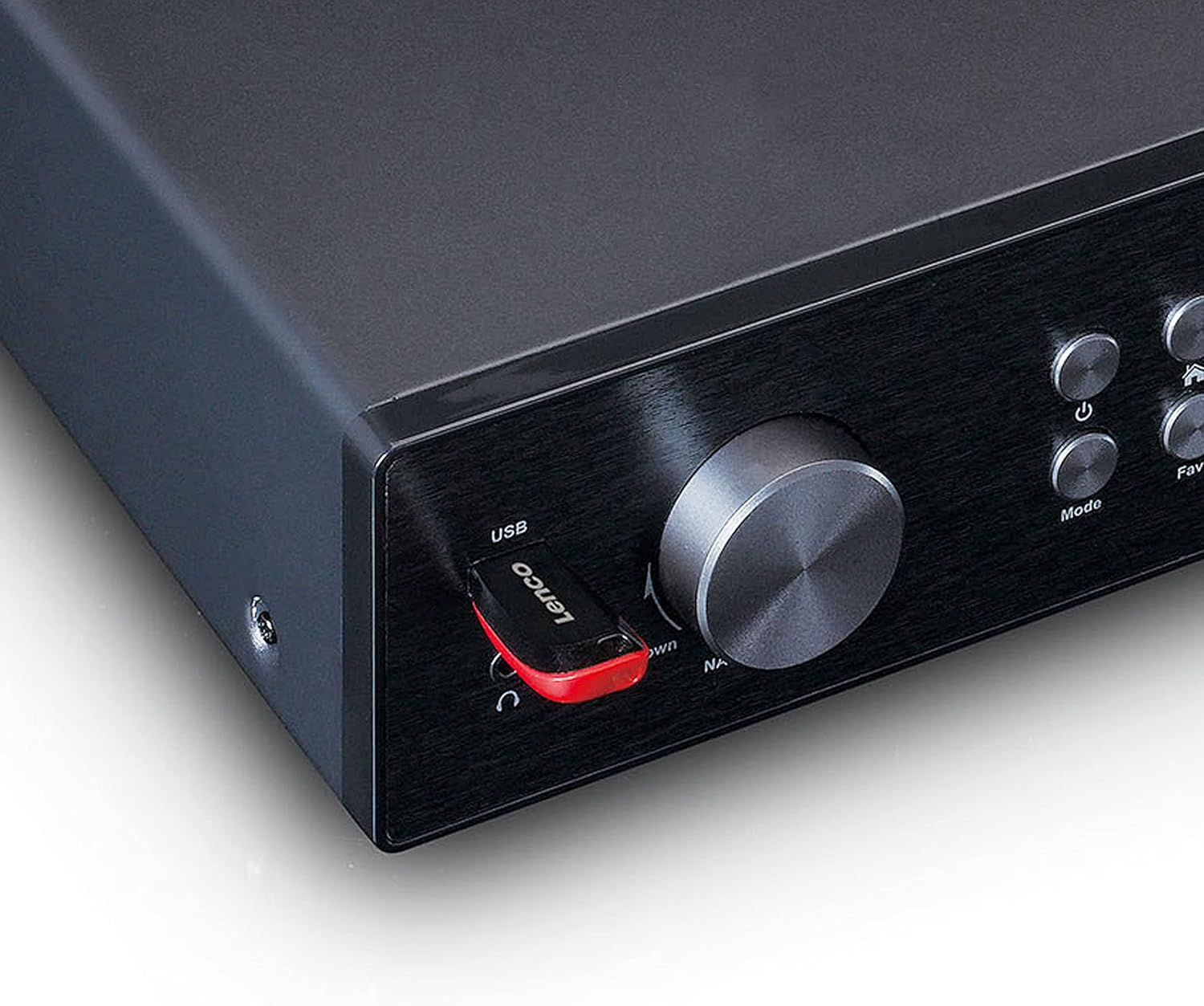
Umfanekiso 4.3: Close-up of the left side of the front panel, showing the USB port, headphone jack, Navigate/OK knob, Mode, and Favorite buttons.

Umfanekiso 4.4: Rear panel connections, including DC IN, Audio Output (RCA), Analog Input/Output, Optical Output, Coaxial Output, LAN (RJ45), and Antenna ports.
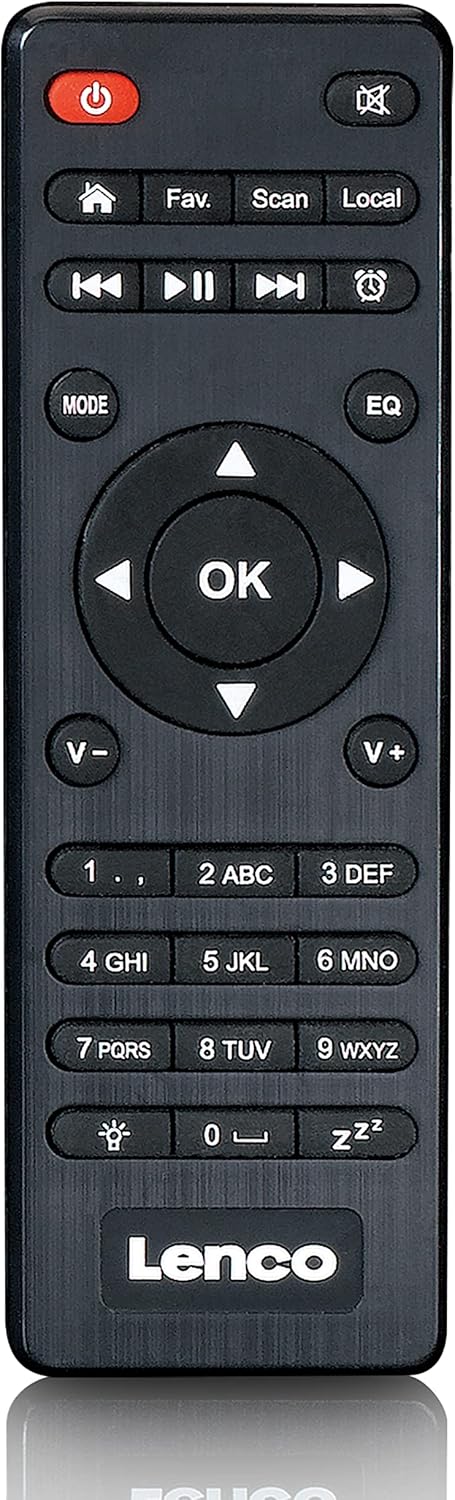
Umfanekiso 4.5: The included remote control for convenient operation of the Lenco DIR-250.
5. Setha
5.1. Ukuxhunywa kwamandla
- Connect the supplied power adapter to the DC IN port on the rear of the unit.
- Xhuma i-adaptha yamandla odongeni.
5.2. Ukuxhuma kwe-Antenna
For optimal reception of DAB+ and FM radio, connect the provided antennas to their respective ports on the rear panel. Extend the telescopic antenna fully for best results.
5.3. Uxhumano Lwenethiwekhi
The DIR-250 supports both Wi-Fi and Ethernet connections for Internet Radio and Spotify Connect.
- I-Wi-Fi: Upon first power-on, the unit will guide you through the Wi-Fi setup. Select your network from the list and enter the password using the navigation knob and OK button, or the remote control.
- I-Ethernet: Connect an Ethernet cable from your router to the LAN port on the rear of the unit. The device will automatically detect the wired connection.
5.4. Iwizadi Yokusetha Yokuqala
The first time you power on the DIR-250, an initial setup wizard will appear on the display. Follow the on-screen prompts to configure language, time, date, and network settings. This ensures the device is ready for use.
6. Ukusebenza
6.1. Izilawuli Eziyisisekelo
The DIR-250 can be operated using the front panel controls or the included remote control.
- Inkinobho yamandla: Turns the unit on/off or puts it into standby mode.
- Ivolumu Knob: Rotate to adjust volume. Press to mute/unmute.
- Navigate/OK Knob: Rotate to scroll through menus and options. Press to confirm a selection.
- Inkinobho yemodi: Cycles through available modes (Internet Radio, DAB+, FM, Bluetooth, USB, AUX).
- Fav. Button: Accesses your list of favorite stations or saves the current station as a favorite.
- Inkinobho ye-Dimmer: Ilungisa ukukhanya kwesibonisi.
- Inkinobho ye-alamu: Sets or manages alarms.
6.2. Umsakazo we-inthanethi
Access thousands of radio stations worldwide via your internet connection.
- Cindezela inkinobho Imodi inkinobho kuze kube yilapho kukhethwe "i-Internet Radio".
- Sebenzisa i- Navigate/OK knob or remote control to browse stations by location, genre, or search.
- Cindezela OK ukukhetha isiteshi.
- To save a station as a favorite, press and hold the Okuthandwayo. inkinobho.
6.3. DAB+ Radio
Enjoy high-quality digital radio broadcasts.
- Cindezela inkinobho Imodi button until "DAB+" is selected.
- The radio will automatically scan for available DAB+ stations.
- Sebenzisa i- Navigate/OK knob or remote to select a station from the list.
6.4. Umsakazo we-FM
Tune into traditional analog FM radio stations.
- Cindezela inkinobho Imodi inkinobho kuze kube yilapho kukhethwe "FM".
- Sebenzisa i- Skena button on the remote or the Navigate/OK knob to search for stations.
- Cindezela OK to listen to a selected station.
6.5. Imodi ye-Bluetooth
Sakaza umsindo ngaphandle kwentambo kusuka ku-smartphone yakho, ithebhulethi, noma amanye amadivayisi asebenzisa i-Bluetooth.
- Cindezela inkinobho Imodi button until "Bluetooth" is selected. The display will show "Pairing".
- On your external device, enable Bluetooth and search for "Lenco DIR-250".
- Select the device to pair. Once connected, you can play audio from your device through the radio.
6.6. Spotify Connect
Control your music directly from the Spotify app on your smartphone or tablet.
- Ensure your Lenco DIR-250 and your smartphone/tablet are connected to the same Wi-Fi network.
- Vula uhlelo lokusebenza lwe-Spotify kudivayisi yakho.
- Play a song and tap the "Devices Available" icon (usually a speaker or computer icon).
- Select "Lenco DIR-250" from the list of available devices.
6.7. Ukudlala nge-USB
Dlala umsindo files (MP3, WAV, AAC) from a USB flash drive.
- Faka idrayivu ye-USB flash echwebeni le-USB elisephaneli engaphambili.
- Cindezela inkinobho Imodi inkinobho kuze kube yilapho kukhethwe "i-USB".
- Sebenzisa i- Navigate/OK knob or remote to browse and select audio files.
6.8.Ukufakwa kwe-AUX
Xhuma amadivayisi omsindo angaphandle usebenzisa ikhebula lomsindo elingu-3.5mm.
- Connect your external audio device to the AUX IN port on the rear panel.
- Cindezela inkinobho Imodi button until "AUX" is selected.
- Play audio from your connected device.
6.9. Alarm and Sleep Timer
Set alarms to wake up to your favorite radio station or use the sleep timer to automatically turn off the radio.
- I-alamu: Cindezela inkinobho I-alamu button on the front panel or remote. Follow the on-screen instructions to set alarm time, source, and volume.
- Isikhathi sokulala: Cindezela inkinobho Lala button on the remote control repeatedly to cycle through available sleep timer durations (e.g., 15, 30, 60 minutes, Off).
7. Isondlo
7.1. Ukuhlanza
To clean the unit, wipe it with a soft, dry cloth. Do not use abrasive cleaners, waxes, or solvents as these may damage the surface. Ensure the unit is unplugged before cleaning.
7.2. Isitoreji
If you plan not to use the unit for an extended period, unplug it from the power outlet and store it in a cool, dry place, away from direct sunlight and extreme temperatures.
8. Ukuxazulula izinkinga
| Inkinga | Imbangela Engenzeka | Isixazululo |
|---|---|---|
| Awekho amandla | I-adaptha yamandla ayixhunyiwe noma i-outlet enephutha. | Hlola ukuxhumeka kwamandla. Zama enye indawo yokukhipha amandla. |
| Awukho umsindo | Volume too low, muted, or incorrect input selected. | Increase volume. Check if muted. Select correct input mode. |
| Ayikwazi ukuxhuma ku-Wi-Fi | Incorrect password, out of range, or router issue. | Verify Wi-Fi password. Move unit closer to router. Restart router. |
| Internet Radio buffering/disconnecting | Weak Wi-Fi signal or slow internet connection. | Improve Wi-Fi signal strength. Check internet speed. Try wired Ethernet connection. |
| Ukwamukela kwe-DAB+/FM kubi | Antenna not properly connected or extended. | Ensure antennas are fully extended and positioned for best reception. |
| Izinkinga zokumataniswa kwe-Bluetooth | Device not in pairing mode, or already paired with another device. | Ensure DIR-250 is in Bluetooth mode. Disconnect from other devices. |
| Unit freezes or becomes unresponsive | Iphutha lesofthiwe yesikhashana. | Unplug the power adapter, wait 10 seconds, then plug it back in to restart the unit. |
9. Imininingwane
| Ibhrendi | Lenco |
| Inombolo Yemodeli | A004231 |
| Bonisa Ubuchwepheshe | I-LCD |
| Ukuxhumana | Bluetooth V5.0, Ethernet (RJ45), Wi-Fi |
| Amabhendi omsakazo asekelwe | Internet Radio, DAB+, FM |
| Izici ezikhethekile | Spotify Connect, USB Playback, Alarm, Sleep Timer |
| Ubukhulu (L x W x H) | 43 x 28.7 x 7.2 cm |
| Isisindo | 1.5 kg |
| Umthombo wamandla | Wired (AC Adapter) |
| Amadivayisi Ahambisanayo | Tablet, Smartphone, USB storage devices |
10. Iwaranti
This product comes with a manufacturer's warranty of 24 months from the date of purchase. Please retain your proof of purchase for warranty claims. The warranty covers defects in materials and workmanship under normal use. It does not cover damage caused by misuse, accidents, unauthorized modifications, or normal wear and tear.
11. Ukusekela
For technical support, service, or further inquiries regarding your Lenco DIR-250 Internet Radio, please visit the official Lenco website or contact their customer service department. Contact information can typically be found on the Lenco website or in the warranty documentation included with your product.
Lenco Official Webindawo: www.lwiyazi.com