
1. Isingeniso
Siyabonga ngokuthengaasing the SOWO Q16 Bluetooth 5.0 Portable Speaker. This manual provides essential information for setting up, operating, and maintaining your device. Please read it thoroughly before use to ensure optimal performance and longevity of your speaker.
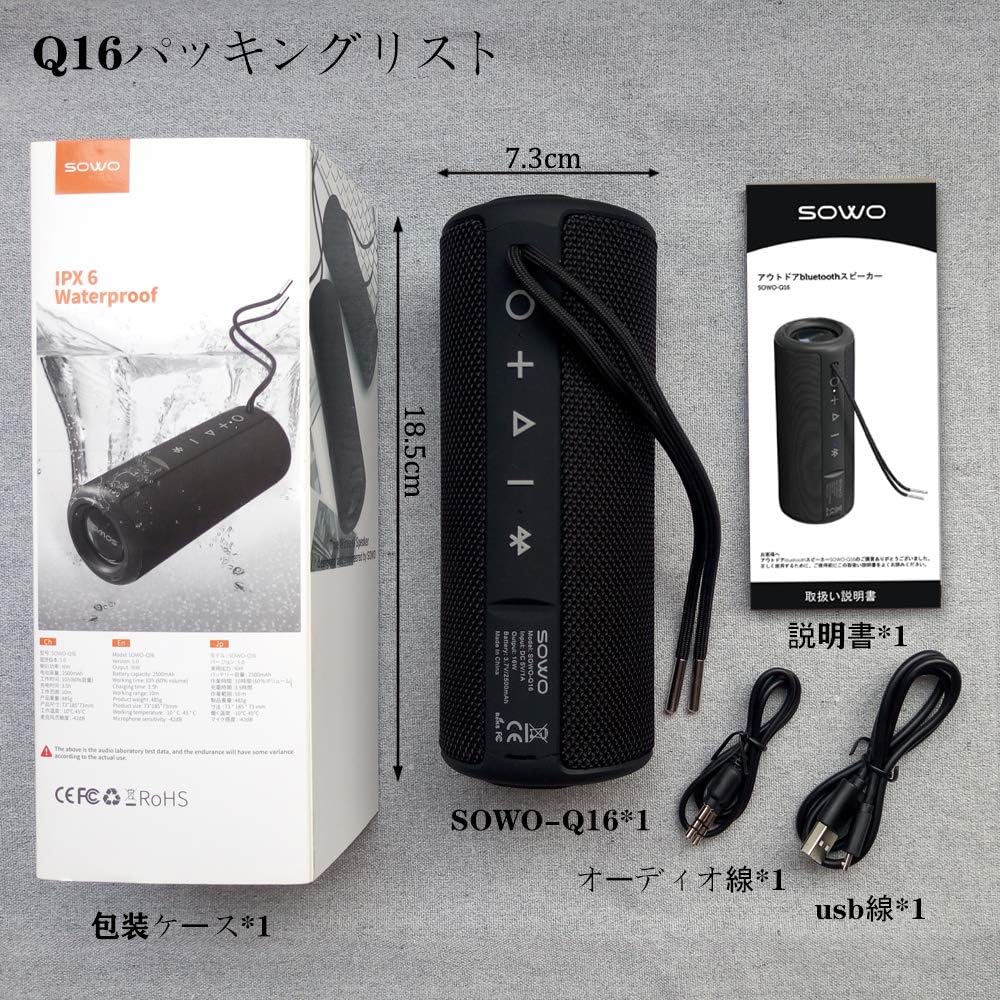
2. Okuqukethwe Kwephakheji
Qinisekisa ukuthi zonke izinto ezibalwe ngezansi zifakiwe kuphakheji yakho:
- SOWO Q16 Portable Bluetooth Speaker
- Ikhebula lokushaja le-Micro USB
- Ikhebula lomsindo le-AUX
- Incwadi Yomsebenzisi (le dokhumenti)
3. Umkhiqizo Uphelileview
The SOWO Q16 is a versatile portable speaker designed for various audio needs. It features Bluetooth 5.0 connectivity, FM radio, MP3 playback via microSD card, and AUX input. The speaker is also IPX6 waterproof, making it suitable for outdoor use.
Izici Eziyinhloko:
- Bluetooth 5.0 for stable wireless connection
- Enhanced bass and clear sound output
- IPX6 Waterproof, dustproof, and shock-resistant design
- FM Radio (87.5MHz - 108MHz)
- MicroSD (TF Card) slot for MP3 playback
- AUX input for wired connections
- Imakrofoni eyakhelwe ngaphakathi yamakholi we-hands-free
- True Wireless Stereo (TWS) function for pairing two speakers
- Kufika emahoreni angu-16 wokudlala okuqhubekayo


4. Setha
4.1 Ukushaja uSomlomo
Before first use, fully charge the speaker. Connect the Micro USB charging cable to the speaker's charging port and the other end to a USB power adapter (not included) or a computer's USB port. The charging indicator light will illuminate during charging and turn off when fully charged.
4.2 Vula/Vala amandla
- Vula: Press and hold the Power button for approximately 3 seconds. You will hear an audible prompt.
- Cisha ugesi: Press and hold the Power button for approximately 3 seconds. You will hear an audible prompt.
4.3 Ukumatanisa kwe-Bluetooth
- Qinisekisa ukuthi isipikha sivuliwe futhi sikwimodi yokumatanisa ye-Bluetooth (ekhonjiswa yi-LED ekhanyayo).
- Edivayisini yakho (i-smartphone, ithebhulethi, ikhompuyutha ephathekayo), vula i-Bluetooth bese usesha amadivaysi atholakalayo.
- Select "SOWO Q16" from the list of devices.
- Once paired, the speaker will emit an audible confirmation, and the LED indicator will stop flashing.
5. Iziqondiso Zokusebenza
5.1 Imisebenzi Yenkinobho
The speaker features several control buttons. Refer to the product diagram for exact locations.
- Inkinobho yamandla: Press and hold to power on/off. Short press to switch modes (Bluetooth, FM, MicroSD, AUX).
- Inkinobho Dlala/Yemisa Isikhashana: Short press to play or pause music. In call mode, short press to answer/end a call. Press and hold to reject a call.
- Ivolumu ephezulu (+): Short press to increase volume. Press and hold for next track (in music modes) or next station (in FM mode).
- Ivolumu Phansi (-): Short press to decrease volume. Press and hold for previous track (in music modes) or previous station (in FM mode).
Imodi ye-Bluetooth ye-5.2
After successful pairing, your speaker will automatically connect to the last paired device when powered on. Play music from your connected device, and control playback using the speaker's buttons or your device.
5.3 Imodi yomsakazo we-FM
- Short press the Power button to switch to FM Radio mode.
- Cindezela inkinobho ethi Dlala/Misa isikhashana ukuze uskene ngokuzenzakalelayo futhi ulondoloze iziteshi ze-FM ezitholakalayo.
- Use the Volume Up (+) and Volume Down (-) buttons (long press) to navigate between saved stations.

5.4 MicroSD (TF Card) Mode
Insert a MicroSD (TF) card with MP3 audio files into the designated slot. The speaker will automatically switch to MicroSD mode and begin playing music. Use the Play/Pause and Volume buttons to control playback.
5.5 Imodi ye-AUX
Connect one end of the AUX audio cable to the speaker's AUX input port and the other end to the audio output of your device (e.g., laptop, MP3 player). The speaker will automatically switch to AUX mode. Control playback from your connected device.
5.6 Umsebenzi Wokushaya
Uma ixhunywe nge-Bluetooth ku-smartphone, isipikha singasetshenziswa kumakholi angenazingcingo:
- Phendula Ucingo: Cindezela kafushane inkinobho ethi Dlala/Misa kancane.
- Qeda ikholi: Cindezela kafushane inkinobho ethi Dlala/Misa kancane.
- Yenqaba Ucingo: Cindezela bese ubamba inkinobho ethi Dlala/Misa kancane.
5.7 Ukubhanqa kwe-True Wireless Stereo (TWS).
To achieve a stereo sound experience, you can pair two SOWO Q16 speakers together:
- Qinisekisa ukuthi zombili izipikha zivaliwe futhi azixhumekile kunoma iyiphi idivayisi ye-Bluetooth.
- Vula izipikha zombili. Zizongena kwimodi yokubhangqa ye-Bluetooth.
- On one of the speakers, double-press the Power button. The speakers will attempt to pair with each other.
- Once successfully paired, you will hear an audible confirmation. The LED indicator on one speaker will flash (master), and the other will be solid (slave).
- Now, connect your device to the master speaker via Bluetooth as described in section 4.3. Both speakers will play audio in stereo.


6. Isondlo
- Ukuhlanza: Sebenzisa indwangu ethambile neyomile ukuhlanza ubuso besipika. Ungasebenzisi izihlanzi ezikhuhlayo noma izinyibilikisi.
- Ukuchayeka emanzini: While the speaker is IPX6 waterproof, avoid prolonged submersion. Ensure charging port covers are securely closed before exposing to water.
- Isitoreji: Gcina isipikha endaweni epholile, neyomile kude nelanga eliqondile namazinga okushisa aphezulu.
- Ukunakekelwa kwebhethri: To prolong battery life, charge the speaker regularly, even if not in frequent use. Avoid fully discharging the battery for extended periods.
7. Ukuxazulula izinkinga
| Inkinga | Imbangela Engenzeka | Isixazululo |
|---|---|---|
| Isipikha asikhanyisi. | Ibhethri eliphansi. | Shaja isipikha usebenzisa intambo ye-USB enikeziwe. |
| Ayikwazi ukubhanqa nge-Bluetooth. | Isipikha asikho kwimodi yokubhangqa noma sesivele sixhunywe kwenye idivayisi. I-Bluetooth yedivayisi ivaliwe. | Ensure speaker is in pairing mode. Disconnect from other devices. Enable Bluetooth on your device. |
| Awukho umsindo. | Volume too low. Incorrect mode selected. Device not playing audio. | Increase speaker and device volume. Ensure correct mode (Bluetooth, AUX, MicroSD) is selected. Check audio playback on your device. |
| Umsakazo we-FM awusamukeli kahle. | Isiginali ebuthakathaka. | Hambisa isipikha endaweni ethola isignali engcono. |
| Ikhadi le-MicroSD alibonakali. | Card inserted incorrectly. Unsupported file format. Corrupted card. | Reinsert the card. Ensure files are in MP3 format. Try a different MicroSD card. |
8. Imininingwane
| Isici | Imininingwane |
|---|---|
| Ibhrendi | SOWO |
| Inombolo Yemodeli | Q16 |
| Ubuchwepheshe bokuxhumana | Bluetooth 5.0, AUX, MicroSD (TF Card), USB (for charging) |
| Uhlobo Lokukhweza | I-Tabletop Mount |
| Okubalulekile | Ipulasitiki |
| Uhlobo lwesipika | Ngaphandle, Iyaphatheka |
| Ukusetshenziswa Okunconyiwe | Computer, TV, Mobile Devices |
| Umbala | Mnyama |
| Isilinganiso Sokungangeni Manzi | IPX6 |
| Indlela Yokulawula | Izinkinobho |
| Ububanzi bomshayeli | 40 mm |
| Impilo Yebhethri (Isilinganiso) | Kufika emahoreni angu-16 |
| Amadivayisi Ahambisanayo | iPhone, iPad, MP3 Players, Laptops, Android devices |
| Umthombo wamandla | Inikwe amandla Ibhethri (Ukushaja i-USB) |
| Uhlobo Lwebhethri | 1 Lithium Ion Battery (Included) |
| Isisindo Somkhiqizo | awu 540g |
9. Iwaranti kanye Nokusekela
SOWO products are designed and manufactured to the highest quality standards. For warranty information or technical support, please refer to the contact details provided with your purchase documentation or visit the official SOWO webindawo. Sicela ugcine ubufakazi bakho bokuthenga izimangalo zewaranti.