
Fender GTX100
I-Fender Mustang GTX100 Guitar AmpIncwadi Yemiyalelo ye-lififier kanye ne-Footswitch enezinkinobho ezingu-7
Model: GTX100 | Brand: Fender
1. Umkhiqizo Uphelileview
The Fender Mustang GTX100 is a versatile 100-watt guitar amplifier designed for a wide range of musical styles. It features a 12-inch Celestion speaker, advanced digital modeling, and a comprehensive suite of effects. The amplifier includes 200 onboard presets and offers modular signal path flexibility, allowing users to customize their sound. Integrated Bluetooth enables audio streaming for play-along sessions and connectivity with the Fender TONE 3.0 app for deep editing and preset management. WiFi capabilities ensure the amplifier stays updated with the latest features. The included 7-button footswitch provides convenient control over bank selection, effects, and a 60-second looper, making it suitable for live performance.
2. Okuqukethwe Kwephakheji
- I-Fender Mustang GTX100 Guitar Ampokokuphila
- 7-Button Footswitch
- Ikhebula Lamandla
- Ikhebula le-USB
3. Ulwazi Lokuphepha
Qinisekisa njalo amplifier is connected to a grounded power outlet. Do not expose the unit to moisture or extreme temperatures. Disconnect the power cable before cleaning or servicing. Refer to local electrical codes for proper installation and usage. Keep ventilation openings clear to prevent overheating.
4. Setha
4.1 Ukuqaqa nokubeka
Susa ngokucophelela i- amplifier and footswitch from their packaging. Place the amplifier on a stable, level surface, ensuring adequate ventilation around the unit. Avoid placing it near heat sources or in direct sunlight.
4.2 Connecting Your Ampokokuphila
- Ukuxhuma kwamandla: Connect the included power cable to the amplifier's power input on the rear panel and then to a grounded electrical outlet.
- Okokufaka kwesiginci: Xhuma isiginci sakho ku- INPUT jack on the top panel of the ampokokuphila.
- Footswitch Connection: Connect the 7-button footswitch to the dedicated I-FOOTSWITCH input on the rear panel.
- Ukuxhumana Ongakukhetha:
- Ama-headphone: For silent practice, connect headphones to the I-HEADPHONE output on the top panel.
- Okokufaka Kwesisizi: Xhuma idivayisi yomsindo yangaphandle (isb., i-smartphone, isidlali se-MP3) ku- I-AUX input on the top panel for play-along.
- I-USB: Xhuma i- amplifier to a computer via the I-USB port on the rear panel for recording or software updates.
- XLR Line Outputs: For connecting to a PA system or recording interface, use the STEREO XLR LINE OUT jacks on the rear panel.
- I-Effects Loop: External effects pedals can be connected via the I-FX THUMELA futhi Ukubuyiselwa kweFX jacks on the rear panel.

Figure 1: Fender Mustang GTX100 Amplifier with 7-Button Footswitch. The amplifier is black with a silver Fender logo, and the footswitch is connected via a cable.
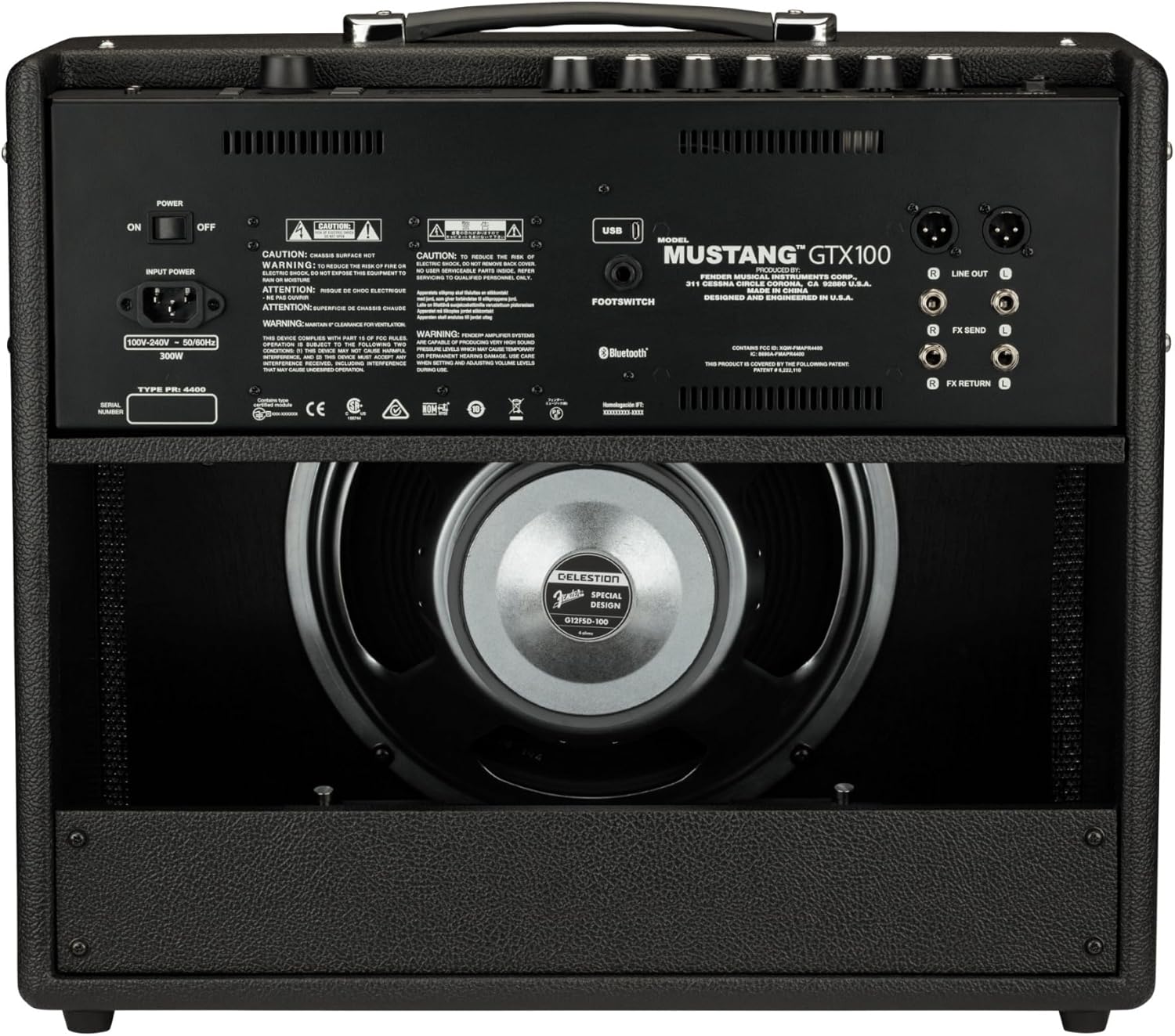
Figure 2: Rear panel connections of the Fender Mustang GTX100 Ampi-lifier. Lokhu view highlights the power input, footswitch jack, stereo XLR line outputs, and effects loop (FX Send/Return).

Figure 3: Top panel controls of the Fender Mustang GTX100 Amplifier. This image displays the input, aux, headphone jacks, gain, volume, tone controls (treble, middle, bass), master volume, and the digital display with navigation buttons.
5. Iziqondiso Zokusebenza
5.1 Ukuvula / Ukuvula
Ukuze amandla ku amplifier, flip the AMANDLA switch located on the top panel to the 'ON' position. The display will illuminate. To power off, flip the switch back to 'OFF'.
5.2 Navigating Presets and Effects
The Mustang GTX100 features 200 onboard presets, offering a wide array of guitar tones. Use the large rotary encoder knob on the top panel to scroll through and select presets. The crisp full-color display will show the selected preset number and name. You can also use the Fender TONE 3.0 app (available for iOS and Android) via Bluetooth for deep editing, preset browsing from the Fender Tone community, and preset backup/restore.
Video 1: A demonstration of the Fender Mustang LT40S amplifier's preset navigation and sound capabilities. While this video features the LT40S, the core functionality of preset selection and sound variety is similar to the GTX100.
5.3 Using the 7-Button Footswitch
The included 7-button footswitch allows for hands-free control during performance. It provides individual bank up and down functions, easy effects selection, and unlocks the amplifier's integrated 60-second looper. Refer to the footswitch's dedicated manual for detailed operation.
5.4 I-Bluetooth Audio Streaming
Connect your Bluetooth-enabled device to the amplifier to stream audio. This feature is ideal for playing along with your favorite tracks or backing music.
5.5 WiFi Connectivity for Updates
I amplifier's WiFi capabilities allow you to connect to your home network for product updates. This ensures your amplifier always has the latest firmware and features.
5.6 Stereo XLR Line Outputs and Effects Loop
Utilize the stereo XLR line outputs to connect the amplifier directly to a PA system, recording interface, or other outboard gear. The stereo effects loop allows for integration of external effects pedals into your signal chain.
5.7 Ukuxhumana nge-USB
The USB port can be used for direct recording to a computer or for managing presets and firmware updates via the Fender TONE 3.0 desktop application.
6. Isondlo
6.1 Ukuhlanza
Sula ingaphandle le amplifier with a soft, dry cloth. Do not use abrasive cleaners or solvents. Ensure no liquids enter the ventilation openings or control panel.
6.2 Isitoreji
Uma ingasetshenziswa, gcina i- amplifier in a cool, dry place away from direct sunlight and extreme temperatures. If transporting, use appropriate protective covers or cases.
7. Ukuxazulula izinkinga
- Awekho Amandla: Ensure the power cable is securely connected to both the amplifier and a working electrical outlet. Check the power switch position.
- Awukho Umsindo: Verify that your guitar is properly plugged into the INPUT jack. Check the volume and master volume knobs. Ensure any connected headphones or external devices are functioning correctly.
- Umsindo Ohlanekezelwe: Adjust the gain and volume settings. Check your guitar's output and any external pedals for proper levels.
- Footswitch Not Responding: Ensure the footswitch cable is securely connected to the dedicated input on the rear panel.
- Bluetooth/WiFi Connectivity Issues: Qinisekisa ukuthi amplifier's Bluetooth/WiFi is enabled. Check your device's settings and ensure it's within range. For WiFi, verify network credentials.
8. Imininingwane
| Isici | Ukucaciswa |
|---|---|
| Inombolo Yemodeli | 2310700000 |
| Okukhiphayo Wattage | 100 Watts |
| Somlomo | 12-inch Celestion |
| Isisindo sento | 28.5 amakhilogremu |
| Ubukhulu bomkhiqizo (L x W x H) | 27.4 x 22.6 x 13.2 amayintshi |
| Ukusetha ngaphambilini | 200 Onboard |
| I-Looper | 60-second integrated |
| Ukuxhumana | Bluetooth, WiFi, USB, Stereo XLR Line Out, Effects Loop |
9. Iwaranti kanye Nokusekela
9.1 Isiqinisekiso Esinomkhawulo
Fender warrants this amplifier to be free from defects in materials and workmanship for two (2) years from the original date of purchase. This warranty is applicable to the original purchaser only and is non-transferable.
9.2 Ukwesekwa Kwamakhasimende
For technical assistance, warranty claims, or further information, please visit the official Fender support webisayithi noma uxhumane nomnyango wabo wesevisi yamakhasimende. Gcina ubufakazi bakho bokuthenga ukuze uqinisekise iwaranti.
Ask a question about this manual
Ask about setup, troubleshooting, compatibility, parts, safety, or missing instructions. Manuals+ will review the question and use this page’s manual context to help answer it.