
Isingeniso
This manual provides essential information for the safe and efficient operation of your Dual MCR 4 Portable DAB+/FM Radio. This device offers both digital DAB+ and analog FM radio reception, ensuring a wide range of listening options. Its color TFT display enhances usability by showing station names and additional information. With intuitive controls, auxiliary input, and headphone jack, the MCR 4 is designed for versatile and enjoyable audio experiences.
Ulwazi Lokuphepha
- Funda yonke imiyalelo ngokucophelela ngaphambi kokusebenzisa idivayisi.
- Gcina idivayisi kude namanzi, umswakama, kanye namazinga okushisa aphezulu.
- Ungazami ukuqaqa noma ukuguqula iyunithi. Thumela zonke izinsiza kubasebenzi abaqeqeshiwe.
- Use only the provided power adapter or recommended battery types.
- Qinisekisa ukuthi kungena umoya ofanele eduze kwedivayisi ngesikhathi sokusebenza.
- Lahla amabhethri ngokuzibophezela ngokwemithetho yendawo.
Okuqukethwe Kwephakheji
Sicela uhlole ukuthi zonke izinto zikhona yini kuphakheji:
- Dual MCR 4 Main Unit
- I-adaptha yamandla
- Imaniwali yosebenzisayo
Umkhiqizo Uphelileview
The Dual MCR 4 features a compact design with intuitive controls for easy access to its functions. Key components include:
- Color TFT Display: Ibonisa ulwazi lwesiteshi, isikhathi, nezinketho zemenyu.
- I-Rotary Knob: For tuning, volume control, and menu navigation.
- Izinkinobho Zememori: To save and recall your favorite radio stations.
- I-Telescopic Antenna: For optimal radio signal reception.
- Auxiliary Input (AUX-IN): Located at the back, for connecting external audio devices.
- I-Headphone Jack: Located at the back, for private listening.
- Mechanical On/Off Switch: Located at the back, for direct power control.
- Passive Membrane: Located at the back, contributing to exceptional sound quality.
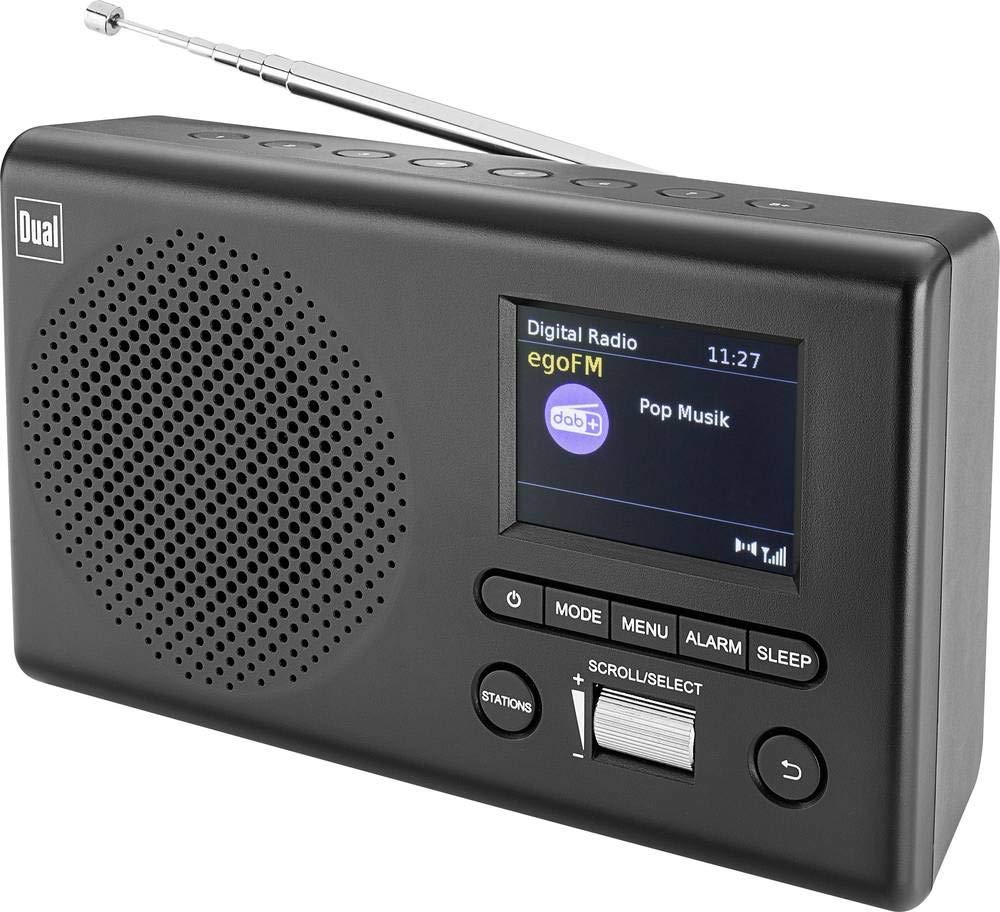
Isithombe: Ngaphambili view of the Dual MCR 4 Portable DAB+/FM Radio, showing the color TFT display, rotary knob, and control buttons. The radio has a black and silver finish.
Setha
1. Ukunika amandla Idivayisi
The Dual MCR 4 can be powered by either the included AC power adapter or batteries, offering portability.
- Ukusebenzisa i-Adapter ye-AC: Connect the power adapter to the DC IN port on the back of the radio and plug the other end into a standard wall outlet.
- Ukusebenzisa Amabhethri: Open the battery compartment on the bottom/back of the radio and insert the required batteries (type and quantity usually specified inside the compartment or in the full manual). Ensure correct polarity.
2. Ukulungiswa Kwe-Antenna
Extend the telescopic antenna fully for optimal reception of both DAB+ and FM radio signals. Adjust its position for the best signal quality.
3. Initial Power On and Station Scan
After connecting power, switch on the radio using the mechanical ON/OFF switch at the back. The radio will typically perform an automatic station scan upon first use, searching for available digital (DAB+) and analog (FM) radio stations. This process may take a few moments.
Imiyalelo yokusebenza
1. Ukusebenza Okuyisisekelo
- Vula/Vala: Use the mechanical switch at the back. For standby, a dedicated button on the front might be available (refer to physical unit).
- Ukulawula ivolumu: Rotate the main rotary knob to adjust the listening volume.
2. DAB+ Radio Mode
- Selecting DAB+ Mode: Press the MODE button (if available) or navigate through the menu using the rotary knob until DAB+ mode is selected.
- Ukukhethwa kwesiteshi: After an automatic scan, use the rotary knob to scroll through the list of available DAB+ stations. Press the knob to confirm your selection.
- Ilondoloza Okusethiwe: Tune to your desired station. Press and hold a memory button (e.g., 1-5) until the display confirms the station is saved.
- Ukukhumbula ukusethwa kusengaphambili: Briefly press the corresponding memory button to recall a saved station.
- Bonisa Ulwazi: The color TFT display will show station name, program information (DLS), and potentially station logos or slideshows.
3. Imodi yomsakazo we-FM
- Selecting FM Mode: Press the MODE button or navigate through the menu until FM mode is selected.
- Ukulungisa mathupha: Rotate the tuning knob to manually adjust the frequency.
- Ukuskena Okuzenzakalelayo: Press and hold the tuning knob or a dedicated scan button to automatically search for the next available FM station.
- Ilondoloza Okusethiwe: Tune to your desired FM station. Press and hold a memory button until the display confirms the station is saved.
- Ukukhumbula ukusethwa kusengaphambili: Briefly press the corresponding memory button to recall a saved station.
4. Auxiliary Input (AUX-IN)
Connect an external audio device (e.g., smartphone, MP3 player) to the AUX-IN port on the back of the radio using a 3.5mm audio cable. Select AUX mode on the radio to play audio from the connected device.
5. Ukusetshenziswa kwama-headphone
For private listening, plug standard 3.5mm headphones into the headphone jack located on the back of the unit. The internal speaker will automatically mute.
Isondlo
- Ukuhlanza: Sula umsakazo ngendwangu ethambile, eyomile. Ungasebenzisi izinto zokuhlanza abrasive noma izincibilikisi.
- Isitoreji: If storing for an extended period, remove batteries and store the unit in a cool, dry place.
- Ukunakekelwa kwe-Antenna: Handle the telescopic antenna gently to prevent damage.
Ukuxazulula inkinga
| Inkinga | Isixazululo Esingenzeka |
|---|---|
| Awekho amandla |
|
| Ukwamukela umsakazo okungekuhle |
|
| Awukho umsindo ovela kuzipikha |
|
Imininingwane
| Ibhrendi | Okukabili |
| Inombolo Yemodeli | 76074 |
| Umbala | Mnyama, Isiliva |
| Ubuchwepheshe Bokushuna | I-DAB+, FM |
| Ubuchwepheshe bokuxhumana | Auxiliary (AUX-IN) |
| Izici ezikhethekile | Portable, Color TFT Display |
| Amadivayisi Ahambisanayo | Headphones, External Audio Devices (via AUX-IN) |
| Umthombo wamandla | Mains (AC Adapter), Battery Powered |
| Izingxenye Ezihlanganisiwe | Main Unit, Power Adapter, User Manual |
| Ukusetshenziswa Okunconyiwe | Umculo |
Iwaranti kanye Nokusekela
For warranty information and technical support, please refer to the specific warranty card included with your product or contact Dual customer service. The included user manual provides detailed instructions and contact information.