
1. Isingeniso kanye Phezuview
The OSD Audio MX1680 GEN2 is a high-performance, multi-channel amplifier designed for distributed audio systems. This Class D amplifier provides 16 channels across 8 independent zones, delivering 80 Watts per channel into 4 Ohms or 50 Watts per channel into 8 Ohms. It is suitable for both residential and commercial audio installations, serving as a main amplifier for multi-room audio or integrating into home theater systems.
Key features include front-panel on/off buttons for each zone, efficient Class D amplification for low distortion, and built-in protection circuitry against thermal overload and short circuits. Its slim, 2U rack-mountable design (hardware included) allows for flexible installation.

Isithombe 1.1: Ngaphambili nangemuva view of the OSD Audio MX1680 GEN2 Multi-Zone Digital Ampokokuphila.
2. Ulwazi Lokuphepha
Sicela ufunde futhi uqonde yonke imiyalelo yokuphepha ngaphambi kokusebenzisa le divayisi. Gcina le ncwadi ukuze uyibhekisele esikhathini esizayo.
- Umthombo wamandla: Xhuma i- amplifier only to the type of power source indicated on the unit. Ensure the voltagI-e ifanele isifunda sakho.
- Ukungenisa umoya: Do not block any ventilation openings. Install in accordance with the manufacturer's instructions. Maintain adequate space around the unit for proper airflow.
- Amanzi Nomswakama: Ungabeki lesi sisetshenziswa emvuleni noma emswakameni. Ungabeki izinto ezigcwele uketshezi, njengamavasi, emshinini.
- Ukushisa: Ungafaki eduze kwanoma yimiphi imithombo yokushisa njengama-radiator, amarejista okushisa, izitofu, noma ezinye izinto ezisetshenziswayo (okuhlanganisa ampama-lifiers) akhiqiza ukushisa.
- Ukubeka phansi: This appliance must be grounded. Ensure the power cord is connected to a properly grounded outlet.
- Ukusevisa: Ungazami ukuletha lo mkhiqizo ngokwakho. Dlulisela konke ukwesekwa kubasebenzi bensizakalo abafanelekayo.
- Ukuhlanza: Unplug the unit from the power outlet before cleaning. Use a dry cloth for cleaning.
3. Ukusetha nokufakwa
3.1 Ukuqaqa
Susa ngokucophelela i- amplifier from its packaging. Verify that all components listed in the 'What's in the Box' section are present. This includes the MX1680 GEN2 amplifier and the Quick Start Guide.
3.2 Ukubekwa
The MX1680 GEN2 is designed for rack mounting (2U height) or placement on a flat, stable surface. Ensure adequate ventilation around the unit to prevent overheating. Avoid placing it near other heat-generating equipment.
3.3 Izixhumanisi
Refer to the rear panel diagram for all input and output connections.
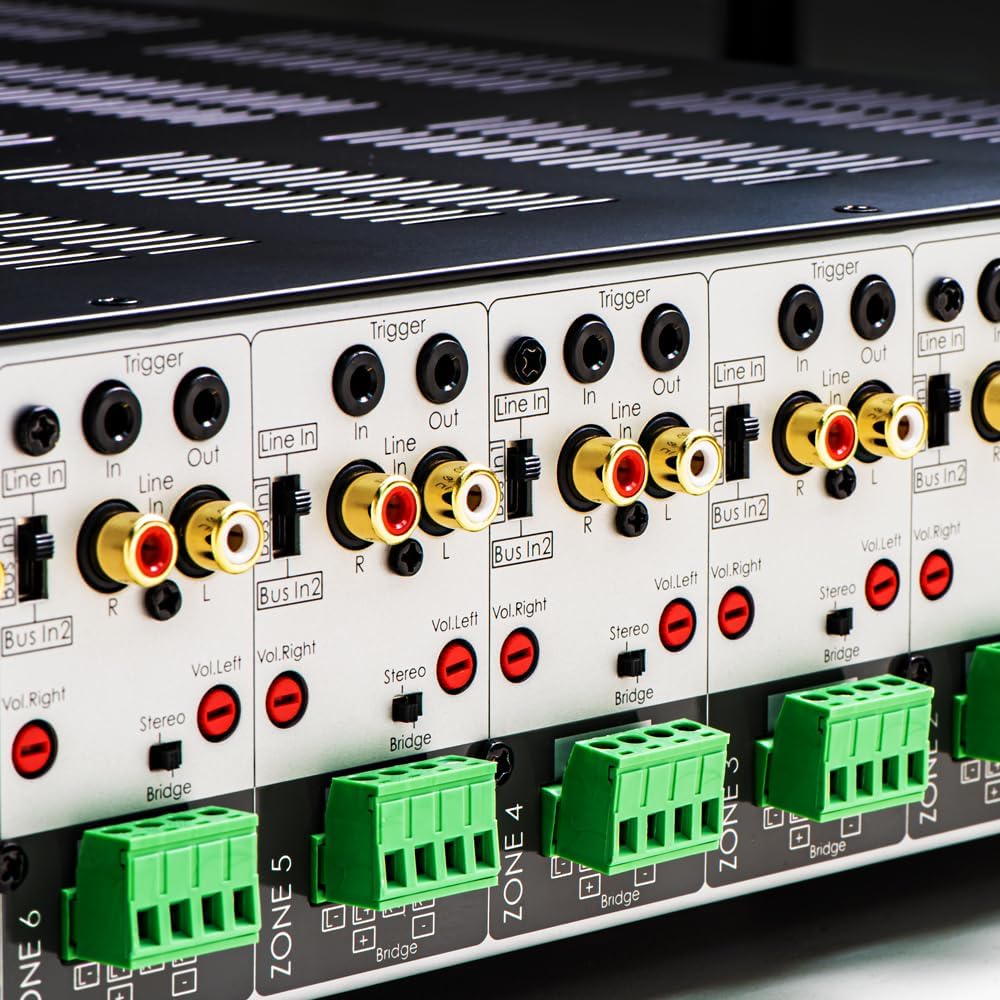
Isithombe 3.1: Okuningiliziwe view of the rear panel input and output connections.
- Imiphumela Yesipikha: Connect your speakers to the corresponding zone terminals. Ensure correct polarity (+ to + and - to -). The amplifier supports both 4-ohm and 8-ohm speakers. For bridged mode operation, refer to section 4.3.
- Line Inputs (RCA): Each zone has a dedicated stereo RCA Line In. Connect your audio sources (e.g., pre-amplifier, media player) to these inputs.
- Bus Inputs (RCA): I amplifier features two stereo Bus Inputs (Bus In 1, Bus In 2). These allow a single audio source to be distributed to multiple zones.
- Imiphumela Yomugqa (RCA): Each zone also has a stereo RCA Line Out, allowing the audio signal from that zone to be passed to another ampi-lifier noma idivayisi yomsindo.
- Qalisa Ukungena/Uphume: The 12V Trigger In allows the amplifier to be turned on/off by an external device. The 12V Trigger Out can be used to control other devices.
- Ukufaka Amandla we-AC: Connect the supplied power cord to the AC IN receptacle and then to a suitable wall outlet.

Isithombe 3.2: Okuningiliziwe view of Bus inputs and Trigger connections on the rear panel.
4. Iziqondiso Zokusebenza
4.1 Vula/Vala amandla
Press the main power button on the front panel to turn the amplifier on or off. A red LED indicator will illuminate when the unit is powered on.

Image 4.1: Front panel power button.
4.2 Zone Control
Each of the 8 zones has a dedicated button on the front panel. Pressing a zone button will activate or deactivate that specific audio zone. The corresponding LED will indicate the zone's status.

Image 4.2: Front panel zone selection buttons.
4.3 Input Selection and Volume Adjustment
On the rear panel, each zone features switches for input selection and rotary controls for volume adjustment:
- Isikhethi sokufaka: A slide switch allows you to select the audio input for each zone: Umugqa ngaphakathi (dedicated input for that zone), Bus In 1, noma Bus In 2.
- Izilawuli zevolumu: Separate rotary controls for Left and Right channels (Vol. Left, Vol. Right) allow for precise volume balancing within each zone.
- Stereo/Bridge Switch: A switch allows you to configure the zone for stereo operation or bridged mono operation. In bridged mode, two amplifier channels combine to deliver higher power to a single speaker. Ensure the speaker impedance is appropriate for bridged mode (typically 8 ohms minimum).
4.4 Audio Sensing
I amplifier incorporates an audio sense feature that automatically activates a zone when an input signal is detected and turns it off after a period of no signal. This helps conserve power and prolong the unit's lifespan.

Isithombe 4.3: Eksample of multi-zone audio distribution with the ampokokuphila.
5. Isondlo
The OSD Audio MX1680 GEN2 amplifier requires minimal maintenance. Follow these guidelines to ensure optimal performance and longevity:
- Ukuhlanza: Periodically wipe the exterior surfaces with a soft, dry cloth. Do not use liquid cleaners or aerosol sprays, as they may damage the finish or internal components.
- Ukungenisa umoya: Ensure that the ventilation openings on the top and sides of the unit remain clear of dust and obstructions. Dust accumulation can impede airflow and lead to overheating.
- Izixhumanisi: Occasionally check all cable connections to ensure they are secure and free from corrosion. Loose connections can lead to signal loss or degradation.
- Isitoreji: Uma ugcina i- amplifier for an extended period, disconnect it from power and store it in a cool, dry place, away from direct sunlight and extreme temperatures.
6. Ukuxazulula izinkinga
If you experience issues with your MX1680 GEN2 amplifier, consult the following troubleshooting guide. For problems not resolved here, please contact OSD Audio support.
| Inkinga | Imbangela Engenzeka | Isixazululo |
|---|---|---|
| Awekho amandla | Intambo kagesi inqanyuliwe; Indawo yokukhipha ugesi inephutha; Ampi-fyuzi ye-lifier evuthelwe | Check power cord connection; Test outlet with another device; Contact service for fuse replacement. |
| No sound from a zone | Zone not activated; Incorrect input selected; Source device off/muted; Speaker wires loose/incorrectly connected; Volume too low | Press the zone button on the front panel; Verify input selector switch position; Check source device; Inspect speaker connections; Adjust zone volume controls. |
| Umsindo ohlanekezelwe | Input signal too high; Speaker impedance mismatch; Faulty speaker cable; Ampukushisa ngokweqile | Reduce source device output level; Ensure correct speaker impedance (4 or 8 ohms, or 8 ohms for bridged); Check speaker cables; Ensure proper ventilation. |
| Amplifier shuts off unexpectedly | Overheating; Short circuit in speaker wiring; Protection circuit activated | Ensure proper ventilation; Check all speaker wiring for shorts; Allow unit to cool down before restarting. |
7. Imininingwane
| Isici | Ukucaciswa |
|---|---|
| Inombolo Yemodeli | MX1680-GEN2 |
| Iziteshi | 16 Channels (8 Zones) |
| Okokukhipha Amandla (4 Ohms) | 80 Watts per channel (1KHz) |
| Okokukhipha Amandla (8 Ohms) | 50 Watts per channel (1KHz) |
| AmpLifier Ikilasi | Ikilasi D |
| Ubukhulu bomkhiqizo (L x W x H) | 16.81 x 16.14 x 3.46 amayintshi |
| Isisindo sento | 23 amakhilogremu |
| I-Rack Mountable | Yes (2U, hardware included) |
| Umkhiqizi | Umsindo we-OSD |
| Usuku Lokuqala Olutholakalayo | Januwari 31, 2020 |
8. Ulwazi Lwewaranti
Warranty information for the OSD Audio MX1680 GEN2 amplifier is typically provided with your purchase documentation or can be found on the official OSD Audio webisayithi. Sicela ubheke lezi zinsiza ukuthola imininingwane mayelana nokumbozwa kwewaranti, imigomo, kanye nemibandela.
9. Ukusekela
For technical assistance, product inquiries, or service requests, please contact OSD Audio customer support. You can typically find contact information, including phone numbers and email addresses, on the official OSD Audio webindawo:
Please have your model number (MX1680-GEN2) and purchase details ready when contacting support.