
Isingeniso
The August Audar Smart Band KERi is a versatile health and fitness tracker designed to monitor various aspects of your well-being. This manual provides detailed instructions for setting up, operating, maintaining, and troubleshooting your device to ensure optimal performance and a seamless user experience. Please read this manual thoroughly before using your Smart Band.
Setha
1. Charging the Smart Band
Before initial use, fully charge your Audar Smart Band KERi. The device features a convenient integrated USB charger. Simply remove the strap from one end of the tracker to reveal the USB connector.

Image: The Audar Smart Band KERi being plugged into a USB port for charging. The image highlights the integrated USB connector on the device.

Isithombe: A enemininingwane view of the Audar Smart Band KERi's integrated USB charging port, showing how it connects to a power source.
- Connect the USB connector to any standard USB charging port (e.g., computer, USB wall adapter).
- Inkomba yebhethri esikrinini izobonisa ukuqhubeka kokushaja.
- A full charge can provide up to 30 days of battery life.
2. Installing the Audar App
To unlock the full potential of your Smart Band and view your health data, download the official Audar app on your smartphone.
- Scan the QR code provided in the product packaging or search for "Audar" in your device's app store.
- The app is compatible with both Android and iPhone devices.

Image: Screenshot of the Audar app interface, displaying health data and showing icons for Google Play and Apple App Store downloads.
3. Ukumatanisa Nomakhalekhukhwini Wakho
- Qinisekisa ukuthi i-Bluetooth ivuliwe ku-smartphone yakho.
- Open the Audar app and follow the on-screen instructions to search for and connect to your KERi Smart Band.
- Confirm the pairing request on both your phone and the Smart Band if prompted.
4. Ukucushwa Kwasekuqaleni
- Once paired, the app will guide you through setting up your personal profile, including age, height, weight, and gender, for accurate data tracking.
- Synchronize the time and date with your phone.
Imiyalelo yokusebenza
1. Ukuhamba Okuyisisekelo
The Audar Smart Band KERi features a color touchscreen display for easy navigation.
- Thepha: To select an option or wake the screen.
- Swayipha: To scroll through different menus and data screens.
2. Ukulandelela Umsebenzi
The Smart Band automatically tracks your daily activity.

Image: A person running outdoors with the Audar Smart Band KERi on their wrist, showing the display with steps, distance, and calorie data.
- Izinyathelo: Counts the number of steps taken throughout the day.
- Ibanga: Estimates the distance covered based on your steps and profile idatha.
- Amakhalori: Calculates calories burned during activity.
- Ukulandelwa kwe-GPS: When connected to your smartphone, the app can use your phone's GPS to map your route during outdoor activities.
3. Ukuqapha Impilo
The KERi Smart Band provides continuous and on-demand health monitoring.
- Isiqaphi sezinga lenhliziyo: Measures your heart rate in real-time. Access this feature from the band's menu or through the app.
- I-Blood Pressure Monitor: Provides an estimate of your blood pressure. For accurate medical readings, consult a healthcare professional.
- I-Blood Oxygen Monitor: Ikala amazinga akho okugcwala komoyampilo egazini.
- Isiqapha Sokulala: Automatically tracks your sleep patterns, including deep sleep, light sleep, and wake times. View detailed analysis in the Audar app.
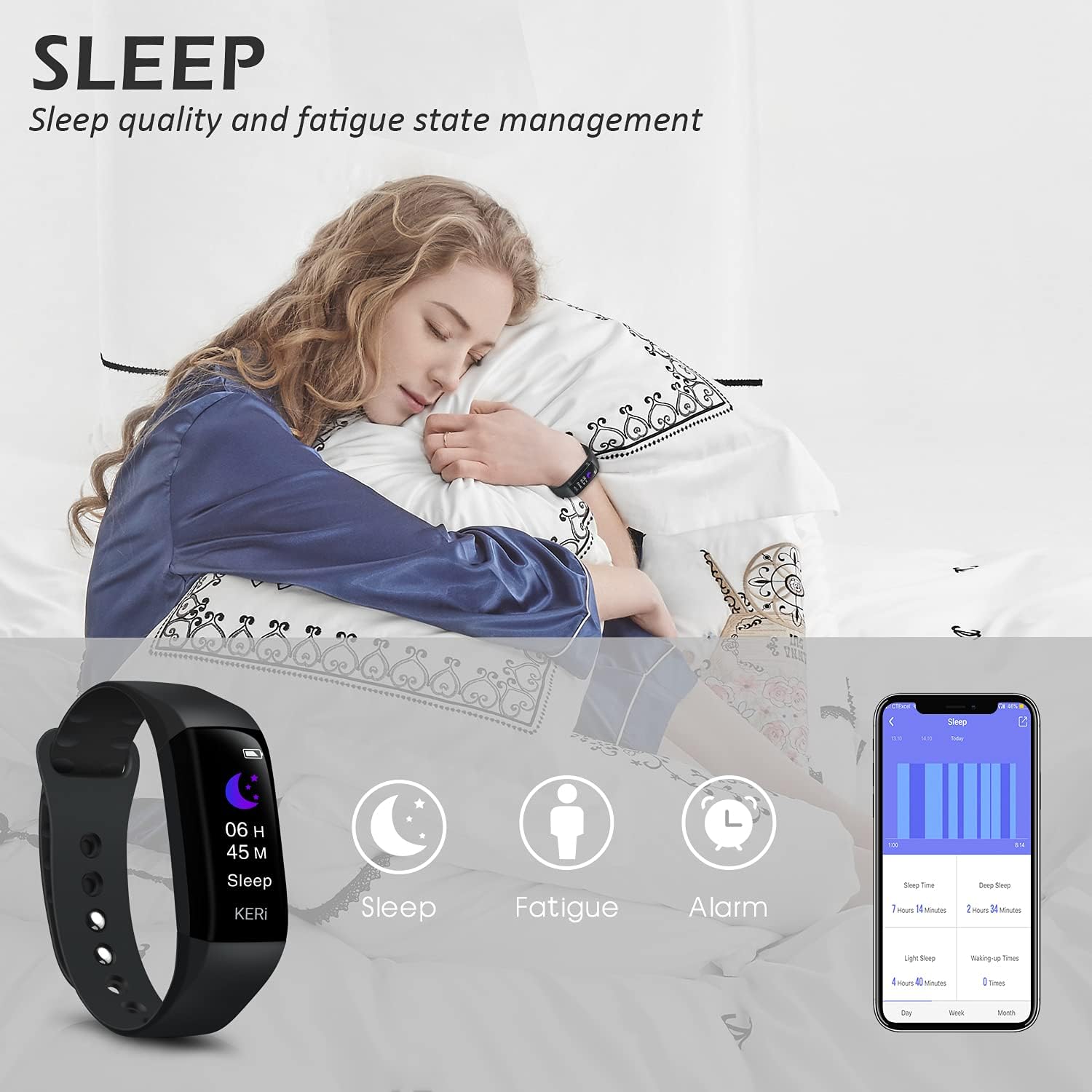
Image: A person sleeping with the Audar Smart Band KERi on their wrist, showing the band's display indicating sleep duration and an accompanying smartphone app displaying sleep analysis.
4. Izaziso
Receive alerts directly on your wrist when connected to your smartphone.

Image: A close-up of a wrist wearing the Audar Smart Band KERi, with the screen showing an incoming call notification.
- Izaziso Zezingcingo: Displays incoming call notifications.
- Izaziso Zomlayezo: Shows notifications for SMS, WhatsApp, Messenger, and other selected apps.
- Configure which app notifications you wish to receive through the Audar app settings.
5. Izici Ezengeziwe
- Remote Camera Control (Shake Shooting): Use the band to remotely trigger your smartphone's camera by shaking your wrist.
- Thola Ucingo Lwami: Activate this feature from the band to make your paired phone ring, helping you locate it.
- Iwashi eline alamu: Set silent vibrating alarms through the app.
- CareMate Function: Share your health data with family members through the app, allowing them to monitor your well-being remotely.

Image: Screenshots of the Audar app demonstrating the CareMate function, showing how users can subscribe to and view family members' health data.
Isondlo
1. Ukuhlanza
- Regularly clean your Smart Band and strap to prevent skin irritation and maintain device hygiene.
- Sula ucingo ngento ethambile, damp indwangu. Gwema ukusebenzisa amakhemikhali anokhahlo noma izihlanzi ezilumayo.
- Qinisekisa ukuthi abathintwayo abashajayo bahlanzekile futhi bomile ngaphambi kokushaja.
2. Ukumelana Namanzi
The Audar Smart Band KERi is IP67 waterproof.

Image: The Audar Smart Band KERi being splashed with water, illustrating its IP67 waterproof capability. Icons for heart rate, calories, steps, distance, SMS alerts, and blood oxygen are also visible.
- It is resistant to rain, sweat, and can be submerged up to 1 meter underwater for a limited time.
- It is suitable for showering and swimming in shallow water.
- Avoid prolonged exposure to hot water, steam, or high-velocity water.
3. Isitoreji
- Gcina idivayisi endaweni epholile, neyomile uma ingasetshenziswa.
- Gwema amazinga okushisa aphezulu.
Ukuxazulula inkinga
If you encounter issues with your Audar Smart Band KERi, refer to the following common solutions:
| Inkinga | Imbangela Engenzeka | Isixazululo |
|---|---|---|
| Device does not turn on or respond | Ibhethri eliphansi | Shaja idivayisi okungenani imizuzu engama-30. |
| Ayikwazi ukubhanqa ne-smartphone | Bluetooth off, app issue, device out of range | Ensure Bluetooth is on. Restart phone and band. Reinstall app. Move band closer to phone. |
| Ukufundwa kwezempilo okungalungile | Improper fit, movement during measurement, sensor obstruction | Ensure band is snug but comfortable. Remain still during measurements. Clean sensor on back of band. |
| No data synchronization to app | Bluetooth connection lost, app not running in background | Check Bluetooth connection. Ensure app has necessary permissions and is running. Manually sync from app. |
| Impilo yebhethri emfushane | Frequent notifications, continuous monitoring, old battery | Reduce notification frequency. Disable continuous monitoring for certain features. Ensure full charge. |
If the problem persists, please refer to the support section for further assistance.
Imininingwane

Image: A diagram illustrating the dimensions of the Audar Smart Band KERi, including screen size and band length.
| Isici | Imininingwane |
|---|---|
| Igama Lemodeli | KERi |
| Ibhrendi | Agasti |
| Usayizi Wesikrini | 0.96 amayintshi |
| Uhlobo lokubonisa | I-LCD |
| Isixazululo | 240 x 240 |
| Ubuchwepheshe bokuxhumana | I-Bluetooth, i-USB |
| Izinga Lokuxhumana Okungenantambo | I-Bluetooth |
| Isistimu esebenzayo | Android (Compatible with Android & iPhone) |
| Amamethrikhi Akaliwe | Heart Rate, Blood Pressure, Sleep Duration, Blood Oxygen |
| Izici ezikhethekile | Alarm Clock, Calorie Tracker, Notifications, GPS (via phone), Remote Camera Control |
| Izinga Lokumelana Namanzi | IP67 (Waterproof up to 1 meter) |
| Uhlobo Lweseli Yebhethri | I-Lithium Polymer |
| Impilo Emaphakathi Yebhethri | Kufika ezinsukwini ezingama-30 |
| Uhlobo Lwempahla Yebhendi | Rubber or Silicone |
| Uhlobo Lwezinto Zekesi | I-Ceramic |
| Isisindo sento | 29 amagremu |
| Ubukhulu bento | 25.8 x 2.2 x 1.3 amasentimitha |
| Ubude bebhendi | 130 - 190 Millimetres |
| Umbala | Mnyama |
Ulwazi Lwewaranti
For detailed warranty information regarding your August Audar Smart Band KERi, please refer to the warranty card included in your product packaging or visit the official August webindawo. Imigomo nemibandela yesiqiniseko ingahluka ngendawo nomthengisi.

Image: The contents of the Audar Smart Band KERi product box, showing the smart band, charging cable, and instruction manuals.
Ukwesekwa Kwamakhasimende
If you require further assistance or have questions not covered in this manual, please contact August customer support through one of the following channels:
- Ukusekelwa Kwe-inthanethi: Visit the official August webiwebhusayithi yemibuzo evame ukubuzwa, izihloko zokusekela, kanye namafomu okuxhumana.
- Usekelo lwe-imeyili: Refer to your product packaging or the August webisayithi lekheli le-imeyili lesevisi yamakhasimende.
- Isitolo somkhiqizo: Ungavakashela futhi August Brand Store ukuze uthole ulwazi olwengeziwe lomkhiqizo nezinsiza zokusekela.