
Isingeniso
Welcome to the user manual for your YunLone ToyZoom Kids Digital Camera. This camera is designed to be a fun and educational tool for children, allowing them to capture their world through photos and videos. Featuring a 2.4-inch LCD screen, 24MP photo resolution, and 1080P HD video recording, it's equipped with a dual lens for both front-facing shots and selfies. Its durable, child-safe silicone material ensures it can withstand active play, making it an ideal companion for young photographers.

Figure 1: YunLone ToyZoom Kids Digital Camera and accessories.
Okuqukethwe Kwephakheji
Sicela uhlole iphakheji ukuze uqinisekise ukuthi zonke izinto zikhona:
- YunLone ToyZoom Kids Digital Camera
- Rechargeable Battery (pre-installed or separate)
- Ikhadi le-MicroSD elingu-32GB
- Ikhebula le-USB
- Lanyard
- Cartoon Stickers
- Incwadi Yomsebenzisi (le dokhumenti)
Umkhiqizo Uphelileview
Zijwayeze izingxenye zekhamera kanye nezilawuli zayo.
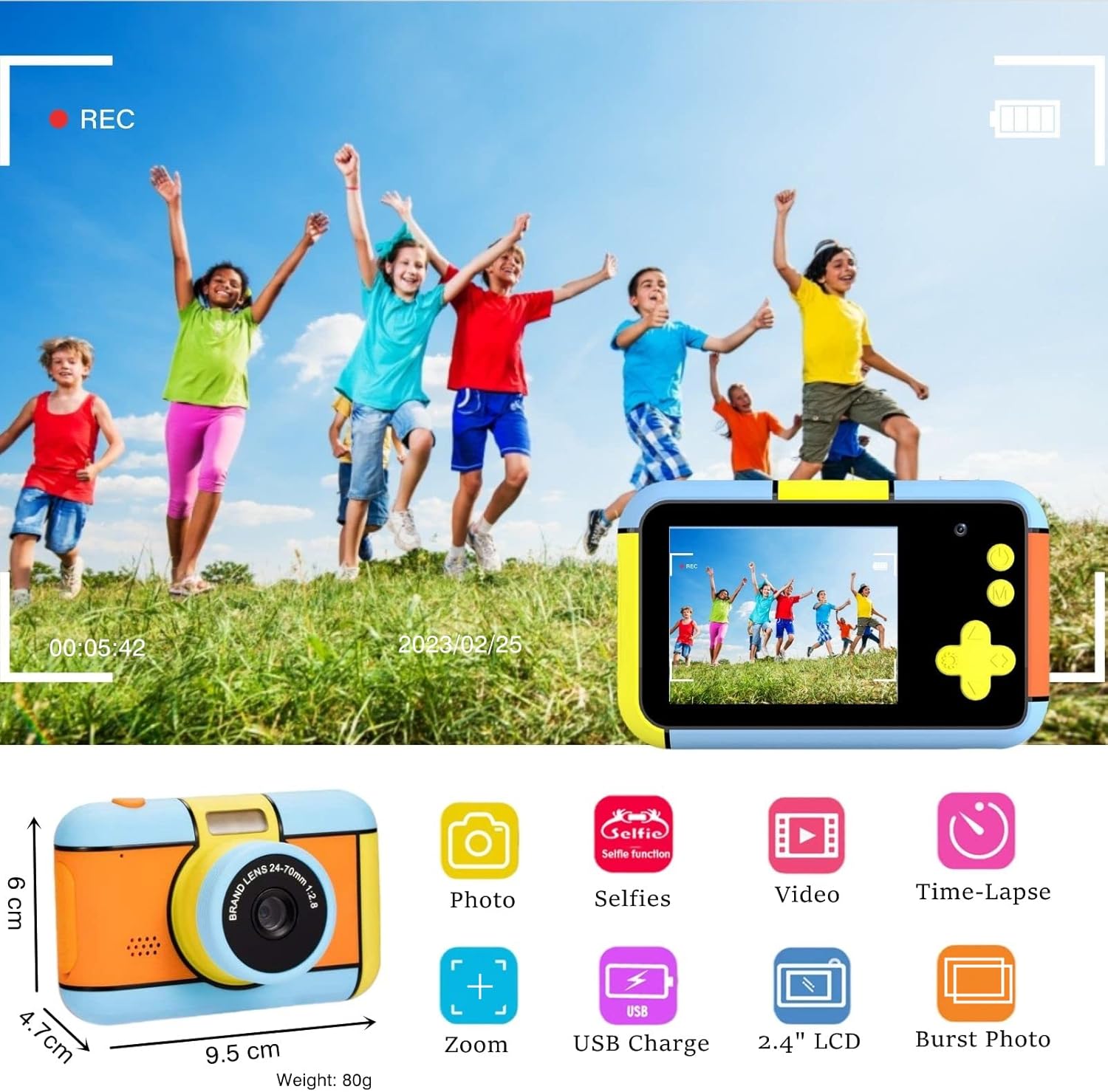
Figure 2: Camera features and dimensions. The camera measures approximately 9.5 cm in length, 6 cm in height, and 4.7 cm in depth, weighing 80g.

Umfanekiso 3: Uhlangothi view showing the MicroSD card slot and USB port, and the 2.4-inch HD LCD screen.
Izingxenye Ezibalulekile:
- Ilensi Engaphambili: For standard photo and video capture.
- Ilensi yangemuva: For selfie mode.
- 2.4-inch HD LCD Screen: Ngoba viewing photos, videos, and navigating menus.
- Inkinobho yamandla: To turn the camera on or off.
- Inkinobho Yokuvala/Kulungile: To take photos, start/stop video recording, or confirm selections.
- Izinkinobho Zokuzulazula (Phezulu, Phansi, Kwesokunxele, Kwesokudla): For menu navigation and zoom control.
- Inkinobho Yemenyu: To access camera settings and modes.
- Inkinobho yokudlala: Ukwenza kabushaview izithombe namavidiyo athathwe.
- Isikhala Sekhadi le-MicroSD: Ukufaka ikhadi lememori.
- Imbobo ye-USB: For charging and connecting to a computer.
Setha
1. Ukushaja Ikhamera
Before first use, fully charge the camera. Connect the provided USB cable to the camera's USB port and the other end to a USB power adapter (not included) or a computer's USB port. The charging indicator light will show the charging status. A full charge typically takes a few hours.
2. Ukufaka Ikhadi Le-MicroSD
The camera requires a MicroSD card to store photos and videos. Locate the MicroSD card slot on the side of the camera (refer to Figure 3). Gently insert the 32GB MicroSD card into the slot until it clicks into place. Ensure the card is inserted in the correct orientation.
3. Ukuvula/Ukucisha
To turn on the camera, press and hold the Power button for a few seconds. The LCD screen will light up. To turn off the camera, press and hold the Power button again until the screen shuts down.
Imiyalelo yokusebenza
1. Ukuthatha Izithombe
- Vula ikhamera.
- Ensure the camera is in photo mode (usually the default upon startup). If not, navigate to photo mode using the menu buttons.
- Hlela isithombe sakho usebenzisa isikrini se-LCD.
- Press the Shutter/OK button to take a picture.
2. Ukuqopha amavidiyo
- Vula ikhamera.
- Navigate to video recording mode using the menu buttons.
- Press the Shutter/OK button once to start recording. A red recording indicator will appear on the screen.
- Cindezela inkinobho ethi Shutter/OK futhi ukuze uyeke ukurekhoda.
3. Selfie Mode (Dual Lens)
This camera features a dual lens, allowing for easy selfies.
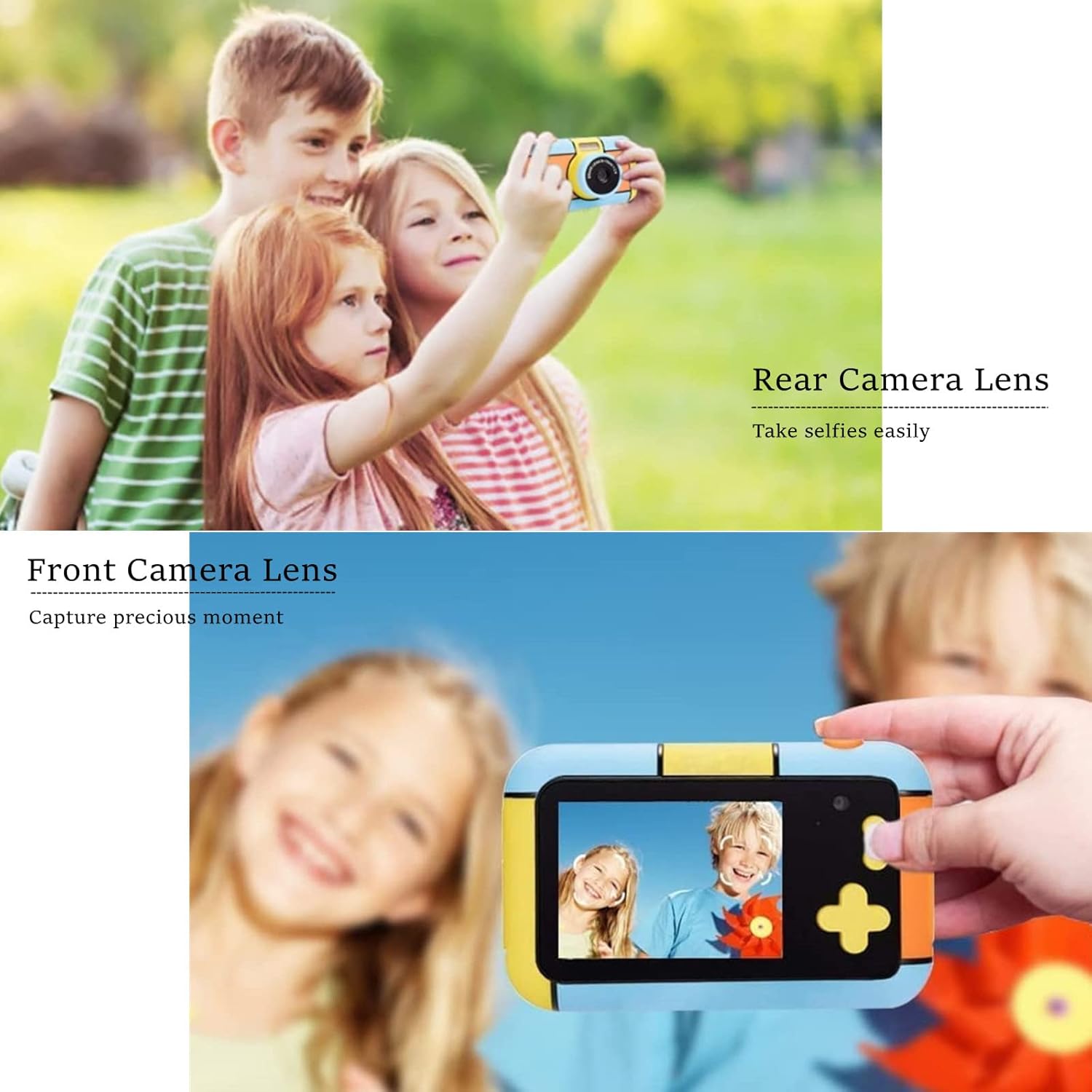
Figure 4: Demonstrating the dual lens functionality for selfies and standard photos.
To switch between the front and rear lenses, use the designated button or menu option (refer to the on-screen prompts or camera interface). Once in selfie mode, you can frame yourself and others using the LCD screen and capture photos or videos as usual.
4. Ukudlala
Kuya view izithombe namavidiyo akho aqoshiwe:
- Cindezela inkinobho Dlala.
- Use the Left/Right navigation buttons to scroll through your media.
- Press the Shutter/OK button to view ividiyo.
- Press the Playback button again to exit playback mode.
5. Menu Navigation and Special Functions
Press the Menu button to access various settings and creative modes. Use the navigation buttons to select options and the Shutter/OK button to confirm.
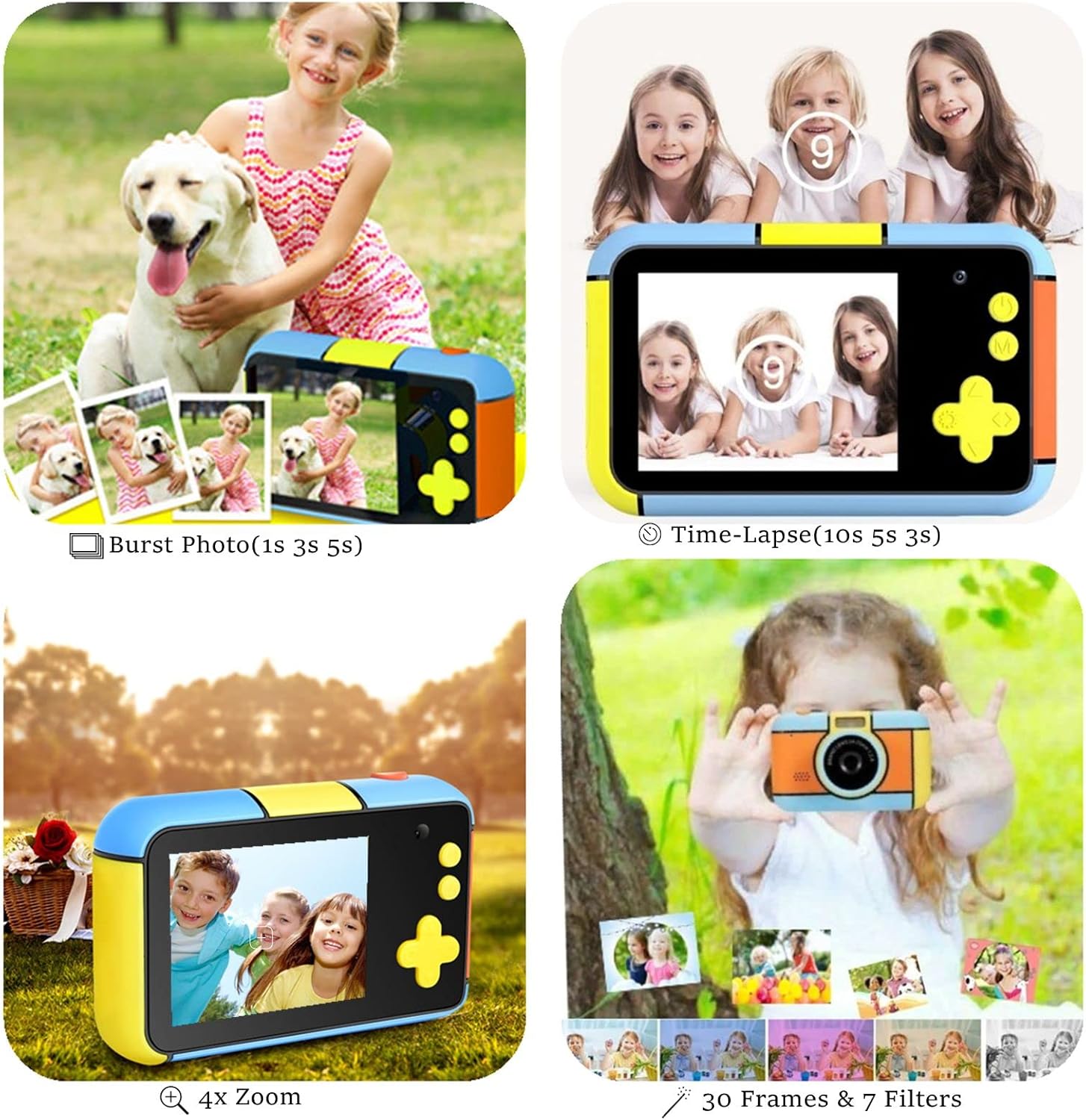
Figure 5: Creative features including Burst Photo, Time-Lapse, Zoom, and various frames and filters.
- Izilungiselelo zesithombe: Adjust resolution, quality, and other photo-specific options.
- Izilungiselelo zevidiyo: Adjust video resolution (e.g., 1080P).
- Filters & Frames: Apply fun filters and decorative frames to your photos (30 photo stickers and 7 filters available).
- Isikhathi seqile: Set the camera to take photos at set intervals (e.g., 3s, 5s, 10s).
- Isithombe se-Burst: Capture multiple photos in quick succession (e.g., 1s, 3s, 5s intervals).
- Sondeza: Use the navigation buttons to digitally zoom in or out (up to 4X zoom).
- Autofocus & Face Detection: The camera features automatic focus and can detect smiling faces for easier capture.
6. Ixhuma Kukhompyutha
To transfer photos and videos to a computer:
- Qinisekisa ukuthi ikhamera icishiwe.
- Xhuma ikhamera kukhompuyutha yakho usebenzisa ikhebula le-USB elihlinzekiwe.
- The camera should appear as a removable disk drive on your computer.
- Open the camera's folder to access and copy your media files.
Isondlo
Ukuhlanza
Wipe the camera body with a soft, dry cloth. For the lens and screen, use a specialized lens cleaning cloth. Do not use liquid cleaners or abrasive materials.
Isitoreji
When not in use, store the camera in a cool, dry place away from direct sunlight and extreme temperatures. Remove the MicroSD card if storing for extended periods.
Ukunakekela Ibhethri
The camera uses a built-in Lithium-ion battery. To prolong battery life:
- Gwema ukukhipha ibhethri ngokugcwele njalo.
- Charge the camera regularly, even if not in frequent use.
- Do not expose the camera to extreme heat or cold.
Ukuxazulula inkinga
| Inkinga | Imbangela Engenzeka | Isixazululo |
|---|---|---|
| Ikhamera ayivuli. | Ibhethri liphelile. | Shaja ikhamera usebenzisa intambo ye-USB enikeziwe. |
| Awukwazi ukuthatha izithombe/amavidiyo. | MicroSD card is full or not inserted correctly. | Check if the MicroSD card is properly inserted. Delete some files or replace the card if full. |
| Ikhamera iyama noma ayiphenduli. | Iphutha lesoftware. | Cindezela futhi ubambe inkinobho yamandla imizuzwana eyi-10-15 ukuze uphoqe ukuqala kabusha. |
| Ayikwazi ukuxhuma kukhompuyutha. | Incorrect cable or driver issue. | Ensure you are using the original USB cable. Try a different USB port on your computer. |
| Ikhwalithi yesithombe esibi. | Ilensi ingcolile noma izimo zokukhanya azizinhle. | Clean the lens. Ensure adequate lighting when taking photos. |
Imininingwane
| Isici | Imininingwane |
|---|---|
| Inombolo Yemodeli | D7 |
| Ubukhulu bomkhiqizo | 10 x 6 x 5 cm |
| Isisindo sento | awu 20g |
| Bonisa Isikrini | I-LCD ye-HD engu-2.4 intshi |
| Ukulungiswa Kwesithombe | 24MP (Front and Rear Lenses) |
| Ukulungiswa kwevidiyo | 1080P / 30fps |
| Ubuchwepheshe benzwa yesithombe | I-CMOS |
| Isekelwe File Ifomethi | MP4 |
| I-Optical Zoom | 4.0x |
| Uhlobo Lwebhethri | Lithium-ion (610mAh mentioned in image) |
| Isitoreji | Supports MicroSD card (32GB included) |
| Okubalulekile | I-Silicone, Ipulasitiki |
Iwaranti kanye Nokusekela
For specific warranty details and customer support, please refer to the documentation included with your purchase or visit the official YunLone webindawo. Gcina irisidi lakho lokuthenga njengobufakazi bokuthenga kwanoma yiziphi izimangalo zewaranti.
If you encounter any issues not covered in this manual, please contact YunLone customer service for assistance.