
Isingeniso
This manual provides instructions for the Extreme Networks Summit X460-24p, a high-performance, managed Layer 3 Ethernet switch designed for enterprise and data center environments. It features 24 Gigabit Ethernet ports with Power over Ethernet (PoE) capabilities, along with additional SFP and shared Gigabit SFP ports for flexible connectivity.
Ulwazi Lokuphepha
Imihlahlandlela yokuphepha
- Always disconnect all power supply inputs before removing any panel for servicing.
- This device contains a Class 1 Laser product. Avoid direct eye exposure to beam.
- Qinisekisa ukubeka phansi okufanele ngesikhathi sokufakwa.
- Refer to the installation manual for power cord selection and additional compliance markings.
Okuqukethwe Kwephakheji
Yini EseBhokisini
- Extreme Networks Summit X460-24p Switch
- Intambo Kagesi (eqondene nesifunda)
- Ikhithi yokufaka ama-rack
- Amadokhumenti (leli bhukwana)
Umkhiqizo Uphelileview
The Summit X460-24p switch is designed for efficient network management and high-speed data transfer.
Iphaneli yangemuva

This image displays the rear panel of the Summit X460-24p switch, highlighting the power input, fan modules, and the SummitStack ports. The overall chassis is purple.

A enemininingwane view of the SummitStack ports (Stack Port 1 and Stack Port 2) located on the rear of the switch, used for stacking multiple switches.
Ilebula Lomkhiqizo
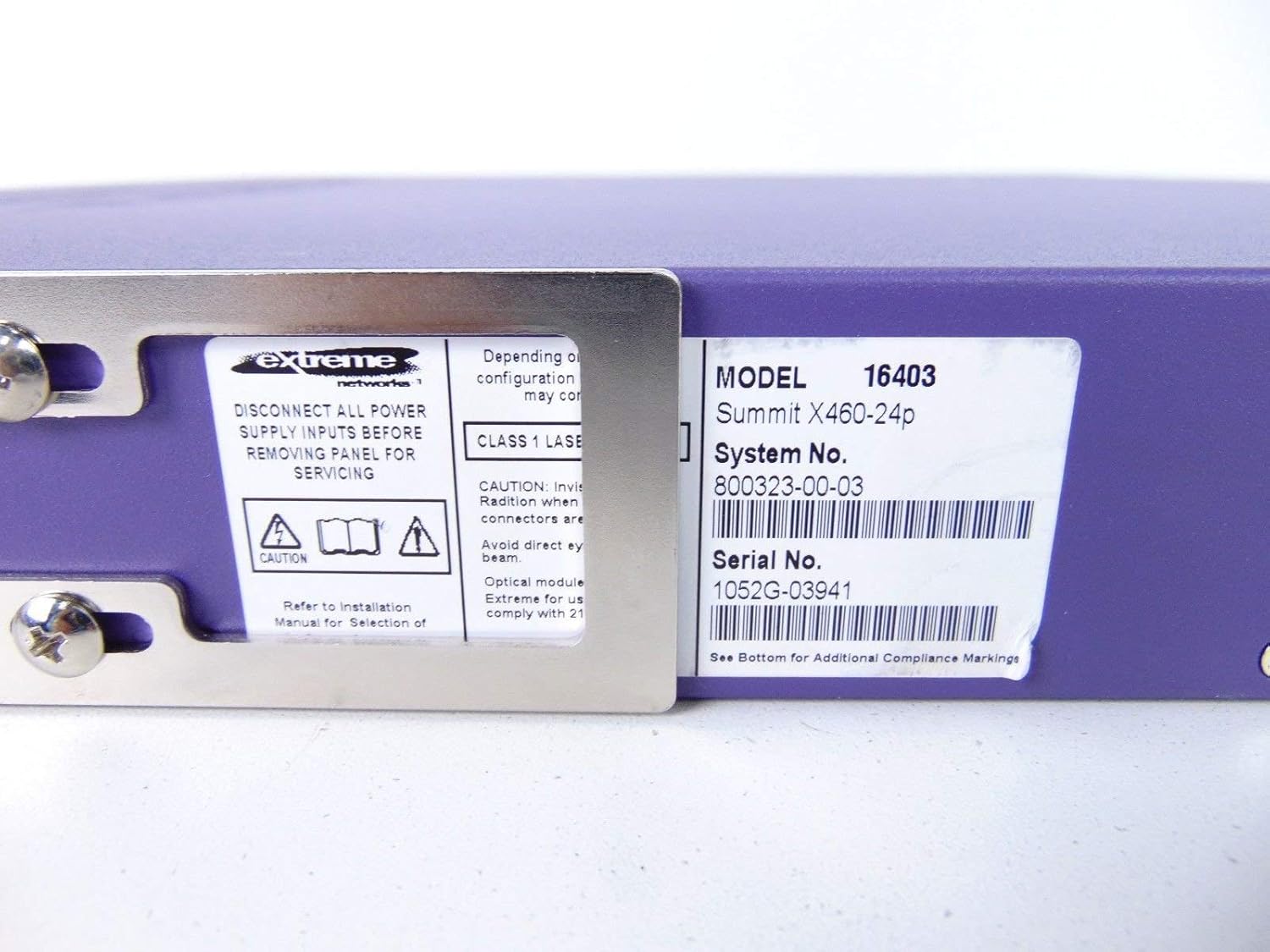
This label provides critical identification information for the switch, including Model: 16403, Summit X460-24p, System No.: 800323-00-03, and Serial No.: 1052G-03941.
Izingxenye Ongazikhethela

This image shows the label for an optional Extreme Networks Summit 750W PoE AC Power Supply Unit (PSU), Model 10931, System No. 800382-00-03, Serial No. 1053A-41986.

This image displays the label for an optional Extreme Networks SummitStack Module, Model 16419, System No. 800384-00-01, Serial No. 1122G-02565.
Setha
Umhlahlandlela wokufaka
Ukukhweza i-Rack
The Summit X460-24p is designed for standard 19-inch rack mounting. Use the provided rack-mounting kit to secure the switch in a server rack. Ensure adequate ventilation around the unit.
Amandla okuxhuma
Connect the power cord to the AC power inlet on the rear of the switch and then to a grounded electrical outlet. The switch will power on automatically.
Ixhuma Izintambo Zenethiwekhi
- Connect Ethernet cables from your network devices to the 24 10/100/1000Base-T PoE ports on the front panel.
- For uplink or fiber connections, use the SFP or shared Gigabit SFP ports.
- For stacking, connect SummitStack ports on multiple switches using appropriate stacking cables.
Initial Configuration Access
Access the switch's management interface via a console cable connected to the console port, or through a web browser if the switch has a default IP address configured. Refer to the Extreme Networks documentation for detailed initial setup procedures.
Imiyalelo yokusebenza
Ukusebenza Okuyisisekelo
Vula/Vala
The switch powers on automatically when connected to a power source. To power off, disconnect the power cord. For proper shutdown, it is recommended to use the software-based shutdown command if available.
Izinkomba ze-LED
Observe the LED indicators on the front panel for status information regarding power, system health, port activity, and PoE status. Consult the full product documentation for a detailed explanation of each LED's behavior.
Isizinda Sokuphatha
The switch can be managed via a Command Line Interface (CLI) accessible through the console port or Telnet/SSH, or through a web-based graphical user interface (GUI).
Isondlo
Ukunakekela Nokunakekela
Ukuhlanza
Keep the switch clean and free of dust. Use a soft, dry cloth for external cleaning. Do not use liquid or aerosol cleaners.
Ukuvuselelwa kwe-Firmware
Periodically check the Extreme Networks support website for firmware updates to ensure optimal performance and security. Follow the provided instructions for firmware upgrade procedures.
Amamojula Okunikezela Ngabalandeli Namandla
The switch may feature hot-swappable fan and power supply modules. Refer to the Extreme Networks documentation for instructions on replacement if necessary.
Ukuxazulula inkinga
Izinkinga Ezivamile
Awekho Amandla
- Qinisekisa ukuthi intambo kagesi ixhunywe ngokuphephile kokubili kuswishi kanye ne-outlet kagesi.
- Qinisekisa ukuthi i-outlet yamandla iyasebenza.
Port Link Down
- Check the Ethernet cable connection at both ends.
- Qinisekisa ukuthi idivayisi exhunyiwe ivuliwe futhi isebenza kahle.
- Check the port status via the management interface.
Izinkinga Zokuxhumaniseka Kwenethiwekhi
- Verify IP configuration and network settings.
- Check for conflicting IP addresses.
- Consult network diagnostics tools.
Imininingwane
Imininingwane Yezobuchwepheshe
| Isici | Incazelo |
|---|---|
| Imodeli | Summit X460-24p (Part Number: 16403) |
| Amachweba | 24 x 10/100/1000Base-T PoE+ ports, 4 x shared Gigabit SFP, 4 x SFP |
| Isendlalelo | I-Layer 3 Managed Switch |
| Ibhrendi | Amanethiwekhi Aphakeme |
| Uhlobo lwesixhumi esibonakalayo | I-PoE, i-SFP |
| Inombolo Yesistimu | 800323-00-03 |
| Inombolo yomkhiqizo | 1052G-03941 |
| I-UPC | 683332278646 |
Iwaranti kanye Nokusekela
Ulwazi Lwewaranti
This product typically comes with a 90-day limited warranty. For specific warranty terms and conditions, please refer to the official Extreme Networks warranty statement or contact your vendor.
Ukusekela kwezobuchwepheshe
For technical assistance, visit the official Extreme Networks support website or contact their customer service. Have your product model and serial number ready when seeking support.