
1. Umkhiqizo Uphelileview
The Tribesigns Adjustable C Table is a versatile and mobile furniture piece designed for various uses, including as a bedside table, sofa side table, or laptop cart. It features an adjustable height mechanism, two-tier storage shelves, and lockable rolling casters for easy movement and stability.
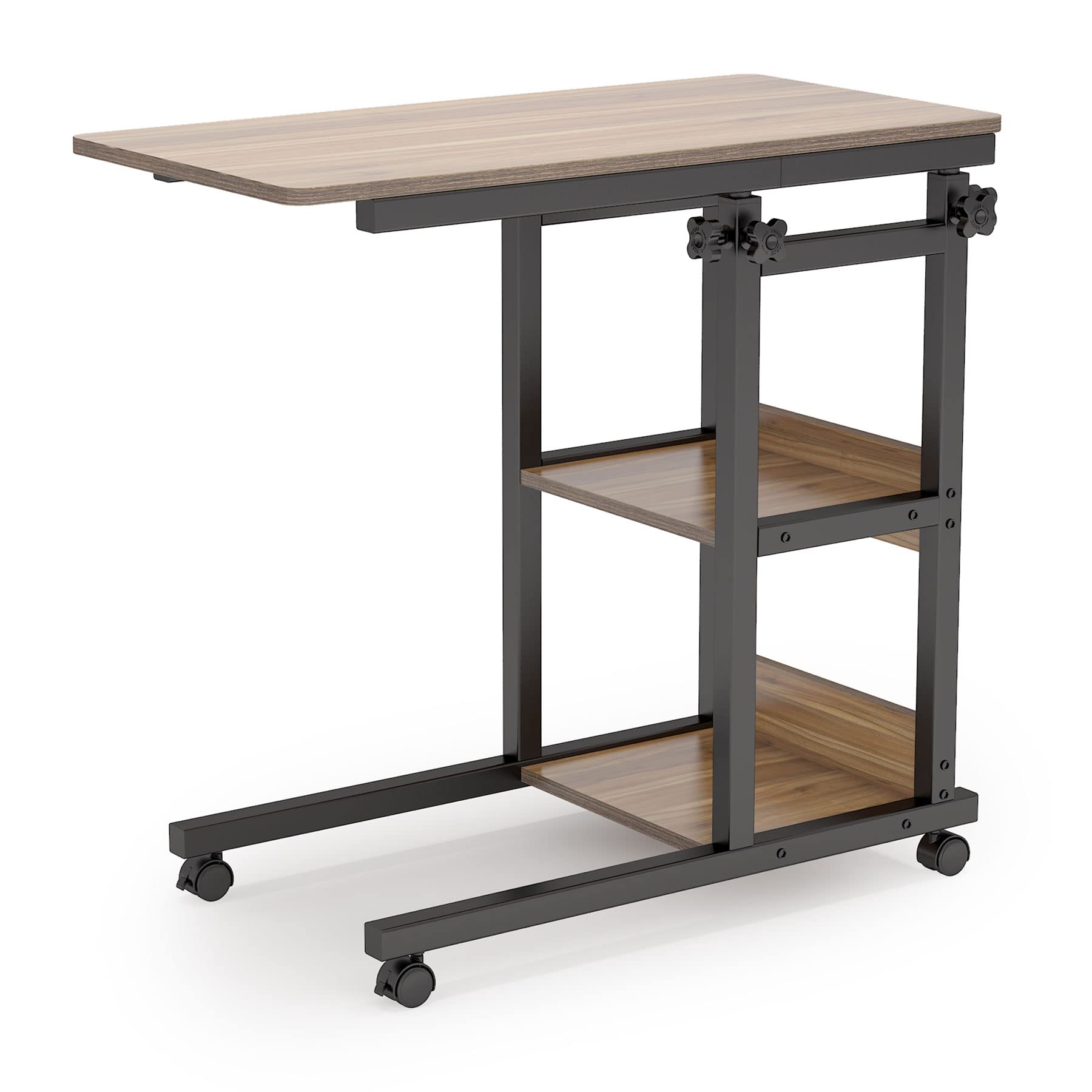
The table's C-shaped design allows it to slide easily under sofas, beds, or chairs, bringing the tabletop closer to you. The height can be adjusted to suit different needs and preferences.

2. Ulwazi Lokuphepha
- Isisindo Somthamo: Ungadluli isisindo esiphezulu esinconyiwe samakhilogremu angu-90.7 (amakhilogremu angu-200) phezulu kwetafula.
- Ukuzinza: Qinisekisa ukuthi zonke izikulufo kanye nezinamathiselo ziqiniswe kahle ngaphambi kokusebenzisa. Hlola njalo bese uqinisa kabusha njengoba kudingeka.
- Ama-Caster Locks: Always engage the caster locks when the table needs to remain stationary to prevent accidental movement.
- Ukulungisa Ubude: When adjusting the table height, ensure no items are on the tabletop that could fall or be damaged. Adjust slowly and carefully.
- Izingane: Keep small parts away from children during assembly. Do not allow children to climb on or play with the table.
3. Okuqukethwe Kwephakheji
Sicela uqinisekise ukuthi zonke izingxenye zikhona ngaphambi kokuqala ukuhlanganisa. Uma kukhona izingxenye ezingekho noma ezilimele, xhumana nokwesekwa kwamakhasimende.
- Ithebulethi
- Izingxenye Zohlaka Lwensimbi
- Storage Shelves (2)
- Casters with Brakes (4)
- I-Hardware Yomhlangano (izikulufu, amantongomane, njll.)
- Installation Tool (Allen Key, Screwdriver, Wrench)
- Umhlahlandlela Womhlangano
4. Ukusetha nokuhlanganisa
Assembly typically takes approximately 30 minutes. It is recommended that two people assemble the table for ease and safety. All necessary tools and hardware are included.
- Khipha Izingxenye: Susa ngokucophelela zonke izingxenye ephaketheni futhi uzibeke endaweni ehlanzekile, ethambile ukuvimbela imihuzuko.
- Hlanganisa i-Base Frame: Attach the horizontal support bars to the vertical frame pieces using the provided screws and tools. Ensure the C-shaped base is correctly oriented.
- Faka ama-Casters: Screw the four casters into the designated holes on the bottom of the base frame. Ensure two of the casters have locking mechanisms.
- Namathisela Amashalofu Esitoreji: Secure the two-tier storage shelves to the vertical frame using the appropriate hardware.
- Mount Tabletop Support: Attach the adjustable height mechanism to the main vertical frame.
- Ithebula Eliphephile: Place the tabletop onto the support mechanism and fasten it securely.
- Ukuhlola Kokugcina: Verify that all screws are tightened and the table is stable before use.
5. Iziqondiso Zokusebenza
5.1 Ukulungisa Ubude
The C Table features an adjustable height mechanism, allowing you to customize its height from 28.3 inches to 35.4 inches.
- Khulula amaKnobs: Locate the adjustment knobs on the vertical support poles. Turn them counter-clockwise to loosen.
- Lungisa Ubude: Phakamisa noma wehlise ngokucophelela i-tabletop ukuze ifinyelele ukuphakama okufisayo.
- Qinisa amaKnobs: Once the desired height is reached, turn the knobs clockwise firmly to secure the tabletop in place. Ensure both knobs are equally tightened for stability.


5.2 Using Rolling Casters
The table is equipped with four rolling casters, two of which have locking mechanisms, for easy mobility and secure positioning.
- Ukuhambisa Itafula: To move the table, ensure the caster locks are disengaged. Gently push or pull the table to its desired location.
- Locking the Table: To keep the table stationary, press down on the lever of the two locking casters until they click into place. This prevents unintended movement.
- Unlocking the Table: To move the table again, lift the lever on the locking casters to disengage the brake.

5.3 Ukusetshenziswa Okuvamile
The Tribesigns C Table is designed for various applications:
- I-Laptop Workstation: Use it as a convenient surface for your laptop while working from a sofa or bed.
- Snack/Meal Table: Ideal for enjoying snacks, meals, or drinks while relaxing on your couch or in bed.
- Ithebula Eliseceleni Kombhede: Provides a stable surface for books, lamps, or personal items next to your bed.
- Isitoreji: The two-tier shelves offer additional space for books, magazines, or other small items.


6. Isondlo
- Ukuhlanza: Sula i-tabletop kanye nohlaka nge-soft, damp indwangu. Gwema amakhemikhali anokhahlo noma izihlanzi ezilumayo, ezingalimaza isiphetho.
- Uthuli: Regularly dust the table to prevent buildup.
- Izibophelelo: Njalo hlola zonke izikulufu namabhawudi ukuze uqinisekise ukuthi zihlala ziqinile. Phinda uqinise uma kunesidingo ukuze ugcine uzinzo.
- Ama-Casters: Keep casters free of debris (hair, lint) to ensure smooth rolling.
7. Ukuxazulula izinkinga
- I-Table Wobbles:
Isixazululo: Ensure all assembly screws are fully tightened. Check that the table is on a flat, even surface. If the floor is uneven, consider using furniture pads to stabilize. - Height Adjustment is Stiff:
Isixazululo: Loosen the adjustment knobs slightly more before attempting to adjust the height. Ensure the vertical poles are clean and free of obstructions. Applying a small amount of silicone lubricant (avoiding contact with wood surfaces) to the sliding mechanism might help, but do so sparingly. - Casters Not Rolling Smoothly or Locking:
Isixazululo: Check casters for trapped debris (e.g., hair, carpet fibers) and remove them. Ensure the locking mechanism is fully engaged or disengaged. If casters are damaged, they may need replacement. - Izingxenye Ezilahlekile noma Ezilimele:
Isixazululo: Refer to Section 9 (Warranty & Support) for contact information to request replacement parts.
8. Imininingwane
| Isici | Ukucaciswa |
|---|---|
| Ibhrendi | Izizwe |
| Inombolo Yemodeli | I-HOGA-C0110 |
| Ubukhulu bomkhiqizo (D x W x H) | 15.7"D x 32.5"W x 28.3"H |
| I-Adjustable Height Range | 28.3" ukuya ku-35.4" |
| Isisindo sento | Amapondo ayi-28 (12.7 kg) |
| ISincomo Sesisindo Esiphezulu | Amapondo ayi-200 (90.7 kg) |
| I-Frame Material | Insimbi |
| Uhlobo Lwezinto Eziphezulu | Izinkuni Ezinobunjiniyela (Ibhodi Lezinhlayiyana ze-E1) |
| Umbala | Oak+Black |
| Inombolo Yamashalofu | 2 |
| Kudingeka Umhlangano | Yebo |
| Abantu Abanconyiwe Bokuhlangana | 2 |
9. Iwaranti & Ukusekela
Tribesigns products come with Izinyanga eziyisi-18 zokuqinisekisa ikhwalithi. If you encounter any issues with your Adjustable C Table, or if you have questions regarding assembly, parts, or operation, please contact Tribesigns customer service.
Ukuze uthole ukwesekwa, sicela uvakashele i-Tribesigns esemthethweni website or contact their customer service department through the retailer where you purchased the product. Have your model number (HOGA-C0110) and purchase date ready for faster service.
Siyabonga ngokukhetha ama-Tribesigns.