
Darkglass Electronics ANAGRAM
Darkglass Anagram Bass Multi-Effects Unit
Imaniwali yosebenzisayo
Model: ANAGRAM | Brand: Darkglass Electronics
1. Isingeniso
Thank you for choosing the Darkglass Anagram Bass Multi-Effects Unit. This device is a powerful and versatile tool designed to provide bass players with an extensive range of tonal possibilities, combining advanced digital signal processing with intuitive controls. This manual will guide you through the setup, operation, and maintenance of your Anagram unit, ensuring you get the most out of its features.
2. Izici Eziyinhloko
- NAM Integration: Paired with the groundbreaking Neural Amp Modeler (NAM) integration, ANAGRAM allows you to deploy thousands of high-quality, user-generated amp and effect models already in existence.
- Customizable Effect Blocks: With 50+ customizable effect blocks ranging from iconic Darkglass overdrives to lush reverbs and ambient delays, your tonal palette is as vast as your imagination.
- Ihlala isikhathi eside futhi iyaphatheka: Rugged anodized aluminum chassis ensures durability on the road, while a compact form factor and power via 9V input or USB-C (PD) offer unmatched portability.
- Studio-grade Sound: Pristine 32-bit/48kHz audio processing ensures pro-level clarity and low noise, while the built-in Darkglass amp and pedal models offer instant world-class tone.
- Isibonisi Sokuthinta: The high-resolution touch display provides fluid, responsive navigation as you construct your sound.
3. Umhlahlandlela wokusetha
3.1 Ukuqaqa kanye Nokuhlola
Carefully remove the Anagram unit from its packaging. Inspect the unit for any signs of damage that may have occurred during shipping. If you find any damage, contact your dealer immediately.
3.2 Ukuxhuma Amandla
The Anagram unit can be powered via a 9-12V DC, 2A power supply (center negative) or via USB-C Power Delivery (PD). Connect the appropriate power source to the designated port on the rear of the unit.

Figure 3.2.1: Rear panel of the Anagram unit, illustrating the power input, audio inputs (Input, Send, Return), audio outputs (Out 1/L, Out 2/R, Out 3/L, Out 4/R), headphone output, and MIDI In/Out ports.
3.3 Uxhumano lomsindo
- Okokufaka Ithuluzi: Connect your bass guitar to the INPUT jack using a standard 1/4-inch instrument cable.
- Okuphumayo: Xhuma i- OUT 1/L futhi OUT 2/R (XLR or 1/4-inch) to your amplifier, audio interface, or mixing console. Additional outputs (OUT 3/L, OUT 4/R) are available for more complex routing.
- I-Effects Loop: Sebenzisa i- THUMELA futhi BUYELA (1/4-inch) jacks to integrate external effects pedals into your signal chain.
- Ama-headphone: Connect headphones to the 1/8-inch headphone jack for silent practice or monitoring.
- I-MIDI: Sebenzisa i- IN-MIDI-OUT ports for MIDI control and synchronization with other devices.
4. Iziqondiso Zokusebenza
The Anagram unit features a high-resolution touch display and a combination of rotary encoders and footswitches for intuitive control.

Figure 4.1.1: Front panel of the Anagram unit, displaying a preset chain with various effect blocks and the main control knobs and footswitches.
4.1 Navigating the Touch Display
The touch display is your primary interface for configuring effects, managing presets, and accessing various functions. Tap icons and menus to navigate. Use the rotary encoders above the display for fine-tuning parameters.
4.2 Footswitch Functions
The three footswitches (A, B, C) provide hands-free control over various functions, including preset switching, tuner activation, looper control, and mode selection. Their functions can often be customized within the unit's settings.

Figure 4.2.1: The Anagram unit displaying the integrated tuner, showing pitch detection and tempo settings.
4.3 Creating and Editing Presets
The Anagram allows you to build complex signal chains using its extensive library of effect blocks. Drag and drop effects on the display to arrange them. Tap an effect block to adjust its parameters using the touch screen and rotary encoders.
4.4 Ukusebenza kwe-Looper
The built-in looper allows for recording and overdubbing audio phrases. Access the looper via the touch display or a dedicated footswitch function. Refer to the on-screen prompts for recording, playback, and clearing loops.
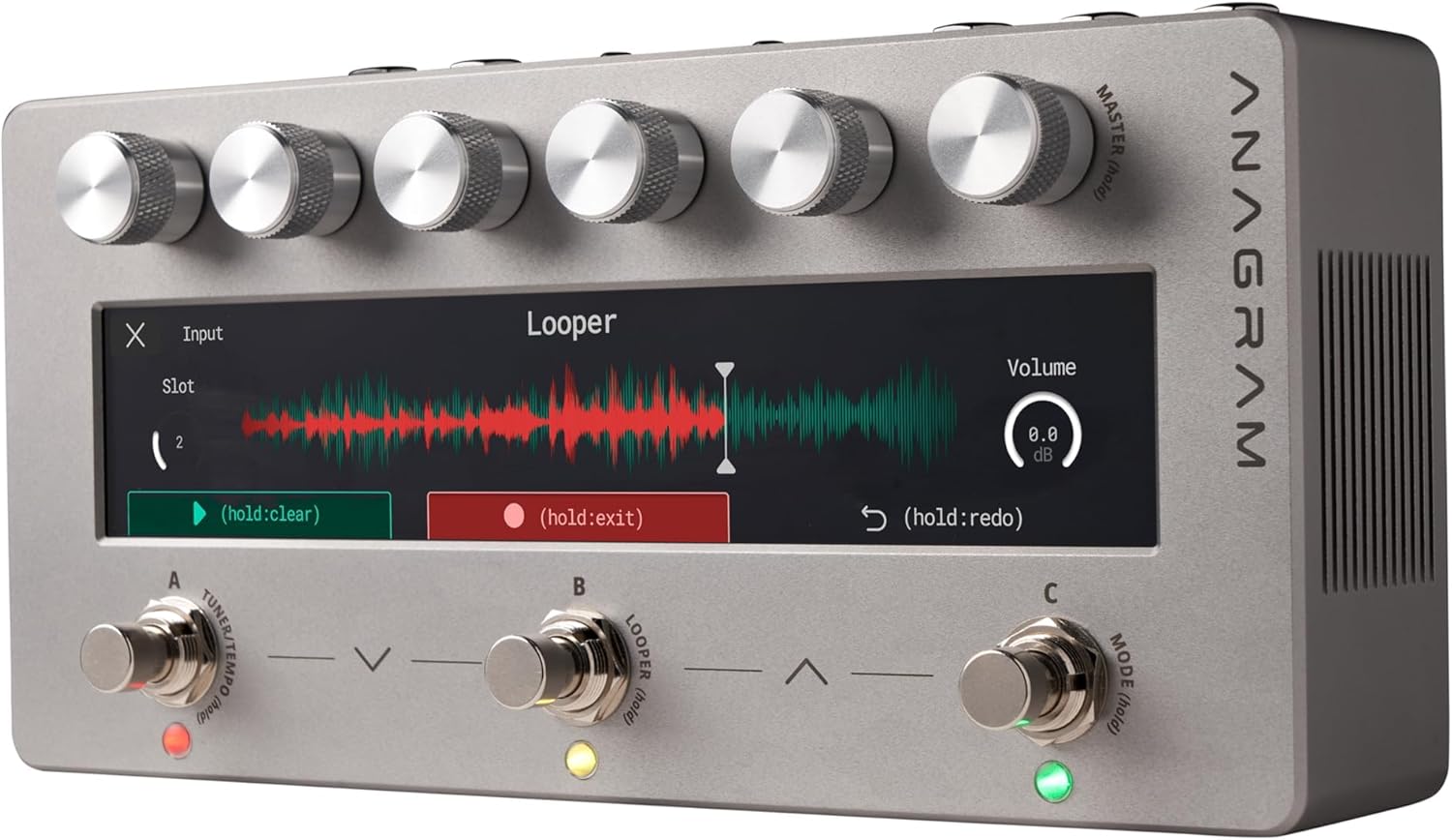
Figure 4.4.1: The Anagram unit displaying the looper interface, showing recorded waveform and volume controls.
4.5 NAM Integration
Leverage the Neural Amp Modeler (NAM) integration to load and use a vast library of user-generated amp and effect models. Consult the Darkglass software application for managing and transferring NAM models to your Anagram unit.
5. Isondlo
To ensure the longevity and optimal performance of your Darkglass Anagram unit, follow these maintenance guidelines:
- Ukuhlanza: Use a soft, dry cloth to clean the exterior of the unit. For the touch display, use a microfiber cloth specifically designed for screens. Avoid abrasive cleaners or solvents.
- Isitoreji: Gcina iyunithi endaweni epholile, eyomile ngaphandle kwelanga eliqondile, amazinga okushisa aphezulu, kanye nomswakama ophezulu.
- Ezokuthutha: When transporting the unit, use a padded case to protect it from physical shock and damage.
- Ukuvuselelwa kwe-Firmware: Periodically check the Darkglass Electronics website for firmware updates. Keeping your unit's firmware up-to-date ensures access to the latest features and bug fixes.
6. Ukuxazulula izinkinga
If you encounter issues with your Anagram unit, refer to the following common troubleshooting steps:
- Awekho Amandla: Ensure the power supply is correctly connected and providing the specified voltage (9-12V DC, 2A). Try a different power outlet or USB-C PD source.
- Awukho Umsindo: Check all audio cable connections. Ensure the input instrument is working and the output device (amp, interface) is properly connected and powered. Verify that the unit's master volume is not muted or set too low.
- Umsindo Ohlanekezelwe: Check input levels to ensure they are not clipping. Adjust gain stages within your presets. Ensure cables are not damaged.
- Isibonisi Asiphenduli: Try restarting the unit by disconnecting and reconnecting power. If the issue persists, contact support.
- Unit Freezes: Disconnect power, wait a few seconds, and reconnect. If frequent, check for available firmware updates.
For more complex issues or if troubleshooting steps do not resolve the problem, please contact Darkglass Electronics customer support.
7. Imininingwane
| Ukucaciswa | Inani |
|---|---|
| Isisindo sento | 1 amakhilogremu |
| Ubukhulu bomkhiqizo | 13.39 x 6.3 x 3.35 amayintshi |
| ASIN | B07RHZFWS2 |
| Inombolo Yemodeli Yento | I-ANAGRAM |
| Usuku Lokuqala Olutholakalayo | Mashi 3, 2025 |
| Igama Lombala | green, purple, and blue |
| Isikhombimsebenzisi se-Hardware | 1/4-intshi yomsindo |
| Ifomethi Yesiginali | I-Analog |
| Voltage | 9 volts |
| Ibhrendi | I-Darkglass Electronics |
| Isitayela | I-ANAGRAM |
| Umbala | green, purple, and blue |
8. Iwaranti kanye Nokusekela
Darkglass Electronics products are designed for reliability and performance. For information regarding warranty coverage, please refer to the warranty card included with your product or visit the official Darkglass Electronics webindawo. Gcina ubufakazi bakho bokuthenga ngezimangalo zewaranti.
8.1 Ukwesekwa Kwamakhasimende
If you require technical assistance, have questions about your Anagram unit, or need to arrange for service, please contact Darkglass Electronics customer support through their official webisayithi noma imininingwane yokuxhumana enikezwe emaphaketheni omkhiqizo wakho.
Webindawo: www.markglass.com
Amadokhumenti Ahlobene - I-ANAGRAM
 |
Darkglass Anagram Bass Multi-Effect Pedal User Manual Explore the Darkglass Anagram, a powerful multi-effect processor and pedalboard platform for bassists. Featuring a six-core DSP, extensive effects, amp modeling, and an intuitive touchscreen, it offers unparalleled flexibility and precision for live and studio use. |
 |
I-Darkglass ADAM Bass Multi-Effects Pedal Owner's Manual Hlola izici nokusebenza kwe-Darkglass ADAM bass multi-effect pedali ngale bhukwana lomnikazi elibanzi. Funda mayelana noxhumo, uchungechunge lwesignali, izilawuli, ukusetha ngaphambilini, ishuna, amandla okusebenza komsindo we-USB, kanye nokucaciswa kobuchwepheshe. |
 |
I-Darkglass Microtubes Infinity Manual: I-Programmable Series Bass Pedal Guide Imanuwali ebanzi yomsebenzisi ye-Darkglass Microtubes Infinity ehlelekayo ye-bass pedal. Ihlanganisa isiqalo esisheshayo, uxhumo, uchungechunge lwesignali, izilawuli, ukusebenza okuyisisekelo, ukumatanisa kwe-Bluetooth, isixhumi esibonakalayo somsindo we-USB, kanye nokucaciswa kobuchwepheshe. |
 |
Darkglass Harmonic Booster Manual - Enhancer Series Official manual and technical specifications for the Darkglass Harmonic Booster pedal from the Enhancer Series. Details controls, technical data, dimensions, warnings, warranty information, and EMC/EMI compliance. |
 |
Darkglass Harmonic Booster Manual: Specs, Warranty, and Technical Details Comprehensive manual for the Darkglass Harmonic Booster, detailing its specifications, controls, technical data, warranty information, and compliance details. Learn about its boost, character, EQ controls, and power requirements. |
 |
I-Darkglass Hyper Luminal Bass Enhancer Pedal - Incwadi Yomsebenzisi Imanuwali ebanzi yomsebenzisi ye-Darkglass Hyper Luminal bass enhancer pedal, enemininingwane ngezilawuli zayo, imininingwane yobuchwepheshe, izexwayiso, ulwazi lwewaranti, nokuhambisana ne-EMC/EMI. |
Ask a question about this manual
Ask about setup, troubleshooting, compatibility, parts, safety, or missing instructions. Manuals+ will review the question and use this page’s manual context to help answer it.