
1. Isingeniso
This manual provides instructions for the Macally BTDYNAMOUSE Wireless Bluetooth Mouse. This device is designed for comfortable and quiet operation across various platforms.
The Macally BTDYNAMOUSE is a slim, ambidextrous Bluetooth mouse featuring silent click buttons and adjustable DPI settings. It connects wirelessly to compatible devices, offering a clutter-free workspace.
2. Yini EseBhokisini
- Macally BTDYNAMOUSE Wireless Bluetooth Mouse
- 2 x AAA Amabhethri
3. Izici zomkhiqizo
- I-DPI elungisekayo: Switch between 800, 1200, and 1600 DPI for precise cursor control.
- Izinkinobho Zokuchofoza Kuthulile: Designed for quiet operation, reducing click noise by 90% compared to traditional mice.
- Slim and Ambidextrous Design: Comfortable for both left and right-handed users, with a low-profile ifomu factor.
- I-Bluetooth Wireless Ukuxhumana: Connects wirelessly up to 10 meters (30 feet).
- Impilo ende yebhethri: Two AAA batteries provide up to 3 months of use (based on 8 hours daily use). Battery life may vary.
- Ukuhambisana: Works with Windows and macOS operating systems.
4. Sethaphu Imiyalelo
4.1. Faka Amabhethri
1. Locate the battery compartment on the underside of the mouse.
2. Vula ikhava yengxenye yebhethri.
3. Insert two AAA batteries, ensuring correct polarity (+/-).
4. Vala ikhava yegumbi lebhethri.

Umfanekiso 1: Ukufakwa Kwebhethri
4.2. Ukubhanqa kwe-Bluetooth
1. Turn on the mouse using the ON/OFF switch located on the underside.
2. Press and hold the Bluetooth pairing button (usually a small button near the ON/OFF switch or sensor) for 2-3 seconds until the LED indicator starts blinking, indicating it's in pairing mode.
3. On your computer or device (Mac, Windows, iPad, Tablet):
- Iya kuzilungiselelo ze-Bluetooth.
- Cinga amadivayisi amasha.
- Select "Macally BTDYNAMOUSE" from the list of available devices.
- Landela noma yikuphi ukwaziswa okusesikrinini ukuze uqedele inqubo yokumatanisa.
Once successfully paired, the LED indicator on the mouse will stop blinking and remain solid or turn off, depending on the mouse model.

Figure 2: Mouse with Laptop, indicating multi-device compatibility
5. Iziqondiso Zokusebenza
The Macally BTDYNAMOUSE features a standard 3-button layout with a scroll wheel for intuitive navigation.
- Chofoza kwesokunxele: Primary action, typically used for selecting items or opening links.
- Chofoza kwesokudla: Secondary action, typically used to open context menus.
- Isondo Lokuskrola: Isetshenziselwa ukuskrola ngokuqondile kumadokhumenti kanye web pages. The scroll wheel can also be pressed for a middle-click action, depending on software configuration.

Figure 3: Ergonomic Design for Comfortable Use

Figure 4: Quiet Click Buttons in Action
6. Ukulungiswa kwe-DPI
The mouse features a DPI switch button to adjust cursor sensitivity. This allows you to fine-tune the mouse's responsiveness to your preference.
To change the DPI setting, press the small button located behind the scroll wheel. Each press cycles through the available DPI levels: 800, 1200, and 1600.
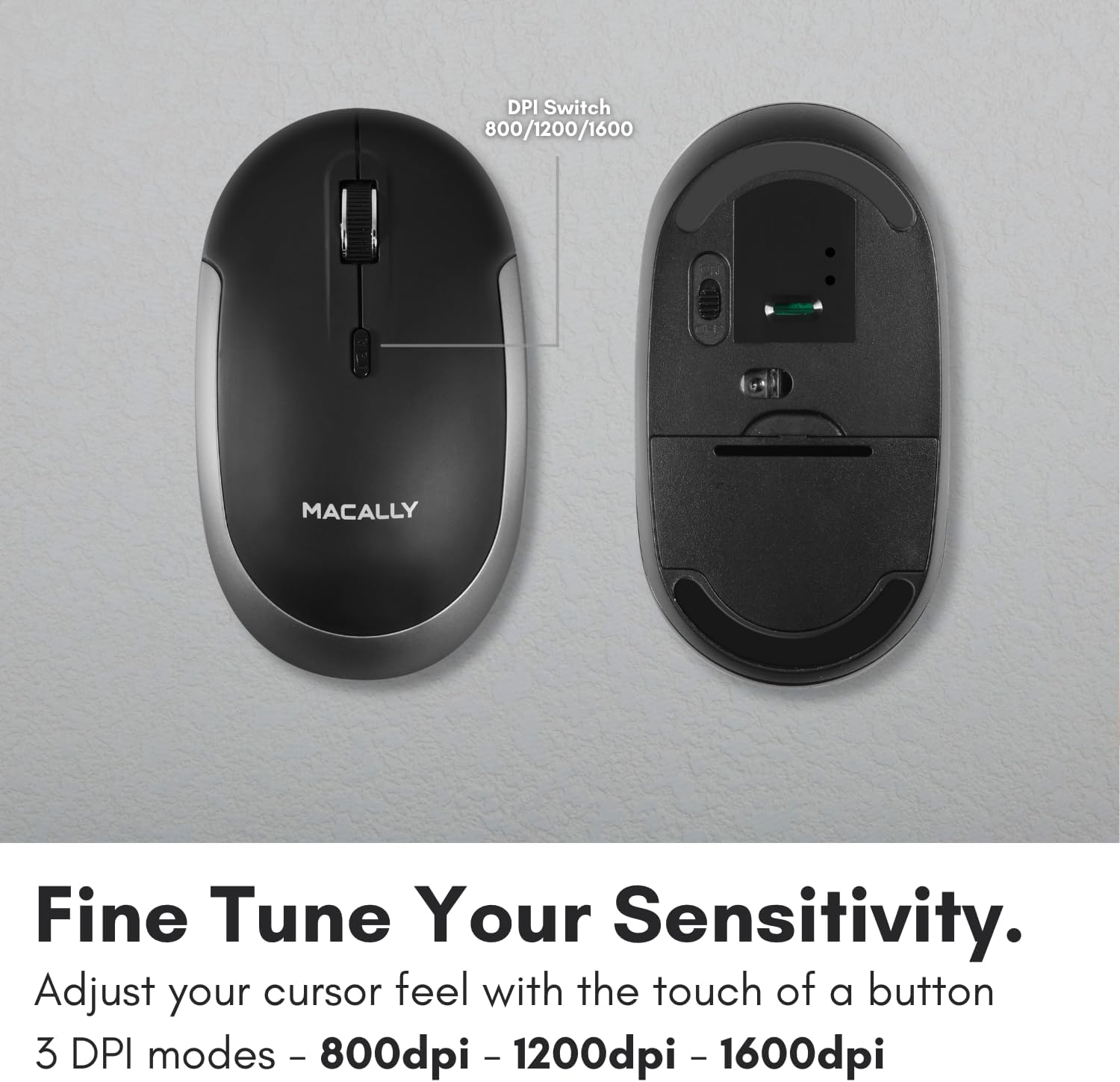
Figure 5: DPI Switch Location
7. Ulwazi Lwebhethri
The Macally BTDYNAMOUSE uses two AAA batteries. For optimal performance and battery life, it is recommended to use high-quality alkaline batteries.
- Uhlobo Lwebhethri: 2 x AAA
- Impilo Yebhethri Elinganiselwe: Up to 3 months (based on 8 hours of daily use). Actual battery life may vary based on usage patterns and computing conditions.
When the battery level is low, the mouse's LED indicator may flash or change color to alert you. Replace batteries promptly to ensure uninterrupted use.
8. Isondlo
To ensure the longevity and optimal performance of your Macally BTDYNAMOUSE, follow these maintenance guidelines:
- Ukuhlanza: Sebenzisa indwangu ethambile, eyomile ukuhlanza igundane. Ngokungcola okunenkani, kancane damp indwangu ingasetshenziswa, kodwa qinisekisa ukuthi akukho mswakamo ongena ocingweni.
- Gwema Uketshezi: Do not expose the mouse to liquids or excessive moisture.
- Isitoreji: Gcina igundane endaweni epholile, eyomile uma lingasetshenziswa isikhathi eside.
- Ukushintshwa Kwebhethri: Replace batteries as needed. Dispose of old batteries according to local regulations.
9. Ukuxazulula izinkinga
| Inkinga | Imbangela Engenzeka | Isixazululo |
|---|---|---|
| Igundane alixhumani nge-Bluetooth | Mouse is off or batteries are low. Not in pairing mode. Device's Bluetooth is off. | Ensure mouse is on and batteries are fresh. Put mouse in pairing mode. Check device's Bluetooth settings. Try re-pairing. |
| Cursor is erratic or unresponsive | Dirty optical sensor. Mouse used on unsuitable surface. Low battery. | Clean the optical sensor. Use a mouse pad or a smooth, non-reflective surface. Replace batteries. |
| Mouse clicks are not silent | This mouse is designed for 90% noise reduction, not complete silence. | The mouse provides a significantly quieter click than standard mice, but a faint sound may still be audible. |
| Impilo yebhethri emfushane | Frequent usage. Low-quality batteries. | Use high-quality alkaline batteries. Turn off the mouse when not in use for extended periods. |
10. Imininingwane
| Isici | Imininingwane |
|---|---|
| Ibhrendi | Macally |
| Igama Lemodeli | BTDYNAMOUSE |
| Ubuchwepheshe bokuxhumana | I-Bluetooth, engenantambo |
| Ubuchwepheshe bokutholwa kokunyakaza | I-Optical |
| Izilungiselelo ze-DPI | 800 / 1200 / 1600 |
| Izinkinobho | 4 (Kwesobunxele, Kwesokudla, Chofoza Kokuskrola, Iswishi se-DPI) |
| Ukuma kwezandla | Ambidextrous |
| Amadivayisi Ahambisanayo | Laptop, Personal Computer (Windows, macOS) |
| Uhlobo olungenantambo | Kufika ku-10 m (30 ft) |
| Uhlobo Lwebhethri | 2 x AAA (ifakiwe) |
| Impilo Yebhethri | Up to 3 months (estimated) |
| Isisindo sento | 73 amagremu |
| Okubalulekile | Silicone (Enclosure) |
| Umbala | Mnyama |
11. Amavidiyo Omkhiqizo Osemthethweni
11.1. Bluetooth Optical Silent Click Mouse - White
Le vidiyo inikeza i-overview of the Macally BTDYNAMOUSE, highlighting its slim design, ambidextrous body, simple 3-button layout, 90% noise reduction, and easy DPI adjustability (800/1200/1600).
11.2. Macally Wireless Bluetooth Mouse for Windows PC and Mac
This video demonstrates the Macally BTDYNAMOUSE's features, including its Bluetooth wireless technology, comfortable ambidextrous design, simple 3-button/scroll wheel layout, silent click buttons, and easy DPI adjustability.
12. Iwaranti kanye Nokusekela
For warranty information and technical support, please refer to the official Macally webisayithi noma uxhumane nesevisi yabo yamakhasimende. Gcina irisidi yakho yokuthenga ukuze uthole izimangalo zewaranti.