
AWEI T5
AWEI T5 True Wireless Earbuds User Manual
Isingeniso
This manual provides detailed instructions for the AWEI T5 True Wireless Earbuds. Please read this guide carefully before using the product to ensure proper operation and to maximize your listening experience.
Okuqukethwe Kwephakheji
Qinisekisa ukuthi zonke izinto ezibalwe ngezansi zikhona ephaketheni lakho:
- AWEI T5 True Wireless Earbuds (Left and Right)
- Ikesi lokushaja
- Ikhebula lokushaja le-USB
- Imaniwali yosebenzisayo
- Usayizi ohlukahlukene wezihloko zendlebe

Image: AWEI T5 True Wireless Earbuds retail packaging, showing the brand logo and product model.
Umkhiqizo Uphelileview
Familiarize yourself with the components of your AWEI T5 True Wireless Earbuds and charging case.

Image: The AWEI T5 True Wireless Earbuds inside their charging case, with an additional image showing an earbud being worn by a user.

Isithombe: Ukuvala view of the AWEI T5 True Wireless Earbuds and their charging case resting on a laptop keyboard.
The earbuds are designed for a secure and comfortable fit, and the charging case provides both protection and power on the go.
Setha
1. Ukushaja Kwasekuqaleni
Ngaphambi kokusebenzisa okokuqala, shaja ngokugcwele ama-earbud nekesi lokushaja.
- Beka zombili izindlebe endlebeni kukesi lokushaja.
- Connect the USB charging cable to the charging case and a power source.
- The indicator lights on the case and earbuds will show charging status.
- Uma isishajwe ngokugcwele, nqamula ikhebula.
2. Ukumatanisa nedivayisi
To connect your AWEI T5 earbuds to a Bluetooth-enabled device:
- Qinisekisa ukuthi ama-earbud ashajiwe.
- Vula ikesi lokushaja bese ukhipha womabili ama-earbud. Bazongena ngokuzenzakalelayo kumodi yokumatanisa.
- Kudivayisi yakho (i-smartphone, ithebhulethi, njll.), iya kuzilungiselelo ze-Bluetooth bese uvumela i-Bluetooth.
- Cinga available devices and select "AWEI T5" from the list.
- Uma usuxhunyiwe, uzozwa ithoni yokuqinisekisa, futhi izibani zesikhombisi kuma-earbud zizoshintsha.
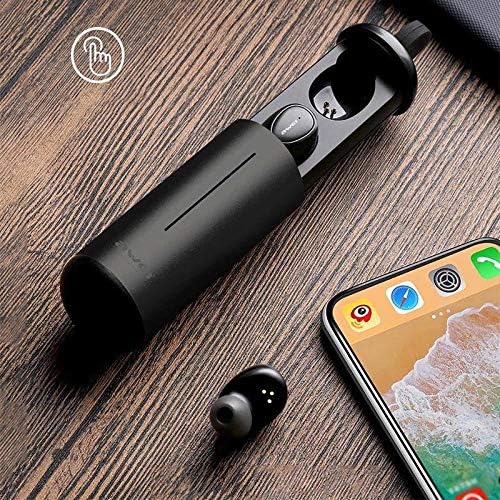
Image: AWEI T5 Earbuds in their charging case, positioned next to a smartphone, illustrating the pairing process.
Imiyalelo yokusebenza
Izilawuli Eziyisisekelo
The AWEI T5 earbuds feature touch controls for various functions:
- Dlala/Misa kancane: Thepha kanye kunoma iyiphi i-earbud.
- Ithrekhi Elandelayo: Thepha kabili i-earbud engakwesokudla.
- Ithrekhi yangaphambilini: Thepha kabili i-earbud yesokunxele.
- Phendula/Phendula ikholi: Thepha kanye kunoma iyiphi i-earbud ngesikhathi socingo olungenayo.
- Yenqaba Ucingo: Cindezela futhi ubambe noma iyiphi i-earbud imizuzwana emi-2 ngesikhathi socingo olungenayo.
- Yenza kusebenze umsizi wezwi: Thepha kathathu noma iyiphi i-earbud.
Imodi ye-Earbud eyodwa
You can use either the left or right earbud independently:
- Remove one earbud from the charging case. It will automatically connect to the last paired device.
- The other earbud can remain in the case or be turned off.
Imodi ye-Earbud Ekabili
For a stereo audio experience, use both earbuds:
- Remove both earbuds from the charging case. They will automatically connect to each other and then to the last paired device.
Isondlo Nokunakekela
To ensure the longevity and optimal performance of your AWEI T5 earbuds:
- Ukuhlanza: Hlanza njalo ama-earbud nekesi lokushaja ngendwangu ethambile, eyomile, engena-lint. Ungasebenzisi amakhemikhali anokhahlo noma izinto ezilumayo.
- Isitoreji: Uma ingasetshenziswa, gcina ama-earbud kukesi lawo lokushaja ukuze uwavikele othulini nasekonakaleni.
- Ukunakekelwa kwebhethri: Avoid fully discharging the battery frequently. Charge the earbuds and case regularly, even if not used for extended periods.
- Ukumelana Namanzi: The earbuds are rated IPX4, meaning they are resistant to splashing water from any direction. Do not submerge them in water or expose them to heavy rain.

Image: AWEI T5 Earbuds with water droplets, indicating their IPX4 splash-resistant rating.
Ukuxazulula inkinga
If you encounter issues with your AWEI T5 earbuds, refer to the following common problems and solutions:
| Inkinga | Isixazululo |
|---|---|
| Ama-earbud awamataniswa nedivayisi. | Ensure earbuds are charged. Turn off and on Bluetooth on your device. Forget "AWEI T5" from your device's Bluetooth list and re-pair. |
| I-earbud eyodwa kuphela esebenzayo. | Place both earbuds back into the charging case, close the lid, then open and remove them together. Ensure both are charged. |
| Awukho umsindo noma ivolumu ephansi. | Check volume levels on both your device and the earbuds. Ensure earbuds are properly connected. |
| Ikesi lokushaja alikhokhisi. | Verify the USB cable is securely connected to both the case and the power source. Try a different cable or power adapter. |
Imininingwane
Technical details for the AWEI T5 True Wireless Earbuds:
| Isici | Imininingwane |
|---|---|
| Inombolo Yemodeli | T5 |
| Ukuxhumana | I-Bluetooth |
| I-Form Factor | Endlebeni |
| Okubalulekile | Ipulasitiki |
| Umbala | Mnyama |
| Ubukhulu (Umkhiqizo) | 4 x 10 x 16.5 cm |
| Isisindo (Umkhiqizo) | 4.54 g |
| Uhlobo Lwebhethri | 1 Lithium Ion (per earbud, typically) |
| Isilinganiso Sokumelana Namanzi | IPX4 (i-Splash-proof) |
Iwaranti kanye Nokusekela
For warranty information and customer support, please refer to the documentation provided with your purchase or contact the retailer. Keep your proof of purchase for any warranty claims.
Ask a question about this manual
Ask about setup, troubleshooting, compatibility, parts, safety, or missing instructions. Manuals+ will review the question and use this page’s manual context to help answer it.