
Isingeniso
Thank you for choosing the Awei B923BL Wireless Magnetic Sports Bluetooth Earphones. This manual provides essential information for setting up, operating, maintaining, and troubleshooting your new earphones. Please read it carefully before use to ensure optimal performance and longevity of your device.
Okuqukethwe Kwephakheji
Sicela uhlole iphakheji ngezinto ezilandelayo:
- Awei B923BL Wireless Magnetic Sports Bluetooth Earphones
- Ikhebula lokushaja le-USB
- Amathiphu Osayizi Abaningi Bendlebe
- Imaniwali yosebenzisayo
Umkhiqizo Uphelileview
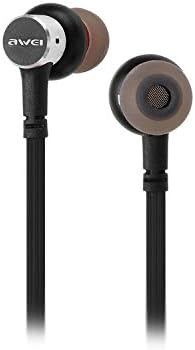
The Awei B923BL earphones are designed for active lifestyles, featuring a wireless Bluetooth connection and a magnetic design for convenient storage around your neck when not in use. They include an integrated microphone for hands-free calling.

Setha
1. Ukushaja ama-Earphone
Before first use, fully charge your earphones. Connect the provided USB charging cable to the charging port on the earphones and the other end to a USB power source (e.g., computer USB port, wall adapter). The indicator light will show charging status and turn off or change color when fully charged.
2. Ukubhanqa kwe-Bluetooth
- Qinisekisa ukuthi ama-earphone avaliwe.
- Press and hold the multi-function button (usually the power button) until the indicator light flashes red and blue alternately, indicating pairing mode.
- On your mobile phone or Bluetooth-enabled device, go to the Bluetooth settings and enable Bluetooth.
- Cinga available devices. You should see "Awei B923BL" or a similar name in the list.
- Select "Awei B923BL" to connect. Once connected, the indicator light will usually flash blue slowly or turn off, and you may hear a confirmation tone.
- Uma ucelwa iphasiwedi, faka "0000".
Once paired, the earphones will automatically connect to the last paired device when turned on, if the device's Bluetooth is active and within range.
Imiyalelo yokusebenza
Vula/Vala
- Vula: Press and hold the multi-function button for approximately 3 seconds until the blue indicator light flashes.
- Cisha ugesi: Press and hold the multi-function button for approximately 5 seconds until the red indicator light flashes and then turns off.
Ukudlala Komculo
- Dlala/Misa kancane: Cindezela inkinobho yemisebenzi eminingi kanye.
- Ithrekhi Elandelayo: Cindezela bese ubamba inkinobho Yevolumu +.
- Ithrekhi yangaphambilini: Cindezela bese ubamba inkinobho Yevolumu.
Ukuphathwa Kwezingcingo
- Phendula/Phendula ikholi: Cindezela inkinobho yemisebenzi eminingi kanye.
- Yenqaba Ucingo: Cindezela bese ubamba inkinobho yemisebenzi eminingi cishe imizuzwana emi-2.
- Phinda ushaye inombolo yokugcina: Cindezela kabili inkinobho yemisebenzi eminingi.
Ukulawula Ivolumu
- Khulisa ivolumu: Cindezela inkinobho yevolumu.
- Nciphisa ivolumu: Cindezela inkinobho ethi Ivolumu.
Isondlo
- Clean the earphones regularly with a soft, dry cloth. Do not use harsh chemicals or abrasive materials.
- Susa izindlebe bese uzihlanza ngensipho ethambile namanzi uma kudingeka, uqinisekise ukuthi zomile ngokuphelele ngaphambi kokuzinamathisela kabusha.
- Gcina ama-earphone endaweni epholile, eyomile kude nokukhanya kwelanga okuqondile kanye namazinga okushisa aphezulu.
- Avoid exposing the earphones to water or excessive moisture.
- Do not attempt to disassemble or modify the earphones, as this will void the warranty.
Ukuxazulula inkinga
- Ama-earphone awavuli: Qinisekisa ukuthi ama-earphone ashajwe ngokugcwele.
- Ayikwazi ukubhanqa nedivayisi:
- Make sure the earphones are in pairing mode (flashing red and blue).
- Qinisekisa ukuthi i-Bluetooth ivuliwe kudivayisi yakho.
- Move the earphones closer to your device.
- Try restarting both the earphones and your device.
- Sula uxhumano lwe-Bluetooth lwangaphambilini kudivayisi yakho uma uneziningi kakhulu.
- Awukho umsindo noma ivolumu ephansi:
- Hlola amazinga evolumu kokubili kuma-earphone kanye namadivayisi akho axhunyiwe.
- Qinisekisa ukuthi ama-earphone axhunywe kahle kudivayisi yakho.
- Zama ukudlala imithombo yomsindo ehlukene.
- Izinkinga zekhwalithi yekholi:
- Qinisekisa ukuthi imakrofoni ayivimbekile.
- Hambisa endaweni enokuphazamiseka okuncane.
Imininingwane
| Isici | Imininingwane |
|---|---|
| I gama le-brand | Awei |
| Inombolo Yemodeli | I-B923BL |
| Umbala | Mnyama |
| I-Headphone Form Factor | Endlebeni |
| Ubuchwepheshe bokuxhumana | Okungenantambo |
| I-Wireless Communication Technology | Okungenantambo |
| Incazelo yebanga lobudala | Umuntu omdala |
| Okubalulekile | Irabha |
| Amadivayisi Ahambisanayo | Omakhalekhukhwini |
| Isici sekhebula | Ngaphandle Kwekhebula |
| Indlela Yokulawula | Thinta |
| Inombolo Yezinto | 1 |
| Umkhiqizi | Awei |
| Izici ezikhethekile | Microphone Included (Note: This model does not feature active noise cancellation as per product description.) |
Iwaranti kanye Nokusekela
Ulwazi Lwewaranti
This product comes with a 1-year manufacturer's warranty from the date of purchase. For warranty claims or service, please contact the manufacturer or their authorized service agent. For further details, you may also contact the retailer where the product was purchased.
Ukwesekwa Kwamakhasimende
If you encounter any issues not covered in this manual or require further assistance, please refer to the contact information provided with your product packaging or visit the official Awei webindawo yezinsiza zokusekela.