
Isingeniso
This manual provides detailed instructions for the setup, operation, and maintenance of your Digoo DG-C3 Wireless Weather Station. This device integrates a hygrometer, thermometer, weather forecast station, and alarm clock functions, offering comprehensive environmental monitoring and timekeeping capabilities. Please read this manual thoroughly before using the product to ensure correct operation and to maximize its features.
Okuqukethwe Kwephakheji
- Digoo DG-C3 Wireless Weather Station Unit
- Ikhebula le-USB Power
- Incwadi Yomsebenzisi (le dokhumenti)
Note: Batteries (3x AAA) are not included and must be purchased separately.
Umkhiqizo Uphelileview
Familiarize yourself with the various components of your Digoo DG-C3 weather station.
Ukubonisa kwangaphambili
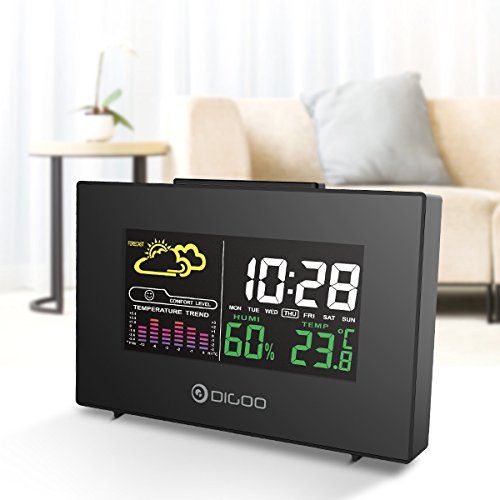
The front display features a color backlit screen showing the current time, day of the week, indoor humidity, indoor temperature, and a weather forecast icon. It also includes a comfort level indicator and a temperature trend graph.
- Isikhathi Nosuku: Digital display of current time and day.
- Isimo sezulu: Izithonjana ezibonisa izimo zezulu ezibikezelwe (isb., ilanga, amafu, imvula).
- Ileveli Yenduduzo: Indicates indoor comfort based on temperature and humidity.
- Ithrendi Yezinga lokushisa: Bar graph showing recent temperature changes.
- Umswakamo: Iphesentitage display of indoor humidity.
- Izinga lokushisa: Digital display of indoor temperature (Celsius or Fahrenheit).
Iphaneli Yasemuva
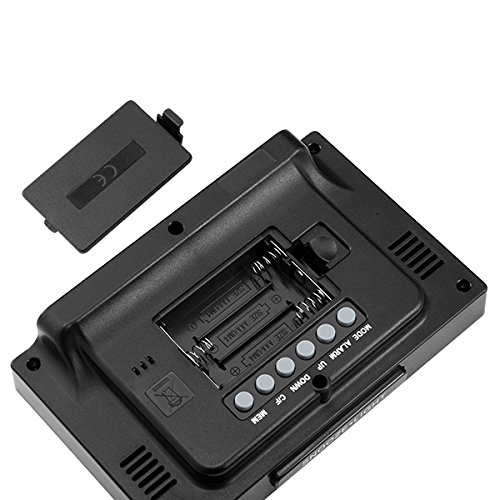
The back of the unit houses the battery compartment and various control buttons for setting the device.
- Igumbi Lebhethri: Holds 3x AAA batteries for power backup.
- Inkinobho ye-MODE: Used to switch between display modes and enter setting mode.
- Inkinobho ye-ALARM: Used to set and activate/deactivate the alarm.
- Inkinobho ye-UP: Used to increase values during settings or view maximum records.
- Inkinobho ephansi: Used to decrease values during settings or view minimum records.
- °C/°F Inkinobho: Ishintshashintsha phakathi kwamayunithi okushisa e-Celsius ne-Fahrenheit.
- Inkinobho ye-MEM: Wawuvamise view memory records for temperature and humidity.
Iphaneli ephezulu
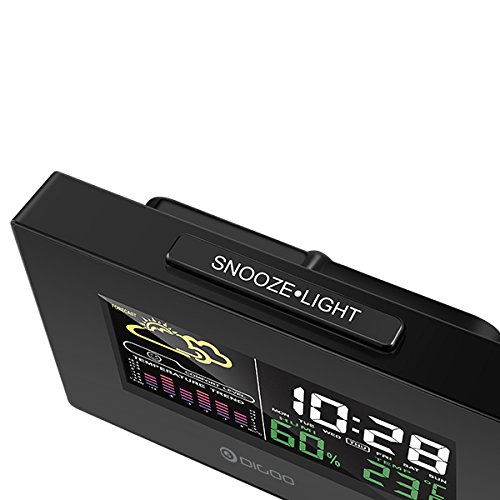
The top of the unit features a single button for snooze and backlight functions.
- SNOOZE·LIGHT Button: Press to activate the backlight or snooze the alarm.
Setha
1. Ivula amandla
- Ukufakwa Kwebhethri: Open the battery compartment cover on the back of the unit. Insert 3x AAA batteries, ensuring correct polarity (+/-). Close the cover. Batteries provide backup power and allow for portability.
- USB Power Connection: For continuous power and backlight, connect the provided USB cable to the USB port on the unit and to a compatible USB power adapter (not included) or a computer USB port.
- The display will light up and show default settings.
2. Initial Settings (Time, Date, Unit)
- Isilungiselelo Sesikhathi:
- Cindezela bese ubamba i IMODE button for approximately 3 seconds to enter time setting mode. The hour digit will flash.
- Sebenzisa i- UP or PHANSI izinkinobho ukulungisa ihora.
- Cindezela IMODE again to confirm the hour and move to minute setting. The minute digit will flash.
- Sebenzisa i- UP or PHANSI izinkinobho ukulungisa iminithi.
- Cindezela IMODE again to confirm and move to 12/24 hour format selection.
- Sebenzisa i- UP or PHANSI buttons to select 12-hour or 24-hour format.
- Cindezela IMODE to confirm and exit time setting.
- Ukusetha Usuku:
- Ngemva kokusetha isikhathi, cindezela IMODE again to enter date setting mode. The year will flash.
- Sebenzisa i- UP or PHANSI izinkinobho zokulungisa unyaka.
- Cindezela IMODE to confirm and move to month setting.
- Sebenzisa i- UP or PHANSI izinkinobho zokulungisa inyanga.
- Cindezela IMODE to confirm and move to day setting.
- Sebenzisa i- UP or PHANSI izinkinobho ukulungisa usuku.
- Cindezela IMODE to confirm and exit date setting.
- Ukukhethwa kweyunithi yezinga lokushisa:
- Cindezela inkinobho ° C / ° F button on the back of the unit to switch between Celsius (°C) and Fahrenheit (°F) temperature display.
Imiyalelo yokusebenza
1. Umsebenzi wewashi le-alamu
- Isetha i-alamu:
- Cindezela inkinobho I-ALARM inkinobho kanye ukuze ubonise isikhathi samanje se-alamu.
- Cindezela bese ubamba i I-ALARM button for approximately 3 seconds. The hour digit will flash.
- Sebenzisa i- UP or PHANSI izinkinobho zokulungisa ihora le-alamu.
- Cindezela I-ALARM again to confirm the hour and move to minute setting. The minute digit will flash.
- Sebenzisa i- UP or PHANSI izinkinobho zokulungisa iminithi ye-alamu.
- Cindezela I-ALARM ukuze uqinisekise futhi uphume ukulungiselelwa kwe-alamu.
- Ivula/Yenza I-alamu ingasebenzi:
- Ngesikhathi usemodi yokubonisa yesikhathi esijwayelekile, cindezela I-ALARM button repeatedly to toggle the alarm ON or OFF. An alarm icon will appear on the display when the alarm is active.
- Umsebenzi wokusnuza:
- Uma i-alamu ikhala, cindezela inkinobho SNUZA ·KUKHANYA button on the top of the unit to activate the snooze function. The alarm will temporarily stop and sound again after a few minutes (typically 5-10 minutes).
- To stop the alarm completely, press any other button on the back panel.
2. Isimo Sezulu
The weather station provides a weather forecast based on internal atmospheric pressure changes. The forecast icons (e.g., sunny, cloudy, rainy) are predictions for the next 12-24 hours and may not always match local weather services, which use more comprehensive data.
- The forecast icon is displayed on the upper left of the screen.
- The device requires a period of stable operation (typically 24 hours) to calibrate and provide accurate forecasts.
3. Isibonisi Sezinga lokushisa Nomswakama
- The current indoor temperature and humidity are continuously displayed on the screen.
- Viewing Min/Max Records:
- Cindezela inkinobho I-MEM button once to display the maximum recorded temperature and humidity.
- Cindezela I-MEM again to display the minimum recorded temperature and humidity.
- Cindezela I-MEM a third time to return to current readings.
- To clear the min/max records, press and hold the I-MEM inkinobho imizuzwana emi-3 ngenkathi viewngokufaka amarekhodi.
4. Ukulawula I-Backlight
- When powered by USB, the backlight will remain on.
- When powered by batteries only, press the SNUZA ·KUKHANYA button to temporarily activate the backlight for a few seconds.
Isondlo
- Ukuhlanza: Wipe the unit with a soft, dry cloth. Do not use abrasive cleaners or solvents. Avoid getting moisture into the unit.
- Ukushintshwa Kwebhethri: When the display becomes dim or functions irregularly, replace the 3x AAA batteries in the back compartment. Ensure correct polarity.
- Isitoreji: If not using the device for an extended period, remove the batteries to prevent leakage. Store in a cool, dry place.
Ukuxazulula inkinga
| Inkinga | Imbangela Engenzeka | Isixazululo |
|---|---|---|
| Isibonisi asinalutho noma sifiphele. | Low batteries or no power connection. | Replace batteries or connect the USB power cable. |
| Isikhathi/idethi engalungile. | Time/date not set correctly after power loss or initial setup. | Follow the "Initial Settings" section to reset time and date. |
| Weather forecast seems inaccurate. | Device needs calibration time; local conditions may differ from pressure-based forecast. | Allow 24 hours for calibration. Understand that the forecast is based on internal pressure changes. |
| I-alamu ayizwakali. | Alarm is not activated or volume is too low (if adjustable). | Ensure the alarm icon is displayed. Check alarm settings. |
Imininingwane
| Imodeli: | DG-C3 |
| Ukuxhumana: | I-USB (yamandla) |
| Umthombo wamandla: | 3x AAA Batteries (not included) or USB Power |
| Izici ezikhethekile: | Hygrometer, Thermometer, Weather Forecast, Alarm Clock, Color Backlight, Portable |
| Bonisa: | Color Backlit LCD |
| Iyunithi Yezinga lokushisa: | °C / °F selectable |
Iwaranti kanye Nokusekela
For warranty information or technical support, please refer to the documentation provided at the time of purchase or contact your retailer. Keep your purchase receipt as proof of purchase.