
Isingeniso
Thank you for choosing the MIUFLY EH15-64GB Body Camera. This device is designed for reliable full-HD video recording in various indoor and outdoor environments, offering advanced features such as GPS tracking, night vision, and password protection. Please read this manual thoroughly to ensure proper operation and maintenance of your body camera.
Okuqukethwe Kwephakheji
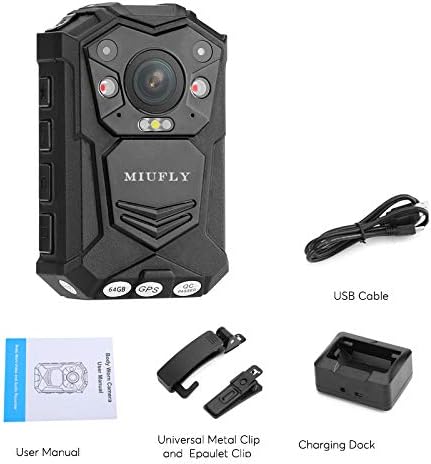
Qinisekisa ukuthi zonke izinto ezibalwe ngezansi zifakiwe kuphakheji yakho:
- MIUFLY EH15-64GB Body Camera
- Ikhebula le-USB
- Idokhi yokushaja
- Universal Metal Clip
- Epaulet Clip
- Imaniwali yosebenzisayo
Setha
1. Ukushaja Kwasekuqaleni
Before first use, fully charge the body camera. Connect the USB cable to the charging dock and then to a power source. Place the camera into the charging dock. The charging indicator will show the charging status.

2. Attaching the Clip
The camera comes with a universal metal clip and an epaulet clip. Select the appropriate clip for your intended use. The universal metal clip allows for 360-degree rotation for flexible mounting options on belts, pockets, or shoulder straps.

Imiyalelo yokusebenza
1. Vula/Vala
Press and hold the Power button to turn the camera on or off. The 2-inch LCD screen will activate upon power-on.
2. Ukuqoshwa Kwevidiyo
To start video recording, press the dedicated video record button. Press it again to stop. The camera supports 1296p video capture resolution.
3. Ukuqoshwa komsindo
To record audio only, press the dedicated audio record button. Press it again to stop.
4. Ukuthatha Izithombe
Press the dedicated photo button to capture still images. The camera supports various photo resolutions up to 32M.
5. Night Vision Activation
The camera features infrared night vision. This can be set to manual, auto, or off via the camera settings. In manual mode, press the night vision button to activate or deactivate.
6. Ukusebenza kwe-GPS
I-GPS eyakhelwe ngaphakathi ikuvumela ukuthi view the movement track on a compatible GPS player. This feature can be toggled on or off in the settings.
7. Iphasiwedi Ukuvikelwa
For enhanced security, you can set a password for the camera to prevent unauthorized access to recorded files. This setting is configurable in the camera menu.
8. Car DV Mode and Loop Recording
The camera supports Car DV Mode for use as a dashcam, and loop recording to continuously record by overwriting the oldest files when memory is full. These modes can be enabled in the settings.
9. Ukutholwa Kokunyakaza
Activate motion detection in the settings to automatically start recording when movement is sensed, conserving battery and storage space.
Isondlo
1. Ukuhlanza
Use a soft, dry cloth to clean the camera body and lens. Avoid using harsh chemicals or abrasive materials that could damage the device.
2. Isitoreji
Store the camera in a cool, dry place away from direct sunlight and extreme temperatures. Ensure the battery is partially charged before long-term storage to maintain battery health.
3. I-Firmware Updates
Periodically check the MIUFLY official website for any available firmware updates to ensure optimal performance and access to new features. Follow the instructions provided with the update carefully.
Ukuxazulula inkinga
Ikhamera Ayivuliwe
- Ensure the battery is fully charged. Connect to the charging dock and verify the charging indicator.
- If the camera vibrates uncontrollably or makes unusual noises, this may indicate a hardware issue. Disconnect from power and contact customer support.
Ukuqopha Izinkinga
- Video/Audio Quality: Ensure the lens is clean and free from obstructions. Check the selected resolution settings in the camera menu.
- Missing Footage: Verify that recording was properly initiated and stopped. Check storage capacity (64GB built-in).
- Ukuphazamiseka komsindo: If using in a vehicle with a power connection, some interference may occur. Test recording in different environments.
File Transfer/Deletion
- Connect the camera to a computer via USB. The camera should be recognized as an external hard drive.
- Files can be deleted directly from the camera via the menu options.
Imininingwane
| Isici | Imininingwane |
|---|---|
| Inombolo Yemodeli | EH15-64GB |
| Ukulungiswa kokuthwebula ividiyo | 1296p |
| Usayizi Wesikrini | 2 amayintshi |
| Inkumbulo Yangaphakathi | 64GB (Flash Memory Type: Micro SD) |
| Ibhethri | 3200mAh Lithium Polymer (up to 10 hours recording) |
| Ubukhulu | 3.66 x 1.18 x 2.17 amayintshi |
| Isisindo sento | 6.5 amakhilogremu |
| Ubuchwepheshe benzwa yesithombe | I-CMOS |
| Ifomethi yokuthwebula ividiyo | MP4 |
| Ifomethi yomsindo esekelwe | WAV |
| Ubuchwepheshe bokuxhumana | Inezintambo |
Ulwazi Lwewaranti
The MIUFLY EH15-64GB Body Camera comes with a standard manufacturer's warranty. Please refer to the product packaging or the official MIUFLY webindawo yemigomo nemibandela ethile yewaranti. Gcina ubufakazi bakho bokuthenga ngezimangalo zewaranti.
Ukwesekwa Kwamakhasimende
If you encounter any issues or have questions regarding your MIUFLY EH15-64GB Body Camera that are not covered in this manual, please contact MIUFLY customer support through the official website or your retailer. Provide your model number and a detailed description of the issue for efficient assistance.