
1. Isingeniso
This manual provides comprehensive instructions for the safe and effective use of the PCE Instruments PCE-170 A Light Meter. This device is designed for measuring illuminance (lux or foot-candles) in various environments, such as offices, factories, and outdoor settings. It features a wide measurement range, fast response time, and a compact design for ease of use.
Sicela ufunde le ncwadi ngokucophelela ngaphambi kokusebenzisa idivayisi bese uyigcina ukuze uyibhekisele esikhathini esizayo.
2. Ulwazi Lokuphepha
Observe the following safety precautions to prevent injury and avoid damage to the device:
- Ungalibeki idivayisi kumazinga okushisa adlulele, umswakama, noma elangeni eliqondile.
- Gwema ukudlidliza okunamandla noma imithelela.
- Ungazami ukuvula noma ukuguqula idivayisi. Thumela konke ukusevisa kubasebenzi abafanelekayo.
- Keep the light sensor clean and free from obstructions to ensure accurate readings.
- Khipha ibhethri uma idivayisi ingeke isetshenziselwe isikhathi eside ukuvimbela ukuvuza.
- Lahla amabhethri nocingo ngokwemithetho yendawo.
3. Umkhiqizo Uphelileview
The PCE-170 A Light Meter consists of a main unit with a display and control buttons, and an integrated light sensor.

Umfanekiso 1: Ngaphambili view of the PCE-170 A Light Meter, showing the display, control buttons, and light sensor at the top.
3.1 Izingxenye
- Inzwa yokukhanya: Located at the top of the device, protected by a white dome. This silicon photodiode measures incident light.
- Isibonisi se-LCD: A 5-digit display showing measurement values, units (lux/fc), and function indicators (e.g., AUTO RANGE, HOLD, MIN, MAX).
- Inkinobho yamandla (Vula/Vala): Ivula noma ivale idivayisi.
- Inkinobho ye-CAL: Used for zero adjustment.
- BAMBA Inkinobho: Imisa ukufundwa kwamanje kusibonisi.
- fc/lx Button: Toggles between foot-candle (fc) and lux (lx) measurement units.
- RANGE Inkinobho: Manually selects measurement ranges or activates auto-ranging.
- Igumbi Lebhethri: Located at the rear, houses the 9V battery.

Umfanekiso 2: Eduze view of the LCD display, showing a reading of "534 lx" and "AUTO RANGE 4 000".
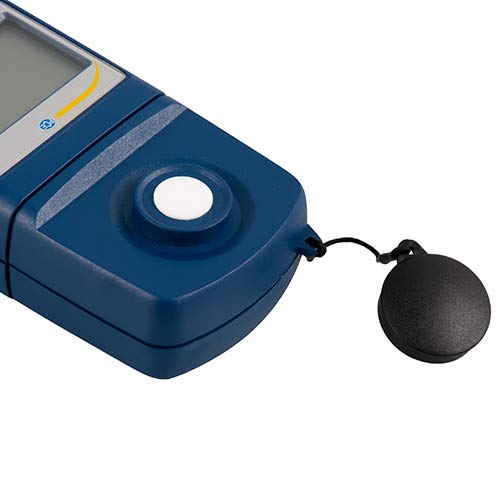
Umfanekiso 3: Okuningiliziwe view of the light sensor at the top of the device, with its protective cap removed.
4. Setha
4.1 Ukufakwa kwebhethri
- Thola ikhava yengxenye yebhethri ngemuva kwedivayisi.
- Slide the cover open or unscrew it, depending on the model.
- Insert one 9V battery, observing the correct polarity (+/-).
- Shintshanisa ikhava yengxenye yebhethri ngokuphephile.
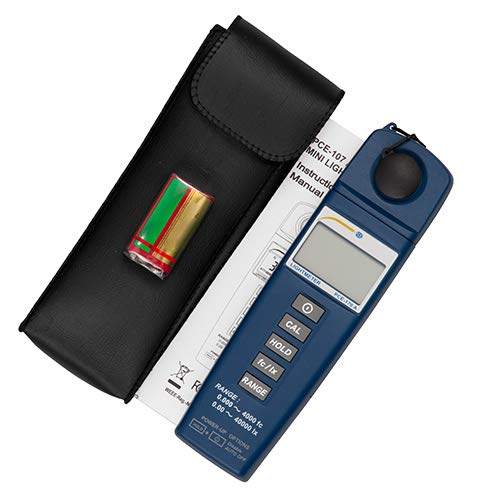
Umfanekiso 4: The PCE-170 A Light Meter shown with its carrying case and the included 9V battery, ready for installation.
4.2 Ukuvula Amandla Okuqala
Cindezela inkinobho Amandla button to turn on the device. The display will illuminate and show a reading. If the battery symbol appears, replace the battery.
5. Iziqondiso Zokusebenza
5.1 Ukuthatha Isilinganiso
- Vula idivayisi usebenzisa i- Amandla inkinobho.
- Ensure the light sensor is clean and unobstructed.
- Position the light sensor at the location where illuminance is to be measured. Ensure the sensor is facing the light source directly for accurate readings.
- The current illuminance value will be displayed on the LCD.

Umfanekiso 5: A user measuring light levels in an office environment with the PCE-170 A Light Meter.
5.2 Changing Measurement Units (fc/lx)
Cindezela inkinobho fc/lx button to toggle between foot-candles (fc) and lux (lx) units. The selected unit will be indicated on the display.
5.3 BAMBA Umsebenzi
Cindezela inkinobho BAMBA button to freeze the current reading on the display. Press it again to release the hold and resume live measurements.
5.4 Zero Adjustment (CAL)
Ukuze wenze ukulungisa uziro:
- Place the light sensor in a completely dark environment (e.g., cover it with the protective cap or place it in a dark box).
- Cindezela inkinobho I-CAL button. The display should show "0.00" or a value very close to zero.
- If the display does not show zero, repeat the process.
5.5 Ukukhetha Uhla
The device typically operates in auto-ranging mode. To manually select a range or cycle through available ranges, press the RANGE button. The display will indicate the active range. Press and hold the RANGE button to return to auto-ranging mode.
5.6 Min/Max Function (Power-Up Option)
The PCE-170 A supports Min/Max recording. To activate this feature, refer to the power-up options indicated on the device label (e.g., press and hold a specific button during power-on). This function records the minimum and maximum illuminance values detected during a measurement session.
6. Isondlo
6.1 Ukuhlanza
Wipe the device with a soft, dry cloth. Do not use abrasive cleaners or solvents. Keep the light sensor clean and free of dust or smudges, as this can affect measurement accuracy.
6.2 Isitoreji
When not in use, store the PCE-170 A Light Meter in its carrying case in a cool, dry place, away from direct sunlight and extreme temperatures. Remove the battery if storing for extended periods.
7. Ukuxazulula izinkinga
| Inkinga | Imbangela Engenzeka | Isixazululo |
|---|---|---|
| Idivayisi ayivuli. | Ibhethri elifile noma elifakwe kabi. | Hlola i-polarity yebhethri noma ufake ibhethri elisha elingu-9V esikhundleni salo. |
| Display shows "OL" (Overload). | Light intensity exceeds the current measurement range. | Switch to a higher measurement range using the RANGE button, or move to a less intensely lit area. |
| Ukufundwa okungalungile. | Dirty sensor, incorrect zero adjustment, or sensor not facing light source correctly. | Clean the sensor, perform zero adjustment in darkness, and ensure the sensor is properly oriented. |
| Isibonisi asinalutho noma siyacwayiza. | Ibhethri eliphansi. | Faka esikhundleni sebhethri le-9V. |
8. Imininingwane
| Ipharamitha | Inani |
|---|---|
| Izilinganiso Zokukala | 0.00 ... 40,000 lux / 0.000 ... 4000 fc |
| Isixazululo | 0.01 lux / 0.001 fc |
| Ukunemba | ±3% of measurement value + 5 digits |
| Inkomba Yokulayisha Okungaphezulu | "OL" |
| Isilinganiso Sokulinganisa | Njalo ngemizuzwana engu-2 |
| Izinga Lokushisa Lokusebenza | 0 ... 40°C / 32 ... 104°F |
| Inzwa yokukhanya | Silicon photodiode, corrected cosine angle |
| Bonisa | I-LCD enezinhlamvu ezingu-5 |
| Umthombo wamandla | 9V ibhethri (lifakiwe) |
| Ubukhulu | 33 x 54 x 196 mm / 1.3 x 2.1 x 7.7 in |
| Isisindo | 180 g / <1 lb (approx. 9.17 ounces) |
8.1 Ububanzi bokulethwa
The standard delivery package includes:
- 1 x PCE-170 A Lux Meter
- 1 x 9V ibhethri
- 1 x Ikesi eliphethe
- 1 x imanuwali yomsebenzisi (le dokhumenti)
9. Iwaranti kanye Nokusekela
PCE Instruments provides a warranty for this product against defects in materials and workmanship. For specific warranty terms and conditions, please refer to the warranty card included with your purchase or visit the official PCE Instruments website. For technical support, service, or calibration inquiries, please contact PCE Instruments customer service.
PCE Instruments US: Vakashela Isitolo