
1. Isingeniso
Thank you for choosing the HTC USB Type-C Hi-Res Earphones, Model 99H20317-00. These earphones are designed to provide a high-quality audio experience with their advanced features and ergonomic design. This manual provides essential information for the proper setup, operation, maintenance, and troubleshooting of your new earphones.
Izici ezibalulekile zifaka:
- Concert hall design for unparalleled sound.
- Larger 13mm speakers for a fuller sound profile.
- Enhanced port optimization for improved bass reproduction.
- Lighter and thinner aerospace polymer diaphragm to increase sound frequency response.
- Ergonomic design for maximum comfort during extended use.
2. Ulwazi Lokuphepha
Please read and follow these safety guidelines to ensure safe and optimal use of your earphones:
- Ukuvikelwa kokuzwa: Gwema ukulalela ngevolumu ephezulu isikhathi eside ukuze uvimbele ukulimala kokuzwa.
- Ukuqwashisa Ngemvelo: Do not use earphones in situations where the inability to hear ambient sounds could be dangerous, such as while driving, cycling, or walking in traffic.
- Ukuhlanza: Clean the earphones regularly with a soft, dry cloth. Do not use liquid cleaners or solvents.
- Ukuchayeka emanzini: These earphones are not waterproof. Avoid exposure to water or excessive moisture.
- Izingane: Gcina kude nezingane ezincane ngenxa yezingxenye ezincane ezingaba yingozi yokuminyana.
3. Okuqukethwe Kwephakheji
Qinisekisa ukuthi zonke izinto zikhona kuphakheji yakho:
- HTC USB Type-C Hi-Res Earphones (Model: 99H20317-00)
- Additional ear tips (if included)
- Incwadi Yomsebenzisi (le dokhumenti)
4. Setha
These earphones are designed for simple plug-and-play operation.
- Xhuma: Insert the USB Type-C connector of the earphones into the USB Type-C port of your compatible device (Smartphone, Laptop, Tablet).
- Ukubonwa Kwedivayisi: Your device should automatically recognize the earphones. If prompted, select the earphones as the audio output device.
- Lungisa Ivolumu: Begin playback at a low volume and gradually increase to a comfortable listening level.
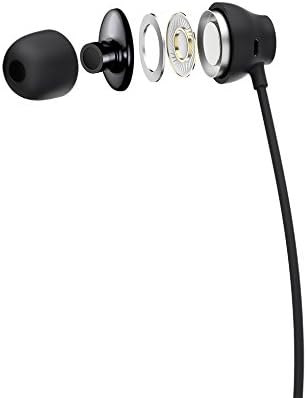
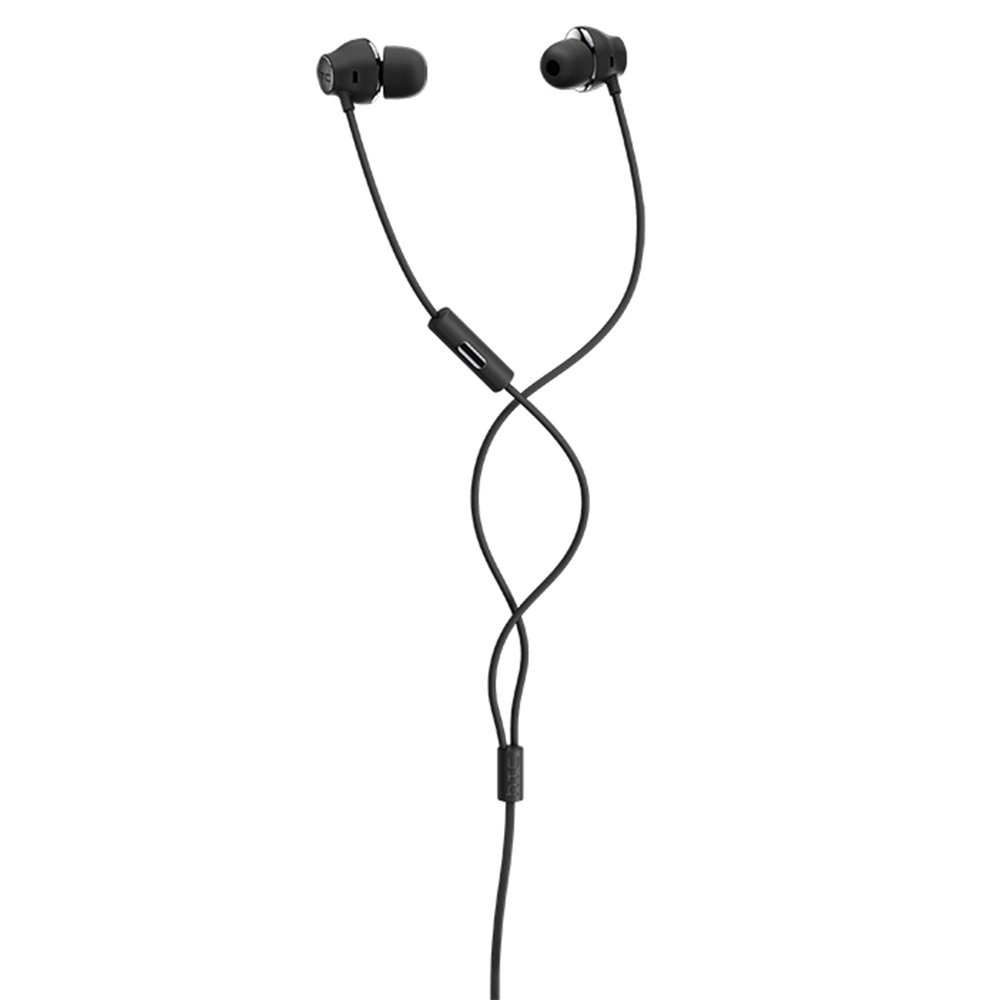
Figure 1: HTC USB Type-C Hi-Res Earphones connected to a device.
5. Iziqondiso Zokusebenza
Once connected, your earphones are ready for use.
- Ukudlala Umsindo: Play audio from your connected device. The sound will be routed through the earphones.
- Ukuphathwa Kocingo: For devices supporting call functions, you can typically answer/end calls using the device's interface.
- Ukulawulwa kohlelo lokusebenza: This model supports control via an application. Refer to your device's app store for any official HTC audio control applications that may offer additional features or sound customization.
6. Isondlo Nokunakekela
Proper care extends the lifespan of your earphones:
- Amathiphu okuhlanza izindlebe: Gently remove ear tips and clean them with a mild soap solution and water. Ensure they are completely dry before reattaching.
- Ukuhlanza Umzimba We-Earphone: Wipe the earphone body and cable with a soft, dry, lint-free cloth. Do not use abrasive materials or harsh chemicals.
- Isitoreji: When not in use, store the earphones in a clean, dry place, preferably in a protective pouch to prevent tangling and damage.
- Ukuphathwa Kwekhebula: Avoid tightly winding the cable or subjecting it to sharp bends, which can damage internal wires.
Umfanekiso 2: Kuqhume view of earphone components, highlighting the 13mm speaker and aerospace polymer diaphragm.
7. Ukuxazulula izinkinga
Uma uhlangabezana nezinkinga, bheka izinkinga ezilandelayo nezisombululo:
| Inkinga | Imbangela Engenzeka | Isixazululo |
|---|---|---|
| Awukho umsindo | Earphones not properly connected; device volume too low; incorrect audio output selected on device. | Ensure the USB Type-C connector is fully inserted. Increase device volume. Check device audio settings to confirm earphones are selected as output. |
| Ikhwalithi yomsindo engeyinhle | Dirty ear tips; damaged cable; low-quality audio source. | Clean ear tips. Inspect the cable for visible damage. Try a different audio source or file. |
| Earphones uncomfortable or fall out | Usayizi wesihloko sendlebe ongalungile. | Try different sized ear tips (if provided) to find the best fit for your ears. |
8. Imininingwane
| Isici | Imininingwane |
|---|---|
| Ibhrendi | I-HTC |
| Inombolo Yemodeli | 99H20317-00 |
| Ubuchwepheshe bokuxhumana | Intambo (USB Type-C) |
| Usayizi wesipika | 13 mm |
| Okubalulekile | Synthetic leather (ear tips/housing accents) |
| Isisindo | awu 50g |
| Ubukhulu bomkhiqizo | 0.1 x 0.1 x 0.1 cm (packaging/shipping dimensions, actual earphone size is compact) |
| Indlela Yokulawula | Uhlelo lokusebenza |
| Ukusekelwa kwe-Bluetooth | Cha |
| Kudingeka Amabhethri | Cha |
| Amadivayisi Ahambisanayo | Smartphone, Laptop, Tablet with USB Type-C audio output |
| Umbala | Okumpunga okumnyama |
| Ukubekwa Kwendlebe | Endlebeni |
9. Iwaranti kanye Nokusekela
For warranty information and technical support, please refer to the documentation provided with your purchase or visit the official HTC support webindawo. Gcina ubufakazi bakho bokuthenga ngezimangalo zewaranti.