
1. Umkhiqizo Uphelileview
The Fender Monterey Bluetooth Speaker delivers clear, powerful audio with a design inspired by classic Fender amplifiers. This speaker is engineered for high-fidelity sound reproduction, featuring 120 watts of power, two woofers, and two tweeters. It supports audio streaming via Bluetooth and direct connection through a 3.5mm auxiliary jack or RCA inputs.
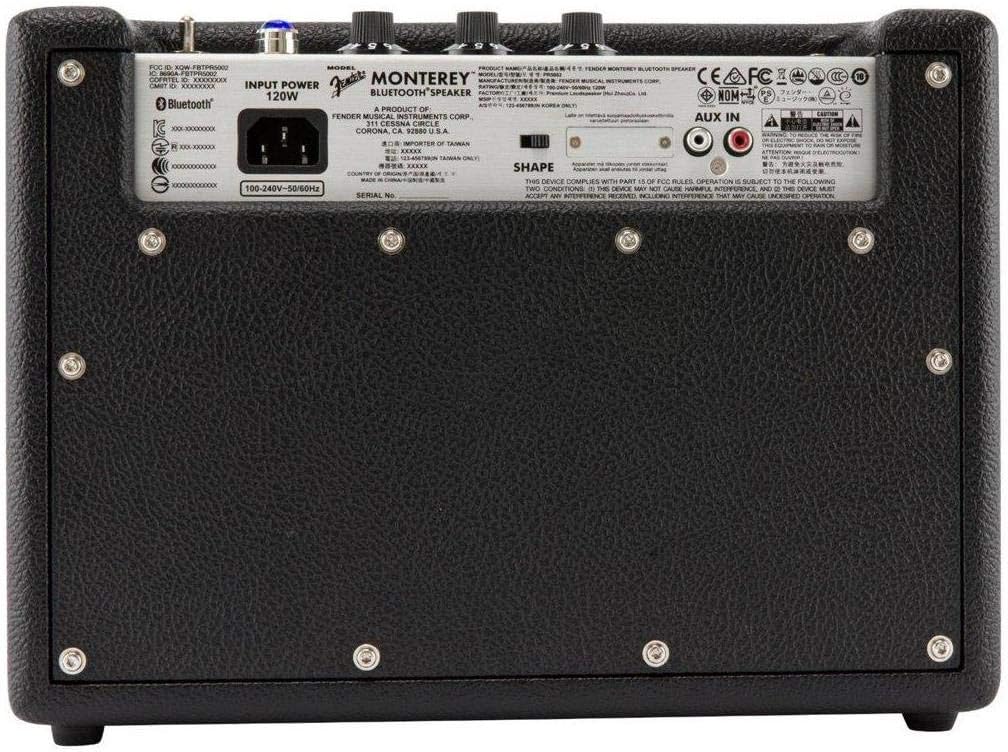
Umfanekiso 1: Ngaphambili view of the Fender Monterey Bluetooth Speaker, showcasing its classic amplifier-inspired grille and Fender logo.
2. Yini EseBhokisini
Qinisekisa ukuthi zonke izinto ezibalwe ngezansi zifakiwe kuphakheji yakho:
- Fender Monterey Bluetooth Speaker
- 3.5 mm Ikhebula Elisizayo
- Ikhebula le-RCA
- Ikhebula Lamandla
3. Umhlahlandlela wokusetha
3.1 Ukuxhuma Amandla
- Ensure the speaker's volume control is set to minimum before connecting power.
- Connect the supplied power cable to the AC input on the rear panel of the speaker.
- Plug the other end of the power cable into a suitable wall outlet (100-240V, 50/60Hz).
- Flip the power switch on the top panel to the "ON" position. The speaker will emit a chime indicating it is powered on.
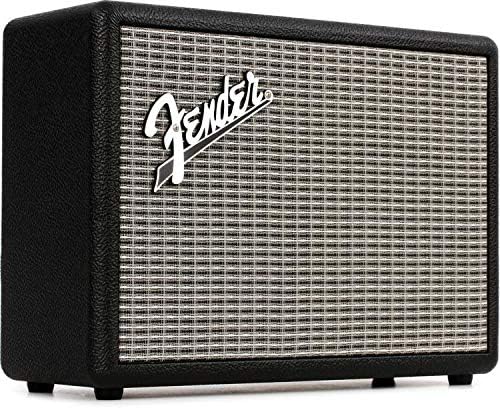
Figure 2: Rear panel of the Fender Monterey speaker, showing the power input and auxiliary connections.
3.2 Ukumatanisa kwe-Bluetooth
- Uma isipikha sivuliwe, cindezela BHANGANI button on the top panel. The Bluetooth indicator light will begin to flash, indicating it is in pairing mode.
- On your audio device (smartphone, tablet, computer), navigate to the Bluetooth settings.
- Select "Fender Monterey" from the list of available devices.
- Once successfully paired, the Bluetooth indicator light on the speaker will turn solid blue, and a confirmation chime will sound.
3.3 Auxiliary Input Connection
For devices without Bluetooth, use the provided 3.5mm auxiliary cable or RCA cable.
- 3.5mm Aux: Connect one end of the 3.5mm cable to your audio device's headphone jack and the other end to the I-MINI input on the speaker's top panel.
- I-RCA: Connect the RCA cable to your audio device's RCA outputs and the other end to the I-RCA inputs on the speaker's rear panel.
Select the appropriate source (I-BlUETOOTH, I-MINI, noma I-RCA) usebenzisa UMTHOMBO inkinobho ephaneli eliphezulu.

Figure 3: Top panel controls of the Fender Monterey speaker, including Volume, Treble, Bass, Source, and Pair buttons.
4. Iziqondiso Zokusebenza
4.1 Ukudlala Umsindo
- Ensure your audio source is connected and selected (Bluetooth, Mini, or RCA).
- Start playing audio from your connected device.
- Lungisa i- UMQULU knob on the speaker's top panel to your desired listening level.
4.2 Izilawuli zethoni
The Fender Monterey speaker features dedicated controls for customizing your sound:
- I-PREBLE: Adjusts the high-frequency response of the audio. Turn clockwise for brighter sound, counter-clockwise for warmer sound.
- I-BASS: Adjusts the low-frequency response of the audio. Turn clockwise for more bass, counter-clockwise for less bass.
- UMUMO: A toggle switch located on the rear panel. This control modifies the overall tonal character, offering different sound profiles. Experiment with both positions to find your preferred sound.
5. Isondlo
- Ukuhlanza: Use a soft, dry cloth to clean the speaker's exterior. Avoid abrasive cleaners, solvents, or sprays that may damage the finish.
- Isitoreji: Lapho singasetshenziswa isikhathi eside, gcina isikhulumi endaweni epholile, neyomile ngaphandle kwelanga eliqondile namazinga okushisa aphakeme.
- Ukungenisa umoya: Qinisekisa ukuthi umoya ungena kahle eduze kwesipikha ukuze uvimbele ukushisa ngokweqile. Ungavimbi noma yiziphi izimbobo zomoya.
- Ukuchayeka koketshezi: Keep the speaker away from liquids. In case of accidental spills, immediately disconnect power and allow it to dry completely before re-use.
6. Ukuxazulula izinkinga
Awekho Amandla
- Ensure the power cable is securely connected to both the speaker and a working wall outlet.
- Verify the power switch on the top panel is in the "ON" position.
- Hlola ukuthi i-outlet yasodongeni iyasebenza yini ngokuxhuma enye idivayisi.
Awukho Umsindo
- Confirm the correct audio source (Bluetooth, Mini, or RCA) is selected using the UMTHOMBO inkinobho.
- Khulisa i- UMQULU knob on the speaker and the volume on your connected audio device.
- If using Bluetooth, ensure the device is properly paired and connected. Try re-pairing if necessary.
- If using auxiliary inputs, ensure cables are fully inserted and not damaged.
Izinkinga zokumatanisa kwe-Bluetooth
- Ensure the speaker is in pairing mode (flashing Bluetooth indicator). Press the BHANGANI button if it's not flashing.
- Move your audio device closer to the speaker to ensure it's within range.
- Turn off and on the Bluetooth function on your audio device.
- If the speaker was previously paired with another device, disconnect it from that device first.
7. Imininingwane Yezobuchwepheshe
| Inombolo Yemodeli | 6960200000 |
| Ibhrendi | I-Fender |
| Okukhiphayo Wattage | 120 Watts |
| Ukucushwa kwesipikha | Two woofers, two tweeters |
| Ukuxhumana | Bluetooth, 3.5mm Auxiliary Input, RCA Input |
| Ubukhulu bomkhiqizo (D x W x H) | 9.3" x 16.8" x 14.6" (23.6 cm x 42.7 cm x 37.1 cm) |
| Isisindo sento | 18.6 pounds (8.44 kg) |
| Umbala | Mnyama |
| Umkhiqizi | I-Fender Musical Instruments Corp. |
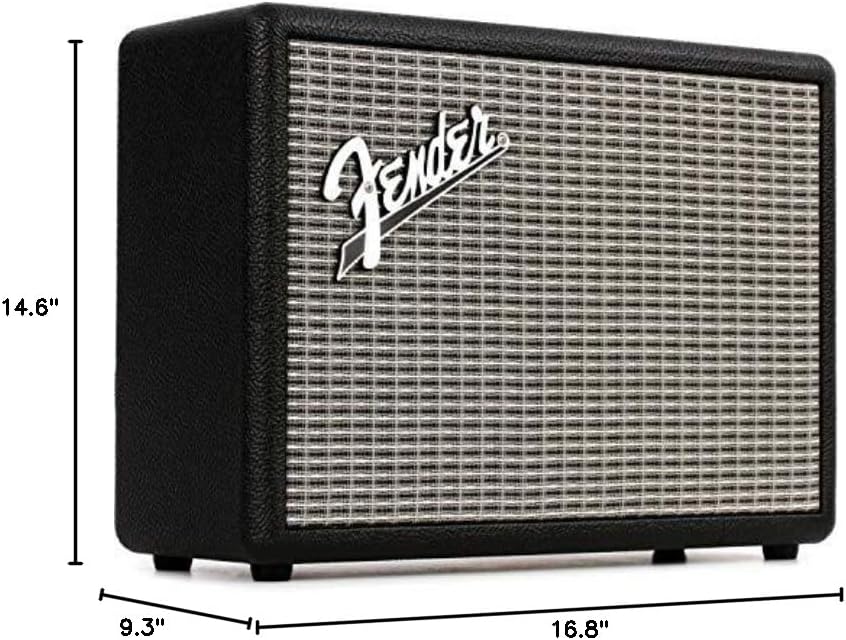
Figure 4: Dimensions of the Fender Monterey Bluetooth Speaker.
8. Iwaranti kanye Nokusekela
For warranty information, product registration, or technical support, please refer to the official Fender website or contact Fender customer service. Keep your proof of purchase for warranty claims.
Izinsiza eziku-inthanethi: www.fender.com