
Isingeniso
Thank you for choosing the Awei A860BL-BK Bluetooth In-Ear Earphones. This manual provides essential information for the proper setup, operation, and maintenance of your device. Please read it thoroughly before use to ensure optimal performance and longevity of your earphones.
Okuqukethwe Kwephakheji
Qinisekisa ukuthi zonke izinto ezibalwe ngezansi zikhona ephaketheni lakho:
- Awei A860BL-BK Bluetooth In-Ear Earphones
- Ikhebula lokushaja le-USB
- Amathiphu Endlebe (osayizi abahlukahlukene)
- Imaniwali yosebenzisayo

Umkhiqizo Uphelileview
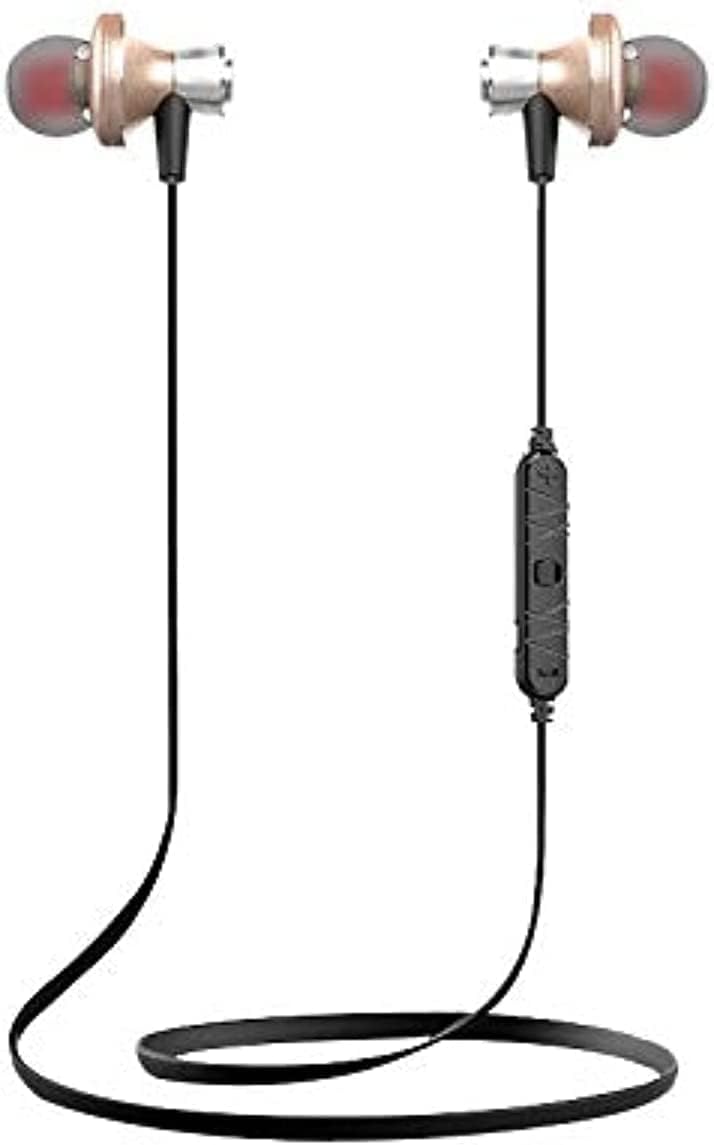
The Awei A860BL-BK earphones are designed for wireless audio playback and hands-free calling. They feature an in-ear design for comfortable fit and sound isolation.

Setha
1. Ukushaja ama-Earphone
Before first use, fully charge the earphones. Connect the USB charging cable to the charging port on the earphones and to a compatible USB power source (e.g., computer, wall adapter). The charging indicator light will typically show red during charging and turn off or blue when fully charged.
- Isikhathi sokushaja: Approximately 1 to 2 hours.
2. Ukubhanqa kwe-Bluetooth
To connect your earphones to a Bluetooth-enabled device:
- Qinisekisa ukuthi ama-earphone ashajwe ngokugcwele futhi acishiwe.
- Press and hold the multi-function button on the earphones until the indicator light flashes red and blue alternately, indicating pairing mode.
- Edivayisini yakho (i-smartphone, ithebhulethi, njll.), vula i-Bluetooth bese usesha amadivayisi atholakalayo.
- Select "Awei A860BL-BK" from the list of found devices.
- Once connected, the indicator light on the earphones will typically flash blue slowly or turn off.
If pairing fails, turn off both devices, restart them, and repeat the pairing process.
Imiyalelo yokusebenza
Vula/Vala
- Vula: Press and hold the multi-function button for approximately 3 seconds until the indicator light flashes blue.
- Cisha ugesi: Press and hold the multi-function button for approximately 3-5 seconds until the indicator light flashes red and then turns off.
Ukulawula Umculo
- Dlala/Misa kancane: Cindezela kafushane inkinobho yemisebenzi eminingi.
- Ithrekhi Elandelayo: Cindezela isikhathi eside inkinobho ethi Ivolumu +.
- Ithrekhi yangaphambilini: Cindezela isikhathi eside inkinobho ethi Ivolumu.
- Ivolumu ephezulu: Cindezela inkinobho ethi Ivolumu + kafushane.
- Ivolumu Phansi: Cindezela inkinobho ethi Ivolumu kafushane.
Call Control
- Phendula/Phendula ikholi: Cindezela kafushane inkinobho yemisebenzi eminingi.
- Yenqaba Ucingo: Cindezela isikhathi eside inkinobho yemisebenzi eminingi.
- Phinda ushaye inombolo yokugcina: Cindezela kabili inkinobho yemisebenzi eminingi.
Umsizi Wezwi
- Yenza kusebenze umsizi wezwi: Triple-press the multi-function button (functionality depends on your connected device).
Isondlo
Ukunakekelwa okufanele kuqinisekisa ukuthi ama-earphone akho ahlala isikhathi eside futhi asebenza kahle.
- Ukuhlanza: Sebenzisa indwangu ethambile neyomile ukuhlanza ama-earphone. Ungasebenzisi izihlanzi ezirhabaxa noma izinyibilikisi.
- Isitoreji: Gcina ama-earphone endaweni epholile, eyomile kude nokukhanya kwelanga okuqondile kanye namazinga okushisa aphezulu.
- Ukumelana Namanzi: These earphones are ayivimbeli amanzi. Avoid exposure to liquids, moisture, and high humidity.
- Ukunakekelwa Kwekhebula: Avoid pulling the cable excessively or bending it sharply to prevent damage.
Ukuxazulula inkinga
If you encounter issues with your Awei A860BL-BK earphones, refer to the following common solutions:
| Inkinga | Isixazululo Esingenzeka |
|---|---|
| Ama-earphone awavuli. | Ensure the earphones are fully charged. Connect to a power source and charge for 1-2 hours. |
| Ayikwazi ukubhanqa nedivayisi. |
|
| Awukho umsindo noma ivolumu ephansi. |
|
| Ikhwalithi yocingo ayilungile. |
|
Imininingwane
Detailed technical specifications for the Awei A860BL-BK Bluetooth In-Ear Earphones:
- Ibhrendi: Awei
- Imodeli: A860BL-BK
- Ukuxhumana: Okungenantambo (Bluetooth)
- Inguqulo ye-Bluetooth: Not specified (assumed standard)
- Ububanzi Obungenantambo: Kufika kumamitha angu-10
- Imakrofoni: Yebo
- Ukusekela Umculo: Yebo
- Umbala: Mnyama
- Uhlobo Lwezindlebe: Endlebeni
- Isikhathi sokushaja: 1-2 amahora
- Isikhathi sokudlala Umculo: Cishe amahora angama-4
- Isikhathi sokukhuluma: Cishe amahora angama-6
- Ukulawula umsindo: Cha
- Uhlobo Lokulawula: Volume control, Touch
- Ukumelana Namanzi: Ayizweli emanzini
- Izingxenye ezifakiwe: Amathiphu endlebe
Ulwazi Lokuphepha
Sicela uqaphele imihlahlandlela yokuphepha elandelayo:
- Do not disassemble, repair, or modify the earphones.
- Gcina kude namazinga okushisa aphezulu, ilanga eliqondile, kanye namalangabi avulekile.
- Gwema ukuchayeka emanzini noma kolunye uketshezi.
- Do not use the earphones at excessively high volumes for prolonged periods to prevent hearing damage.
- Gcina endaweni lapho izingane nezilwane ezifuywayo zingafinyeleleki khona.
Iwaranti kanye Nokusekela
For warranty information or technical support, please refer to the documentation provided at the point of purchase or contact your retailer. Keep your proof of purchase for any warranty claims.