
1. Isingeniso
The Lenco BT-210 Light is a versatile Bluetooth stereo speaker designed for portable audio playback. It features integrated LED lighting, which can be controlled via a dedicated application, and offers multiple connectivity options including Bluetooth, AUX-in, and USB. This manual provides essential information for the safe and efficient use of your speaker.
2. Ulwazi Lokuphepha
- Funda yonke imiyalelo ngokucophelela ngaphambi kokusebenzisa idivayisi.
- Gcina leli bhukwana ukuze lisetshenziswe esikhathini esizayo.
- Ungalibeki idivayisi emvuleni, emswakameni, noma emazingeni okushisa aphezulu.
- Gwema ukubeka idivayisi eduze kwemithombo yokushisa efana nama-radiator, ama-heat registers, izitofu, noma ezinye izinto (kufaka phakathi ampama-lifiers) akhiqiza ukushisa.
- Sebenzisa kuphela okunamathiselwe/izinsiza ezicaciswe umenzi.
- Khipha idivayisi phakathi neziphepho zombani noma uma ingasetshenziswa isikhathi eside.
- Ungavimbi noma yiziphi izimbobo zokungenisa umoya. Faka ngokuhambisana nemiyalelo yomkhiqizi.
- Vikela intambo yamandla ekuhanjweni ngayo noma ekuncinzweni, ikakhulukazi kumapulaki, ezintweni ezisetshenziswayo, kanye nendawo lapho ziphuma khona ezinsizeni.
3. Okuqukethwe Kwephakheji
Sicela uhlole ukuthi zonke izinto zikhona futhi zisesimweni esihle:
- Lenco BT-210 Light Bluetooth Stereo Speaker
- Ikhebula lokushaja le-USB
- AUX-in Cable (3.5mm)
- Imaniwali yosebenzisayo
4. Umkhiqizo Uphelileview
Familiarize yourself with the various parts of your Lenco BT-210 Light speaker.
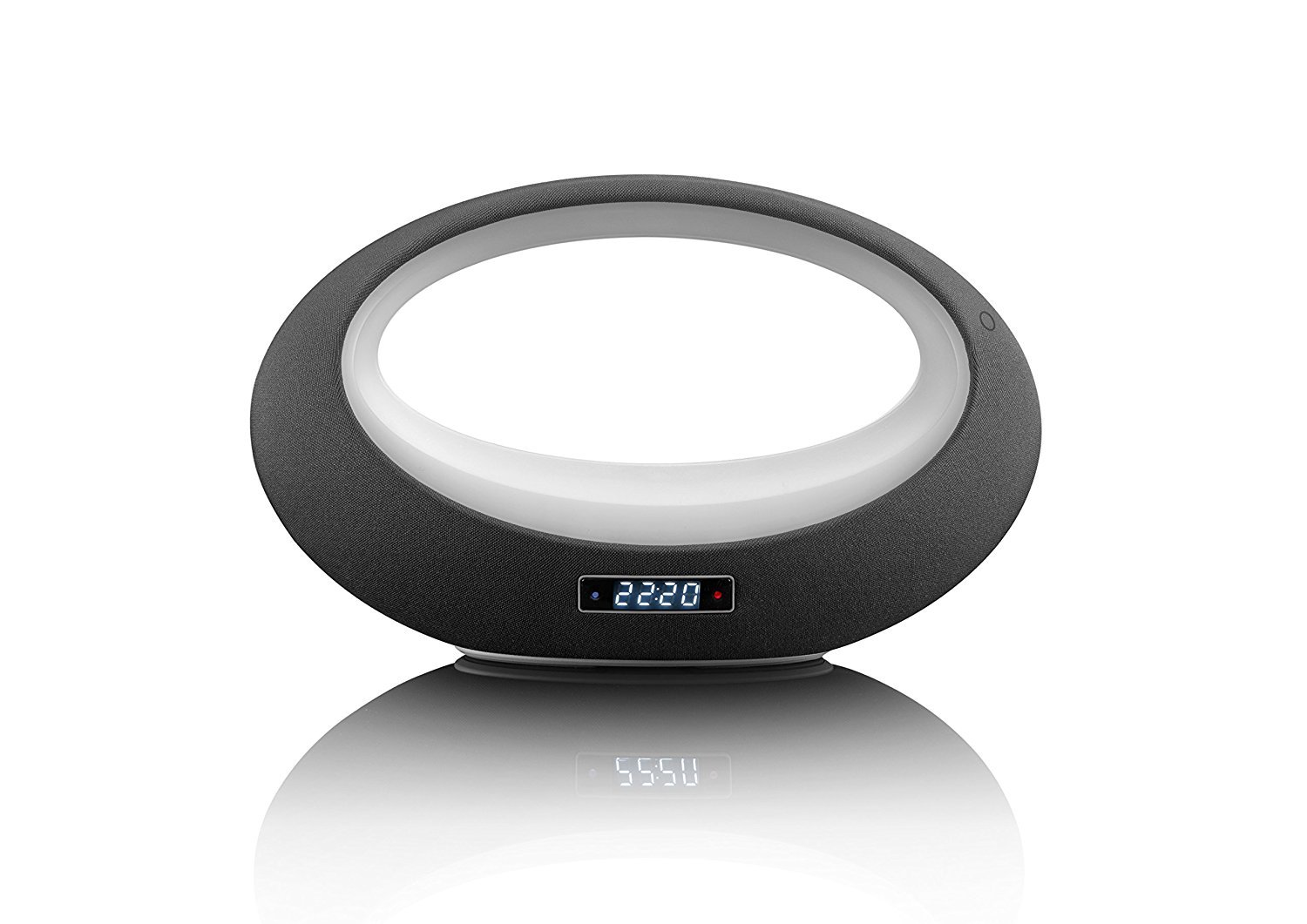
Umfanekiso 1: Ngaphambili view of the Lenco BT-210 Light speaker, showing the central LED light ring and the digital display.

Umfanekiso 2: Emuva view of the Lenco BT-210 Light speaker, illustrating the various input ports and control buttons.
Izilawuli nezimbobo:
- Inkinobho yamandla: Ivula noma ivale isipikha.
- Ivolumu phezulu/Phansi: Ilungisa izinga lokuphuma komsindo.
- Inkinobho Dlala/Yemisa Isikhashana: Ilawula ukudlala kwemidiya.
- Inkinobho yemodi: Ishintsha phakathi kwezindlela zokufaka ze-Bluetooth, AUX, kanye ne-USB.
- Inkinobho yokulawula ukukhanya kwe-LED: Cycles through LED light modes or turns them off.
- Okokufaka kwe-DC 5V: Eyokushaja ibhethri langaphakathi.
- AUX-in Port (3.5mm): For connecting external audio devices via cable.
- Imbobo ye-USB: Ukudlala umsindo kusuka kumadivayisi esitoreji se-USB.
5. Setha
5.1 Ukushaja uSomlomo
- Connect the supplied USB charging cable to the DC 5V input port on the speaker.
- Xhuma olunye uhlangothi lwekhebula le-USB ku-adaptha yamandla ye-USB ehambisanayo (engafakiwe) noma imbobo ye-USB yekhompyutha.
- Isibani sesikhombisi sokushaja sizokhanya. Linda cishe amahora ama-3-4 ukuze ushaje ngokugcwele.
- Uma isishajwe ngokugcwele, isibani senkomba singashintsha noma sivale. Nqamula ikhebula lokushaja.
5.2 Ukuvula / Ukuvula
- Ukuvula: Press and hold the Power button for a few seconds until the display lights up and you hear an audible prompt.
- Ukucisha: Cindezela bese ubamba inkinobho yamandla futhi kuze kube yilapho isibonisi sicisha.
6. Iziqondiso Zokusebenza
6.1 Ukumatanisa kwe-Bluetooth
- Ensure the speaker is powered on and in Bluetooth mode. If not, press the Mode button until 'Bluetooth' or a similar indicator appears on the display. The LED light will flash, indicating it's in pairing mode.
- Ku-smartphone yakho, ithebhulethi, noma enye idivayisi esebenzisa i-Bluetooth, vula i-Bluetooth bese usesha amadivayisi atholakalayo.
- Select "Lenco BT-210 Light" from the list of devices.
- Once paired, the speaker will emit a confirmation sound, and the LED light will stop flashing. You can now play audio from your device through the speaker.
6.2 AUX-in Mode
- Connect one end of the 3.5mm AUX-in cable to the AUX-in port on the speaker.
- Xhuma olunye uhlangothi lwekhebula ku-jack yama-headphone noma i-output yomsindo yedivayisi yakho yomsindo yangaphandle.
- Press the Mode button on the speaker until 'AUX' or a similar indicator appears on the display.
- Play audio from your external device. Adjust volume on both the speaker and your device.
6.3 Ukudlala nge-USB
- Faka idrayivu ye-USB equkethe umsindo we-MP3 files echwebeni le-USB esipikheni.
- Press the Mode button on the speaker until 'USB' or a similar indicator appears on the display.
- Isipikha sizoqala ukudlala umsindo ngokuzenzakalelayo files from the USB drive. Use the Play/Pause and Volume buttons to control playback.
6.4 Ukulawula Ukukhanya Kwe-LED
The integrated LED lighting can be controlled directly from the speaker or via a dedicated application (if available). Press the LED Light Control button to cycle through different light modes or to turn the lights off. Refer to the product's official website or app store for information on the companion application for advanced control.
6.5 Ukulawula ivolumu
Use the Volume Up (+) and Volume Down (-) buttons on the speaker to adjust the playback volume. For Bluetooth and AUX modes, you may also need to adjust the volume on your connected device.
7. Isondlo
- Ukuhlanza: Sebenzisa indwangu ethambile neyomile ukuhlanza ingaphandle lesipikha. Ungasebenzisi izihlanzi eziwuketshezi noma izinto ezihudulayo.
- Isitoreji: Lapho singasetshenziswa isikhathi eside, gcina isikhulumi endaweni epholile, neyomile ngaphandle kwelanga eliqondile namazinga okushisa aphakeme.
- Ukunakekelwa kwebhethri: Ukuze welule isikhathi sokuphila kwebhethri, gwema ukukhipha ibhethri ngokugcwele njalo. Shaja isipikha njalo, noma singasetshenziswa.
8. Ukuxazulula izinkinga
| Inkinga | Imbangela Engenzeka | Isixazululo |
|---|---|---|
| Isipikha asikhanyisi. | Ibhethri liphelile. | Shaja isipikha usebenzisa ikhebula le-USB elinikeziwe. |
| Awukho umsindo. | Volume is too low or muted. Incorrect input mode. | Increase volume on speaker and connected device. Press the Mode button to select the correct input. |
| Ukubhangqa kwe-Bluetooth kwehluleka. | Isipikha asikho kumodi yokumatanisa. Idivayisi ikude kakhulu. Ukugxambukela. | Ensure speaker is in Bluetooth pairing mode. Move devices closer. Turn off other Bluetooth devices. |
| AUX-in not working. | Cable not connected properly. Incorrect mode. | Check cable connections. Ensure speaker is in AUX mode. |
| Ukudlala kwe-USB akusebenzi. | USB drive not formatted correctly or unsupported file izinhlobo. | Qinisekisa ukuthi idrayivu ye-USB ifomethwe ku-FAT32 futhi iqukethe i-MP3 files. |
9. Imininingwane
| Isici | Ukucaciswa |
|---|---|
| Ibhrendi | Lenco |
| Imodeli | BT-210 Light |
| Umbala | I-anthracite/White |
| Ubukhulu bomkhiqizo (D x W x H) | 18.3D x 29.4W x 11.5H cm |
| Speaker Output Power (Max) | 6 Watt |
| Okukhiphayo Wattage | 3 Watt |
| Voltage | 3.7 Volt |
| Okokufaka Voltage | 5 Volt DC (VDC) |
| Umthombo wamandla | Ibhethri |
| Uhlobo Lwebhethri | I-Lithium-polymer |
| Isilinganiso Sempilo Yebhethri | Amahora angu-10 |
| Ubuchwepheshe bokuxhumana | I-Bluetooth, AUX, ne-USB |
| I-Wireless Communication Technology | I-Bluetooth |
| Imodi Yokukhipha Umsindo | Isitiriyo |
| Amadivayisi Ahambisanayo | I-mp3 player |
| Izici ezikhethekile | Bluetooth, Portable, LED Light |
| Indlela Yokulawula | Remote Control (implied by app control) |
| Uhlobo Lokukhweza | I-Tabletop Mount |
10. Ulwazi Lwewaranti
Lenco products are designed and manufactured to the highest quality standards. This product is covered by a limited warranty against defects in materials and workmanship. The warranty period and terms may vary by region. Please refer to the official Lenco website or your local retailer for specific warranty details and registration information.
11. Ukusekela
For technical support, troubleshooting assistance, or further information about your Lenco BT-210 Light speaker, please visit the official Lenco website or contact their customer service department. Contact details can typically be found on the Lenco webindawo noma emaphaketheni omkhiqizo.
Webindawo: www.lwiyazi.com