
Isingeniso
The Jam Audio HMDX HX-P280 is a portable Bluetooth speaker designed for wireless audio streaming. It features two active drivers and two passive radiators for enhanced bass, providing a rich audio experience. This speaker also includes a speakerphone function for hands-free calls and offers multi-language voice prompts for ease of use. Its compact design makes it highly portable, fitting conveniently into a pocket.
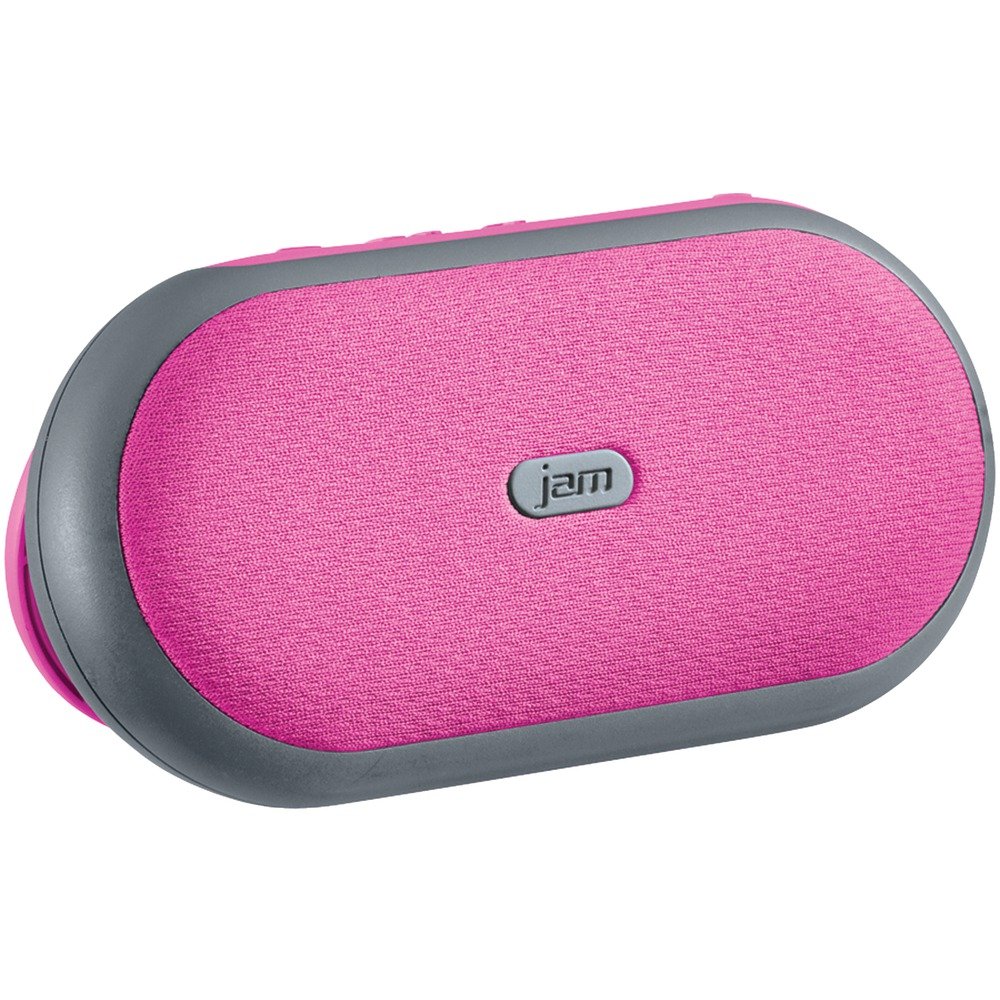
Isithombe 1: Ngaphambili view of the Jam Audio HMDX HX-P280 Bluetooth Speaker. This image displays the compact, rectangular design of the speaker, highlighting its portable nature.
Yini EseBhokisini
- Jam Audio HMDX HX-P280 Bluetooth Speaker
- Ikhebula lokushaja le-USB
- Incwadi Yomsebenzisi (le dokhumenti)
Setha
Ekhokhisa uSomlomo
- Locate the charging port on your HX-P280 speaker.
- Connect the small end of the provided USB charging cable to the speaker's charging port.
- Xhuma ingxenye enkulu yekhebula lokushaja le-USB ku-adaptha yamandla ye-USB (engafakiwe) noma imbobo ye-USB yekhompyutha.
- Isibani sesikhombisi sokushaja sizokhanyisa, ngokuvamile sibomvu, ukuze sibonise ukuthi isipikha siyashaja.
- Once fully charged, the indicator light will change color or turn off. A full charge provides up to 6 hours of playtime.
Ukubhanqa kwe-Bluetooth
- Qinisekisa ukuthi isipikha sishajwe ngokugcwele.
- Press and hold the Power button on the speaker until you hear an audible prompt indicating it is in pairing mode. The Bluetooth indicator light will typically flash rapidly.
- On your smartphone, tablet, or other Bluetooth-enabled device, go to the Bluetooth settings menu.
- Enable Bluetooth if it is not already on.
- Scan for available devices. You should see "HMDX HX-P280" or a similar name appear in the list.
- Select "HMDX HX-P280" to initiate the pairing process.
- Once paired, you will hear an audible confirmation from the speaker, and the Bluetooth indicator light will typically turn solid blue or flash slowly.
- The speaker can maintain a Bluetooth connection up to 30 feet (9 meters) from your device.
Imiyalelo yokusebenza
Vula/Vala
- To turn on: Press and hold the Power button until the speaker powers on.
- To turn off: Press and hold the Power button again until the speaker powers off.
Ukudlala Umsindo
Once paired, audio from your connected device will stream wirelessly to the HX-P280 speaker. Use the controls on your connected device to manage playback (play, pause, skip tracks) and adjust volume. The speaker itself may have basic touch controls for volume adjustment.
Umsebenzi wesipikha
When a call comes in while your phone is connected to the speaker:
- Ukuphendula Ucingo: Press the Play/Pause button (or a dedicated call button if present) once.
- Ukuvala Ucingo: Press the Play/Pause button (or dedicated call button) once during a call.
- Ukwenqaba Ucingo: Press and hold the Play/Pause button (or dedicated call button) for a few seconds.
The speaker's built-in microphone allows for hands-free conversation.
Isondlo
Ukuhlanza
- Use a soft, dry, lint-free cloth to clean the surface of the speaker.
- Ungasebenzisi izinto zokuhlanza abrasive, wax, noma izincibilikisi.
- Gwema ukuthola umswakama kunoma yiziphi izimbobo.
Ukunakekela Ibhethri
- The HX-P280 uses a rechargeable Li-Ion battery.
- Ukwelula impilo yebhethri, gwema ukukhipha ibhethri ngokugcwele njalo.
- Charge the speaker regularly, even if not in use for extended periods, to maintain battery health.
- Gcina isipikha endaweni epholile, neyomile uma singasetshenziswa.
Ukuxazulula inkinga
| Inkinga | Isixazululo |
|---|---|
| Isipikha ngeke sivule. | Ensure the speaker is fully charged. Connect it to a power source using the USB cable and allow it to charge for at least 30 minutes before attempting to power on again. |
| Ayikwazi ukubhanqa nedivayisi. |
|
| Awukho umsindo noma ikhwalithi yomsindo ephansi. |
|
| Isipikha sefoni asisebenzi. |
|
Imininingwane
| Isici | Imininingwane |
|---|---|
| Igama Lemodeli | HX-P280 Pink |
| Ibhrendi | Jam Audio |
| Ubuchwepheshe bokuxhumana | I-Bluetooth |
| I-Wireless Communication Technology | I-Bluetooth |
| I-Bluetooth Range | Kufika ku-30 feet (9 metres) |
| Umthombo wamandla | Battery Powered (Rechargeable Li-Ion) |
| Isikhathi sokudlala | Kufika emahoreni angu-6 |
| Imodi Yokukhipha Umsindo | Isitiriyo |
| Uhlobo Lomshayeli Womsindo | Dynamic Driver (2 active drivers & 2 passive radiators) |
| Uhlobo lwesipika | Isipikha seBluetooth esiphathekayo |
| Isici Esikhethekile | Portable, Speakerphone Function |
| Indlela Yokulawula | Thinta |
| Ukusetshenziswa Okunconyiwe | For Smartphones or Tablets, For Computers, Travel |
| Amadivayisi Ahambisanayo | Smartphone, Tablet, Bluetooth-enabled devices |
| Umbala | Pink |
| Ubukhulu bomkhiqizo | 6 x 5 x 2 amayintshi (15.24 x 12.7 x 5.08 cm) |
| Isisindo sento | 12.8 ama-ounces (363 amagremu) |
| Ingangeni manzi | Cha |
| Umkhiqizi | I-JAM |
| I-UPC | 031262070609 |
| ASIN | B01GIH0OOK |
| Usuku Lokuqala Olutholakalayo | Juni 2, 2016 |
Iwaranti kanye Nokusekela
The Jam Audio HMDX HX-P280 Bluetooth Speaker comes with a Iwaranti Enomkhawuko. For specific details regarding warranty coverage, duration, and terms, please refer to the warranty card included with your product or visit the official Jam Audio webindawo.
For technical support, frequently asked questions, or to contact customer service, please visit the Jam Audio official support page. Keep your purchase receipt and product model number (HX-P280) handy when seeking support.