
1. Isingeniso
The Sony SBH54 is a versatile Stereo Bluetooth Headset designed for wireless communication and audio playback. It offers both handset and headset functionalities, allowing you to take and make calls, view messages, listen to music, and tune into FM radio directly from its display. Crafted from premium metal with a splash-proof design, it combines elegance with durability.
Key features include Bluetooth Wireless 3.0, NFC technology for easy pairing, an OLED display, and built-in noise cancellation for clear audio during calls. The headset supports A2DP profile and can connect to two devices simultaneously.
2. Umkhiqizo Uphelileview
The SBH54 features a compact design that fits comfortably in your hand. It includes an OLED display for information at a glance and physical controls for media and call management.
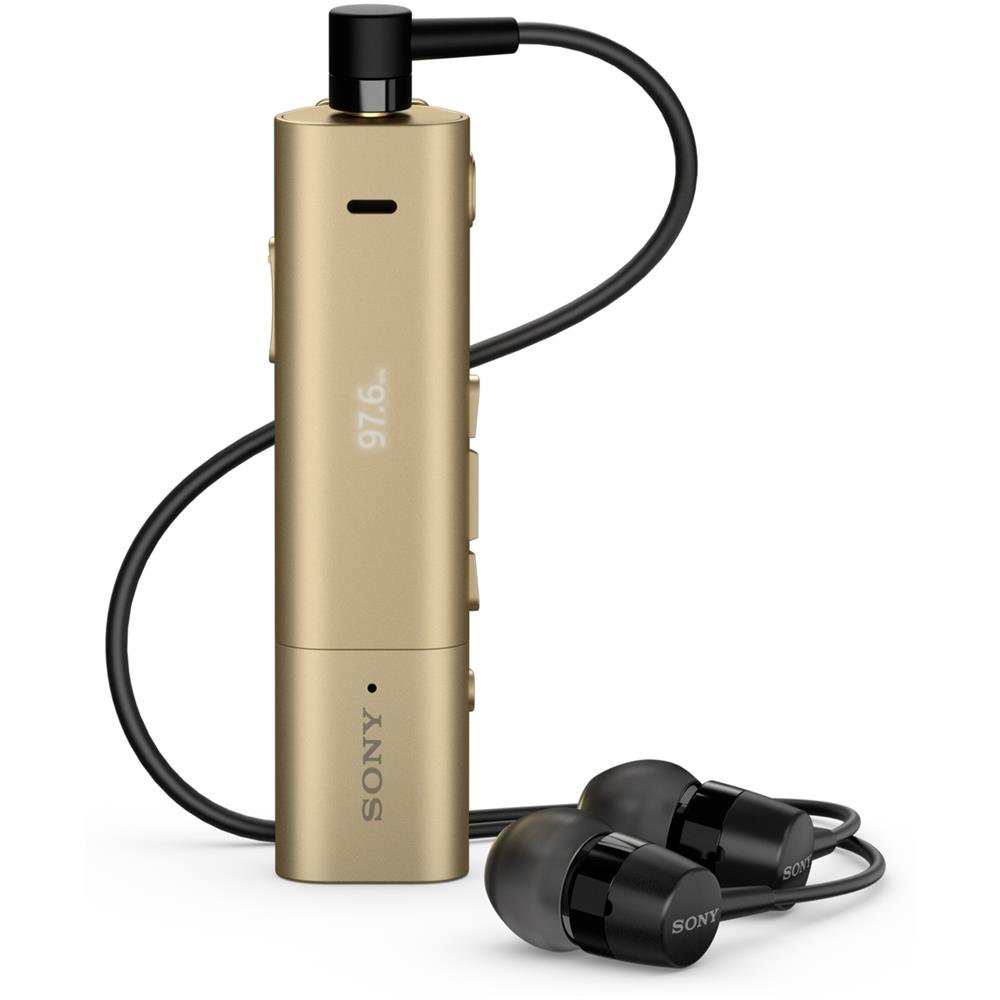
Image: Sony SBH54 Gold Stereo Bluetooth Headset. This image displays the compact, gold-colored headset with its integrated clip and display screen.
Izilawuli Nezinkomba:
- Isibonisi se-OLED: Shows caller ID, messages, music track information, and FM radio frequency.
- Inkinobho Yemisebenzi eminingi: For call answering/ending, play/pause music.
- Izinkinobho zevolumu: Lungisa ivolumu yomsindo.
- Izinkinobho Zokuzulazula: For menu navigation and track skipping.
- Imakrofoni: Integrated for voice calls.
- I-Headphone Jack: 3.5mm port for connecting the included premium headphones.
- Imbobo yokushaja: Micro USB port for charging the device.
3. Setha
3.1 Ukushaja ihedisethi
- Connect the supplied USB cable to the headset's charging port and to a USB power adapter or a computer's USB port.
- Isibonisi sebhethri esibonisini sizobonisa isimo sokushaja.
- Shaja ihedsethi ngokugcwele ngaphambi kokuyisebenzisa okokuqala.
3.2 Pairing with a Device (Bluetooth)
- Qinisekisa ukuthi i-headset ishajwe futhi icishiwe.
- Press and hold the power button until the headset enters pairing mode (indicated by a specific light pattern or message on the display).
- Ku-smartphone yakho noma kwenye idivayisi esebenzisa i-Bluetooth, vula i-Bluetooth bese usesha amadivayisi atholakalayo.
- Select "SBH54" from the list of found devices.
- If prompted, enter the passcode "0000" (four zeros).
- Once paired, the headset will indicate a successful connection.
3.3 Pairing with a Device (NFC)
For devices with NFC (Near Field Communication):
- Ensure NFC is enabled on your smartphone and the screen is unlocked.
- Touch the NFC detection area of your smartphone to the NFC detection area on the SBH54 headset.
- Landela noma yikuphi ukwaziswa okusesikrinini ukuze uqedele inqubo yokumatanisa.
4. Ukusebenzisa ihedisethi
4.1 Vula/Vala amandla
- Ukuvula: Cindezela futhi ubambe inkinobho yamandla kuze kube yilapho isibonisi sikhanyisa.
- Ukucisha: Cindezela bese ubamba inkinobho yokuvula kuze kube yilapho isibonisi sicisha.
4.2 Ukushaya nokwamukela izingcingo
- Ukuphendula Ucingo: When a call comes in, press the multi-function button.
- Ivala Ucingo: During a call, press the multi-function button.
- Ukwenqaba Ucingo: Press and hold the multi-function button when a call comes in.
- Ukushaya ucingo: Dial the number on your phone. The call will automatically route to the headset. You can also use voice commands if supported by your phone.
- Handset Function: The compact SBH54 can be used as an unobtrusive handset for calls.
- Ukukhansela Umsindo: The headset features echo, wind, and noise cancellation for clear voice transmission.
- Izwi le-HD: Enhances voice clarity for both parties during a call.
4.3 Ukudlala Umculo
- Dlala/Misa kancane: Cindezela inkinobho yemisebenzi eminingi.
- Ithrekhi Elandelayo: Press the forward navigation button.
- Ithrekhi yangaphambilini: Press the backward navigation button.
- Ukulawula ivolumu: Sebenzisa izinkinobho zokukhuphula/ukwehlisa ivolumu.
4.4 Umsakazo we-FM
- Vula irediyo ye-FM: Navigate through the headset menu to select the FM Radio function.
- Iziteshi Zokushuna: Use the navigation buttons to scan or manually tune to FM frequencies.
- Londoloza Okusethiwe: The headset may allow saving favorite stations (refer to on-screen prompts).
5. Isondlo
- Ukuhlanza: Sula ihedisethi ngendwangu ethambile, eyomile. Gwema ukusebenzisa amakhemikhali anokhahlo noma izinto ezilumayo.
- Ukumelana Namanzi: The SBH54 has a splash-proof design. This means it can withstand light splashes of water but should not be submerged or exposed to heavy rain. Ensure the charging port cover is securely closed.
- Isitoreji: Gcina ihedisethi endaweni epholile, eyomile ekude nelanga eliqondile namazinga okushisa aphezulu.
- Ukunakekelwa kwebhethri: To prolong battery life, avoid fully discharging the battery frequently. Charge it regularly.
6. Ukuxazulula izinkinga
Izinkinga Ezivamile Nezixazululo:
- Headset does not power on: Qinisekisa ukuthi ibhethri ishajiwe. Xhuma kumthombo wamandla bese uzama futhi.
- Ayikwazi ukubhanqa nedivayisi:
- Qinisekisa ukuthi ihedisethi ikumodi yokumatanisa.
- Qiniseka ukuthi i-Bluetooth ivuliwe kudivayisi yakho.
- Sondeza ihedisethi kudivayisi yakho.
- Qala kabusha kokubili ihedisethi kanye nedivayisi yakho.
- Sula uxhumo lwangaphambilini lwe-Bluetooth kudivayisi yakho bese uzama ukubhanqa futhi.
- Awukho umsindo noma ikhwalithi yomsindo ephansi:
- Hlola amazinga evolumu kokubili kuma-headset nakudivayisi yakho exhunyiwe.
- Ensure the headset is within range of your device.
- Nqamula futhi uxhume kabusha uxhumano lwe-Bluetooth.
- Ensure the headphones are properly plugged into the 3.5mm jack.
- Umsakazo we-FM awusebenzi: Ensure you are in an area with good FM signal reception.
7. Imininingwane
| Isici | Imininingwane |
|---|---|
| Ibhrendi | U-Sony |
| Inombolo Yemodeli | SBH54GD |
| Umbala | Igolide |
| Ukubekwa Kwendlebe | Endlebeni |
| I-Form Factor | Endlebeni |
| Ukulawula Umsindo | Ukukhansela Umsindo Okusebenzayo |
| Isisindo sento | 0.1 kg |
| Uhlobo Lomshayeli Womsindo | I-Dynamic Driver |
| I-Frequency Range | 20 Hz - 20,000 Hz |
| Impahla Ebiyelwe | Insimbi |
| Amadivayisi Ahambisanayo | Smartphones, Laptops, Tablets, Bluetooth-enabled Devices |
| Izinga Lokumelana Namanzi | Water Resistant (Splash-proof) |
| Ubuchwepheshe bokuxhumana | I-Bluetooth, i-NFC |
| Ubuchwepheshe obungenantambo | I-Bluetooth, i-NFC |
| Inguqulo ye-Bluetooth | 3.0 |
| Uhlobo Lokulawula | Ukulawulwa Kwemidiya |
| Indlela Yokulawula | Isilawuli kude |
8. Iwaranti kanye Nokusekela
For warranty information and customer support, please refer to the documentation included with your purchase or visit the official Sony support webindawo. Imigomo ethile yesiqinisekiso ingahluka ngendawo nomthengisi.
Ukusekelwa Kwe-inthanethi: www.sony.com/electronics/support