
Isingeniso
This manual provides essential information for the safe and efficient installation, operation, and maintenance of your APC Smart-UPS SRT 8kVA Rack Mount Uninterruptible Power Supply (UPS) with a 208V to 120V Step-Down Transformer. Please read this manual thoroughly before installing or operating the equipment.
The APC Smart-UPS SRT 8kVA is designed to provide protected power to electronic equipment from utility power outages, sags, surges, and small utility fluctuations. The integrated step-down transformer converts 208V input to 120V output for compatible equipment.
Imiyalelo Ebalulekile Yezokuphepha
GCINA LEMIYALO - This manual contains important instructions that should be followed during installation and maintenance of the UPS and batteries.
- Le UPS ihloselwe ukusetshenziswa endlini kuphela.
- Ungayisebenzisi le UPS elangeni eliqondile, lapho uthintana noketshezi, noma lapho kunothuli noma umswakama owedlulele.
- Xhuma ikhebula lamandla le-UPS ngqo endaweni esedongeni. Ungasebenzisi izivikeli zokwenyuka noma izintambo zokwelulwa.
- Ukuhlinzekwa kwamabhethri kufanele kwenziwe noma kugadwe ngabasebenzi abanolwazi ngamabhethri kanye nezinyathelo zokuqapha ezidingekayo. Gcina izisebenzi ezingagunyaziwe kude namabhethri.
- Lapho ushintsha amabhethri, faka uhlobo olufanayo nenombolo yamabhethri noma amaphakethe ebhethri.
- Ungawalahli amabhethri emlilweni. Amabhethri angase aqhume.
- Ungawavuli noma ugawule amabhethri. I-electrolyte ekhishiwe iyingozi esikhumbeni nasemehlweni. Kungase kube nobuthi.
- Ibhethri lingaletha ubungozi bokushaqeka kukagesi kanye namandla omjikelezo omfushane omfushane. Izinyathelo zokuphepha ezilandelayo kufanele zibhekwe lapho usebenza kumabhethri:
- Susa amawashi, izindandatho, noma ezinye izinto zensimbi.
- Sebenzisa amathuluzi anezibambo ezivalekile.
- Gqoka amagilavu enjoloba namabhuzu.
- Ungabeki amathuluzi noma izingxenye zensimbi phezu kwamabhethri.
- Nqamula umthombo wokushaja ngaphambi kokuxhuma noma ukunqamula amatheminali ebhethri.
Okuqukethwe Kwephakheji
Inspect the package upon receipt. Notify the carrier and dealer if there is any damage. The package contains:
- APC Smart-UPS SRT 8kVA UPS Unit
- 208V to 120V Step-Down Transformer
- Izingxenyekazi zekhompyutha zokufaka ama-rack
- Ikhebula lokuxhumana le-serial
- Ikhebula lokuxhumana le-USB
- I-CD yamadokhumenti
- Imiyalo yokuphepha
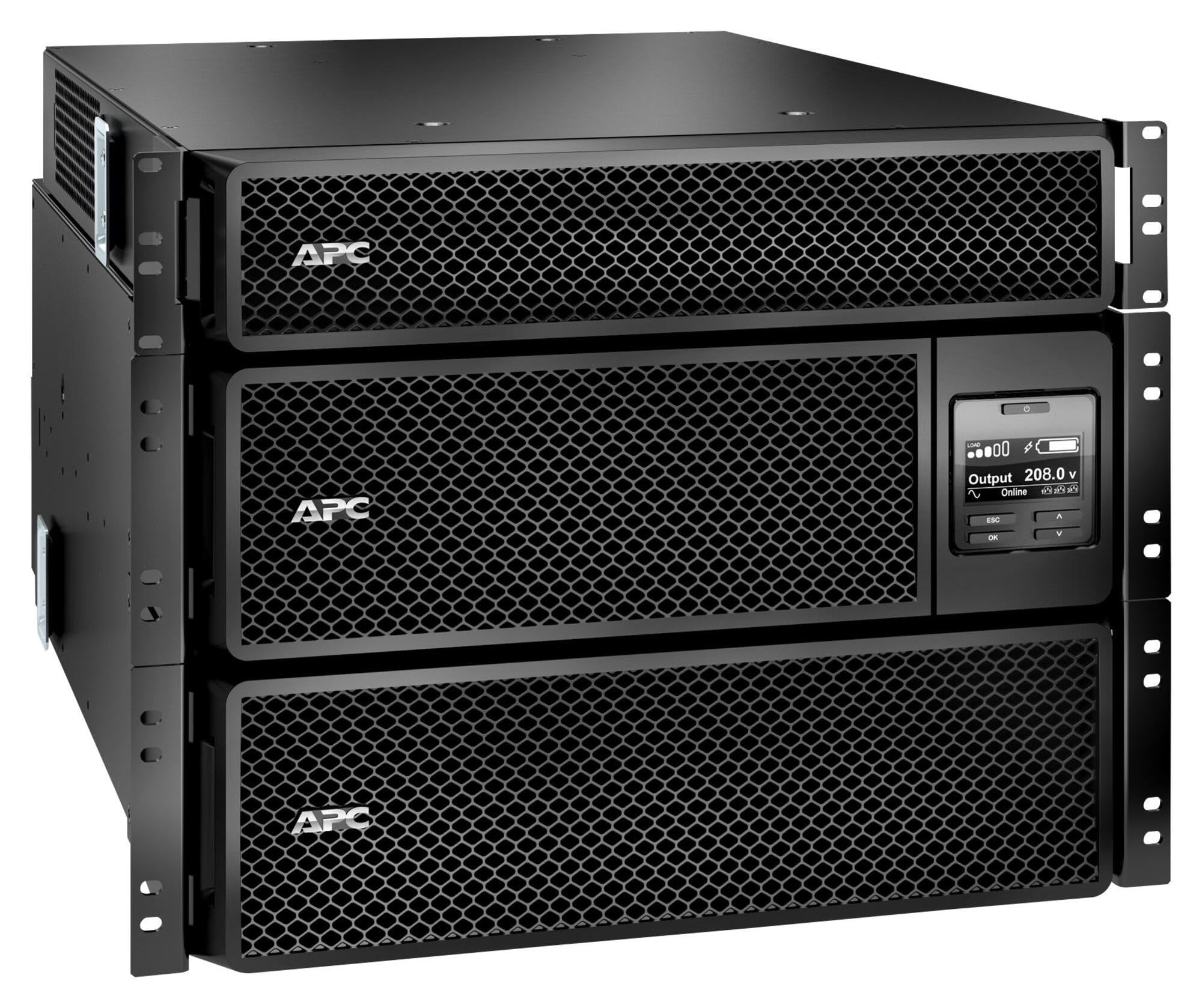
Image: APC Smart-UPS SRT 8kVA Rack Mount UPS with 208V to 120V Step-Down Transformer. This image shows the main UPS unit and the accompanying step-down transformer, typically in a rack-mountable configuration.
Setha
1. Ukubekwa
The UPS and transformer are heavy. For rack-mount installations, ensure the rack is stable and capable of supporting the combined weight of the UPS, transformer, and any other equipment. For tower installations, place the unit on a flat, stable surface.
- Maintain at least 20 cm (8 inches) of clearance from the front and rear panels for proper ventilation.
- Gwema ukubeka iyunithi eduze kwemithombo yokushisa noma elangeni eliqondile.
2. Ibhethri Connection
The UPS is shipped with the internal batteries disconnected for safety. Follow these steps to connect the batteries:
- Remove the front bezel or access panel to expose the battery compartment.
- Connect the internal battery cables as indicated by the labels or instructions inside the compartment. Ensure a secure connection.
- Replace the front bezel or access panel.
3. Ukuxhunywa kwamandla
Connect the UPS to utility power and your equipment.
- Amandla Okufaka: Connect the UPS input power cord (NEMA L6-30P) to a dedicated 208V AC outlet. Ensure the outlet is properly grounded and rated for the UPS capacity.
- Uxhumano Lwe-Transformer: Connect the output of the UPS to the input of the 208V to 120V Step-Down Transformer.
- Amandla Okukhiphayo: Connect your 120V equipment to the 120V output receptacles on the step-down transformer. Do not overload the transformer or the UPS.
- Amakhebuli Okuxhumana: Connect the serial or USB communication cable from the UPS to your computer or server for monitoring and management.
4. Isinyathelo sokuqala
After all connections are made:
- Press the power ON button on the UPS front panel. The UPS will perform a self-test.
- Allow the UPS to charge its batteries for at least 24 hours before connecting critical loads to ensure full runtime capacity.
- Verify the UPS display shows normal operation status.
Ukusebenza kwe-UPS
Isibonisi Sephaneli Yangaphambili Nezilawuli
The front panel features an LCD display and control buttons for monitoring and configuring the UPS. Refer to the detailed user manual on the documentation CD for specific menu navigation.
- VULA/VULA Inkinobho: Powers the UPS on or off.
- Escape/Menu Button: Navigates back or enters the main menu.
- Imicibisholo Yaphezulu/Phansi: Scrolls through menu options or adjusts settings.
- Faka Inkinobho: Ikhetha inketho noma iqinisekisa isethingi.
- Izinkomba ze-LED: Provide quick status updates (e.g., On Line, On Battery, Fault).
Ukusebenza Okuvamile
During normal operation, the UPS will be in "On Line" mode, providing conditioned power to connected equipment and charging its batteries. The LCD display will show input/output voltage, iphesenti lomthwalotage, and battery charge level.
Imodi yebhethri
If utility power fails or fluctuates outside acceptable limits, the UPS will automatically switch to battery power. An audible alarm may sound, and the display will indicate "On Battery" mode. The runtime available depends on the load and battery charge level.
Izinqubo zokuvala shaqa
- Graceful Shutdown: Use the PowerChute software (if installed) to gracefully shut down connected equipment before the UPS runs out of battery power.
- Ukuvala shaqa: Press and hold the OFF button on the front panel until the UPS powers down. Ensure all connected equipment is safely shut down first.
Isondlo
Ukushintshwa Kwebhethri
The batteries in the UPS are user-replaceable hot-swappable battery modules. Refer to the specific battery replacement instructions provided with your replacement battery kit or on the APC website. Always use genuine APC replacement battery cartridges (RBCs).
- Battery life is typically 3-5 years, but can vary based on temperature and discharge cycles.
- Replace batteries when the UPS indicates a "Replace Battery" warning or when runtime significantly decreases.
Ukuhlanza
Keep the UPS and transformer free of dust and debris. Use a dry cloth to clean the exterior. Do not use liquid cleaners or solvents.
Ukuvuselelwa kwe-Firmware
Periodically check the APC website for available firmware updates for your UPS model. Firmware updates can provide enhanced features, improved performance, or bug fixes. Follow the instructions provided with the firmware update package carefully.
Ukuxazulula inkinga
This section provides solutions to common issues. For more complex problems, contact APC Technical Support.
| Inkinga | Imbangela Engenzeka | Isixazululo |
|---|---|---|
| I-UPS ngeke ivule. | Battery not connected; No input power; UPS fault. | Ensure battery cables are securely connected. Verify input power cable is plugged into a live outlet. If fault persists, contact support. |
| UPS beeps continuously or frequently. | On battery mode; Overload; Low battery. | Check utility power. Reduce connected load. Allow batteries to charge. |
| "Replace Battery" indicator is lit. | Batteries are at end of life or faulty. | Order and install new APC replacement battery cartridges. |
| Connected equipment not receiving 120V. | Transformer not connected or faulty; UPS output issue. | Verify transformer connections. Check UPS output voltage on display. Ensure equipment is plugged into the 120V outlets of the transformer. |
Imininingwane
The following table outlines the key specifications for the APC Smart-UPS SRT 8kVA Rack Mount with 208V to 120V Step-Down Transformer (SRT8KRMXLT-5KTF).
| Isici | Imininingwane |
|---|---|
| Ibhrendi | I-APC |
| Inombolo Yemodeli | SRT8KRMXLT-5KTF |
| Amandla (VA/Watts) | 8000 VA / 8000 W |
| Okokufaka Voltage | 208 V AC |
| Okukhipha Umqtage | 120 V AC (via Step-Down Transformer) |
| Okukhiphayo Kwamanje | 66.67 Amps |
| I-Frequency Range | 50/60 Hz |
| Uhlobo Lwebhethri | I-Lead Acid |
| Isikhathi sokushajwa kwebhethri | Amahora angu-1.5 |
| Typical Runtime (Full Load) | 5 imizuzu |
| I-Form Factor | Rack / Tower Mountable (8U) |
| Ubukhulu bomkhiqizo (D x W x H) | 28.2" x 17" x 13.9" (71.6cm x 43.2cm x 35.3cm) |
| Isisindo sento | Amapondo ayi-341 (154.7 kg) |
| Okukhiphayo Connections | 1 x NEMA L6-30R, 4 x NEMA 5-20R (via transformer) |
| Impahla Ebiyelwe | Insimbi |
| Umbala | Mnyama |
| Izinga Lokuphepha | I-UL 1778 |
Iwaranti kanye Nokusekela
For detailed warranty information, please refer to the warranty card included with your product or visit the official APC website. APC offers technical support to assist with installation, troubleshooting, and product inquiries.
- Ukusekelwa Kwe-inthanethi: Vakashela i-APC website for FAQs, documentation, and software downloads.
- Usekelo Lwefoni: Contact APC Technical Support using the numbers provided on the APC webindawo yesifunda sakho.
- Ukubhaliswa Komkhiqizo: Register your product online to receive notifications about firmware updates and product information.