
Isingeniso
This manual provides detailed instructions for the installation, operation, and maintenance of your Zenec Z-E3726 2-DIN Car Radio Navigation System. The Z-E3726 is specifically designed for FIAT Ducato, Citroën Jumper, and Peugeot Boxer vehicles, offering advanced multimedia and navigation functionalities. Please read this manual thoroughly before using the device to ensure proper operation and to maximize your user experience.
Ukusetha nokufaka
The Zenec Z-E3726 is engineered for optimal integration into FIAT Ducato, Citroën Jumper, and Peugeot Boxer dashboards. Professional installation is recommended.
Ukuhlanganiswa Kwezimoto
- The unit's design and amber key illumination are specifically matched to these vehicle models.
- An optionally available Stalk interface allows connection to an existing multifunction steering wheel, supporting audio and phone functions.
Ngemuva View Ukuxhumeka kwekhamera
The Z-E3726 supports easy connection of a rear-view ikhamera.
- Connect the camera to the designated input on the device.
- The camera activates automatically when reverse gear is engaged.
- Optional guidelines can be displayed on the screen for improved distance estimation, regardless of the camera model.
- The E>GO is compatible with cameras featuring integrated microphones.
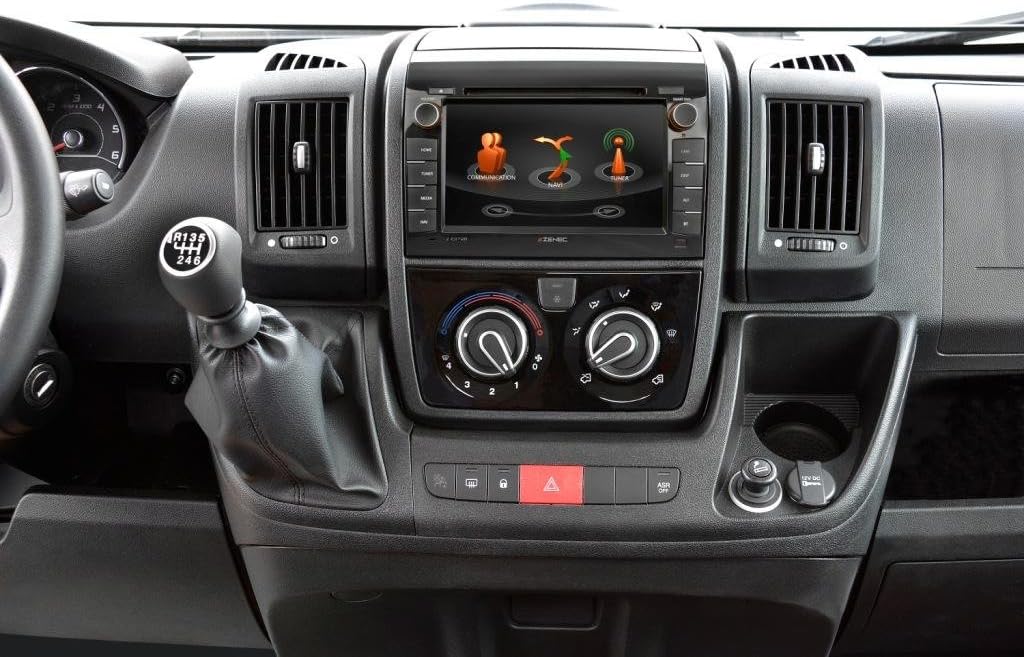
Image: The Zenec Z-E3726 unit seamlessly integrated into the dashboard of a compatible vehicle, showcasing its 7-inch display and physical control buttons.

Isithombe: A enemininingwane view of the Zenec Z-E3726 within the vehicle's interior, demonstrating its fit and the interactive display showing communication and navigation options.
Imiyalelo yokusebenza
The Z-E3726 features a high-resolution 7-inch (17.8 cm) touchscreen for intuitive control. The menu is available in 28 languages.
Uhlelo Lokuzulazula
- The system uses the Zenec Primo NextGen navigation engine with an EU map package covering 47 countries.
- Includes over 6 million Premium Points of Interest (P.O.I.).
- Features detailed 3D maps, TMC (Traffic Message Channel), auto-zoom, and lane assist.
- CampingSchaf P.O.I. Database: A pre-installed, comprehensive database (in German) provides detailed information on approximately 20,000 camping and parking sites across Europe.
- Route planning can be optimized by selecting a vehicle profile and entering vehicle-specific data.
- Map updates are available for free for one year after initial use via the Naviextras portal.

Image: The Zenec Z-E3726 screen displaying a detailed navigation map, including route information and options for alternative routes.
Izici ze-Multimedia
- DAB+ Tuner: Enjoy a wide variety of digital radio programs with crystal-clear reception through the multituner system.
- I-CD/DVD Drive: Integrated drive supports various audio and video formats.
- Imbobo ye-USB: A rear USB port (with 80 cm cable extension) supports modern audio and video formats.
- Audio Optimization: Features a 4 x 50 watt amplifier with a DSP suite, including runtime correction and an equalizer with presets.
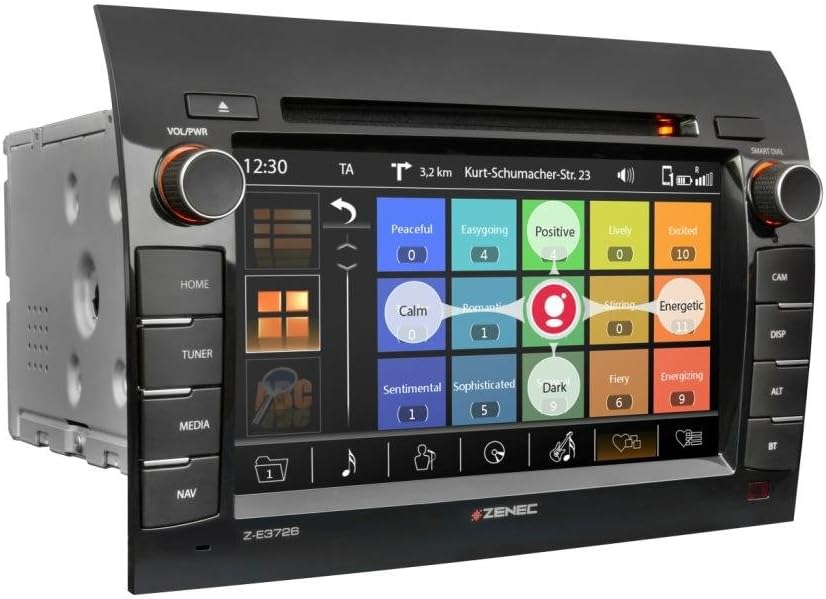
Image: The Zenec Z-E3726 interface displaying multimedia options, possibly for music selection based on mood or genre.
Ukuxhumana kwe-Bluetooth
- A powerful, database-supported Parrot Bluetooth unit enables hands-free calling.
- Supports comfortable music streaming while driving.

Image: The Zenec Z-E3726 screen showing an incoming call interface, demonstrating its Bluetooth phone functionality.
Ngemuva View Ukusebenza kwekhamera
- In addition to automatic activation, the Z-E3726 features a dedicated I-CAM button on the front panel for direct selection.
- This allows manual activation of the rear-view camera system whenever needed, aiding in maneuvering and parking.
Isondlo
- Ukuhlanza isikrini: Sebenzisa indwangu ethambile, engenazinti ukuze usule ngobumnene isikrini sokuthinta. Uma unezimpawu eziqinile, susa kancaneampzu indwangu enamanzi noma isicoci esiphephile esikrinini. Gwema izinto ezilimazayo noma amakhemikhali anokhahlo.
- Izibuyekezo zesofthiwe: Regularly check the official Zenec website or the Naviextras portal for available software and map updates to ensure optimal performance and access to the latest features.
- Ukunakekelwa Okuvamile: Gcina iyunithi ingenalo uthuli nemfucumfucu. Qinisekisa ukungena komoya ngendlela efanele ezungeze iyunithi ukuvikela ukushisa ngokweqile.
Ukuxazulula inkinga
If you encounter issues with your Z-E3726, refer to the following common problems and solutions:
| Inkinga | Imbangela Engenzeka | Isixazululo |
|---|---|---|
| Awekho amandla / Iyunithi ayivuli. | Izintambo ezingalungile, i-fuse eshaywayo, inkinga yebhethri yemoto. | Check power connections and fuses. Ensure vehicle battery is charged. Consult a professional installer. |
| Awukho umsindo. | Volume too low, mute activated, incorrect audio source, speaker wiring issue. | Increase volume. Check if mute is active. Select correct audio source. Verify speaker connections. |
| Navigation not working or inaccurate. | GPS signal loss, outdated maps, incorrect settings. | Qinisekisa kucacile view of the sky for GPS signal. Update maps via Naviextras. Check navigation settings. |
| Izinkinga zokuxhumeka kwe-Bluetooth. | Device not paired, Bluetooth off on phone, interference. | Ensure Bluetooth is enabled on both devices. Re-pair the device. Move closer to the unit. |
| Touchscreen unresponsive or slow. | Temporary software glitch, dirty screen, system overload. | Restart the unit. Clean the screen. Perform a system reset if necessary (refer to advanced settings). |
If the problem persists after attempting these solutions, please contact Zenec customer support or a qualified service technician.
Imininingwane
| Isici | Imininingwane |
|---|---|
| Ibhrendi | zenec |
| Igama Lemodeli | Z-E3726 |
| Inombolo Yemodeli Yento | 02027Z-E3726 |
| Usayizi Wesikrini | I-Intshi engu-7 (17.8 cm) |
| Isixazululo | 1024 x 600 |
| Uhlobo Lokukhweza | IDashboard Mount |
| Uhlobo Lwezinsizakalo Zezimoto | Fiat Ducato, Citroën Jumper, Peugeot Boxer |
| Izici ezikhethekile | Bluetooth, Navigation, DAB+ |
| Ubuchwepheshe bokuxhumana | I-Bluetooth, i-USB |
| Uhlobo Lwemephu | Europe (47 countries) |
| Imodi Yokukhipha Umsindo | Digital, Stereo |
| Ubukhulu bephakheji | 31.8 x 28 x 20.6 cm |
| Isisindo sento | 3.94 kg |
| Idethi Yokuqala Etholakalayo | Januwari 15, 2020 |
Ulwazi Lwewaranti
Zenec products are covered by a manufacturer's warranty. Please refer to the warranty card included with your product or visit the official Zenec webindawo ngemigomo nemibandela enemininingwane. Gcina ubufakazi bakho bokuthenga ngezimangalo zewaranti.
Map updates are guaranteed for one year free of charge after initial activation via the Naviextras portal.
Ukwesekwa Kwamakhasimende
For technical assistance, troubleshooting, or general inquiries regarding your Zenec Z-E3726, please contact Zenec customer support.
- Ukusekelwa Kwe-inthanethi: Visit the official Zenec webiwebhusayithi yemibuzo evame ukubuzwa, ukulandwa kwesofthiwe, kanye namafomu okuxhumana.
- Abathengisi Abagunyaziwe: For installation support or service, contact your authorized Zenec dealer.